Wacom - Cintiq Pro 24 – 23.6” 4K Creative Pen and Touch Display - Black
FREE shipping to

Specifications
- Screen Size23.6 inchesScreen Resolution3840 x 2160Multi-Touch ScreenYesActive Area20.6 x 11.6 inColor Gamut (Adobe RGB)99 percentTotal Storage Capacity0 gigabytes
- Key Specs
- Screen Size: 23.6 inches (Size of the screen, measured diagonally from corner to corner.)
- Screen Resolution: 3840 x 2160 (Screens come in a range of resolutions (measured in pixels, horizontal x vertical). The higher the resolution, the greater the picture quality.)
- Multi-Touch Screen: true (A screen that recognizes multiple points of contact, allowing for intuitive navigation functions such as pinch to zoom.)
- Active Area: 20.6 x 11.6 in (The size of the screen area that a user interacts with, either by stylus and/or touch (if supported).)
- Color Gamut (Adobe RGB): 99 percent (This number represents the percentage of colors on the RGB spectrum that are visible, as specified by the International Commission on Illumination (CIE).)
- Total Storage Capacity: 0 gigabytes
- Pressure Levels: 8192 (Allows the device to recognize different pressures from a compatible pen or stylus, which may control line thickness, opacity, or color. The more pressure levels, the more responsive the pen will feel.)
- General
- Brand: Wacom
- Model Number: DTH2420K0
- Product Name: Cintiq Pro 24 – 23.6” 4K Creative Pen and Touch Display
- Color: Black
- Model Family: Wacom Cintiq Pro
- Year of Release: 2018
- Display
- Display Type: LCD
- Screen Type: AHVA
- Screen Size: 23.6 inches (Size of the screen, measured diagonally from corner to corner.)
- Screen Resolution: 3840 x 2160 (Screens come in a range of resolutions (measured in pixels, horizontal x vertical). The higher the resolution, the greater the picture quality.)
- Stylus Input: Active (Electromagnetic Resonance) (An active stylus/pen is able to communicate directly with a compatible device; active electromagnetic resonance (EMR) pens are powered via a device's screen and active electrostatic (AES) pens require an additional power source. A passive stylus does not have electronic features and is compatible with most capacitative touch screens.)
- Multi-Touch Screen: true (A screen that recognizes multiple points of contact, allowing for intuitive navigation functions such as pinch to zoom.)
- Response Time: 14 milliseconds (The speed at which pixels can change colors is called response time. It is measured in milliseconds (ms).)
- Active Area: 20.6 x 11.6 in (The size of the screen area that a user interacts with, either by stylus and/or touch (if supported).)
- Aspect Ratio: 16:9 (The measurement of the width of a screen compared to the height of a screen, expressed as a ratio.)
- Brightness: 350 candela per square meter (A measure of the total light output.)
- Color Gamut (Adobe RGB): 99 percent (This number represents the percentage of colors on the RGB spectrum that are visible, as specified by the International Commission on Illumination (CIE).)
- Displayable Colors (Maximum): 1.07 billion
- Contrast Ratio: 1000:1 (Measured difference between a displayed image's brightest whites and darkest blacks. The larger the first number, the more detail and color that can be displayed.)
- Storage
- Total Storage Capacity: 0 gigabytes
- Compatibility
- Operating System Compatibility: Mac OS, Windows
- System Requirements: Windows® 7 or later (latest service pack/build), OS X 10.11 or later (latest update); USB-C port with DisplayPort Alternate Mode (UHD), or Mini DisplayPort/DisplayPort (UHD) and USB-A, or HDMI 2.0 (UHD) and USB-A; Internet access for driver download. (The software that a product must have for it to be able to integrate with another product.)
- Connectivity
- Headphone Jack: true (The device features an interface that allows for the connection of headphones.)
- Power
- Charging Interface(s): USB-C (The connection for transmitting power to charge the device.)
- Features
- Cable Lock Slot: Kensington Security Slot (K-Slot)
- Pressure Levels: 8192 (Allows the device to recognize different pressures from a compatible pen or stylus, which may control line thickness, opacity, or color. The more pressure levels, the more responsive the pen will feel.)
- Number Of Switches: 2
- Number of Shortcut Keys: 10 (Allows for convenient access to frequently used software shortcuts.)
- Tilt Angle (Maximum): 60 degrees (Greatest angle of tilt between the pen and active screen area that the device can recognize. Allows for intuitive functions when using the pen, such as more natural brush strokes or shading.)
- Dimensions
- Product Height: 1.9 inches (The out of box height of the item. Height is measured as the vertical distance from the bottom of the item to the top as it would be primarily used or placed.)
- Product Width: 15.5 inches (The out of box width of the item. Width is measured as the horizontal distance from one side of the item to the other as it would be primarily used or placed.)
- Product Depth: 26.65 inches (The out of box depth of the item. Depth is measured as the distance from the front of the item to the back as it would be primarily used or placed.)
- Product Weight: 253.92 ounces (The out of box weight of the item.)
- Certifications Listings & Approvals
- ENERGY STAR Certified: false (Devices carrying the ENERGY STAR service mark, such as computer products and peripherals, kitchen appliances, and other products, generally use 20% to 30% less energy than required by federal standards.)
- Included
- Stylus Included: true
- Stylus Model Included: Wacom Pro Pen 2
- Stylus Stand Included: true
- Tablet Stand Included: false
- Other
- UPC: 753218986962
Generate the highest quality art with this Wacom Cintiq Pro 24-inch tablet. Every movement and pressure change of your hand is flawlessly captured by the pen technology, and colors come to life on the 4K screen. The natural tilt support ensures a realistic writing experience on this Wacom Cintiq Pro 24-inch tablet.
- Create directly on screen with natural pen experience: Add world-class on-screen creative experience to your Mac or PC. Wacom Cintiq Pro 24 offers Wacom's most powerful array of capabilities in a high-performance creative pen display.
- 23.6-inch 4K Ultra HD display: Features 3840 x 2160 resolution and color accuracy of up to 99% of Adobe RGB. The etched glass screen reduces glare and reflections while providing a distinct, tactile experience as you draw, mimicking the feel of a pen on paper.
- Multitouch support: Pan, zoom and rotate with gestures available in most applications, including Adobe Photoshop and Illustrator.
- Wacom Pro Pen 2: Features 8192 levels of pressure sensitivity, exceptional tilt response and lag-free tracking to provide great creative control.
- Built-in stand: Features integrated pop-out legs for 20° angle.
- Connect your way: Connect to any Mac or PC with a single USB-C cable (included) to a USB-C port for both video and data.
- Bonus software pack: Register your Cintiq Pro & receive 3-month trials of Capture One, Toon Boom Harmony & Storyboard Pro, MASV, and Clip Studio Paint EX; offer available for customers located in the Americas.
Whats Included
- Wacom Cintiq Pro 24 Pen & Touch display
- Wacom Pro Pen 2 with 4-color pen ring set
- ExpressKey remote (with USB-A RF dongle and 30cm micro-USB to USB charger cable)
- Pen stand with 10 replacement nibs (6 standard, 4 felt) and nib removal tool
- Pen holder, cleaning cloth
- 180W AC power adapter and 1.8m power cable
- 1.5m USB-C to USB-C cable, 3m DisplayPort to DisplayPort cable, 3m HDMI2.0 to HDMI2.0 cable
- 3m standard USB-A to USB-A cable
- DisplayPort to Mini DisplayPort adapter
- Quick start guide, Regulation sheet
Q: What is the screen size of this Wacom tablet?
A: This Wacom Cintiq Pro tablet features a 23.6-inch display screen.
Q: What is the resolution of the display on this Wacom tablet?
A: This Wacom Cintiq Pro tablet has a 4K Ultra HD display with a 3840 x 2160 resolution.
Q: What is the color accuracy of this Wacom Cintiq Pro tablet?
A: The Wacom Cintiq Pro 24-inch tablet boasts a color accuracy of up to 99% of Adobe RGB.
Q: How does the Wacom Cintiq Pro tablet enhance the creative experience?
A: The Wacom Cintiq Pro 24 offers a world-class on-screen creative experience by allowing you to create directly on the screen with a natural pen experience.
Q: Does this Wacom tablet come with a stand?
A: This Wacom Cintiq Pro tablet features a built-in stand with integrated pop-out legs.
Q: Does this Wacom tablet support multi-touch gestures?
A: Yes, this Wacom tablet supports multi-touch gestures for panning, zooming, and rotating in most applications, including Adobe Photoshop and Illustrator.
Q: What type of cable is needed to connect this tablet to a computer?
A: This Wacom tablet connects to any Mac or PC with a single USB-C cable, which is included, to a USB-C port for both video and data.
Q: How many levels of pressure sensitivity does the Wacom Pro Pen 2 have?
A: The Wacom Pro Pen 2 features 8192 levels of pressure sensitivity.
Compare similar products
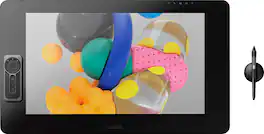
Generate the highest quality art with this Wacom Cintiq Pro 24-inch tablet. Every movement and pressure change of your hand is flawlessly captured by the pen technology, and colors come to life on the 4K screen. The natural tilt support ensures a realistic writing experience on this Wacom Cintiq Pro 24-inch tablet.
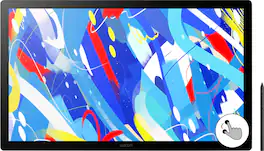
Dive into creativity with the expansive and intuitive Wacom Cintiq 24 Touch (2025) — a drawing tablet display that feels as natural as pen on paper and performs like a pro studio tool. See your entire project at once on a spacious 23.8" IPS display with 2.5K WQHD resolution (2560 x 1440) that transforms your creative process. The anti-glare etched glass bonded surface provides the familiar resistance of traditional media while reducing distracting reflections and near-zero parallax for precise pen placement. See millions of subtle color variations with 100% sRGB coverage and 8-bit color depth, ensuring your vision translates perfectly from concept to final output. Enhanced brightness at 350 cd/m² adapts comfortably to varied studio environments—so you can work confidently whether in bright offices or dimly lit home studios. Wacom Pro Pen 3 captures every nuance with 8,192 pressure levels, 60° tilt support and 3 programmable side-switches. The 12ms LCD response time keeps pen movement fluid and natural — setting the standard others can only attempt to follow. And with advanced multi-touch functionality, you can rotate, zoom, and pan using intuitive 10-finger gestures, bringing even more natural control and fluidity to your workflow. Cintiq 24 touch is VESA mount compatible (75x75), offering flexible installation options to fit your studio setup. For those who prefer a dedicated solution, the redesigned included stand delivers rock-solid stability and allows for smooth, reliable adjustment between 16-69 degrees. Wacom Cintiq 24 (2025 version) delivers professional power in a true 16:9 aspect ratio perfect for everything from animation and video editing to game development and design—making premium creative tools accessible to creators who refuse to compromise. Professional-grade performance. Streamlined design. Accessible price. Dive in with confidence—Cintiq 24 Touch is ready.

Draw accurate illustrations with this 15.6-inch Wacom Cintiq creative pen display. The 1920 x1080 Full HD anti-glare screen makes for comfortable viewing, and the pressure-sensitive pen has a comfortable grip and tilt recognition for accurate drawing. The foldable legs on this Wacom Cintiq creative pen display can be adjusted for personal comfort.
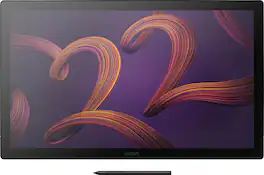
Wacom Cintiq Pro 22 is designed and engineered for professionals to create a harmonious creative process between artists and their work. Featuring a professional quality Ultra HD/4K display, along with Wacom’s Pro Pen 3, which matches performance with customizable comfort, every detail of Wacom Cintiq Pro 22 has been engineered for effortless harmony between creator and tool.
| Pros for Wacom - Cintiq Pro 24 – 23.6” 4K Creative Pen and Touch Display - Black | |||
|---|---|---|---|
| There were no pros for this product— | There were no pros for this product— | Ease of use, Drawing Tablet, Screen Size, Quality | There were no pros for this product— |
| Cons for Wacom - Cintiq Pro 24 – 23.6” 4K Creative Pen and Touch Display - Black | |||
| There were no cons for this product— | There were no cons for this product— | Connection, Setup, Compatibility, Lag, Parallax | There were no cons for this product— |
Specs
Reviews
Customer Images
The vast majority of our reviews come from verified purchases. Reviews from customers may include My Best Buy members, employees, and Tech Insider Network members (as tagged). Select reviewers may receive discounted products, promotional considerations or entries into drawings for honest, helpful reviews.
- Rated 5 out of 5 stars
Very Nice!
This is definitely a Pro piece of gear! It's solidly built, and comes with everything needed to get it running. The vesa mount points on the back give you many options aside from the stout folding legs on the back of the unit. I actually mounted mine on a heavy duty music stand in my studio! I opted for this model with the touch feature even though I had read some negative reports on the touch response, and in my opinion it works nicely. The only problem I encountered was if I swiped my canvas too far off the screen it was tricky swiping it back on, but most graphics software has a widget you can tap to re-center your work. I've also experimented with using the touch screen on my audio mixing system for console control of faders buttons and knobs (With good results). The Cintiq Pro is very smooth in operation, the pen is sleek and feels very natural. The touch sensitivity is wonderful. Using a scratch pencil tool really gives you a feel when going from fading to darker an darker strokes. The glare free screen will save your eyes, magnetic attachment for the control pad on either side of the work surface, and a large border around the screen to rest your paw while working the edges. Granted, The Wacom Cintiq Pro 24 is not inexpensive, but good tools will make your craft work much more enjoyable for you. I'm enjoying mine!
This review is from Wacom - Cintiq Pro 24 – 23.6” 4K Creative Pen and Touch Display - Black
Posted by Bruce
- Rated 5 out of 5 stars
This thing is MASSIVE but is excellent
I'm a graphic designer and I've never had a drawing tablet before so I went all in and got this one. I like the option to turn touch display on or off but I find myself with it off more than on. I was worried the screen would get hot while drawing on it but I can draw on it for hours and it just gets warm to the touch but never hot. The fans are extremely quiet and you would really have to listen for it to even hear them. Do your self and get a stand for this thing because it is brutal on your neck staring down at it. The Express Key remote is hands down one of the best features Wacom has come out with. I use it so much and is completely customizable. The screen quality is excellent but the matte finish does mess with the color in your design program a little bit unless you have a screen calibrator. I'm super happy with this display so far though.
This review is from Wacom - Cintiq Pro 24 – 23.6” 4K Creative Pen and Touch Display - Black
Posted by SignGuyA1
- Rated 5 out of 5 stars
Wacom vs the competition. You get what you pay for
Amazing tablet, you get what you pay for! I’ve been using an iPad Pro 12.9 but have gotten to the point where the screen size is just too small for bigger projects so I constantly have to be zooming in and out so I figured upgrade to a Wacom for the studio and keep the iPad Pro for on the go. 1st impressions it’s bigger than you’d think, for size reference I’d say it about the size of an IMac 27” definitely get an arm or the ergo stand the little legs behind it won’t do it your neck will thank you later on. 2. The touch functionality is really really hit or miss especially compared to the iPad Pro, touch is just not there yet. I found myself turning it off as other reviewers mentioned. Save $500 and do the non touch version. 3. Pressure sensitivity is on par with the Apple Pencil 2nd gen. 4. Setup was really easy and straight forward 5. Overall it’s a really great tablet I would recommend for any serious or professional artist definitely worth the money. Compared to huion, xp pen and gamón this is definitely better quality think of it as apple vs Android they all do the same thing at the end of the day but in my opinion after trying all 3 I’d say the Wacom beats out the others in build quality and pencil response/pressure sensitivity. The others tend to skip at times or just issues with the drivers. Only thing bad if at all is the price but again after experiencing the competition it’s well worth it in my mind. Side note if you can’t justify the price of the Wacom I would go with the huion personally if you need some sort of specific pc or Mac application they even have a 4K 16” will have to try that out soon as well. If you just want something to draw On and don’t care about specific applications I would definitely say an iPad Pro that way you have a drawing tablet and also have other iPad functionalities. I ended up returning it but only because I would like a 32” instead just for more space for references and windows within the monitor.
This review is from Wacom - Cintiq Pro 24 – 23.6” 4K Creative Pen and Touch Display - Black
Posted by Xempt