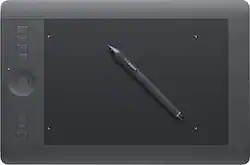
Wacom - Intuos Professional Pen and Medium Touch Tablet - Black
- General
- Product Name: Intuos Professional Pen and Medium Touch Tablet
- Brand: Wacom
- Model Number: PTH651
- Features
- Mouse Type: Touchpad
- Performance
- Mouse Operation: Other
- Handedness: Ambidextrous
- Tracking Method: Touchpad (There are several types of computer mice, optical and laser being among the most common. Optical mice detect less detail and provide more precise and accurate movement. Laser mice detect more detail and can be used on a wider variety of surfaces, but are more sensitive to small movements.)
- Connectivity
- Wireless Connectivity: Bluetooth (The manner in which a device sends data to another device over a short distance without the use of wires or cables.)
- Wired Connectivity: USB
- Operating System Compatibility: Windows
- Power
- Mouse Power Source: Wired
- Batteries Included: true (Indicates whether the product comes with the required batteries for its operation.)
- Dimensions
- Product Height: 0.45 inches (The out of box height of the item. Height is measured as the vertical distance from the bottom of the item to the top as it would be primarily used or placed.)
- Product Length: 14.9 inches (The out of box length of the item. Length is measured as the longest dimension of the item.)
- Product Width: 9.9 inches (The out of box width of the item. Width is measured as the horizontal distance from one side of the item to the other as it would be primarily used or placed.)
- Product Weight: 34.88 ounces (The out of box weight of the item.)
- Warranty
- Manufacturer's Warranty - Parts: 2 years
- Manufacturer's Warranty - Labor: 2 years
- Other
- UPC: 753218990990
This Wacom Intuos Professional PTH651 pressure-sensitive pen and multitouch tablet enable simple, intuitive navigation, so you can easily create or edit a variety of digital artwork. Included downloadable software lets you begin designing right away.
- Multitouch tablet: Lets you pan, zoom, rotate and navigate on-screen content naturally using gestures for intuitive operation. The ample workspace allows you to design, sketch, paint, retouch and create with ease.
- ±60 levels of tilt recognition: Provide a responsive interface.
- Pen: With 2,048 levels of pressure sensitivity in both the pen's tip and eraser offers the accuracy and feel of traditional brushes, pens and markers, so you can easily draw on the tablet. Ambidextrous design enables right- or left-handed use.
- Customizable, application-specific ExpressKeys: Along with a finger-sensitive Touch Ring with 4 customizable functions provide quick access to your shortcuts. The tablet detects what software you're using and offers optimal shortcut selections.
- Custom radial menus and an Express View heads-up display: Simplify operation and help you stay focused.
- Included wireless kit: Allows cord-free use for flexible placement options. USB interface enables easy wired connection to your PC or Mac via an included 6.6' USB cable.
Whats Included
- Wacom Intuos Professional Pen and Medium Touch Tablet
- Pen stand, assorted replacement pen tips
- Wireless kit, 6.6' USB cable
- Color identification rings
- Installation CD-ROM with driver, software download instructions
- Owner's manual
Q: Can the Intuos connect to the Internet?
A: No. The tablet itself cannot connect to the Internet. If you can connect the tablet to your computer however, you can use it to draw on different programs that allows it.
Q: What is the active drawing area
A: It is adjustable in Your settings. It can be small or the whole surface. Check out setup tutorials.
Q: Does it come with a writing cover, or does one need to be purchased?
A: The Intuos Professional tablet includes everything you need to get started using the pen to interact with your PC or Mac. It includes the tablet, pen, USB cable, wireless kit, and driver software.
A: There is a license key on the envelope containing the driver installation CD. Use that license key to retrieve downloads of the bundled software along with those license keys when registering your product on the Wacom website.
A: The PTH660 is the latest version of the Intuos Pro. It takes advantage of the new Pro Pen 2 which provides over 8,000 levels of pressure sensitivity. This model also has built-in Bluetooth connectivity and replaceable surface sheets with varying textures.
Q: Does this work well with Manga studio?
A: Absolutely, Manga studio is a very popular application to use with an Intuos tablet!
Q: Can it be used without a pc?
A: NO you may want a tablet that is a display screen itself. You will need a computer with this one