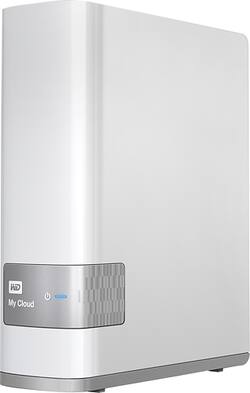
WD - My Cloud 6TB External Hard Drive (NAS) - White
- Key Specs
- Storage Drive Type: HDD (Traditional, mechanical hard disk drives are the most common type of storage because they're relatively inexpensive and offer huge capacities. However, they also generate both noise and heat. Solid state drives, also known as SSDs, are many times faster than hard disk drives and have no moving parts to wear out, but typically offer less capacity for the same price.)
- Interface(s): Ethernet (Refers to the types of connections that devices use to interact and communicate with each other.)
- General
- Product Name: My Cloud 6TB External Hard Drive (NAS)
- Brand: WD
- Model Number: WDBCTL0060HWT-NESN
- Performance
- Storage Drive Type: HDD (Traditional, mechanical hard disk drives are the most common type of storage because they're relatively inexpensive and offer huge capacities. However, they also generate both noise and heat. Solid state drives, also known as SSDs, are many times faster than hard disk drives and have no moving parts to wear out, but typically offer less capacity for the same price.)
- Compatibility
- Internal Or External: External
- External Hard Drive Type: Desktop (Physical characteristics of the hard drive, including size, weight and how you connect to your device.)
- Interface(s): Ethernet (Refers to the types of connections that devices use to interact and communicate with each other.)
- Minimum System Requirements: Microsoft Windows 7 / 8 / 10
- Features
- Security Features: Password Protection
- Dimensions
- Product Height: 6.7 inches (The out of box height of the item. Height is measured as the vertical distance from the bottom of the item to the top as it would be primarily used or placed.)
- Product Width: 1.9 inches (The out of box width of the item. Width is measured as the horizontal distance from one side of the item to the other as it would be primarily used or placed.)
- Product Weight: 36.8 ounces (The out of box weight of the item.)
- Included
- Included Software: WD Set Up Software, WD SmartWare Pro, WD Quick View, WD My Cloud mobile app, WD Photos app
- Other
- UPC: 718037826035
Enjoy the diverse utility of having 6TB of Cloud storage with this WD My Cloud external Gigabit Ethernet hard drive, which features auto network discovery for easy setup. Password protection helps keep your Cloud data secure.
- 6TB storage capacity: Provides ample space for your music, movies and other files.
- Gigabit Ethernet interface: Lets you store data to a personal Cloud.
- Up to 105MB/sec. read speed and up to 55MB/sec. write speed: For fast response when accessing and updating files.
- Dual-core processor: Ensures efficient performance.
- Auto network discovery: Simplifies the setup process.
- Password protection: Offers security for your sensitive data.
- Compatible with Mac and PC: For flexible installation options.
Whats Included
- My Cloud 6TB External Hard Drive (NAS)
- AC adapter, Ethernet cable
- Owner's manual
Q: can it be access from anywhere via wi-fi?
A: I have no problem accessing the cloud from anywhere, including my smartphone.
Q: If NAS is connected through internet, what security software is it using?
A: I do not share my NAS through my firewall and out to the internet. If you did that, then all someone needs is your account/pwd for external access. Also then they can also sniff your packets anywhere between you and your NAS; a coffee shop or plane with free wifi.
Q: Can I access files from my playstation 3 & 4?
A: Yes, but not through the cloud service. It has a DLNA Media Server. I've never used it before but I gave it a shot and it showed up on my PS4 using the default media player app and the video I loaded played fine. I also streamed a 4k video to a 4k TV and it worked. Looks like it'll serve up pretty much any video to any player that uses DLNA. Put your video, music, and photos into the Public video, music, and photo folders and turn on the DLNA server. It'll scan the content and share it on your local network. However, I can't recommend this product. I've had one for a while and it's been virtually useless as anything but a NAS device. The WD backup software never worked and that was the main reason I bought it. The "cloud" access is unbearably slow. The web interface rarely works unless the device is freshly rebooted and it's often missing information. The latest firmware update (a couple weeks ago) seems to have significantly improved performance of the web interface (meaning it actually works now), but it's too little too late for me. I've already given up on it. I only noticed the latest update because the best buy site asked if I could answer this question so I gave it a shot. :)
Q: Can I backup my hard drive including programs on this drive and restore it.
A: The normal backup will backup only your files in normal mode. Advanced mode you can select to backup everything but that will not translate into a restore situation. You need third party backup like ghost or acronis and do system image that can be copied to this drive, not through backup software for nas but by setting up a user and shared profile on the nas and once signed into the nas, you can use it like normal external hard drive. Note: if you have gigs of storage to move, it is best to be hardwire Ethernet into your router or network switch at gigabyte speed or it will be super slow.
A: I had a difficult time even setting it up in the basic out of the gate configuration. I would waste my time with it. I purchased a different brand has all is great
A: It supports DLNA so should work. I tesyed it with Samsung TV, Roku. No problems found
Q: How many video hours will 6TBs hold? (average speed)
A: I would say, depending on the file size, about 6000 hours. The typical measurement is about 1000 per TB.