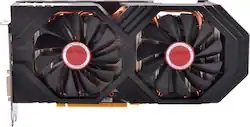
XFX - AMD Radeon RX 580 GTS Edition 8GB GDDR5 PCI Express 3.0 Graphics Card - Black
- Key Specs
- Maximum Resolution: 4096 x 2160 (The highest display resolution that the graphics card(s) can support.)
- Maximum Number of Displays Supported: 6
- Advanced Graphics Rendering Technique(s): RIS (Radeon Image Sharpening) (Imaging technology designed to improve graphics rendering.)
- Slot Size: Single slot (A graphics card only requires one PCIe/PCI slot for connection to the motherboard but, depending on size, may block other slots. The slot size listed by the manufacturer is therefore not an exact measurement of the card's size but an indication of how much clearance will be available after it is installed.)
- Product Height: 4.9 inches (The out of box height of the item. Height is measured as the vertical distance from the bottom of the item to the top as it would be primarily used or placed.)
- Product Width: 1.6 inches (The out of box width of the item. Width is measured as the horizontal distance from one side of the item to the other as it would be primarily used or placed.)
- Product Length: 10.6 inches (The out of box length of the item. Length is measured as the longest dimension of the item.)
- Graphics Processing Unit (GPU): AMD Radeon RX 580 GTS (Often referred to as a graphics card, a graphics processing unit (GPU) is the electronic circuitry responsible for manipulating and processing computer graphics/images and accelerating video decoding. Ultimately, a powerful GPU will provide a boost for anything involving visuals, including games, graphic design, and video editing.)
- General
- Product Name: AMD Radeon RX 580 GTS Black Edition 8GB GDDR5 PCI Express 3.0 Graphics Card
- Brand: XFX
- GPU Chipset Manufacturer: AMD
- Graphics Processing Unit (GPU): AMD Radeon RX 580 GTS (Often referred to as a graphics card, a graphics processing unit (GPU) is the electronic circuitry responsible for manipulating and processing computer graphics/images and accelerating video decoding. Ultimately, a powerful GPU will provide a boost for anything involving visuals, including games, graphic design, and video editing.)
- Model Number: RX-580P8DBDR
- Performance
- Cooling System: Liquid (A computer's CPU generates heat while operating and requires a cooling system to keep internal components functioning properly. Air cooling uses fans to draw in cool air and exhaust hot air, while liquid cooling uses coolant-filled tubes and water blocks to regulate internal temperature more efficiently.)
- Display
- Maximum Resolution: 4096 x 2160 (The highest display resolution that the graphics card(s) can support.)
- Maximum Number of Displays Supported: 6
- Advanced Graphics Rendering Technique(s): RIS (Radeon Image Sharpening) (Imaging technology designed to improve graphics rendering.)
- Compatibility
- Slot Size: Single slot (A graphics card only requires one PCIe/PCI slot for connection to the motherboard but, depending on size, may block other slots. The slot size listed by the manufacturer is therefore not an exact measurement of the card's size but an indication of how much clearance will be available after it is installed.)
- Operating System Compatibility: Windows
- Features
- Included Software: Radeon Wattman; AMD Radeon Crimson; Radeon ReLive
- Power
- Recommended Power Supply: 600 watts
- Dimensions
- Product Height: 4.9 inches (The out of box height of the item. Height is measured as the vertical distance from the bottom of the item to the top as it would be primarily used or placed.)
- Product Width: 1.6 inches (The out of box width of the item. Width is measured as the horizontal distance from one side of the item to the other as it would be primarily used or placed.)
- Product Length: 10.6 inches (The out of box length of the item. Length is measured as the longest dimension of the item.)
- Other
- UPC: 778656076310
Enhance your gaming rig with this XFX Radeon graphics card. Its True Clock technology controls clock speed to maximize performance, and the Radeon Chill feature tracks game play to regulate the frame rate to lower temperature and conserve power. The aluminum backplate of this XFX Radeon graphics card protects it while absorbing heat.
- Powered by the AMD Radeon RX 580 graphics processing unit (GPU): With a 1405MHz clock speed and 1425MHz boost clock speed to help meet the needs of demanding games.
- 8GB GDDR5 (256-bit) on-board memory: Provides the memory needed to recreate game visuals with striking realism.
- PCI Express 3.0 x16 interface: Offers compatibility with a range of systems.
- AMD Eyefinity technology: Lets you connect up to 6 displays (not included), enlivening your gaming experience with panoramic visuals.
- AMD CrossFire technology: Lets you combine 2 or more discrete graphics cards, up to 4 GPUs (graphics processing units), to improve graphics performance for resource-intensive games.
- AMD TrueAudio technology: Delivers rich, detailed sound.
- Virtual Reality Ready: Provides a powerful next-generation platform for the ultimate immersive virtual reality experience.
- OpenCL, Mantle, DirectX 12, OpenGL 4.5 and Vulkan support: Enhances gameplay by delivering ultrarealistic images, detail and texture and improved lighting effects that create lifelike interactivity.
- DVI, HDMI and 3 DisplayPort outputs: Enable flexible connectivity.
Whats Included
- 8-pin to 6-pin power cable
- Radeon Wattman, AMD Radeon Crimson, Radeon ReLive
- XFX AMD Radeon RX 580 GTS Black Edition 8GB GDDR5 PCI Express 3.0 Graphics Card
Q: I want buy more than 100 cards. What price?
A: Take the price listed above and Multiply it by 100.
Q: Will it work with a mac pro?
A: This video card works fine on my Mac Pro (Mid 2010). Note, this graphics card is capable of supporting Metal, which is required if you intend to upgrade to macOS Mojave. Also note, For this installation you will need an additional mini 6 pin connector and a GutsParker Dual 6-Pin Female to 8-Pin Male Cable Micro Blue connector or equivalent. I ordered this part from Amazon.
A: The blue light means there is power going to the video card, it is on during normal operation. Do you see anything at all when your computer is first starting up? Does your screen say no signal? First thing to check is if your video card output is being disabled by your motherboard BIOS settings. If you were using onboard graphics before, remove the video card and start computer with screen connected only to the onboard video output on the motherboard. Check your video settings in motherboard BIOS settings if you can get into it and make sure dedicated graphics option is enabled or do a CMOS Reset on the motherboard. Reinstall your video card after that and reconnect it to the screen and see if that fixed it. If not, check your video cables and connections, sometimes in rare occasions cables can be bad or the video settings on motherboard is set to use onboard video instead of the dedicated graphics card. For more help you can try contacting XFX support or your motherboard manufacturer's support to help you with further troubleshooting.
A: It is not water cooled, it might have some liquid in the system to cool it similar to and AIO but it’s self contained and slots right into the motherboard with no extra connections (other than power)
Q: What brand memory is used (Hynix, Samsung, etc.)?
A: I just bought three of these from bestbuy and two of them were hynix and one was samsung memory i talked with XFX also about it. i just returned the two Hynix ones. and now am needing two Samsung memory ones. there are actually three Memory brands out there. it is a gamble what you will get from Best buy apparently. because they have the same UPC (7865607631) but are sending out different memory with the same UPC. the one i am needing to get has a Model number of RX-580P8DB and a Part number of RX-580P8DBDR and that one has samsung memory. but the others did not. the others have the same model number but the part number (RX-580P8DBD (no R) and has Hynix memory) the one that has the R at the end of it is samsung apparently. remember same UPC different part number. they just scan it an send it. there is also a RX-580P8DBDRR but i dont know what that one has.
A: If you've got an HP with PCI-E slot, you may be able to replace your existing card with this one. However, this RX-580 card takes more power (185W max) than the pci-e slot provides (max power of 75W). The card comes with an adapter to allow you to combine open connectors to supply additional power, but your HP might not have any spare connectors, and there may not be enough margin in the power supply to provide the needed power to this card. In that case, it may require replacing your existing power supply also. To figure it out--add the power demand of your CPU (look on HP's website/CPU website) to the power demand of this card to determine how much power is needed. keep in mind that the rating on the 12 volt is what's being tested here--not total power supply rating. So, if your existing CPU is 95 watts, this is 185; you would need at least 280 watts of power on the 12 volts line of the power supply. If the power supply lists at least 25 Amps at 12 volts (12 Volts x 25 Amps = 300 watts) it would work in this hypothetical case. Also note this is assuming that some other device in the box isn't using 12V power for anything (like a BluRay disc or motherboard). If the graphics card wants more power than you have, you'll probably shut down in the middle of heavy gaming. So, it's best to check on that before you buy this card.
Q: what power supply do I need to run this card
A: The documentations states that a 500 watt power supply is required. I tested the card in a bench test system I have that had a 600 watt EVGA and it was just fine. If you are even thinking about a crossfires system; I would go with a EVGA 750 watt or a Corsair TX850M. The EVGA would run four RX580-8GB cards just fine; however the Corsair has less connectors and cables than EVGA provides; hence the price difference between the two; both PSU's are very quiet, if that is of any concern. Be sure to download the AMD pixel patcher, otherwise text is kind of funky. I couldn't locate the EVGA 600 watt ad or the CORSAIR 850 watt ad link; but I bought both at Best Buy. I linked the closest models I could find to this response. I hope this helps.

















