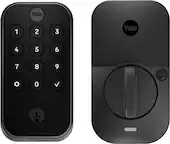
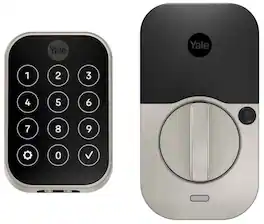
Yale - Assure Lock 2 - Smart Lock Keyless Wi-Fi Deadbolt with Touchscreen Keypad Access - Satin Nickel
Color
Satin NickelRelated Item

Highlights
- Key Specs
- Color Finish: Satin nickel
- Lock Type: Deadbolt
- Lock/Unlock Mechanism: App, Touchscreen, Voice assistant (There are several technologies used by smart locks to manage access, such as biometrics, Bluetooth, or NFC. Some locks allow codes to be entered via a keypad or touchscreen; digital keys can often be sent to multiple authorized devices or temporarily shared with guests.)
- Power Source: Battery-powered
- Installation Type: Replacement
- Wireless Connectivity: Bluetooth, Wi-Fi (The manner in which a device sends data to another device over a short distance without the use of wires or cables.)
- General
- Brand: Yale
- Model Number: YRD450-WF1-619
- Product Name: Assure Lock 2 - Smart Lock Keyless Wi-Fi Deadbolt with Touchscreen Keypad Access
- Color: Satin Nickel
- Color Finish: Satin nickel
- Features
- Finish: Stainless steel
- Lock Type: Deadbolt
- Lock/Unlock Mechanism: App, Touchscreen, Voice assistant (There are several technologies used by smart locks to manage access, such as biometrics, Bluetooth, or NFC. Some locks allow codes to be entered via a keypad or touchscreen; digital keys can often be sent to multiple authorized devices or temporarily shared with guests.)
- Auto Unlock: true (Locks with this feature automatically unlock when certain conditions are met, such as coming within range of a home wireless network or when activated via a mobile app.)
- Unlock Notifications: true
- Shareable Keys: true (This feature allows a single key to be shared with multiple users or authorized devices.)
- Number of Key Fobs Included: 0
- Number of Keypad Codes Supported: 250 (Multiple keypad codes can be programmed to allow temporary access for guests, deliveries, and more while keeping primary codes secure.)
- Remote Monitoring Capabilities: true (Monitor)
- Power
- Power Source: Battery-powered
- Rechargeable Battery: false
- Battery Size: AA (The battery size required for operation.)
- Number of Batteries Required: 4
- Batteries Included: true (Indicates whether the product comes with the required batteries for its operation.)
- Low-Battery Indicator: true
- Compatibility
- Installation Type: Replacement
- App Compatible: true (The product can be connected to a program or software application on a mobile device, which then receives collected data from the product.)
- Wireless Connectivity: Bluetooth, Wi-Fi (The manner in which a device sends data to another device over a short distance without the use of wires or cables.)
- Network Connectivity: None (The manner in which a device sends data to another device over a long distance using a cellular network.)
- Operating System Compatibility: Apple iOS, Android
- Works With: Amazon Alexa, Google Home, Apple Home (Compatible with or able to be connected to other smart devices or applications.)
- Voice Assistant Built-in: No, No (A digital assistant built into the device that uses voice commands to answer questions and control smart devices.)
- Performance
- Minimum Operating Temperature: -22.0 degrees fahrenheit (The lowest recommended ambient (surrounding) temperature in which the product can ideally operate stated by the manufacturer. Generally long-term exposure of the product to temperatures less than the minimum can result in ineffective operation.)
- Maximum Operating Temperature: 140 degrees fahrenheit (The highest recommended ambient (surrounding) temperature in which the product can ideally operate stated by the manufacturer. Generally long-term exposure of the product to temperatures more than the maximum can result in ineffective operation.)
- Warranty
- Warranty - Parts: 1 year
- Warranty - Labor: 1 year
- Other
- UPC: 810230910914
You've got enough on your plate, let Yale get the door with the Yale Assure Lock 2. With multiple ways to unlock, the ability to easily share and track entry codes and advanced Auto-Lock with DoorSense, this Wi-Fi smart lock gives you one less thing to worry about. With built-in Wi-Fi, you can easily check in on home, from wherever you are.
- Key-free access, your way: Use the Yale Access app to lock or unlock from anywhere, or unlock with your phone or smart watch, touchscreen keypad, or optional Auto-Unlock
- Don’t worry, it’s locked: Make sure your door is locked when you want it to be with Auto-Lock
- Not home? Use the app: Lock/unlock, send entry codes & more from anywhere using the Yale Access App
- Know who's home: Easily check who got home, and when, in the app
- Featuring Auto-Unlock (optional): Let Yale get the door for you as you get home, with optional Auto-Unlock
- Emergency unlock feature: If the battery dies, you can use a 9V battery to charge the keypad.
Whats Included
- Yale Assure Lock 2, Yale Wi-Fi Smart Module, Yale DoorSense, Deadbolt, Strike Plate, Mounting Hardware, Installation Manual
Q: What type of battery does the smart lock use?
A: This smart lock uses four AA batteries.
Q: What is the minimum operating temperature for the smart lock?
A: The minimum operating temperature for the smart lock is -22 degrees Fahrenheit.
Q: Can the smart lock be unlocked remotely?
A: The smart lock has remote monitoring capabilities.
Q: Does the smart lock have a low-battery indicator?
A: This smart lock has a low-battery indicator.
Q: How many keypad codes can the smart lock support?
A: The lock can support up to 250 keypad codes.
Q: Is the smart lock compatible with Amazon Alexa?
A: This smart lock is compatible with Amazon Alexa.
A: Yes it does show up in the Google home app. Google will also lock and unlock your door if asked. But for Google to unlock your door it will ask for your lock code. It will not automatically unlock it for safety reasons.
Q: Does this work with myQ app?
A: I do not believe it does. It works with the August app, and integrates with other smart-home devices but I haven't seen an integration with MyQ.
Compare similar products
You've got enough on your plate, let Yale get the door with the Yale Assure Lock 2. With multiple ways to unlock, the ability to easily share and track entry codes and advanced Auto-Lock with DoorSense, this Wi-Fi smart lock gives you one less thing to worry about. With built-in Wi-Fi, you can easily check in on home, from wherever you are.

Tap. Unlock. You're Home. Yale Assure Lock 2 Plus makes key-free access easier and more secure than ever before. Using Apple home keys, a simple tap with your iPhone or Apple Watch is all it takes to lock or unlock your door- and for even faster access, add your Home Key to your Apple Wallet app with Express Mode enabled. Remotely let people in, lock up, send custom entry codes, and track who comes with real time notifications from anywhere through the Yale Access app. For added peace of mind, never worry about locking the door behind you with advanced Auto-Lock and advanced DoorSense technology. To use home keys, iPhone XS or later with iOS 15 or later and Apple Watch Series 4 or later with watchOS 8 or later are required.

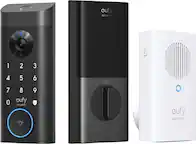
Introducing the Video Doorbell E330 that provides a secure, convenient, and smart home experience. Featuring crystal clear 2K views, even in low-light conditions with its f/1.6 lens. You'll experience clarity like never before, ensuring every detail is displayed vividly. Dual motion detection accurately senses movement up to 19ft away. Use the eufy Security app to easily manage, create, and delete user profiles (even for guests and visitors), ensuring you're always in control. Ultra-fast fingerprint recognition takes just 0.4 seconds to unlock your door. Or open the door via the eufy Security app, Alexa or Google Voice Assistant, built-in keypad or included keys. Stay connected with real-time notifications on your phone, showing who's coming and going as all door activities are logged in the event history for your review.

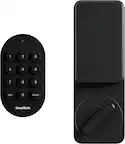
Let Yale welcome you home with it’s very first retrofit biometric smart lock: the Yale Approach Lock with Wi-Fi + Keypad. This discreet, interior-only lock installs over your existing deadbolt and lets you keep your keys, while the keypad can be placed anywhere within Bluetooth(R) range- so you're effortlessly enhancing your door without changing a thing about it. Thanks to the biometric keypad, enjoy an extra layer of convenience and security and enter your home with just a simple touch of your finger. With multiple ways to lock your door- including Auto-Lock with Doorsense and One-Touch Locking, and the ability to easily track who comes and goes using the Yale Access App, rest easy knowing your home is secure at all times.
| Pros for Yale - Assure Lock 2 - Smart Lock Keyless Wi-Fi Deadbolt with Touchscreen Keypad Access - Satin Nickel | |||
|---|---|---|---|
| Ease of use, Installation, Keypad, Wi-Fi, Auto Unlock | Ease of use, Installation, Keypad, Overall Performance, Design | Ease of use, Battery Life, Overall Performance, Installation, Video Quality | Installation, Keypad, Battery Life, Ease of use, Auto Lock |
| Cons for Yale - Assure Lock 2 - Smart Lock Keyless Wi-Fi Deadbolt with Touchscreen Keypad Access - Satin Nickel | |||
| Battery Life, App | Battery Life, Wi-Fi | App, Price | App, Fingerprint Reader |
Specs
Reviews
Customers are saying
Customers are impressed with the Assure Lock 2's ease of use and straightforward installation. Many appreciate the convenient features like Wi-Fi connectivity, keypad access, and auto-unlock functionality, while also highlighting the lock's secure design and quality construction. However, some users note that the battery life could be improved, and the app's performance has been inconsistent for a few.
Customer Images
The vast majority of our reviews come from verified purchases. Reviews from customers may include My Best Buy members, employees, and Tech Insider Network members (as tagged). Select reviewers may receive discounted products, promotional considerations or entries into drawings for honest, helpful reviews.
- Rated 4 out of 5 stars
Solid Lock, works remotely with internet & HK
Good lock that works with Apple HomeKit app and Yale Access app. Decent improvement over their previous version YRD226 which required a Yale Connect Hub for internet access. Wi-Fi is built into this one within the module. Much cleaner set-up and ordering this version gets you everything you need for HK and Wi-Fi (also works with Bluetooth and AppleWatch Yale app). Hardware is slightly condensed over previous model. Yale Support is 24/7 if there are any issues with set-up. I installed two Yale model YRD450 locks so far. Printed and app instructions (with videos/images) for physical installation of lock are quite good. Note, DoorSense (magnet) if installing into door frame, I suggest using a 9/16 spade drill bit. In their literature they show in a picture a 1/2 drill bit (too small, DoorSense magnet won't fit) and they reference in copy 5/8" drill bit (hole will be slightly too large--a metal door with cause the magnet to pop out and stick to door side--on first door I had to use silicone sealer in the hole to solve the issue "by gluing in the magnet" so it wouldn't pop out. The 9/16" drill bit worked just right on second door--magnet goes in snuggly (takes a few taps from a rubber hammer) and stays in place flush with the door frame. On the first one I had to call support for help (module had HK Code + Yale QR code AND Lock Hardware had different HK Code + Yale QR code--if this happens use the lock HK Code and QR code, not the module. The second lock didn't have this issue and I simply used the codes on the hardware and had no difficulty following the Yale Access app directions. I can recommend. I do hope they last 15+ years. Nice to have remote access to lock and unlock doors, see who is going in/out, provide temp password entry to guests, etc. Now maybe I'll have time to clean and paint my doors!
This review is from Yale - Assure Lock 2 - Smart Lock Keyless Wi-Fi Deadbolt with Touchscreen Keypad Access - Oil-Rubbed Bronze
Posted by Scott
- Rated 5 out of 5 stars
So far so good
It works pretty well overall. The Yale app is pretty slick too. Makes a satisfying chime when locked. Keypad only lights up when you need it (press the Yale logo). So, it looks pretty sleek as well. Highly recommended
Posted by LiangH
- Rated 5 out of 5 stars
Best smart lock ever
It was a simple installation & is working great! this lock is amazing!! I love the features & design of this lock. The auto lock & unlock is so convenient I don’t need to get my phone out for it to work.
This review is from Yale - Assure Lock 2 - Smart Lock Keyless Wi-Fi Deadbolt with Touchscreen Keypad Access - Black Suede
Posted by Chelsea