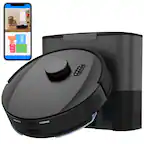
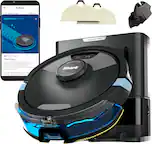
iRobot - Roomba 105 Vacuum - Easy-to-Use, Intense Power-Lifting Suction, LiDAR Navigation, Multi-Surface Cleaning, Self-Charging - Black
FREE shipping to
More Buying Options
Related Item

Specifications
- Cleaning Path Width5.8 inchesVacuum TypeRoboticBin Capacity0 gallonsProduct Weight6.06 poundsCompatible Floor TypeAll floorsBaglessYes
- Key Specs
- Cleaning Path Width: 5.8 inches
- Vacuum Type: Robotic
- Bin Capacity: 0 gallons
- Product Weight: 6.06 pounds (The out of box weight of the item.)
- Compatible Floor Type: All floors
- Bagless: true
- Corded/Cordless: Cordless
- Filter Type: Standard
- Multi Surface: true
- Auto Docking and Recharging: true
- Room-by-Room Navigation: true
- General
- Brand: iRobot
- Model Number: Q312020
- Product Name: Roomba 105 Vacuum - Easy-to-Use, Intense Power-Lifting Suction, LiDAR Navigation, Multi-Surface Cleaning, Self-Charging
- Color: Black
- Dimensions
- Product Height: 4.1 inches (The out of box height of the item. Height is measured as the vertical distance from the bottom of the item to the top as it would be primarily used or placed.)
- Product Length: 13.2 inches (The out of box length of the item. Length is measured as the longest dimension of the item.)
- Product Width: 13.2 inches (The out of box width of the item. Width is measured as the horizontal distance from one side of the item to the other as it would be primarily used or placed.)
- Features
- Connectivity Technology: Wi-Fi (The manner in which a device sends data to another device over a short distance.)
- Cliff Sensor: true
- Bagless: true
- Filter Type: Standard
- Voltage: 2.4 volts (Amount of power needed to support an electrical current.)
- Protective Bumpers: true
- Remote Control: false
- Self-Emptying: false (During docking these products can automatically empty the contents of the collection bin into a separate base collection bin which is capable of holding dirt and debris from more than one cleaning cycle.)
- Performance
- Programmable Cleaning Intervals: true
- Power
- Self-Charging: true
- Rechargeable Battery: true
- Charger Included: true
- Battery Chemistry: Lithium-ion
- Battery Capacity: 3000 milliampere hours (The amount of energy stored in the battery.)
- Compatibility
- App Compatible: true (The product can be connected to a program or software application on a mobile device, which then receives collected data from the product.)
- Warranty
- Warranty - Parts: 1 year limited
- Warranty - Labor: 1 year limited
- Other
- UPC: 885155046420
The Roomba 105 Vac Robot Vacuum is made for every kind of dry floor-cleaning task. The 3-stage cleaning system delivers high-performance cleaning by combining 70X more intense power-lifting suction*, an edge-sweeping brush that cleans 20% better*, and a multi-surface brush to pick up all kinds of dirt. ClearView LiDAR quickly maps your home for precise coverage. Tap the app, push the robot's buttons or ask your preferred voice assistant** for an on-demand clean.
- Devours Dirt with 70x More Power-Lifting Suction*: 3-Stage Cleaning includes 70X more power-lifting suction*, a Multi-Surface brush, and Edge-Sweeping brush to devour dirt and dust bunnies and leave floors barefoot clean.
- Super-Smart Mapping and Navigation: ClearView LiDAR quickly maps your home, avoids obstacles and cleans in neat rows, even in the dark.
- Fully Custom Cleaning: Schedule and target rooms based on your daily routine and adjust the number of cleaning passes and levels of suction power.
- A Targeted Clean: Focus on specific rooms that need extra love, or skip a room if an activity is going on in there.
- Easy-to-use Roomba Home App: Simply tap to set a custom clean, get time estimates, check on the filter life, or create keep-out zones to avoid specific areas
- Extra Dirt? Spot Cleaning Is On It: Easily target the places where your floors need extra attention. With spot cleaning, your robot repeatedly cleans in one area for up to 5 minutes.
- 3 Easy Ways to Control: Conveniently control your Roomba robot by speaking to your preferred voice assistant-enabled* devices, tapping the app, or pressing the robot's buttons.
- Recharges and Resumes the Cleaning Task: Sends itself for a recharge when needed, and picks up cleaning where it left off. The ultimate in cleaning efficiency.
- Blends in Beautifully: The Roomba 105 Vac Robot’s sleek look is inspired by modern design with beautiful finishes and textures that blend easily with home décor.
- WiFi Ready: Uses a 2.4 GHz network for setup and operation. After setup, your robot will stay on 2.4GHz for operation and your phone can return to 5GHz.
- Devours Dirt with 70x More Power-Lifting Suction*: 3-Stage Cleaning includes 70X more power-lifting suction*, a Multi-Surface brush, and Edge-Sweeping brush to devour dirt and dust bunnies and leave floors barefoot clean.
- Super-Smart Mapping and Navigation: ClearView LiDAR quickly maps your home, avoids obstacles and cleans in neat rows, even in the dark.
- Fully Custom Cleaning: Schedule and target rooms based on your daily routine and adjust the number of cleaning passes and levels of suction power.
- A Targeted Clean: Focus on specific rooms that need extra love, or skip a room if an activity is going on in there.
- Easy-to-use Roomba Home App: Simply tap to set a custom clean, get time estimates, check on the filter life, or create keep-out zones to avoid specific areas
- Extra Dirt? Spot Cleaning Is On It: Easily target the places where your floors need extra attention. With spot cleaning, your robot repeatedly cleans in one area for up to 5 minutes.
- 3 Easy Ways to Control: Conveniently control your Roomba robot by speaking to your preferred voice assistant-enabled* devices, tapping the app, or pressing the robot's buttons.
- Recharges and Resumes the Cleaning Task: Sends itself for a recharge when needed, and picks up cleaning where it left off. The ultimate in cleaning efficiency.
- Blends in Beautifully: The Roomba 105 Vac Robot’s sleek look is inspired by modern design with beautiful finishes and textures that blend easily with home décor.
- WiFi Ready: Uses a 2.4 GHz network for setup and operation. After setup, your robot will stay on 2.4GHz for operation and your phone can return to 5GHz.
Whats Included
- 1 Roomba 105 Vac robot
- 1 Extra Filter
- 1 Charge Only Dock
- 1 Line Cord
- 1 Roomba 105 Vac robot
- 1 Extra Filter
- 1 Charge Only Dock
- 1 Line Cord
Disclaimers
- *As compared to Roomba 600 series robots
- **See iRobot website for list of compatible cleaning solutions
- *Works with Alexa, Siri, and Google Assistant-enabled devices. Alexa and all related logos are trademarks of Amazon or its affiliates. Google and Google Home are trademarks of Google LLC. Siri is a registered trademark of Apple Inc., registered in the U.S. and other countries and regions.
- *As compared to Roomba 600 series robots
- **See iRobot website for list of compatible cleaning solutions
- *Works with Alexa, Siri, and Google Assistant-enabled devices. Alexa and all related logos are trademarks of Amazon or its affiliates. Google and Google Home are trademarks of Google LLC. Siri is a registered trademark of Apple Inc., registered in the U.S. and other countries and regions.
Q: Is this Roomba compatible with an app?
A: Yes, this Roomba is compatible with the Roomba Home App.
Q: What is the battery capacity of this Roomba?
A: The battery capacity is 3000 milliampere hours.
Q: What is the cleaning path width of the Roomba?
A: The cleaning path width is 5.8 inches.
Q: Does the Roomba have a spot cleaning mode?
A: Yes, it has a spot cleaning mode that cleans a specific area for up to 5 minutes.
Q: What kind of navigation system does the Roomba robot vacuum use?
A: The Roomba robot vacuum uses ClearView™ LiDAR for navigation.
Q: Does this Roomba automatically return to its charging station?
A: Yes, the Roomba automatically returns to its charging station when needed and resumes cleaning where it left off.
Q: How can I control this Roomba?
A: You can control the Roomba using the app, voice assistant, or buttons on the robot.
Q: What is the noise level in decibels?
A: Hello Irene, The Roomba 105 has a noise level of 62 dB.
Compare similar products

The Roomba 105 Vac Robot Vacuum is made for every kind of dry floor-cleaning task. The 3-stage cleaning system delivers high-performance cleaning by combining 70X more intense power-lifting suction*, an edge-sweeping brush that cleans 20% better*, and a multi-surface brush to pick up all kinds of dirt. ClearView LiDAR quickly maps your home for precise coverage. Tap the app, push the robot's buttons or ask your preferred voice assistant** for an on-demand clean.

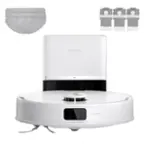
The Roomba 105 Vac Robot Vacuum + AutoEmpty Dock is made for every kind of dry floor-cleaning task. The self-emptying dock holds up to 75 days of debris in a bag you just lift out and toss away. The 3-stage cleaning system delivers high-performance cleaning by combining 70X more intense power-lifting suction*, an edge-sweeping brush that cleans 20% better*, and a multi-surface brush to pick up all kinds of dirt. ClearView LiDAR quickly maps your home for precise coverage. Tap the app, push the robot's buttons or ask your preferred voice assistant** for an on-demand clean.

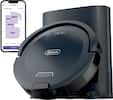
The Navigator robot vacuum is perfect for starting your journey to a cleaner home. Unlike robots that just bounce around, it uses Smart Path Navigation to map your home and clean in a row-by-row pattern. It delivers powerful performance on carpets & hard floors and detects & avoids objects—so you don’t have to tidy up beforehand.

The Roomba 105 Combo Robot + AutoEmpty Dock is made for every kind of wet and dry floor-cleaning task. The self-emptying dock holds up to 75 days of debris in a bag you just lift out and toss away. The 4-stage cleaning system delivers high-performance cleaning by combining 70X more intense power-lifting suction*, an edge-sweeping brush that cleans 20% better*, a multi-surface brush to pick up all kinds of dirt, and a washable, re-usable microfiber pad to wipe away spills. ClearView LiDAR quickly maps your home for precise coverage. Choose from 3 cleaning options - mop, vacuum, or vacuum-and-mop at the same time. Using water or cleaning solution**, choose the perfect amount of liquid for the job, and set SmartScrub to 2X deeper scrubbing*** on high-traffic areas the way you would to erase the messes of the day. Tap the app, push the robot's buttons or ask your preferred voice assistant**** for an on-demand clean.
| Pros for iRobot - Roomba 105 Vacuum - Easy-to-Use, Intense Power-Lifting Suction, LiDAR Navigation, Multi-Surface Cleaning, Self-Charging - Black | |||
|---|---|---|---|
| There were no pros for this product— | Navigation, Cleaning Performance, Setup Ease, Suction Power, Build Quality | Navigation, Cleaning Performance, Noise Level, Setup Ease, Suction Power | Cleaning Performance, Noise Level, Suction Power, Ease of Use, Setup |
| Cons for iRobot - Roomba 105 Vacuum - Easy-to-Use, Intense Power-Lifting Suction, LiDAR Navigation, Multi-Surface Cleaning, Self-Charging - Black | |||
| There were no cons for this product— | Battery Life, Noise Level, Docking | Dustbin Capacity | Battery Life, Navigation, Mapping |
Specs




Reviews
Customer Images
The vast majority of our reviews come from verified purchases. Reviews from customers may include My Best Buy members, employees, and Tech Insider Network members (as tagged). Select reviewers may receive discounted products, promotional considerations or entries into drawings for honest, helpful reviews.
- Rated 5 out of 5 stars
Roomba Series 105: Long Overdue
It has officially completed its first mission—and I’m not exaggerating when I say I gasped. Watching it glide across the floor like a silent little ninja, weaving between chair legs and fearlessly confronting dust bunnies I didn’t even know existed… I teared up. My floors haven’t felt this clean since I moved in. It found crumbs from snacks I don’t even remember eating. It tried to fight a pretzel, got stuck for a second, and then triumphed. I stood there like a proud parent watching their kid’s first recital, whispering “You did it, buddy” as it rolled back to its charging dock like the humble hero it is. If it asked me for a raise, I’d give it one. No notes. Just love.
This review is from iRobot - Roomba 105 Vacuum - Easy-to-Use, Intense Power-Lifting Suction, LiDAR Navigation, Multi-Surface Cleaning, Self-Charging - Black
Posted by Foster
- Rated 4 out of 5 stars
Nice Entry Level Robovac - Good Suction
The iRobot Roomba 105 is iRobot latest entry level robovac option. There are 2 versions of the non-mopping 105 – 1 with a standard dock and the other with a self emptying dock. This model comes with a standard charging dock and requires manual emptying. I have used iRobots for several years now including a self-emptying J7+ and last year’s Essential Combo. These vacuumshave held up well and for the most part been pretty reliable. This version of the 105 basically replaces last year’s Roomba Essential. Design and Features The 105 maintains the standard round shape that Roomba’s always have, but now has a puck on the top of the body that carries the LIDAR sensor. It measures in at Ø13.2” x 4.1” which is basically the same diameter as the Essential, but is an inch taller due to the LIDAR sensor puck. The main cleaning path (roller head width) is 6” along with a side brush that picks up dirt along the edge. The top of the vacuum has 2 buttons (Home and Power), along with the sensor puck. The home button returns the 105 to the dock while the power button turns on the 105 or will start a cleaning session. The front of the device has the sensor array with light, touch, and cliff sensors. The rear of the device is the dustbin and charging contacts. To remove the dustbin you need to remove the 105 from the dock to access it. This is really not the best solution, but because this vacuum has a self-emptying dock version I understand the need for placement at the rear. Pulling the dustbin out reveals a cleaning brush/tangle knife for cleaning/maintenance, and opening the dustbin reveals the location of the replaceable air filter. The dock is small and easy to tuck up next to a wall, which keeps the robot from sticking out a long ways. There is plenty of cord length to reach a decent ways, and the dock has some built in cable management. The 105 seems to find the dock pretty easily, and manually putting the 105 on the dock is easy as the charging contacts have a good contact area. Most of your options and settings are found once you start to setup a cleaning run. You have the option of 4 different suction levels, 3 levels of cleaning (light, normal, and deep), and the number of passes you need to make. You can also setup the order of rooms being cleaned in case you want one area prioritized first. Aside from that there is the scheduling assistant. You can also see your previous runs, but it only shows you the cleaning sessions that occurred in the last 10 days. The vacuum also likes to talk to you. It caught me off-guard the first time I heard it because I was home alone, and started hearing a woman talking to me. Once I realized it was the vacuum I knew what to listen for. The vacuum will notify you when it completes its run, needs to recharge, successfully docks, and has the dust bin reinstalled. Setup and Initial Mapping Run Controlling your 105 is done with the NEW iRobot Home app. I already had iRobot Home installed for my j7+ and the Essential Combo, but that app wouldn’t connect. I found out iRobot released a new, separate app to control the 105, which is more than a little annoying. Once the NEW version of the app installed from the Play store I was able to add the 105 to my network and get it set up. There’s not a whole lot to control on the 105 once you are in the app. already had the app installed for my J7+, so this was one less step for me to take. Pairing it with the app was easy and getting it onto the home Wi-Fi was no problem. I left the vac to charge on the dock for about 2 hours before starting any cleaning processes. Before cleaning you do need to complete an initial mapping run, which took about 20 min for the upstairs (1000 ft2). The mapping run produced a floor layout, and the app makes a solid attempt the break the space up into rooms. The only area of the map that was a little wonky was in the bedroom where the closet door is a full mirror to the floor. That produced an interesting result and caused the map to show 2 rooms as 1 – it connected the next room that is “through” the mirrored closet. That was a simple edit to the map and caused zero actual issues. Cleaning Performance Cleaning is fairly straightforward once you have your mapping completed. I made sure the floors were picked up prior to started a run, like I’ve done with all my robovacs. From there I can select the rooms I want to vacuum, the suction strength, cleaning level, and the number of passes I want it to make (1 or 2). I left the cleaning level on normal and used the highest suction level for all spaces for my first run, and this is the setting I will probably leave it on going forward. I have found that I can select different suction/cleaning levels based on the room being cleaned. I can have it be more thorough in the room with carpet vs. the areas with hardwood. That’s pretty convenient. The main brush roll is only 6” wide and its a combo rubber finned/bristle beater bar. The rubber fins help a lot on carpet where fur and hair might stick down. My j7+ has counter rotating rubber finned rollers and its awesome on carpet, so I assumed carpet performance wouldn’t be too bad. I have 2 huskies at home and 4 girls with long hair that rival the huskies in shedding. I only have 1 room with carpet so I don’t have much use for the deep clean function. I have ran it on the deep setting, and it really cuts the battery life down – it needed a recharge in the middle, and it really wasn’t a benefit except in the carpeted room. For the most part I have left it on the normal setting but with higher suction – it helps when pulling the wisps of husky fluff out of corners and along baseboards. The higher suction level does create a decent uptick in noise, but it’s not the loudest vacuum I have used. On the hardwood floors the vacuum does a good job of collecting the dog hair. In corners and along baseboards the little rotating brush did fine pulling fur and crumbs out. Its not perfect, but it does no worse than other round robovacs. The one thing I did notice was I found little pilled up balls of fur left in the room with carpet. I wasn’t surprised because my j7+ does this sometimes as a result of the rubber fins on the roller. It pulls the hair up fine but sometimes it will make a little ball that doesn’t get sucked up. The cleaning pattern for the vacuum is to work the perimeter of the room before running lines up and down. This is my preferred cleaning path rather than the randomized bouncing around the room. The run time is lower and its more efficient. I was surprised to not get a “Bin Full” notice or something like that while it was running, because the bin was pretty full after each cleaning run. Emptying the bin requires pulling the vacuum from the dock to access the dust bin. It opens up and empties easily enough. I had to clean out the roller after a few runs to undo the long hair/dog fur combo before it impacted the rollers ability to spin or clean effectively. I used the little tool located on the bin to cut the hair/fur. Overall, the Roomba 105 is a good starter robovac. While it was annoying to download another iRobot app, I can say it does work well. I really didn’t run up against any issues while using the 105 either from and operational or software perspective. I could monitor its progress while away from home and schedule cleanings in the app. The vacuum handled the dog fur welland did a good job of picking up the little wisps that like to tumble around. I do see this as a pretty significant improvement over the Essential that was released last year, and I am really glad this vacuum cleans in rows instead of bouncing around. I do hope iRobot makes the self-emptying dock available for separate purchase because I would be willing to pay for that upgrade. However, the basic dock helps keep the initial cost down, and it’s really not that much of a burden to empty it on my own.
This review is from iRobot - Roomba 105 Vacuum - Easy-to-Use, Intense Power-Lifting Suction, LiDAR Navigation, Multi-Surface Cleaning, Self-Charging - Black
Posted by DaveW
- Rated 5 out of 5 stars
Upgrade
Our died few months ago, 7 years service. This upgrade was above our expectations
This review is from iRobot - Roomba 105 Vacuum - Easy-to-Use, Intense Power-Lifting Suction, LiDAR Navigation, Multi-Surface Cleaning, Self-Charging - Black
Posted by Hector