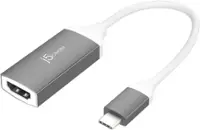
Best Buy essentials™ - USB to VGA Adapter - White
FREE shipping to
More Buying Options
Related Item

About This Item
- Key Specs
- Connector Type (End 1): USB-A
- Gender (End 1): Male
- Connector Type (End 2): VGA
- Gender (End 2): Female
- General
- Brand: Best Buy essentials™
- Model Number: BE-PA3UVG
- Product Name: USB to VGA Adapter
- Color: White
- Quantity: 1
- Compatibility: Most USB 3.0 port to a VGA-enabled monitors
- Connectivity
- Cable Type: USB, VGA
- Product Type: Adapter
- Connector Type (End 1): USB-A
- Gender (End 1): Male
- Connector Type (End 2): VGA
- Gender (End 2): Female
- Environmental
- Indoor Or Outdoor Use: Indoor (Indicates the appropriate environment product was designed to be used in.)
- Warranty
- Warranty - Parts: 1 year limited
- Warranty - Labor: 1 year limited
- Other
- UPC: 600603275654
This Best Buy essentials USB to VGA Adapter can help you mirror or extend your display, granting you a setup that shows videos, presentations, games and more on a better screen. It supports Full HD resolution to mirror the display from a computer without losing image quality. Plug-and-play technology on Windows computers makes the connection simple. Just connect to a VGA-enabled monitor and you’ll be ready to work or play. This adapter is also USB 2.0 backwards compatible, giving you the option to use it with an older computer. And it’s backed by Best Buy, so you can trust it to upgrade your computer setup.
- Male USB 3.0 to female VGA conversion: Connects your computer’s USB 3.0 port to a VGA-enabled monitor, for mirroring or extending your display.
- Wide-ranging use: Connects USB 3.0 computers and laptops running Windows 10 (32 bit/64 bit) or macOS 10.12 through 11.4. View your content on VGA-compatible TVs, monitors and projectors.
- High-quality video: Supports up to 2048 × 1152 resolution at 60 Hz for crisp, clear images.
- USB 2.0 backwards compatibility: Works with older computers.
- Windows Plug-and-play connection: Provides a hassle-free connection with Windows 10 updates online (macOS requires manual driver installation).
- 3 in. cord: Includes a small, attached cord for flexible placement options.
- Compact: Our small design makes the adapter simple to transport.
- Backed by Best Buy: For quality and reliability that you can trust.
- Backed by Best Buy: For quality and reliability that you can trust.
Whats Included
- Best Buy essentials USB to VGA Adapter
- Quick Setup Guide
Q: What is the primary function of this adapter?
A: This adapter allows you to mirror or extend your computer's display to a VGA-enabled monitor, TV, or projector.
Q: Does this Best Buy essentials adapter require any special setup for Windows computers?
A: This adapter offers plug-and-play functionality for Windows computers with Windows 10 updates installed.
Q: Is this USB adapter compatible with older computers?
A: Yes, this adapter is backward compatible with USB 2.0, allowing you to use it with older computers.
Q: Does this adapter work with macOS?
A: Yes, this adapter is compatible with macOS versions 10.12 through 11.4.
Q: Are Best Buy essentials products designed to be budget-friendly?
A: Yes, Best Buy essentials products are designed to make your life easier at a great price.
Q: How long is the cord on this adapter?
A: The adapter has a 3-inch cord attached to it.
Q: What is the maximum resolution supported by this adapter?
A: This adapter supports a maximum resolution of 2048 x 1152 at 60Hz.
A: After you plug in the adapter, go to windows update. Click on check for updates and when it's finished checking click on view optional updates. Click on driver updates and you should see one for the USB/VGA adapter. Click to install it. The driver is from Magic Control Technology.
Reviews
Customers are saying
Customers frequently mention the USB to VGA Adapter's ease of use and broad compatibility as significant advantages. Users appreciate the adapter's performance in meeting their needs and find it to be a good value. Some customers also highlight the picture quality as crisp and clear.
Customer Images
The vast majority of our reviews come from verified purchases. Reviews from customers may include My Best Buy members, employees, and Tech Insider Network members (as tagged). Select reviewers may receive discounted products, promotional considerations or entries into drawings for honest, helpful reviews.
Compare similar products

This Best Buy essentials USB to VGA Adapter can help you mirror or extend your display, granting you a setup that shows videos, presentations, games and more on a better screen. It supports Full HD resolution to mirror the display from a computer without losing image quality. Plug-and-play technology on Windows computers makes the connection simple. Just connect to a VGA-enabled monitor and you’ll be ready to work or play. This adapter is also USB 2.0 backwards compatible, giving you the option to use it with an older computer. And it’s backed by Best Buy, so you can trust it to upgrade your computer setup.

Plugable's Display Port to VGA Port adapter allows you to connect from a DisplayPort (DP) output on your laptop, desktop, or tablet to virtually any VGA-enabled display. Active adapters are compatible with both Single-mode and Dual-mode DisplayPort outputs. Our adapter supports resolutions up to 1920x1200 @ 60Hz refresh rate. This versatile adapter complements a docking station dual monitor setup, making it easy to expand your workspace with multiple monitors. Compatibility Plugable's DPM-VGAF adapter is compatible with systems that have a DisplayPort output port (DP) on a laptop, desktop or tablet PC to add a VGA capable monitor, TV or projector. Whether you need a DisplayPort to VGA, Display Port to VGA or DP to VGA adapter, this product provides seamless intergration. Note that adapter is not bi-directional and will not convert in the other direction. Compliant with VESA DisplayPort 1.1 In the Bag Plugable DisplayPort to VGA Active Adapter (VGA cable not included)

This USB-C to VGA adapter converts a USB-C output to a VGA input, letting you connect your computer to a VGA-enabled TV, monitor or projector. Resolutions up to 60Hz deliver outstanding presentations or movie showings with crystal clear video quality. Plus, the compact design makes it effortless to carry.

The Insignia VGA to HDMI Adapter mirrors the display from a VGA computer or laptop to any HDMI-enabled monitor, TV, Projector. Or extend your existing display to a second monitor, making it easier to organize programs and windows for day-to-day use at work or while browsing. This adapter supports resolutions up to 1920 × 1080 at 60 Hz for high-quality video, and an attached USB cable lets you hook up your audio and enables video output. Its hassle-free setup requires no additional software. This product can’t support HDMI to VGA output. To enable the adaptor correct setting up, the VGA port need to be connected your PC or laptop, a HDMI cable (not included) is required to connect the monitor, TV, projector, and the USB cable need to be connected with USB port of computer.
| Pros for Best Buy essentials™ - USB to VGA Adapter - White | |||
|---|---|---|---|
| Ease of use, Compatibility, Performance, Price, Picture Quality | Overall Performance | Compatibility, Ease of use, Performance, VGA, Resolution | Overall Performance, Ease of use, Compatibility, Price, HDMI |
| Cons for Best Buy essentials™ - USB to VGA Adapter - White | |||
| There were no cons for this product— | There were no cons for this product— | There were no cons for this product— | Resolution |