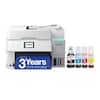
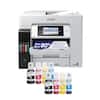
Epson - EcoTank Photo ET-8550 All-in-One Wide-format Supertank Printer - White
More Buying Options
Specifications
- NetworkingWireless, WiredENERGY STAR CertifiedYesPrinter TypeAll In One, Copier, Printer, ScannerISO Color Print Speed12 pages per minuteISO Mono Print Speed16 pages per minuteTouch ScreenYes
- Key Specs
- Networking: Wireless, Wired
- ENERGY STAR Certified: true (Devices carrying the ENERGY STAR service mark, such as computer products and peripherals, kitchen appliances, and other products, generally use 20% to 30% less energy than required by federal standards.)
- Printer Type: All In One, Copier, Printer, Scanner
- ISO Color Print Speed: 12 pages per minute (The number of color pages able to be printed per minute in the device's default single-side mode, as tested by the International Standards Organization (ISO).)
- ISO Mono Print Speed: 16 pages per minute (The number of black ink (grayscale) pages able to be printed per minute in the device's default single-side mode, as tested by the International Standards Organization (ISO).)
- Touch Screen: true (Touch-screen devices make navigating more intuitive. Using a touch-screen display, you can do things such as tap to select, hold and drag to move items, swipe to scroll, and pinch to zoom.)
- General
- Brand: Epson
- Model Number: C11CJ21201
- Product Name: EcoTank Photo ET-8550 All-in-One Wide-format Supertank Printer
- Color: White
- Display Screen: true
- Display Screen Size: 4.3 inches
- Dimensions
- Product Height: 16.9 inches (The out of box height of the item. Height is measured as the vertical distance from the bottom of the item to the top as it would be primarily used or placed.)
- Product Width: 20.6 inches (The out of box width of the item. Width is measured as the horizontal distance from one side of the item to the other as it would be primarily used or placed.)
- Product Depth: 29.8 inches (The out of box depth of the item. Depth is measured as the distance from the front of the item to the back as it would be primarily used or placed.)
- Product Weight: 24.5 pounds (The out of box weight of the item.)
- Features
- Automatic Document Feeder: false
- Photo Printing: true
- Automatic Two-Sided Printing: true
- Tray Capacity: 100
- Connectivity
- Wired Connectivity: Ethernet, USB-A
- Wireless Connectivity: Bluetooth, Wi-Fi (The manner in which a device sends data to another device over a short distance without the use of wires or cables.)
- Ink
- Compatible Cartridges: Epson T522
- Ink Cartridges Required: None (The quantity and color of ink cartridges required for the printer to operate.)
- Ink Cartridges Included: None (The quantity and color of ink cartridges included.)
- Ink Bags/Bottles Required: 1 x Black, 1 x Cyan, 1 x Gray, 1 x Magenta, 1 x Photo black, 1 x Yellow (The quantity and color of ink bags/bottles required for the printer to operate.)
- Ink Bags/Bottles Included: 1 x Black, 1 x Cyan, 1 x Gray, 1 x Magenta, 1 x Photo black, 1 x Yellow (The quantity and color of ink bags/bottles included.)
- Paper Info
- Paper Handling: y Front Tray 1: 20 sheets photo 5x7”, Front Tray 2: 100 sheets plain Letter/A4, Rear: 50 sheets plain or 5 sheets photo A3+, Rear Straight Pass: 1 sheet
- Performance
- Printer Resolution (Color): Up to 5760 x 1440 (Refers to the number of pixels/dots, both horizontally and vertically, of the image produced by the printer in colored ink. Generally, the higher the resolution, the sharper and cleaner the produced image.)
- Warranty
- Warranty - Parts: 1 year limited
- Warranty - Labor: 1 year limited
- Other
- UPC: 010343952492
The EcoTank Photo ET-8550 wireless all-in-one prints lab-quality, wide-format color photos, graphics and everyday documents — all at an incredible value. Epson’s cartridge-free, 6-color Claria ET Premium Ink system delivers vibrant colors and sharp text for all your creative projects. With low-cost replacement ink bottles, print 4" x 6" photos for about 4 cents each compared to 40 cents with cartridges (1). Print everything from borderless 13" x 19" photos to customized CDs/DVDs. You can even print on cardstock and other media up to 1.3 mm thick. For added convenience, each set of bottles lets you print for up to 2 years (2). Plus, save up to 80 percent with replacement ink bottles vs. ink cartridges (3) — that’s about $2,000 on each set (3). The EcoTank Photo lets you do it all with affordable in-house printing.
- Cartridge-free printing for lab-quality photos, graphics and creative projects: Get vibrant colors and sharp text with Epson's high-accuracy printhead and Claria ET Premium 6-color inks; print a 4 x 6" photo in as fast as 15 seconds (4)
- Extraordinary media support, including borderless photos up to 13" x 19": Accommodates cardstock, CD/DVDs and other specialty media up to 1.3 mm thick; auto 2-sided printing
- Amazing value: Save a ridiculous amount on photos (1) and creative projects with affordable in-house photo printing; print 4" x 6" photos for about 4 cents each vs. 40 cents with traditional ink cartridges (1)
- Save up to 80% with low-cost replacement ink bottles vs. ink cartridges (3): That's about $2000 on each set (3), enough ink to print up to 6,200 pages color (5)
- Print up to 2 years (2): With each included and replacement ink bottle set
- Zero cartridge waste: With high-yield ink bottles; each replacement ink bottle set is equivalent to about 100 individual ink cartridges (6)
- Print, scan and more from your mobile device (7) with Epson Smart Panel app (8): Set up, monitor and operate your printer directly from your mobile device; supports iOS and Android
- Intuitive touch display and wireless connectivity: 4.3" color display, voice-activated printing (9) and more for fast, easy performance
- Exclusive EcoFit ink bottle design: Uniquely keyed for easy filling of each color
- Use Genuine Epson Ink: For optimal print quality and performance. Non-genuine ink could cause damage not covered by the printer’s limited warranty
Whats Included
- EcoTank Photo ET-8550 All-in-One Wide-format Supertank Printer
Disclaimers
- 1. Actual savings and costs will vary considerably based on print tasks, print volumes and usage conditions. Savings and cost per ISO 29103 page are based on the cost of replacement ink bottles and the cost of enough standard cartridges to achieve the total page yields of the bottles using the MSRP (USD) and yields for Epson standard-capacity ink cartridges for similarly featured Epson consumer inkjet printers as of May 2023.
- 2. Based on average monthly document print volumes of about 200 pages.
- 3. Actual savings and costs will vary considerably based on print tasks, print volumes and usage conditions. Savings and cost per ISO 24712 page are based on the cost of replacement ink bottles and the cost of enough standard cartridges to achieve the total page yields of the bottles using the MSRP (USD) and yields for Epson standard-capacity ink cartridges for similarly featured Epson consumer inkjet printers as of May 2023.
- 4. Color photo in Draft Mode on Premium Photo Paper Glossy measured from start of paper feed. Actual print times will vary based on factors including system configuration, software, and page complexity. For more information, visit www.epson.com/printspeed
- 5. Replacement ink bottle yields based on the ISO/IEC 24712 pattern with Epson’s methodology. Replacement ink bottle photo yields are significantly lower and are based on the ISO/IEC 29103 pattern with Epson’s methodology. Actual ink yields will vary considerably for reasons including images printed, print settings, temperature and humidity. Yields may be lower when printing infrequently or predominantly with one ink color. All ink colors are used for printing and printer maintenance
- 6. Individual cartridges estimate based on print yields of a replacement set of black and color ink bottles as compared to Epson standard-capacity ink cartridges for similarly featured Epson consumer inkjet printers as of May 2023.
- 7. Most features require an Internet connection to the printer, as well as an Internet- and/or email-enabled device. For a list of Epson Connect enabled printers and compatible devices and apps, visit www.epson.com/connect
- 8. Epson Smart Panel app download required. Data usage fees may apply.
- 9. Epson Connect account and voice-activated account registration required. See www.epson.com/voice for device compatibility.
- *Requires a high-speed Internet connection.
Q: What is the maximum size photo this Epson printer can print borderless?
A: The Epson EcoTank Photo ET-8550 can print borderless photos up to 13 inches by 19 inches.
Q: What is the warranty on this Epson printer?
A: The Epson EcoTank Photo ET-8550 comes with a 1-year limited warranty for both parts and labor.
Q: How much can I expect to save on ink with this Epson printer?
A: This model allows you to save up to 80% on ink compared to using ink cartridges.
Q: Does this Epson printer offer wireless connectivity?
A: Yes, the Epson EcoTank Photo ET-8550 supports wireless connectivity via Bluetooth and Ethernet.
Q: Does this model use ink cartridges?
A: No, the Epson EcoTank Photo ET-8550 is a cartridge-free printer and uses high-yield ink bottles.
Q: Can I print on both sides of the paper automatically with this printer?
A: Yes, the Epson EcoTank Photo ET-8550 has an auto 2-sided printing feature.
Q: What is the difference between the ET-8500 and ET-8550 ?
A: Hello 4sallypat. Both printers are similar in design and features. The main difference between the two is that the ET-8550 is a wide-format printer that can print up to 13" x 19" in size. The largest paper that can be used on the ET-8500 is 8.5" x 14". Regards, Kevin - The Epson Team.
A: Epson claims with the Claire ink system in this printer 98 years framed under glass and 200 years in dark storage.
Compare similar products

The EcoTank Photo ET-8550 wireless all-in-one prints lab-quality, wide-format color photos, graphics and everyday documents — all at an incredible value. Epson’s cartridge-free, 6-color Claria ET Premium Ink system delivers vibrant colors and sharp text for all your creative projects. With low-cost replacement ink bottles, print 4" x 6" photos for about 4 cents each compared to 40 cents with cartridges (1). Print everything from borderless 13" x 19" photos to customized CDs/DVDs. You can even print on cardstock and other media up to 1.3 mm thick. For added convenience, each set of bottles lets you print for up to 2 years (2). Plus, save up to 80 percent with replacement ink bottles vs. ink cartridges (3) — that’s about $2,000 on each set (3). The EcoTank Photo lets you do it all with affordable in-house printing.
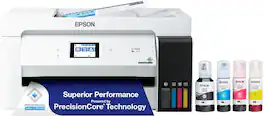
The EcoTank ET-15000 wireless all-in-one offers Cartridge-Free Printing with easy-to-fill supersized ink tanks. Save up to 90 percent on ink with low-cost replacement bottles (1). This all-in-one delivers vibrant prints up to 13" x 19" (through rear-feed tray) and scans up to 8.5" x 14" (via the ADF). Print for up to 2 years with each included or replacement ink bottle set (2) — each replacement set includes enough ink to print up to 7,500 pages (3). That’s equivalent to about 80 individual cartridges (4). And, there’s zero cartridge waste. The ET-15000 features a 250-sheet front tray paper capacity and rear specialty-paper feed, plus a 2.7" color touchscreen and hands-free voice-activated printing (5).
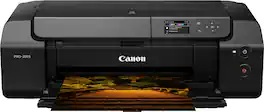
Bring your photos and designs to life with the PIXMA PRO-200 S Professional 13" Wireless Inkjet Photo Printer. With an 8-color dye-based ink system, this 13" wide printer is designed to meet the demands of photographers and graphic artists alike. Versatile and easy to use, print borderless up to 13" x 19" on a variety of media types and sizes . The PIXMA PRO-200S offers beautiful and vibrant print quality, high-speed printing, and outstanding productivity in a compact footprint, allowing you to consistently deliver the results your artistic work deserves.
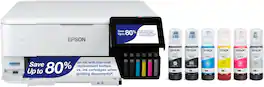
The EcoTank Photo ET-8500 wireless all-in-one prints lab-quality color photos, graphics and everyday documents — all at an incredible value. Epson’s cartridge-free, 6-color Claria ET Premium Ink system delivers vibrant colors and sharp text for all your creative projects. With low-cost replacement ink bottles, print 4" x 6" photos for about 4 cents each compared to 40 cents with cartridges (1). Print everything from borderless 8.5" x 11" photos to customized CDs/DVDs. You can even print on cardstock and other media up to 1.3 mm thick. For added convenience, each set of bottles lets you print for up to 2 years (2). Plus, save up to 80 percent with replacement ink bottles vs. ink cartridges (3) — that’s about $2,000 on each set (3). The EcoTank Photo lets you do it all with affordable in-house printing.
| Pros for Epson - EcoTank Photo ET-8550 All-in-One Wide-format Supertank Printer - White | |||
|---|---|---|---|
| Print Quality, Ease of use, Overall Performance, Setup | Print Quality, Ease of use, Overall Performance, Setup, Size | Print Quality, Overall Performance | There were no pros for this product— |
| Cons for Epson - EcoTank Photo ET-8550 All-in-One Wide-format Supertank Printer - White | |||
| Paper Jam, Price, Output Tray | Paper Jam, Noise Level | There were no cons for this product— | There were no cons for this product— |
Specs

Reviews
Customers are saying
Customers consistently note the outstanding print quality and ease of use, particularly highlighting the simple setup process. Many customers are satisfied with the overall performance of the printer. However, some customers have reported issues with paper jams and consider the price to be a drawback. Additionally, a few customers have expressed concerns about the output tray's build quality.
Customer Images
The vast majority of our reviews come from verified purchases. Reviews from customers may include My Best Buy members, employees, and Tech Insider Network members (as tagged). Select reviewers may receive discounted products, promotional considerations or entries into drawings for honest, helpful reviews.
- Rated 5 out of 5 stars
Easy to set up and very versatile.
I've only had this printer for a few days, but I am impressed. Packaging was excellent. The footprint is as small as it can be for a "large format" printer. Setup was smooth, thanks to Epson's step by step instructions and the thought that went into them. (I thoroughly read the manuals and on-line PDF guide -- be sure you do this, and be sure to accept all options, and updates.) The paper tray pops out automatically, and self-adjusts for long length paper. There is a button on the control panel to withdraw the paper tray. I wish they would design it to retract with manual push, because the retraction icon is not always visible. Ink installation was easy. Seems like there is plenty of ink. I was not expecting my personal involvement in selection of the best calibration level, nor was I expecting so many levels, but I assume this will be an infrequent activity. I connected the printer to wired Ethernet. Unlike my previous printer, this printer always seems ready to go. We also were able to connect our phones for mobile printing. There is also an option to e-mail print jobs. I set this up, too. I bought this printer because I wanted the ability to print 11x17 documents on parchment paper. Paper larger than 8 1/2 x 11 gets fed through an easy to use rear feed. It handled card-stock 11x17 without a problem. The paper tray automatically extended to accommodate the long paper. The printer includes two paper trays. I loaded the top tray with 4x6 photo paper, and the bottom with plain letter paper. Windows programs allow selection of paper and parameters. There is an option to allow the printer/program to select settings. I prefer to opt out and define my own settings. Photo printing is five-star, just as I would expect from an Epson Photo printer! This printer was easier to set up than expected, has excellent paper handling, and produces great output. At this point, I highly recommend it.
Posted by Teddy
- Rated 5 out of 5 stars
Fantastic printer, gorgeous GIANT photos!
Excellent quality prints, super easy painless set up, solid build quality and large 4.3" color touchscreen. I am so impressed with the photo quality. What sold me was the ability to print 13" x 19" documents on cardstock and other media up to 1.3 mm thick. The Epson 8500 does NOT print 13x19 so pay close attention to the model number you purchase if you want to print up to that size, which is the 8550. There are tutorials online for turning this into a dye-sublimation printer (though the Epson black ink is dye, whereas the colors and photo black are pigment). I am sticking with the original Epson ink because the results have been perfect. I have already printed hundreds of photos and there's barely a dent in the ink tank, which was my main motivation for purchasing.
Posted by MamaO
- Rated 5 out of 5 stars
Epson lives up to its name!!!
I am a fan of any product manufactured by Epson. I already own the Epson Stylus 3880. Purchased used and the ink is so expensive. I decided to treat myself to the 8550 model and "Love it". The vivid colors are amazing and it was easy to set up. My only quirk is the paper trays. I find them to be hard to pull out, and put back in. I really have to put pressure on pushing the tray back in printer. For the price point, the trays should flush effortlessly without the strain of pushing them in manually.
Posted by AntoinetteW








