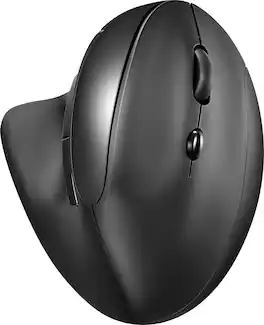
Insignia™ - Bluetooth 6-Button Ergonomic Mouse - Wireless - Black


Specifications
- Maximum Sensitivity1600 dots per inchNumber of Buttons (Total)6Connection TypeWireless
- Key Specs
- Maximum Sensitivity: 1600 dots per inch (Mouse sensitivity is measured in dots per inch (DPI). The higher the DPI, the more sensitive the mouse is and may be more useful for high-density pixel screens. Lower DPI typically means more precision and accuracy in mouse movement.)
- Number of Buttons (Total): 6
- Connection Type: Wireless
- General
- Brand: Insignia™
- Model Number: NS-PM4EK6B24
- Product Name: Bluetooth 6-Button Ergonomic Mouse
- Color: Black
- Features
- Mouse Type: Standard
- Performance
- Mouse Grip Style: Ergonomic (In comparison to many palm and claw grips, ergonomic grip mice are designed for a specific handedness and put the hand and wrist in a position to promote comfort. Customizable grips feature buttons/keys that can be configured to perform specific actions and may also have customizable calibration and sensitivity settings.)
- Tracking Method: Optical (There are several types of computer mice, optical and laser being among the most common. Optical mice detect less detail and provide more precise and accurate movement. Laser mice detect more detail and can be used on a wider variety of surfaces, but are more sensitive to small movements.)
- Maximum Sensitivity: 1600 dots per inch (Mouse sensitivity is measured in dots per inch (DPI). The higher the DPI, the more sensitive the mouse is and may be more useful for high-density pixel screens. Lower DPI typically means more precision and accuracy in mouse movement.)
- Number of Buttons (Total): 6
- Number of Thumb Buttons: 2
- Connectivity
- Connection Type: Wireless
- Wireless Connectivity: Bluetooth (The manner in which a device sends data to another device over a short distance without the use of wires or cables.)
- Maximum Wireless Range: 32.81 feet
- Operating System Compatibility: Windows, Chrome, Mac, Apple iPadOS, Android
- Power
- Mouse Power Source: Battery-powered
- On/Off Switch: true
- Rechargeable Battery (Mouse): false
- Battery Size: AA (The battery size required for operation.)
- Number of Batteries Required: 1
- Batteries Included: true (Indicates whether the product comes with the required batteries for its operation.)
- Dimensions
- Product Height: 2.55 inches (The out of box height of the item. Height is measured as the vertical distance from the bottom of the item to the top as it would be primarily used or placed.)
- Product Length: 4.3 inches (The out of box length of the item. Length is measured as the longest dimension of the item.)
- Product Width: 3.56 inches (The out of box width of the item. Width is measured as the horizontal distance from one side of the item to the other as it would be primarily used or placed.)
- Product Weight: 0.273 grams (The out of box weight of the item.)
- Warranty
- Warranty - Parts: 1 year limited
- Warranty - Labor: 1 year limited
- Other
- UPC: 600603304095
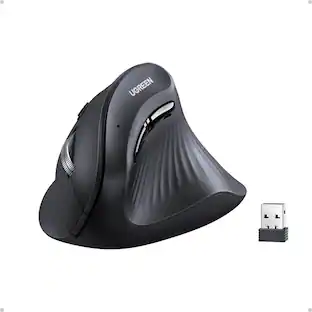
Whether you just got a new computer or are simply upgrading your current setup, you can’t go wrong with this Insignia NS-PM4EK6B24 Bluetooth 6-Button Ergonomic Mouse. It uses reliable Bluetooth technology to easily connect to your Windows, macOS, ChromeOS, iPadOS and Android systems. A sleek, ergonomic build is comfortable enough for everyday use, and 6 buttons provide plenty of simple, intuitive control options. Optical technology makes this mouse more than suitable for a variety of daily uses. Finally, a power switch and LED indicators help to preserve the battery life of your mouse. Upgrade your setup with this easy-to-use Insignia mouse.
- Wide-ranging compatibility: Works with Windows 11 and 10, macOS 10.12 to 11.4, ChromeOS 89, iPadOS 14.4.2 and Android 6.
- 6-button layout: Features 6 buttons, including the scroll wheel and 2 thumb buttons.
- Bluetooth technology: Maintains a reliable connection from up to 32.81 ft. (10 m) away.
- Ergonomic design: Provides increased comfort for long-term use.
- Up to 1600 DPI: Allows for ultra-precise control.
- Optical technology: Utilizes sensors for smooth tracking.
- LED indicator and power switch: Helps you to preserve your mouse’s battery life.
Whats Included
- Insignia Bluetooth6-Button Ergonomic Mouse
- AA battery (1)
- Quick Setup Guide
Q: What type of battery does this mouse use?
A: This mouse uses one AA battery.
Q: What is the maximum range of the bluetooth connection for this mouse?
A: The bluetooth on this mouse maintains a reliable connection from up to 32.81 ft (10 m) away.
Q: Is this mouse compatible with a Chromebook?
A: This mouse is compatible with ChromeOS 89.
Q: Does this mouse come with a power switch?
A: Yes, this mouse has a power switch to help preserve battery life.
Q: How many buttons does this mouse have?
A: This mouse features a 6-button layout, including the scroll wheel and 2 thumb buttons.
Q: Does this mouse use optical technology?
A: Yes, this mouse utilizes optical technology and sensors for smooth tracking.
Q: Does this mouse have the option or ability to side scroll (horizontal scroll)?
A: The Insignia™ Bluetooth 6-Button Ergonomic Mouse is designed primarily for vertical scrolling (up and down) and does not have a dedicated horizontal scroll feature. The scroll wheel supports vertical scrolling only. Patricia | Insignia Support
Compare similar products
Whether you just got a new computer or are simply upgrading your current setup, you can’t go wrong with this Insignia NS-PM4EK6B24 Bluetooth 6-Button Ergonomic Mouse. It uses reliable Bluetooth technology to easily connect to your Windows, macOS, ChromeOS, iPadOS and Android systems. A sleek, ergonomic build is comfortable enough for everyday use, and 6 buttons provide plenty of simple, intuitive control options. Optical technology makes this mouse more than suitable for a variety of daily uses. Finally, a power switch and LED indicators help to preserve the battery life of your mouse. Upgrade your setup with this easy-to-use Insignia mouse.

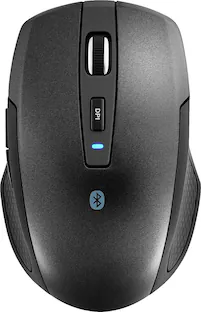
Eliminate the most common computer mouse issue—the cord. With the Best Buy Essentials Bluetooth Optical 6-Button Mouse, you can navigate the web without the limitations of a cable. Compatible with both Windows and Mac computers, simply pair the mouse using wireless Bluetooth 5.1 connection. It has 6 buttons that grant you total control, including left, right, scroll, DPI adjustment, forward and back. An ambidextrous design allows you to use your left or right hand. Optical technology detects when the mouse moves to deliver an accurate 1600 DPI response. We also included two (2) AAA batteries, so you’re ready to go right out of the box. Let us improve your computer navigation by going wireless with this Best Buy-backed mouse.
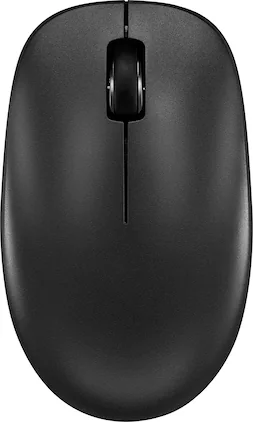
Whether you just got a new computer or simply upgrading your current setup, you can’t go wrong with this Insignia NS-PM3NK3B24 Bluetooth 3-Button Mouse. It uses reliable Bluetooth technology to easily connect to your Windows, macOS, ChromeOS, iPadOS and Android systems. A slim, ambidextrous design works for both right and left-handed users, and a timeless layout consists of 3 buttons. Finally, optical technology makes this mouse more than suitable for a variety of daily uses. Upgrade your setup with this easy-to-use Insignia mouse.

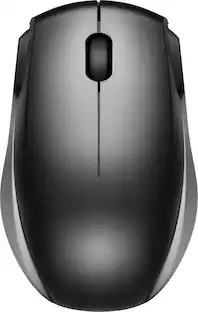
Eliminate the most common computer mouse issue—the cord. With the Best Buy Essentials Wireless Mouse with USB Receiver, you can navigate the web with speed and accuracy. Compatible with both Windows and Mac computers, simply insert the included nano receiver into one of your computer’s USB ports to wirelessly connect the mouse. It has just 3 buttons and an ambidextrous design for simple control. Optical technology detects when the mouse moves to deliver an accurate 1600 DPI response. We also included a AA battery, so you won’t have to worry about keeping the mouse powered until the LED indicator starts to blink. Let us improve your computer navigation by going wireless with this Best Buy-backed mouse.
| Pros for Insignia™ - Bluetooth 6-Button Ergonomic Mouse - Wireless - Black | |||
|---|---|---|---|
| Ease of use, Bluetooth, Battery Life, Ergonomics, Quality | Overall Performance, Bluetooth, Ease of use, Price, Battery Life | Ease of use, Overall Performance, Size, Battery Life, Connectivity | Ease of use, Overall Performance, Price, Size, Wireless |
| Cons for Insignia™ - Bluetooth 6-Button Ergonomic Mouse - Wireless - Black | |||
| Size | Scroll Wheel | USB | Click Sound, Grip |
Specs





Reviews
Rating 4.5 out of 5 stars with 134 reviews
- Ergonomics (49)
- Ease of use (16)
- Bluetooth (15)
- Quality (14)
- Battery Life (12)
- Size (6)
Customer Images
The vast majority of our reviews come from verified purchases. Reviews from customers may include My Best Buy members, employees, and Tech Insider Network members (as tagged). Select reviewers may receive discounted products, promotional considerations or entries into drawings for honest, helpful reviews.
Customers often buy these together
Computer Keyboards
![esc ~ ! 1 tab caps lock shift ctrl F2 Fl # 2 3 Q W A S Z start opt L F3 $ 4 E D X alt cmd3 ) FS F4 A % 5 6 R T F G V C logi 44 HI & F9 FID FB F7 F6 * ) - - & 0 8 9 7 O P U I Y K L H J > < N M 1 B PM + = { [ : I ; ? I alt cmd D 2 4 300 3 1 F12 . * page I insert home up clear backspace 8 9 + 7 page A pg up end down home } I delete ] / 6 4 5 4 enter 2 3 enter 1 dn Pg end shift = 0 del ins etrl fn opt](https://pisces.bbystatic.com/image2/BestBuy_US/images/products/6539/6539505_sd.jpg;maxHeight=232;maxWidth=233?format=webp)
Logitech - MX Keys S Universal Full-size Wireless Scissor Keyboard for PC and Mac with Backlit keys - Black
Top Deal$119.99The price was $129.99![Esc F1 F2 F3 F4 F5 F6 F7 F8 F9 F10 F11 F12 Print Screen Scroll Lock Pause Break 1 2 3 4 5 6 7 8 9 0 - + = Backspace Insert Home H Page Up A Num Look 1 I Tab Q W E R T Y U I o P { [ } ] I I Delete End IN Page Down 7 Home 8 9 Pg Up Caps A Lock A S D F G H J K L ; : DE g Enter 4 5 6 Shift Z X C V N M < > ? I Shift 1 End 2 3 Pp Dn Enter Ctrl Alt Alt Ctrl 0 Ins Del](https://pisces.bbystatic.com/image2/BestBuy_US/images/products/a588d446-5678-40ae-86b8-1f15e0026e66.jpg;maxHeight=232;maxWidth=233?format=webp)
Logitech - K120 Full-size Wired Membrane Keyboard for PC with Spill-Resistant Design - Black
$9.99The price was $12.99
![logi esc 1 F1 2 F2 3 F3 F4 F5 F6 F7 F8 x F9 NI F10 x F11 F12 ins del ~ ! 1 2 # 3 $ 4 % 5 ^ 6 & 7 8 ( 9 ) 0 e - + = backspace tab Q W E R T Y U I O P { [ } ] I / caps lock A S D F G H J - K L : ; " enter shift Z X C V B N M < > ? / shift ctrl fn L start opt H alt cmd alt cmd ctrl opt](https://pisces.bbystatic.com/image2/BestBuy_US/images/products/6478/6478163_sd.jpg;maxHeight=232;maxWidth=233?format=webp)



![The text on the image is a list of keys on a keyboard. Here is the grouped and corrected text:
1. Function keys: F1, F2, F3, F4, F5, F6, F7, F8, F9, F10, F11, F12
2. Numeric keys: 1, 2, 3, 4, 5, 6, 7, 8, 9, 0, -, =, +, (, )
3. Modifier keys: shift, control, option, command, caps lock, and return
4. Navigation keys: arrow keys (up, down, left, and right), and home and end keys
5. Punctuation keys: [, ], |, /, and ;
6. Numeric keypad keys: 7, 8, 9, *, -, and =
7. Other keys: tab, Q, W, E, R, T, Y, U, I, O, P, J, K, L, and Z
This list includes all the keys on a standard keyboard, grouped by their functions and types.](https://pisces.bbystatic.com/image2/BestBuy_US/images/products/eba31cb9-2606-42ab-9643-ed4280533545.jpg;maxHeight=232;maxWidth=233?format=webp)






More to consider
 Top Deal$79.99The price was $119.99
 Top Deal$79.99The price was $89.99
 $22.99The price was $23.99



Explore tech essentials Sponsored
 Top Deal$79.99The price was $89.99
 $59.99The price was $119.99

Discover related products
 $13.99The price was $19.99
 $30.99The price was $32.99








Keep exploring
- $22.99The price was $23.99