Kensington - Orbit Trackball Mouse - Silver/Graphite/Black
About this product
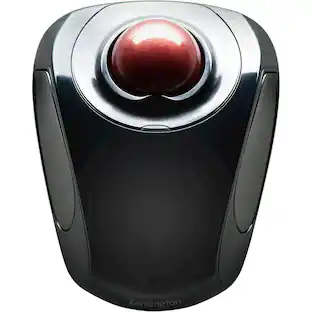
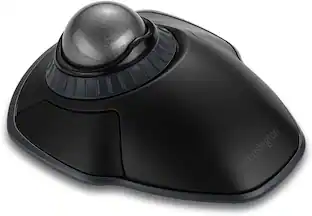
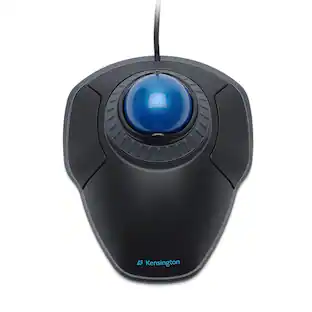
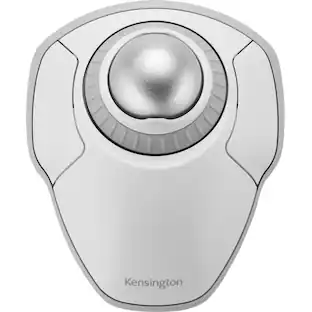
Kensington Orbit Trackball Mouse: This trackball mouse requires minimal wrist movement during use and features an ergonomic, symmetrical design, so you can enjoy lasting comfort while working at your PC or Mac.
Trackball mouse with reliable optical tracking
Trackball mice require less wrist movement than traditional mice, since they track the motion of the built-in ball instead of the movement of the entire mouse.
2-button design
Makes it easy to navigate features on your computer.
Ergonomic, symmetrical design
Offers lasting comfort.
Compatible with most Windows and Mac computers
Works across a wide array of computers.
- Number of Buttons (Total)2
Reviews
Rating 4 out of 5 stars with 8 reviews
The vast majority of our reviews come from verified purchases. Reviews from customers may include My Best Buy members, employees, and Tech Insider Network members (as tagged). Select reviewers may receive discounted products, promotional considerations or entries into drawings for honest, helpful reviews.





Compare similar products

Kensington Orbit Trackball Mouse: This trackball mouse requires minimal wrist movement during use and features an ergonomic, symmetrical design, so you can enjoy lasting comfort while working at your PC or Mac.

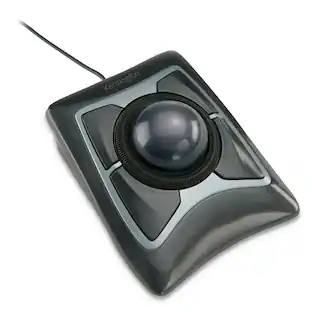
All-day comfort and scrolling come together in the Kensington Orbit Trackball with Scroll Ring. The scroll ring allows you to fly through web pages and documents. And all while delivering comfort and space savings no mouse can match.
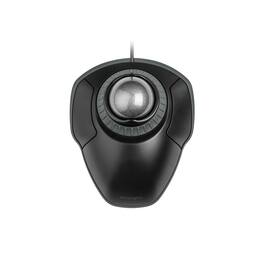
The Kensington Orbit Trackball with Scroll Ring is a wired stationary pointing device for desk users who want to move the cursor from one spot instead of sweeping a mouse across a pad. A 40 mm space gray ball sits at the center of the housing and is driven with the fingertips, so the wrist and forearm stay still and no clear tracking surface is needed beside the keyboard. Wrapped around the ball is the scroll ring, a rotating collar that scrolls long documents, spreadsheets, and web pages in either direction with one finger and offers smoother, more gradual control than a stepped wheel. Two buttons flank the ball, and both can be reassigned through the free KensingtonWorks utility so frequent commands sit under the fingers already resting on the device. The shell is symmetrical, giving left and right hand users identical reach to the ball and the same button geometry, and a detachable wrist rest clips to the front edge to lift and cushion the heel of the hand for longer sessions. Optical tracking handles cursor movement without a mechanical roller, and the ball lifts free for periodic cleaning. Connection is plug and play over USB-A with no driver download, and the assembly measures 8.7 by 6 by 1.8 inches or 221 by 152.4 by 45.7 mm with the wrist rest attached. Because the housing stays in one place, the trackball suits narrow desks, height-adjustable desks, and shared benches where there is no clear room to sweep a mouse. Windows, macOS, and Chrome OS are supported, and the trackball is backed by a 5-year limited warranty.

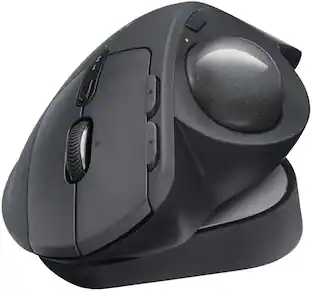
The MX Ergo S Plus is Logitech’s most advanced ergonomic trackball mouse yet, with a 20-degree tilt angle and a 10-degree detachable wedge, and precise thumb control - user-tested and certified by United States Ergonomics. The MX Ergo S wireless ergonomic mouse is sculpted to fit the palm of your hand while keeping it relaxed, and it tilts 20 to 30 degrees for 27% less muscle activity in the forearm, providing elevated comfort throughout your day. Work faster with 6 customizable buttons and a DPI button to effortlessly switch between speed and high-precision tracking. Now with 80% quieter clicks. For even more control that's tailored to your needs, assign time-saving shortcuts and Smart Actions using the Logi Options+ App. Connect your wireless mouse to 2 devices via Bluetooth or the included Logi Bolt receiver and switch between devices with a click of the Easy-Switch button.
| Pros for Kensington - Orbit Trackball Mouse - Silver/Graphite/Black | |||
|---|---|---|---|
| There were no pros for this product— | There were no pros for this product— | There were no pros for this product— | Ergonomics, Overall Performance, Battery Life, Connectivity, Ease of Use |
| Cons for Kensington - Orbit Trackball Mouse - Silver/Graphite/Black | |||
| There were no cons for this product— | There were no cons for this product— | There were no cons for this product— | Weight |
Specs
Customers often buy these together
Computer Keyboards
![esc 1 2 3 F F2 F3 F4 F5 U F6 44 F I F8 > F 0 11 F12 ins del logitech ~ ! 1 @ 2 # 3 $ 4 % 5 A 6 & 7 * 8 ( 9 ) 0 - - + = back num lock cleor / . - tab Q W E R T Y U I O P { [ } ] I I 7 home 8 A 9 g up + cops lock A S D F G H J K L : ; " enter 4 5 6 shift Z X V B N M < , > ? / shift 1 end 2 Y 3 PG pg dn enter ctrl fn start alt opt alt cmd x alt cmd x ctrl alt opt A Y 0 iins del](https://pisces.bbystatic.com/image2/BestBuy_US/images/products/5592/5592420_sd.jpg;maxHeight=232;maxWidth=233?format=webp)
Logitech - K780 Full-size Wireless Scissor Keyboard - Graphite
$65.99The price was $83.06![esc ~ ! 1 tab caps lock shift ctrl F2 Fl # 2 3 Q W A S Z start opt L F3 $ 4 E D X alt cmd3 ) FS F4 A % 5 6 R T F G V C logi 44 HI & F9 FID FB F7 F6 * ) - - & 0 8 9 7 O P U I Y K L H J > < N M 1 B PM + = { [ : I ; ? I alt cmd D 2 4 300 3 1 F12 . * page I insert home up clear backspace 8 9 + 7 page A pg up end down home } I delete ] / 6 4 5 4 enter 2 3 enter 1 dn Pg end shift = 0 del ins etrl fn opt](https://pisces.bbystatic.com/image2/BestBuy_US/images/products/6539/6539505_sd.jpg;maxHeight=232;maxWidth=233?format=webp)
Logitech - MX Keys S Universal Full-size Wireless Scissor Keyboard for PC and Mac with Backlit keys - Black
Top Deal$119.99The price was $129.99

![Esc F1 F2 F3 F4 F5 F6 F7 F8 F9 F10 F11 F12 Print Screen Scroll Lock Pause Break 1 2 3 4 5 6 7 8 9 0 - + = Backspace Insert Home H Page Up A Num Look 1 I Tab Q W E R T Y U I o P { [ } ] I I Delete End IN Page Down 7 Home 8 9 Pg Up Caps A Lock A S D F G H J K L ; : DE g Enter 4 5 6 Shift Z X C V N M < > ? I Shift 1 End 2 3 Pp Dn Enter Ctrl Alt Alt Ctrl 0 Ins Del](https://pisces.bbystatic.com/image2/BestBuy_US/images/products/a588d446-5678-40ae-86b8-1f15e0026e66.jpg;maxHeight=232;maxWidth=233?format=webp)










More to consider
 Top Deal$109.99The price was $119.99


Explore tech essentials Sponsored
 Top Deal$48.99The price was $89.99
 Top Deal$79.99The price was $139.99
 $89.99The price was $149.99


Discover related products
 $12.99The price was $13.99
 $24.99The price was $27.99





Keep exploring
 $79.95The price was $109.95