Keychron - K10 HE 100% Custom Hall Effect Mechanical Gaming Keyboard with Programmable QMK Launcher Software - Black
Keychron - K10 HE 100% Custom Hall Effect Mechanical Gaming Keyboard with Programmable QMK Launcher Software - Black
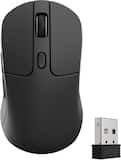
- Keychron - M3 Wireless Bluetooth Laser Gaming Mouse with 8K Polling Rate - Wired - BlackTech Fest Deal$59.49The price was $69.99
Related Item

Specifications
- Lighting TypeRGBForm FactorFull-sizeKeyboard TechnologyMagnetic hall effectKey Switch BehaviorLinear, LinearConnection TypeWired, Wireless
- Key Specs
- Lighting Type: RGB
- Form Factor: Full-size (The size, arrangement, and physical configuration of the product.)
- Keyboard Technology: Magnetic hall effect (Type of technology that detects a key press.)
- Key Switch Behavior: Linear, Linear (Refers to the mechanisms under the keycaps on a keyboard that enable you to type faster and more precisely. Linear switches move straight up and down without any sound or bump. Tactile switches provide a noticeable bump in the key press, and no sound. Clicky switches provide a bump in the key press and "clicky" sound.)
- Connection Type: Wired, Wireless
- General
- Brand: Keychron
- Model Number: K10H-F1
- Product Name: K10 HE 100% Custom Hall Effect Mechanical Gaming Keyboard with Programmable QMK Launcher Software
- Color: Black
- Features
- Lighting Type: RGB
- Customizable Lighting: true
- Numeric Keypad: true
- Touchpad: false
- Keyboard Type: Gaming
- Palm Rest: false
- Spill Resistant: false (Designed to resist some degree of accidental liquid spill. The level of spill-resistance is indicated by the product manufacturer, but the degree of protection may not be guaranteed after normal wear of the product.)
- Keyboard Features: QMK/Launcher/Adjustable Actuation Point/Hot Swap/Magnetic Switch/2.4GHZ/BT /Wired
- Foldable: false
- Keycap Material: PBT, PBT, PBT
- Maximum Number of Memory Profiles: 256
- Functions
- Form Factor: Full-size (The size, arrangement, and physical configuration of the product.)
- Number Of Keys: 104
- Keyboard Technology: Magnetic hall effect (Type of technology that detects a key press.)
- Dedicated Macro Keys: false (Perform shortcuts of key sequences to carry out commands with a single key. Key sequences may include key strokes, mouse actions, and/or menu actions.)
- Adjustable Tilt Function: true
- Number Of Programmable Macros: 16
- Key Switch Behavior: Linear, Linear (Refers to the mechanisms under the keycaps on a keyboard that enable you to type faster and more precisely. Linear switches move straight up and down without any sound or bump. Tactile switches provide a noticeable bump in the key press, and no sound. Clicky switches provide a bump in the key press and "clicky" sound.)
- Rollover: Full-key (Refers to the number of keys that can be correctly registered when pressed simultaneously. Rollover may be referred to as n-key rollover (KRO) or anti-ghosting.)
- Multimedia Keys: true
- Internet Keys: true
- Number Of Programmable Keys: 104
- Connectivity
- Connection Type: Wired, Wireless
- Wireless Connectivity: Radio Frequency (RF - 2.4 Ghz/Low Latency), Bluetooth (The manner in which a device sends data to another device over a short distance without the use of wires or cables.)
- Maximum Wireless Range: 10 feet
- Wired Connectivity: USB-C
- Cable Length: 1.2 feet
- Detachable Cable: true
- Number Of USB Port(s): 1 (The total number of USB ports including all generations and versions.)
- Number of Devices Connectable Simultaneously: 3
- Compatibility
- Operating System Compatibility: Windows, Mac, Linux, Universal
- Plug and Play Operation: true
- Power
- On/Off Switch: true
- Dimensions
- Product Height: 1.31 inches (The out of box height of the item. Height is measured as the vertical distance from the bottom of the item to the top as it would be primarily used or placed.)
- Product Width: 17.33 inches (The out of box width of the item. Width is measured as the horizontal distance from one side of the item to the other as it would be primarily used or placed.)
- Product Depth: 5.09 inches (The out of box depth of the item. Depth is measured as the distance from the front of the item to the back as it would be primarily used or placed.)
- Product Weight: 4.32 ounces (The out of box weight of the item.)
- Warranty
- Warranty - Parts: 1 year limited
- Warranty - Labor: 1 year limited
- Other
- UPC: 4894979016812
Transform your gaming and typing experience with the Keychron K10 HE. Combining classic mechanical feel with cutting-edge magnetic technology, it offers exceptional performance in a sleek design—enhanced by elegant natural rosewood accents. A fully customizable 100% layout wireless keyboard with magnetic switches — a breakthrough in switch technology, which instead of physical contacts, uses magnetic sensors to measure actuation depth, putting you in total control over the response of each and every switch.
- 2.4 GHz & Bluetooth Connection: Switch seamlessly between three connection modes. Pair up to three devices via Bluetooth 5.2, or choose 2.4 GHz wireless or Type-C wired modes for stable, high-speed performance across different setups.
- Hall Effect Magnetic Switches: Hall Effect magnetic switches detect keypresses using magnetic sensors instead of physical contact, reducing wear and tear. Hot-swappable and durable, they offer 0.1mm senstivity with actuation adjustable range from 0.2mm to 3.8mm. They are hot-swap, you can easily replace them without soldering.
- Launcher Web Configurator: Access the Launcher configurator from any browser, anytime. Customize every key, create macros, adjust actuation points, and enable rapid triggering and snap action. Perfect for setting up your K10 HE keyboard exactly how you like it.
- Non-Shine-Through PBT Keycaps & Wood Sidings: Equipped with OSA-profile double-shot PBT keycaps, the K10 HE resists shine and wear while delivering a satisfying feel. Finished with natural wood sidings, it brings a refined, organic touch to your setup.
- Cross-System Compatibility: Designed for macOS and Windows with dedicated media keys and extra keycaps, the K10 HE easily adapts to your workflow. Remap it to suit Linux systems as well, making it truly universal.
Whats Included
- Fully Assembled Keyboard
- USB Type-A to USB Type-C Cable
- USB Type-A 2.4GHz Receiver
- Extension Adapter for Receiver
- Tools - Keycap Puller/Screwdriver/Hex Key
A: The battery is internal and charges using a USB-C port.
Q: is the cable usb c to usb c or usb c to usb a? is the receiver also usb c?
A: The cable is USB-C to USB-A. The receiver dongle is USB-A and comes with an adapter to use a USB-C cable for it too.
Q: Is the keyboard programmable to display 1 color if desired as well as multi colors?
A: Yes! There are 25 pre-programmed color effects, all of which can be customized in the "keychron launcher," which is an HTML-/web-based launcher that recognizes your keyboard and allows you to change rhythms, colors, effects, macros, the HE switches, everything. I really like some of the light patterns like the candy rain.
Compare similar products
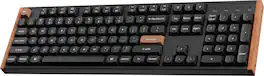
Transform your gaming and typing experience with the Keychron K10 HE. Combining classic mechanical feel with cutting-edge magnetic technology, it offers exceptional performance in a sleek design—enhanced by elegant natural rosewood accents. A fully customizable 100% layout wireless keyboard with magnetic switches — a breakthrough in switch technology, which instead of physical contacts, uses magnetic sensors to measure actuation depth, putting you in total control over the response of each and every switch.
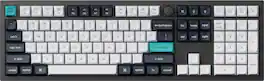
The Q6 Max is a full-metal QMK/VIA wireless customized mechanical keyboard with a 100% full-size layout and support for 2.4 GHz wireless, Bluetooth 5.1, and Type-C wired connectivity. The combination of reinforced multi-layer acoustic foam and double-gasket design provides an incredibly satisfying typing experience.

The V5 Max is a QMK custom mechanical keyboard with 2.4 GHz wireless and Bluetooth 5.1 connection. Coming in an 1800 compact layout, it offers a gasket mount design, sound-absorbing foam, double-shot PBT keycaps, and more to take your typing experience to a new level, delivering enhanced comfort and productivity.

The Keychron Q6 Ultra 8K is a premium full-size mechanical keyboard engineered for gamers and power users who demand speed, precision, and customization. Its ultra-fast 8,000 Hz polling rate—available in both wired and 2.4 GHz wireless modes—delivers exceptionally responsive input for competitive play and high-speed workflows. Tactile Silk POM brown switches provide smooth, satisfying feedback, while the sturdy backplate and redesigned rubber feet ensure a solid, stable typing experience. Triple-mode connectivity (wired, 2.4 GHz, Bluetooth) keeps you versatile across devices and setups. With ZMK firmware and Launcher software, you can program every key, layer, and macro to match your exact workflow. A refined control knob and available color-variant keycaps elevate both function and style, giving the Q6 Ultra 8K a polished presence on any desk.
| Pros for Keychron - K10 HE 100% Custom Hall Effect Mechanical Gaming Keyboard with Programmable QMK Launcher Software - Black | |||
|---|---|---|---|
| Build Quality, Connectivity, Noise Level, Feel, Software | Build Quality, Typing Experience, Connectivity, Key Feel, Switch Sound | Build Quality, Typing Experience, Noise Level, Battery Life, Responsiveness | Build Quality, Connectivity, Switch Type, Weight |
| Cons for Keychron - K10 HE 100% Custom Hall Effect Mechanical Gaming Keyboard with Programmable QMK Launcher Software - Black | |||
| Weight | Keycap Design | There were no cons for this product— | There were no cons for this product— |
Specs



Reviews
Customers are saying
Customers admire the K10 HE 100% Custom Hall Effect Mechanical Gaming Keyboard, especially its sound quality. Many users feel it is an amazing keyboard for the price.
Customer Images
The vast majority of our reviews come from verified purchases. Reviews from customers may include My Best Buy members, employees, and Tech Insider Network members (as tagged). Select reviewers may receive discounted products, promotional considerations or entries into drawings for honest, helpful reviews.
- Rated 5 out of 5 stars
So far its been great
Ive had some time to spend with this keyboard and so far its been solid. The sound is also top tier compared to the many other keyboards ive bought before. Theres very little that compares to building your own board to get an even better sound. But right out of the box and prebuilt, this sounds thocky and smooth. I game on fps like battlefield 6 and graphic design in adobe illustrator. Butter smooth for each application. The hall effect switches are worth it for gaming. Theres nothing that stops the keys from turing shiny especially when playing fps games. But i dont mind that really. The RGB is lowkey and ambient. And finally thr build quality is 10/10 wood grain and aluminum case sides are unique.
Victor Posted
- Rated 5 out of 5 stars
Great feel and customizability
I've been bouncing around a couple keyboards trying to find one I really like. I spent a long time with silver "speed" switches which have a really short activation travel and I think I just really like that style of typing because you can basically customize this keyboard to act just like that and I really love it. Setup was pretty simple. Plug in the keyboard and it should just work. I'll just add a little anecdote of my own that might help someone in the future. Since this keyboard doesn't have a wrist rest and my last one did, I decided to just slap the old wrist rest in front of this keyboard. I failed to remember that the old wrist rest "attached" to the keyboard with magnets, which aren't the best things to place around a hall effect keyboard. So I spent some time trying to figure out why certain keys weren't working or were firing randomly because I understood what the magnets were doing. Don't do what I did. Keep the magnets away from this keyboard. After getting the magnet situation sorted out, everything worked really well. There is a "helper" app that you can download that assists with launching applications from hotkeys if you want, but almost all of the setup and customization of the keyboard is done via a web application. No need to install anything to use OR customize the keyboard. This is a HUGE win in my book because it feels like every device now will work fine without an app but as soon as you want to change or customize anything, you're going to need that app running 24/7. You get asked to download a generic "driver" that helps connect to the keyboard and that's it. But if you use Firefox, you'll need to use Chrome or Brave (or any other Chromium based browser) to use the app. You can customize pretty anything you can think of for keyboards. Because it's hall effect, you can set the activation travel distance for every single key. If you want everything to activate really quick, you can do that. If you want to press the ESC key harder than all the other keys for some reason, you can do that. Settings up macros and rebinding keys is all doable straight from the app and the only time you need to use the "helper" app is if you're trying to launch other applications. As far as the hall effect nature of this keyboard, you can also customize your keys to find to analog gamepad inputs so you have actual analog control of your keys. Sadly, this just simulates a gamepad and you have to set up the keyboard to your liking beforehand (there is a preset "Gamepad" setting that sets this up for you if you're fine with their settings). I'd really love it if keyboards started presenting the ability to be analog to the system and any key could be set up in game to support analog movements. Imagine still having your WASD keys available but when you're driving in GTA, you can steer with analog controls automatically. As it stands, the keyboard translates "key" presses as digital on and off when it gets passed to the OS unless they're set up as a gamepad input. Lighting has a lot of preset effects. You'll probably be fine with the offerings available. If you're coming from a corsair or similar keyboard with ultra lighting customization, you might feel like you're limited. I would love to see the ability to layer lighting effects so you can stack things as well as being able to set different effects for any number of groups of keys (currenty, you were only able to fully customize two different sets of keys). Being able to overlap, layer and create as many sets of keys as we want would open up the lighting options so much. As is, the lighting is mostly just the couple dozen effects you'd find anywhere. Typing feels really good to me. I set all of my keys to activate after 1mm and it really feels like my old "speed" switches. If you're looking for bumpy clicks, this isn't for you. This is a linear keyboard. The weight and feel of the keyboard in general also feels very nice and not cheap. It's also always nice to have a numpad again. I've been using the keyboard wired but there's also options for bluetooth or their own wireless dongle. The dongle even comes with an extension cord so you can move it to be closer to the keyboard so it maintains a great connection without any interference. There is also a switch to move between Windows/Android and Mac/iOS so you can make sure you maintain full compatibility with whatever system you're connecting to. Bottom line, I'm a big fan of this keyboard. Loving the hall effect feel and how customizable everything is. I could do with some more options for customizing the lighting but I'm fine with most of their defaults. If you're in the market for a new keyboard, you want something a little different, and you're OK with linear switches, give this a look.
swemoney Posted
- Rated 5 out of 5 stars
Solid HE unit from Keychron
I have to be honest, this is my first Keychron keyboard, and I've had/used LOADS of different keyboards. I'm usually into the firm ultra clicky "blue switch" style keyboards, but I may have been converted by this K10 HE. I honestly thought I wouldn't like the soft-ish linear switches as much as others, but this Keychron is so buttery smooth, and even when I type fast, the click is still there, but just muted. (if you want a premium keyboard to use in a cubicle, look at this unit, your nearby coworkers will thank you for this one vs something ultra clicky) When you open the box, you know you're dealing with a solid, premium product. My only gripe is that I had to swap on Windows keys, like it came out of the box with the Mac keys installed...This is supposedly marketed as a gaming keyboard, and everyone knows you can't game on Mac's (/s) The ability to run in Windows specific mode with just a switch is great, plus it works wirelessly with the included dongle, or via Bluetooth which is always welcome. The RGB is noticeable but very muted, which makes sense given the brand, the wood looking trim doesn't scream "gamer" at all. This keyboard didn't make me any better at video games, but I sure enjoy losing while using it!
GlennT Posted