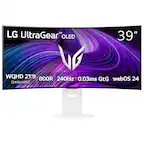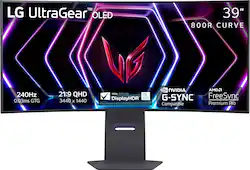
LG - UltraGear 39" OLED Curved WQHD 240Hz 0.03ms FreeSync and NVIDIA G-SYNC Compatible Gaming Monitor with HDR400 - Black
- Key Specs
- Refresh Rate: 240Hz (The number of frames per second the device can produce natively without enhancement. Higher rates help produce smooth, seamless pictures.)
- Maximum Resolution: 3440 x 1440 (Maximum resolution refers to the highest number of pixels that a screen can process and display. Higher resolution signals produce more detailed images.)
- Response Time: 0.03 milliseconds (The speed at which pixels can change colors is called response time. It is measured in milliseconds (ms).)
- Panel Type: Not Applicable (Technology that affects response time and image quality.)
- Synchronization Technology: G-SYNC Compatible (NVIDIA Adaptive Sync), FreeSync Premium Pro (AMD Adaptive Sync) (Generally, these technologies allow syncing between a computer/console game's frame rate and the device's refresh rate for a smoother display without tearing.)
- Screen Size: 39 inches (Size of the screen, measured diagonally from corner to corner.)
- Display Connector(s): 1 x DisplayPort, 2 x HDMI (The number and type of connectors used to connect to an external display.)
- General
- Brand: LG
- Model Number: 39GS95QE-B.AUS
- Product Name: UltraGear 39" OLED Curved WQHD 240Hz 0.03ms FreeSync and NVIDIA G-SYNC Compatible Gaming Monitor with HDR400
- Color: Black
- Operating System Compatibility: Not Applicable
- Display
- Refresh Rate: 240Hz (The number of frames per second the device can produce natively without enhancement. Higher rates help produce smooth, seamless pictures.)
- Maximum Resolution: 3440 x 1440 (Maximum resolution refers to the highest number of pixels that a screen can process and display. Higher resolution signals produce more detailed images.)
- Contrast Ratio: 1,500,000:1 (Measured difference between a displayed image's brightest whites and darkest blacks. The larger the first number, the more detail and color that can be displayed.)
- Response Time: 0.03 milliseconds (The speed at which pixels can change colors is called response time. It is measured in milliseconds (ms).)
- Display Type: OLED
- Panel Type: Not Applicable (Technology that affects response time and image quality.)
- Synchronization Technology: G-SYNC Compatible (NVIDIA Adaptive Sync), FreeSync Premium Pro (AMD Adaptive Sync) (Generally, these technologies allow syncing between a computer/console game's frame rate and the device's refresh rate for a smoother display without tearing.)
- Aspect Ratio: 21:9 (The measurement of the width of a screen compared to the height of a screen, expressed as a ratio.)
- Curved Screen: true
- Brightness: 275 candela per square meter (A measure of the total light output.)
- Screen Size: 39 inches (Size of the screen, measured diagonally from corner to corner.)
- High Dynamic Range (HDR): true (An HDR-compatible 4K TV or other HDR-compatible product displays HDR video content when it's available from sources like 4K Ultra HD Blu-ray Discs and 4K streaming services.)
- High Dynamic Range Format: VESA Certified DisplayHDR 400 True Black (There are a few HDR formats that tell the TV or other HDR-compatible product how to best utilize its capabilities to display HDR content. HDR technology can support one or multiple formats, each with various benefits to picture quality.)
- Touch Screen: false (Touch-screen devices make navigating more intuitive. Using a touch-screen display, you can do things such as tap to select, hold and drag to move items, swipe to scroll, and pinch to zoom.)
- On-Screen Display Languages: English (The available language options for displayed text.)
- Display Surface: Standard glass
- Color Gamut (Standard RGB): 98.5 percent
- Connectivity
- Number of DisplayPort Inputs (Total): 1
- Number of HDMI Inputs (Total): 2
- Number of VGA Ports: 0 (VGA (Video Graphics Adapter or Video Graphics Array) is a display standard that transmits via analog signals. This type of interface is typically used to connect a computer to a display device such as a monitor, projector, or TV.)
- Number of DVI Inputs: 0 (The number of digital cables carrying analog (VGA) video signals that can be connected to the product.)
- Number of Mini DisplayPort Inputs: 0
- Number of Thunderbolt Ports (Total): 0
- Display Connector(s): 1 x DisplayPort, 2 x HDMI (The number and type of connectors used to connect to an external display.)
- Number of USB Ports (Total): 3
- Headphone Jack: true (The device features an interface that allows for the connection of headphones.)
- Compatibility
- Wall Mountable: true (The product is able to be secured to a wall. Some products are designed ready to mount, while others may require additional hardware/accessories for installation.)
- VESA Wall Mount Standard: 100mm x 100mm (VESA wall mount standards refer to the spacing of screw holes built into a TV in order to fit with standard TV wall mounts. These standards are implemented into most TVs and monitors.)
- Voice Assistant Built-in: No (A digital assistant built into the device that uses voice commands to answer questions and control smart devices.)
- Features
- Tiltable: true
- Adjustable Stand Height: true
- Anti-Glare: true (Product has features, such as a matte finish, that reduce the likelihood for screen glare.)
- Eye Relief Features: Anti-glare
- Built-In Webcam: false
- Integrated Speaker(s): false
- Smart Capable: false (Smart, or smart-capable devices are able to connect directly to your home network in order to stream content from the Internet, run Internet-based apps, or connect to other smart devices.)
- Dimensions
- Product Height With Stand: 24.1 inches
- Product Height Without Stand: 15.9 inches
- Product Width: 35 inches (The out of box width of the item. Width is measured as the horizontal distance from one side of the item to the other as it would be primarily used or placed.)
- Product Depth (With Stand): 12.2 inches
- Product Depth Without Stand: 7.8 inches
- Product Weight: 22.9 pounds (The out of box weight of the item.)
- Stand Included: true
- Certifications Listings & Approvals
- ENERGY STAR Certified: false (Devices carrying the ENERGY STAR service mark, such as computer products and peripherals, kitchen appliances, and other products, generally use 20% to 30% less energy than required by federal standards.)
- EPEAT Qualified: false (The Electronic Product Environmental Assessment Tool (EPEAT) was designed to provide an environmental assessment tool for purchasers. In order to qualify for EPEAT, a product must meet all 23 required criteria.)
- Warranty
- Warranty - Parts: Limited 2 Years
- Warranty - Labor: Limited 2 Years
- Other
- UPC: 195174074527
Experience stunning performance with the huge 39” curved WQHD LG UltraGear OLED gaming monitor. Stay a step ahead of the competition with an ultra-fast refresh rate up to 240Hz and .03ms response time that will bring you into the game like never before¹. And with the steep and dramatic 800R curve, you’ll feel enveloped in the action from virtually all around you. This UltraGear's ultra-thin bezel design, height, tilt and swivel adjustability along with impressive connectivity options and make this UltraGear, ultra-essential for your battlestation setup.
- Up to 240Hz & 0.03ms For Outrageously Fast OLED Gaming: Gear up for smooth gameplay with an ultra-fast 240Hz OLED display. The faster speed lets you respond quickly to opponents and stay a step ahead of the competition. Plus, enjoy smoother scenes with less lag or ghosting thanks to LG UltraGear OLED's nearly instantaneous 0.03ms (GtG) response time.¹
- VESA DisplayHDR True Black 400 & 1.5M:1 contrast ratio: VESA DisplayHDR True Black 400 certified means this monitor meets industry standards for brightness as well as deep, rich black color expression. With a 1.5M:1 contrast ration, the benefit for gaming impeccable color and image detail in dark scenes for a stunning visual experience.
- NVIDIA G-SYNC Compatible and AMD FreeSync Premium Pro: Officially validated by NVIDIA as G-SYNC Compatible² and equipped with AMD FreeSync Premium Pro means this UltraGear provides smooth, fast action that reduces screen tearing and stutter. Never miss a frame of the action as you clinch your victories.
- The 800R Curve Envelops You As You Play: This UltraGear OLED monitor's dramatic and steep 800R curve draws you in with game play by extending the periphery to feel like you're surround by the action.
- Designed For the Win: Lose yourself in the game with a virtually borderless, ultra-thin design that optimizes space within your battlestation. Easily make height, tilt, and swivel adjustments to the display to be able to see and play exactly to your specs.
- Anti-Glare / Low Reflection OLED: Play with less distractions thanks to an anti-glare screen that minimizes light reflections and lets you concentrate on winning.
- 2 Year UltraGear OLED Warranty: Game with peace of mind. This UltraGear OLED gaming monitor is protected by a two year limited warranty covering internal and functional parts and labor, including OLED Display Panel. See Warranty Information on this page for all warranty details.
- Amp Up Your Game Audio with DTS Headphone:X: DTS Headphone:X³ provides accurate spatialization and localization in games for 3D audio over headphones. Supports channel-based, scene based, and object-based audio. Plus, a 4-pole headphone jack lets you carry a stereo headphone signal and mono microphone signal with common ground.
- Serious Connections for Serious Gamers: Enjoy smoother, vivid colors and high-resolution graphics thanks to HDMI 2.1 and DisplayPort 1.4. Both connections are supported on this display and let you experience up to 240Hz refresh rate.⁴
- Bold Color On A 39" OLED Screen: Bring big time color to the screen. The LG UltraGear OLED 34" display lets you explore HDR content the way it was meant to be seen with up to 98.5% DCI-P3 color gamut expression —an elevated color spectrum that showcases brilliant color.
- Up to 240Hz & 0.03ms For Outrageously Fast OLED Gaming: Gear up for smooth gameplay with an ultra-fast 240Hz OLED display. The faster speed lets you respond quickly to opponents and stay a step ahead of the competition. Plus, enjoy smoother scenes with less lag or ghosting thanks to LG UltraGear OLED's nearly instantaneous 0.03ms (GtG) response time.¹
- VESA DisplayHDR True Black 400 & 1.5M:1 contrast ratio: VESA DisplayHDR True Black 400 certified means this monitor meets industry standards for brightness as well as deep, rich black color expression. With a 1.5M:1 contrast ration, the benefit for gaming impeccable color and image detail in dark scenes for a stunning visual experience.
- NVIDIA G-SYNC Compatible and AMD FreeSync Premium Pro: Officially validated by NVIDIA as G-SYNC Compatible² and equipped with AMD FreeSync Premium Pro means this UltraGear provides smooth, fast action that reduces screen tearing and stutter. Never miss a frame of the action as you clinch your victories.
- The 800R Curve Envelops You As You Play: This UltraGear OLED monitor's dramatic and steep 800R curve draws you in with game play by extending the periphery to feel like you're surround by the action.
- Designed For the Win: Lose yourself in the game with a virtually borderless, ultra-thin design that optimizes space within your battlestation. Easily make height, tilt, and swivel adjustments to the display to be able to see and play exactly to your specs.
- Anti-Glare / Low Reflection OLED: Play with less distractions thanks to an anti-glare screen that minimizes light reflections and lets you concentrate on winning.
- 2 Year UltraGear OLED Warranty: Game with peace of mind. This UltraGear OLED gaming monitor is protected by a two year limited warranty covering internal and functional parts and labor, including OLED Display Panel. See Warranty Information on this page for all warranty details.
- Amp Up Your Game Audio with DTS Headphone:X: DTS Headphone:X³ provides accurate spatialization and localization in games for 3D audio over headphones. Supports channel-based, scene based, and object-based audio. Plus, a 4-pole headphone jack lets you carry a stereo headphone signal and mono microphone signal with common ground.
- Serious Connections for Serious Gamers: Enjoy smoother, vivid colors and high-resolution graphics thanks to HDMI 2.1 and DisplayPort 1.4. Both connections are supported on this display and let you experience up to 240Hz refresh rate.⁴
- Bold Color On A 39" OLED Screen: Bring big time color to the screen. The LG UltraGear OLED 34" display lets you explore HDR content the way it was meant to be seen with up to 98.5% DCI-P3 color gamut expression —an elevated color spectrum that showcases brilliant color.
Whats Included
- UltraGear 39" OLED Curved WQHD 240Hz 0.03ms FreeSync and NVIDIA G-SYNC Compatible Gaming Monitor
- Power Cord
- Display Port Cable
- HDMI Cable
- USB A to B cable
- UltraGear 39" OLED Curved WQHD 240Hz 0.03ms FreeSync and NVIDIA G-SYNC Compatible Gaming Monitor
- Power Cord
- Display Port Cable
- HDMI Cable
- USB A to B cable
Product Manuals
Disclaimers
- ¹Actual refresh rates may vary depending on computer graphics specifications and configurations.
- ²NVIDIA G-SYNC Compatible supports variable refresh rate on GeForce GTX 10 Series and higher GPUs on Display Port, and GeForce RTX 30 Series and higher GPUs on HDMI 2.1.
- ³Headphones sold separately. For DTS patents, see http://patents.dts.com. Manufactured under license from DTS, Inc. or its affiliates. DTS trademarks and logos are registered trademarks or trademarks of DTS, Inc. in the United States and other countries. ALL RIGHTS RESERVED.
- ⁴Graphics card that supports DisplayPort 1.4 or HDMI 2.1 are required to achieve up to 240Hz refresh rate support. Graphics card sold separately.
- ¹Actual refresh rates may vary depending on computer graphics specifications and configurations.
- ²NVIDIA G-SYNC Compatible supports variable refresh rate on GeForce GTX 10 Series and higher GPUs on Display Port, and GeForce RTX 30 Series and higher GPUs on HDMI 2.1.
- ³Headphones sold separately. For DTS patents, see http://patents.dts.com. Manufactured under license from DTS, Inc. or its affiliates. DTS trademarks and logos are registered trademarks or trademarks of DTS, Inc. in the United States and other countries. ALL RIGHTS RESERVED.
- ⁴Graphics card that supports DisplayPort 1.4 or HDMI 2.1 are required to achieve up to 240Hz refresh rate support. Graphics card sold separately.
Q: What is the response time of this LG monitor?
A: This monitor has a 0.03ms response time.
Q: Does this monitor have built-in speakers?
A: No, this monitor does not have built-in speakers.
Q: Which connections are supported on this monitor for optimal gaming experience?
A: This monitor supports HDMI 2.1 and DisplayPort 1.4 connections for a smooth gaming experience.
Q: What is the contrast ratio for the LG UltraGear OLED monitor?
A: This monitor has a 1,500,000:1 contrast ratio.
Q: Why is AMD FreeSync Premium Pro a good feature for gamers?
A: AMD FreeSync Premium Pro ensures a fluid, virtually tear-free gaming experience with at least 120Hz refresh rate, so you won't miss a frame of the action.
Q: How does the anti-glare feature on this monitor help gamers?
A: The anti-glare feature minimizes light reflections, allowing for better focus and less distractions during gameplay.
Q: What type of warranty does this LG UltraGear OLED gaming monitor have?
A: This monitor is protected by a two-year limited warranty that covers internal and functional parts, labor, and the OLED display panel.
A: Hello there, Spencer. Thank you for sharing your inquiry with us regarding the split-screen capability on your LG 39GS95QE-B.AUS gaming monitor. We understand your situation and appreciate your interest in maximizing your viewing experience. This monitor does indeed feature Picture by Picture (PBP) mode, which allows you to display content from two different sources simultaneously without the need for any additional software. As a troubleshooting step, we recommend verifying that your monitor’s firmware is up to date and exploring the built-in OnScreen Control settings to ensure that PBP is activated. Additionally, please confirm that the proper input sources are connected and configured accordingly. These steps will help ensure that the split-screen function operates as intended. For further assistance or a more detailed walkthrough, please send us a private message on Social Media @LGUSSupport. Our team is here to work with you and explore possible solutions to optimize your experience. https://www.lg.com/us/monitors/lg-39gs95qe-b-gaming-monitor#pdp_specs We appreciate your patience and are eager to help. —Renzo