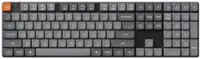
Logitech - Signature Slim Solar+ K980 for Mac Wireless Bluetooth Solar and Artificial Light Powered Keyboard with Customizable Keys - Off-White
Logitech - Signature Slim Solar+ K980 for Mac Wireless Bluetooth Solar and Artificial Light Powered Keyboard with Customizable Keys - Off-White
Color
Off-White- Logitech - Signature M550 Wireless Bluetooth Optical Ambidextrous Mouse with Silent Clicks - Wireless - Off-White$22.99$29.99

Related Item

Specifications
- Lighting TypeNoneForm FactorFull-sizeConnection TypeWireless
- Key Specs
- Lighting Type: None
- Form Factor: Full-size (The size, arrangement, and physical configuration of the product.)
- Connection Type: Wireless
- General
- Brand: Logitech
- Model Number: 920-013787
- Product Name: Signature Slim Solar+ K980 for Mac Wireless Bluetooth Solar and Artificial Light Powered Keyboard with Customizable Keys
- Color: Off-White
- Features
- Lighting Type: None
- Numeric Keypad: true
- Touchpad: false
- Keyboard Type: Programmable
- Palm Rest: false
- Spill Resistant: false (Designed to resist some degree of accidental liquid spill. The level of spill-resistance is indicated by the product manufacturer, but the degree of protection may not be guaranteed after normal wear of the product.)
- Foldable: false
- Functions
- Form Factor: Full-size (The size, arrangement, and physical configuration of the product.)
- Connectivity
- Connection Type: Wireless
- Wireless Connectivity: Bluetooth, Radio Frequency (RF - 2.4 Ghz/Low Latency) (The manner in which a device sends data to another device over a short distance without the use of wires or cables.)
- Maximum Wireless Range: 33 feet
- Number of Devices Connectable Simultaneously: 3
- Compatibility
- Operating System Compatibility: Mac, Apple iPadOS, Apple iOS
- System Requirements: Required: Bluetooth Low Energy, Windows 10, 11 or later, macOS 12 or later, Linux, Chrome OS, iPadOS 15 or later, iOS 15 or later, Android 12 or later (The software that a product must have for it to be able to integrate with another product.)
- Power
- Rechargeable Battery: false
- On/Off Switch: true
- Dimensions
- Product Height: 0.8 inches (The out of box height of the item. Height is measured as the vertical distance from the bottom of the item to the top as it would be primarily used or placed.)
- Product Width: 16.93 inches (The out of box width of the item. Width is measured as the horizontal distance from one side of the item to the other as it would be primarily used or placed.)
- Product Depth: 5.63 inches (The out of box depth of the item. Depth is measured as the distance from the front of the item to the back as it would be primarily used or placed.)
- Product Weight: 24.7 ounces (The out of box weight of the item.)
- Mouse
- Mouse Included: false
- Warranty
- Warranty - Parts: 1 year
- Warranty - Labor: None
- Other
- UPC: 097855206534
Signature Slim Solar+ K980 for Mac is always ready. This sleek, durable wireless keyboard draw§m solar and artificial light sources for cable-free, hassle free typing with a familiar, laptop-style feel. Using Logi LightCharge technology, the light-absorbing strip harvests energy from any light source and stores it efficiently for up to four months in a durable, replaceable battery with lifespan up to 10 years. Designed for your minimal, elegant Mac setup and built to last for up to 10 million keystrokes, featuring high quality construction materials including recycled plastic, it’s better for longer. Save time by automating repetitive tasks to one keystroke with the Action Key, customizable using the Logi Options+ App, and switch between up to three devices in a single tap. Pair it with a Logitech multi-device mouse for effortless typing and clicking across computers.
- Always powered: A full size wireless keyboard made for Mac with instant and and uninterrupted typing under any light source - solar or artificial - even on a dark or rainy day.¹
- Powered by Logi LightCharge: A charging innovation that combines a light-absorbing strip and a durable energy-efficient battery built on our Signature Slim Solar+ K980 Keyboard for Mac.
- No cables, Ever: Never worry about recharge cables or running low on battery power; works out of the box with zero hassle for instant productivity.
- Better for longer: A wireless Bluetooth keyboard designed to last up to 10 million keystrokes and with a durable battery functional for up to a decade ² ³
- Upgrade your space: A sleek and solidly built full-size keyboard made for Mac with familiar laptop-style typing, made with recycled plastic ⁴
- Smart Actions for work & life: Time-saving and ready-to-use shortcuts to automate repetitive tasks with one keystroke using the Logi Options+ App ⁵ ⁶
- Seamlessly switch typing between Mac, iPad, & iPhone with a tap: Pair it with a Logitech multi-device mouse for effortless typing and clicking across computers ⁵ ⁶ ⁷
- Feel good about your choice: Plastic parts in Signature Slim Solar+ K980 for Mac Keyboard include certified post-consumer recycled plastic - minimum 52% ⁴
Whats Included
- Signature Slim Solar+ for Mac Wireless Keyboard
- User documentation
Disclaimers
- ¹ Requires at least 200 lux illuminance
- ² Actual key switch lifetime varies with use conditions. Projection is based on one million keystrokes per key switch in a year.
- ³ Lifetime projections are based on results from an 18 months testing conducted by the battery manufacturer. Actual Battery lifetime may vary based on user, environment and computing conditions.
- ⁴ Signature Slim Solar+ Keyboard off white recycled plastic content: minimum 52%. Excludes plastic in printed wiring assembly (PWA), and packaging. Signature Slim Solar+ Keyboard K980 graphite recycled plastic content: minimum 70%. Excludes plastic in printed wiring assembly (PWA), and packaging.
- ⁵ Customizing the device requires the Logi Options+ App, available for recent versions of Windows and macOS at logi.com/optionsplus
- ⁶ Logi Options+ App is currently not supported for ChromeOS, Linux, iPadOS, iOS and Android OS. The device’s basic functions will work without it.
- ⁷ Logi Options+ App is currently not supported for iPadOS or iOS. The device’s basic functions will work without it.
Q: What is the expected lifespan of the battery in this keyboard?
A: The battery in this keyboard is functional for up to a decade.
Q: Is this keyboard powered by solar energy?
A: Yes, this keyboard is powered by solar and artificial light sources.
Q: Are there any shortcuts available on this keyboard?
A: Yes, there are time-saving shortcuts available to automate repetitive tasks.
Q: How many devices can I connect to this keyboard simultaneously?
A: You can connect up to three devices simultaneously to this keyboard.
Q: Can I use this keyboard with an iPad?
A: Yes, this keyboard is compatible with iPadOS 15 or later.
Q: Does this keyboard have a numeric keypad?
A: Yes, this keyboard includes a numeric keypad.
Q: What is the maximum wireless range of this keyboard?
A: The maximum wireless range of this keyboard is 33 feet.
A: It works with my Apple Air computer.
Compare similar products
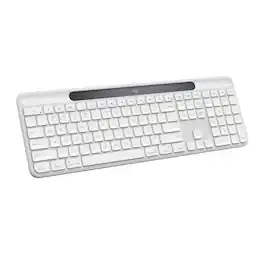
Signature Slim Solar+ K980 for Mac is always ready. This sleek, durable wireless keyboard draw§m solar and artificial light sources for cable-free, hassle free typing with a familiar, laptop-style feel. Using Logi LightCharge technology, the light-absorbing strip harvests energy from any light source and stores it efficiently for up to four months in a durable, replaceable battery with lifespan up to 10 years. Designed for your minimal, elegant Mac setup and built to last for up to 10 million keystrokes, featuring high quality construction materials including recycled plastic, it’s better for longer. Save time by automating repetitive tasks to one keystroke with the Action Key, customizable using the Logi Options+ App, and switch between up to three devices in a single tap. Pair it with a Logitech multi-device mouse for effortless typing and clicking across computers.

MX Keys S Logitech Wireless Keyboard — a low-profile full-size keyboard that offers a fluid, precise typing experience and customizable, time-saving Smart Actions that automate your most repetitive tasks with a single keystroke. The backlit keyboard features smart backlighting that lights up when your hands approach it and automatically adjusts to suit the time of day.

Magic Keyboard delivers a remarkably comfortable and precise typing experience for Mac and Apple Vision Pro. It’s also wireless and rechargeable, with an incredibly long-lasting internal battery that will power your keyboard for about a month or more between charges. It pairs automatically with your Mac, so you can get to work right away. It features a USB-C port and includes a woven USB-C Charge Cable that lets you pair and charge by connecting to a USB-C port on your Mac. If you would like to pair Magic Keyboard with your Apple Vision Pro, click to see supported languages.

Magic Keyboard with Numeric Keypad features an extended layout, with document navigation controls for quick scrolling and full-size arrow keys for gaming. A scissor mechanism beneath each key allows for increased stability, while optimized key travel and a low profile provide a comfortable and precise typing experience. The numeric keypad is also great for spreadsheets and finance applications. And the built-in, rechargeable battery is incredibly long-lasting, powering your keyboard for about a month or more between charges.
| Pros for Logitech - Signature Slim Solar+ K980 for Mac Wireless Bluetooth Solar and Artificial Light Powered Keyboard with Customizable Keys - Off-White | |||
|---|---|---|---|
| There were no pros for this product— | Battery Life, Ease of use, Connectivity, Keyboard Quality, Key Feel | Overall Performance, Battery Life, Connectivity, Ease of Use, Size | Battery Life, Ease of use, Overall Performance, Numeric Keypad, Wireless |
| Cons for Logitech - Signature Slim Solar+ K980 for Mac Wireless Bluetooth Solar and Artificial Light Powered Keyboard with Customizable Keys - Off-White | |||
| There were no cons for this product— | There were no cons for this product— | There were no cons for this product— | Price, Key Travel |
Specs
Reviews
Customer Images
The vast majority of our reviews come from verified purchases. Reviews from customers may include My Best Buy members, employees, and Tech Insider Network members (as tagged). Select reviewers may receive discounted products, promotional considerations or entries into drawings for honest, helpful reviews.
- Rated 5 out of 5 stars
Better than expected!
After searching to replace my mouse that my dog chewed up, I settled on this one. I wanted the same model as I had before because it is red as well but couldn't find it in stock anywhere. I didn't look at the specs on this one too much, I just wanted a Logitech mouse and one that is big enough for my hand, I can't do dinky! I was surprised at how quiet this one was, it took some getting used to on not hearing the click. It glides well across my desk even without a mouse pad. I didn't realize until I got it home that it was Bluetooth so that's an added bonus for me since it frees up a USB port. The only thing I wish it included are instructions for the side buttons, yes I know I can look at it on Logitech's website for that but it would be helpful to have it in the box with the mouse. I also like that this came in an actual box and not plastic. I would recommend this mouse to anyone wanting a full size mouse!
This review is from Logitech - Signature M650 L Full-size Wireless Optical Scroll Mouse with Silent Clicks - Wireless - Red
Tammi Posted
- Rated 5 out of 5 stars
Best mouse EVER!
I absolutely LOVE this mouse. The larger size is so comfortable in my hand and I absolutely LOVE that it connects by Bluetooth and does not require a dongle of any sort attached to my computer (although it comes a micr-sized dongle if, for some reason, you choose that option). You have the option of downloading Logi software to reprogram the buttons and side buttons if you wish, or you can simply connect it and use it quickly and easily as it is. I also love the fact that multiple colors are available. I have three different colors for three different computers, and I have two connected to each computer - one at home and one at the office, so I simply open my laptop and get to work instantly without carrying mice around. You should buy this mouse. It’s the best one I’ve ever owned. And for those with smaller hands, the same mouse is available in a smaller version without the “L” at the end of the model number. (“L” stands for “Large”). I got my wife that version and she loves it!
This review is from Logitech - Signature M650 L Full-size Wireless Optical Scroll Mouse with Silent Clicks - Wireless - Graphite
DavidC Posted
- Rated 5 out of 5 stars
Logitech M650 is a great mouse
After years of problems with wireless USB mice, it's great to have a mouse with no wires and no dongle. Despite warnings that a Bluetooth mouse may be more difficult to set up, all I had to do was turn it on, and the computer began using it. The M650 is a nice size, and has enough buttons for most purposes. The projected battery life of 20 months is a plus.
This review is from Logitech - Signature M650 Wireless Optical Mouse with Silent Clicks - Wireless - Graphite
swolfe Posted