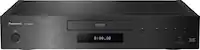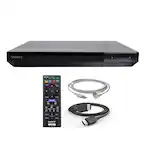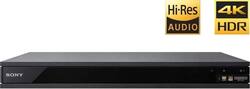
Sony - Geek Squad Certified Refurbished UBP-X800 - Streaming 4K Ultra HD 3D Hi-Res Audio Wi-Fi Built-In Blu-ray - Black
- Key Specs
- Smart Capable: true (Smart, or smart-capable devices are able to connect directly to your home network in order to stream content from the Internet, run Internet-based apps, or connect to other smart devices.)
- High Dynamic Range (HDR): true (An HDR-compatible 4K TV or other HDR-compatible product displays HDR video content when it's available from sources like 4K Ultra HD Blu-ray Discs and 4K streaming services.)
- Ethernet Port(s): true (Connection on the device that fits an ethernet cable, allowing for connection to wired network hardware.)
- Wireless Connectivity: Wi-Fi (The manner in which a device sends data to another device over a short distance without the use of wires or cables.)
- General
- Brand: Sony
- Model Number: GSRF-UBPX800
- Product Name: Geek Squad Certified Refurbished UBP-X800 - Streaming 4K Ultra HD 3D Hi-Res Audio Wi-Fi Built-In Blu-ray
- Color: Black
- Player Type: 3D Blu-ray Player, 4K UHD Blu-ray Player, Blu-Ray Player
- Remote Control Included: true
- Disc Loading Type: Tray
- Parental Control Capability: true
- Cable(s) Included: None
- Dimensions
- Product Height: 2.1 inches (The out of box height of the item. Height is measured as the vertical distance from the bottom of the item to the top as it would be primarily used or placed.)
- Product Depth: 10.6 inches (The out of box depth of the item. Depth is measured as the distance from the front of the item to the back as it would be primarily used or placed.)
- Product Width: 16.9 inches (The out of box width of the item. Width is measured as the horizontal distance from one side of the item to the other as it would be primarily used or placed.)
- Product Weight: 8.4 pounds (The out of box weight of the item.)
- Output
- Number of HDMI Outputs (Total): 1
- Number Of Coaxial Digital Audio Outputs: 1 (The number of RCA outputs used for transferring digital audio between devices. This number lets you know how many devices, like receivers or speakers, the device can connect to.)
- Number Of Optical Digital Audio Outputs: 0 (The number of digital audio streams that can be connected between components.)
- Number Of Component Video Outputs: 0 (The number of component analog video (CAV) sources that can be connected to the product.)
- Number Of Composite Video Outputs: 0
- Display
- Maximum Video Resolution: Not Applicable (Maximum resolution refers to the highest number of pixels that a screen can process and display. Higher resolution signals produce more detailed video.)
- High Dynamic Range Format: HDR 10 (There are a few HDR formats that tell the TV or other HDR-compatible product how to best utilize its capabilities to display HDR content. HDR technology can support one or multiple formats, each with various benefits to picture quality.)
- Connectivity
- Number Of USB Port(s): 1 (The total number of USB ports including all generations and versions.)
- Wireless Connectivity: Wi-Fi (The manner in which a device sends data to another device over a short distance without the use of wires or cables.)
- Certifications Listings & Approvals
- ENERGY STAR Certified: false (Devices carrying the ENERGY STAR service mark, such as computer products and peripherals, kitchen appliances, and other products, generally use 20% to 30% less energy than required by federal standards.)
- Features
- Playable Formats: 3G2, 3GP, 3GPP, AAC, AIFF, ASF, AVCHD, AVI, BD-ROM, CD-DA, CD-R, CD-RW, DVD+R, DVD+R DL, DVD+RW, DVD-Audio, DVD-R, DVD-R DL, DVD-RAM, DVD-RW, FLAC, FLV, GIF, HE-AAC, JPEG, M2TS, M4A, M4V, MKA, MKV, MOV, MP4, MPEG, MPEG-1, MPEG-4 AVC, MPO, MTS, PNG, PS, SACD, VC-1, VOB, VRO, XviD
- Warranty
- Warranty - Parts: 90 days
- Warranty - Labor: 90 days
- Other
- UPC: 400058488308

Geek Squad® Certified Refurbished products are thoroughly, painstakingly and lovingly tested, so you can be sure that your device will work right, right away. Learn more about Geek Squad® Certified Refurbished products.
Play audio or video CDs with this refurbished Sony Ultra HD Blu-ray player. Its intense brightness and deeply saturated colors enhance the details of whatever you're watching, and Dolby Atmos technology provides an immersive audio experience. Connect this Sony Ultra HD Blu-ray player to your home network to stream most popular video formats.

- Blu-ray player: For high-definition movie playback with resolution up to 5 times greater than DVD. Watch films in stunning high-definition just like you do on the big screen.
- Upconvert DVDs: Delivers greatly enhanced video performance of standard DVDs by upconverting their video resolution to HDTV-compliant up to 4K via the HDMI interface.
- 3D technology: So you can experience full 3D content when you pair this Blu-ray player with a 3D HDTV.
- Built-in Wi-Fi: For access to streaming content and firmware updates.
- Ethernet port: Enables simple wired network connection.
- Playable formats: Include CD-R/RW, DVD-RAM, SACD, DVD-Audio, DVD±R/RW, DVD, CD, DVD+R DL, BD-ROM, DVD-R DL, Blu-ray Disc, CD-DA, BMP, GIF, JPEG, PNG, MPO.
- 2 HDMI outputs: High-speed HDMI cable is the only connection that can deliver a Blu-ray experience with a full 1080p picture and digital surround sound.
- BRAVIA Theater Sync: Lets you link compatible home theater components for simplified use.
- Miracast technology: Makes it easy to mirror your Android smartphone's screen on your TV.
- Blu-ray player: For high-definition movie playback with resolution up to 5 times greater than DVD. Watch films in stunning high-definition just like you do on the big screen.
- Upconvert DVDs: Delivers greatly enhanced video performance of standard DVDs by upconverting their video resolution to HDTV-compliant up to 4K via the HDMI interface.
- 3D technology: So you can experience full 3D content when you pair this Blu-ray player with a 3D HDTV.
- Built-in Wi-Fi: For access to streaming content and firmware updates.
- Ethernet port: Enables simple wired network connection.
- Playable formats: Include CD-R/RW, DVD-RAM, SACD, DVD-Audio, DVD±R/RW, DVD, CD, DVD+R DL, BD-ROM, DVD-R DL, Blu-ray Disc, CD-DA, BMP, GIF, JPEG, PNG, MPO.
- 2 HDMI outputs: High-speed HDMI cable is the only connection that can deliver a Blu-ray experience with a full 1080p picture and digital surround sound.
- BRAVIA Theater Sync: Lets you link compatible home theater components for simplified use.
- Miracast technology: Makes it easy to mirror your Android smartphone's screen on your TV.
Whats Included
- Sony Geek Squad Certified Refurbished UBP-X800 - Streaming 4K Ultra HD 3D Hi-Res Audio Wi-Fi Built-In Blu-ray
- Sony Geek Squad Certified Refurbished UBP-X800 - Streaming 4K Ultra HD 3D Hi-Res Audio Wi-Fi Built-In Blu-ray
A: Yes, this plays 4K discs.
Q: Does it show visible signs of use such as scratches?
A: Yes, lots of scratches. Don't know if they were from use or shipping damage since it wasn't packaged well with remote and cord and manual floating around in box and styrofoam half-missing. If you want an as-new player, don't buy.
Q: I didn't get a manual. Is it supposed to be included with the refurbished product?
A: No manual included
Q: does it play sacd. not just the redbook only but, the sacd discs?
A: Yes it does play the SACD layer. I have a non- hybrid disc that plays perfectly on it.
A: I'm not sure I can address the first part of your question accurately as you are asking it....I run a "signal" from my Sony 4K Ultra DVD Player via HDMI to a Sony A/V Receiver, and then, again, from the A/V Receiver to an Epson Projector, again via HDMI. So, I have control of all speaker volumes thru my A/V Receiver. My guess would be that if you directly connect your Sony 4K Ultra player to a TV, then, yes, you can control the volume via the "Volume" up and down (or plus and minus) buttons on the remote. Otherwise there would be no reason to place them on the remote control. As far as 'stopping' and then 'resuming' playback....Yes, you can do that and continue on from where you left off, if you press "Pause", or if you press "Open Tray" and remove the disc ....and then put the disc back in and press "play". You will be asked "do you wish to resume playback from where you left off". BUT, if you press the "STOP" button on the remote, and then remove the disc and put it back and press "play".....it'll then start from the beginning. I believe most DVD players are similar in this regard, at least my Sony and Panasonic Blue Ray and 4K Ultra players work this way. IF you just press "Pause" and/or "Open Tray" and remove a disc....and shut down the units power....and then start over.....powering up the DVD Player, placing the disc in it, and pressing "Play" and/or sometimes "OK", you'll be asked if you wish to "Resume Play" from where you left off. Using the "STOP" button cancels that option. I hope this was helpful.
A: I don't know for sure, but I think the receiver is just a "pass through" for video since the HDMI cable delivers both video and audio. This player does have an optical outlet for audio if your receiver has an input for it. Then you can go straight into your tv with the HDMI. That's how I have mine set up, but I have an older receiver that's pre-HD. I hope this helps.
Q: Do the moives come with this ,like the one you buy retail.
A: I was able to order the 2, 4K movies but I don't think there's any guarantee because they appear to be used and if the person before you registered the player you won't be eligible to get the movies.
A: Hello, Thomas343! Yes, this Blu-ray player supports Dolby Atmos. Happy to help, David