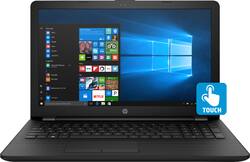
15.6" Touch-Screen Laptop - Intel Core i3 - 8GB Memory - 1TB Hard Drive - HP Finish In Jet Black
- Key Specs
- Screen Type: Touchscreen Widescreen LED-LCD
- Screen Size: 15.6 inches (Size of the screen, measured diagonally from corner to corner.)
- Screen Resolution: 1366 x 768 (HD) (Screens come in a range of resolutions (measured in pixels, horizontal x vertical). The higher the resolution, the greater the picture quality.)
- Touch Screen: true (Touch-screen devices make navigating more intuitive. Using a touch-screen display, you can do things such as tap to select, hold and drag to move items, swipe to scroll, and pinch to zoom.)
- Processor Model: Intel 8th Generation Core i3 (Your computer's processor is like its brain. Working in combination with system memory, the power of the processor determines the complexity of software you can run, how many programs you can have open at the same time, and how fast those programs will run. Most computers feature an AMD, Intel or Snapdragon processor.)
- Storage Type: HDD
- Total Storage Capacity: 1000 gigabytes
- System Memory (RAM): 8 gigabytes (Random-access memory (RAM) is a computing device's short-term data storage, which allows active information to be accessed quickly. The size and type of RAM determines how efficiently the device can handle large amounts of information at one time. For example, gaming or video editing requires more RAM for optimal performance.)
- Backlit Keyboard: false (Integrated lights allow for visibility of the keys in low-light conditions.)
- General
- Product Name: 15.6" Touch-Screen Laptop - Intel Core i3 - 8GB Memory - 1TB Hard Drive
- Brand: HP
- Model Number: 15-BS113DX
- Display
- Screen Type: Touchscreen Widescreen LED-LCD
- Screen Size: 15.6 inches (Size of the screen, measured diagonally from corner to corner.)
- Screen Resolution: 1366 x 768 (HD) (Screens come in a range of resolutions (measured in pixels, horizontal x vertical). The higher the resolution, the greater the picture quality.)
- Touch Screen: true (Touch-screen devices make navigating more intuitive. Using a touch-screen display, you can do things such as tap to select, hold and drag to move items, swipe to scroll, and pinch to zoom.)
- Processor
- Processor Brand: Intel
- Processor Model: Intel 8th Generation Core i3 (Your computer's processor is like its brain. Working in combination with system memory, the power of the processor determines the complexity of software you can run, how many programs you can have open at the same time, and how fast those programs will run. Most computers feature an AMD, Intel or Snapdragon processor.)
- Processor Model Number: i3-8130U
- Storage
- Storage Type: HDD
- Total Storage Capacity: 1000 gigabytes
- Hard Drive Capacity: 1000 gigabytes (The amount of data that can be stored on the device's mechanical hard drive. Hard disk drives (HDDs) typically have larger capacities than solid state drives (SSDs) but may have slower speeds.)
- Hard Drive Interface: SATA (Connects the hard drive to the host system for transferring data between the hard disk cache and system memory. IDE and SATA interfaces are primarily used for personal computing, while larger servers and workstations typically use SAS or SCSI.)
- Hard Drive RPM: 5400 revolutions per minute (A hard drive's data is stored on disks, or platters, that spin while transferring information to the host system. The higher the RPM, the faster the hard drive's performance.)
- Hard Drive Accelerator: None (A module integrated (or added) into a PC to improve performance speed. By acting as a high-speed cache, an accelerator speeds up access times to the hard drive, which results in faster web browsing, improved gaming experience, and overall more responsiveness.)
- Memory
- System Memory (RAM): 8 gigabytes (Random-access memory (RAM) is a computing device's short-term data storage, which allows active information to be accessed quickly. The size and type of RAM determines how efficiently the device can handle large amounts of information at one time. For example, gaming or video editing requires more RAM for optimal performance.)
- Type of Memory (RAM): DDR4 SDRAM (Each type of RAM delivers a different level of speed, bandwidth, energy efficiency and performance.)
- Number of Memory Sticks Included: 1
- Compatibility
- Operating System: Windows 10 Home (The operating system manages all software and hardware, including files, memory and connected devices. Most importantly, it lets you interact with your device and your programs in a visual way; otherwise, you'd be typing computer code to get anything done.)
- Connectivity
- Headphone Jack: true (The device features an interface that allows for the connection of headphones.)
- Ethernet Card: 10/100/1000 (Also known as an Ethernet adapter, this card plugs into a computer's motherboard and enables it to access an Ethernet network. Ethernet data transmission speeds are measured in Mbps (megabits per second) and Gbps (gigabits per second). For example, a 10/100 Ethernet port transmits 10 and 100 Mbps, while a 10/100/1000 Ethernet port transmits 10 and 100 Mbps and has a maximum speed of 1000 Mbps (1 Gbps).)
- Power
- Battery Cells: 3-cell
- Camera
- Front-Facing Camera: true
- Features
- Backlit Keyboard: false (Integrated lights allow for visibility of the keys in low-light conditions.)
- Touchpad Type: Multi-touch, with gesture support
- Media Card Reader: true (A hardware device that allows for access to data on a memory card and enables the transfer of its files to a computer. These devices may have one or multiple slots for various types of memory cards, and may be integrated into the computer or available as an external device.)
- Speaker Type: Stereo speakers
- Dimensions
- Product Height: 0.9 inches (The out of box height of the item. Height is measured as the vertical distance from the bottom of the item to the top as it would be primarily used or placed.)
- Product Width: 15 inches (The out of box width of the item. Width is measured as the horizontal distance from one side of the item to the other as it would be primarily used or placed.)
- Product Depth: 10 inches (The out of box depth of the item. Depth is measured as the distance from the front of the item to the back as it would be primarily used or placed.)
- Certifications Listings & Approvals
- ENERGY STAR Certified: true (Devices carrying the ENERGY STAR service mark, such as computer products and peripherals, kitchen appliances, and other products, generally use 20% to 30% less energy than required by federal standards.)
- EPEAT Qualified: false (The Electronic Product Environmental Assessment Tool (EPEAT) was designed to provide an environmental assessment tool for purchasers. In order to qualify for EPEAT, a product must meet all 23 required criteria.)
- Included
- Included Software: HP Recovery Manager, HP Support Assistant, HP Games Powered by WildTangent, HP ePrint, Netflix, McAfee LiveSafe (30 days trial), CyberLink Power Media Player, Dropbox (25 GB Cloud Storage) (free for 1 year), HP Audio Switch
- Numeric Keypad: true
- Other
- UPC: 192018956384

HP Laptop: Perform virtual tasks efficiently with this 15.6-inch HP laptop. Its touch-screen HD display enables intuitive browsing, and its eighth-generation Intel Core i3 processor and 8GB of RAM let you run Windows 10 programs smoothly. This HP laptop has 1TB of storage, and its three-cell 2.8 Ah battery provides up to eight hours of operation for extended work sessions.
- Windows 10 operating system: Windows 10 brings back the Start Menu from Windows 7 and introduces new features, like the Edge Web browser that lets you markup Web pages on your screen. Learn more ›
- 15.6" touch screen: Typical 1366 x 768 HD resolution. Natural finger-touch navigation makes the most of Windows 10. Energy-efficient WLED backlight.
- 8th Gen Intel® Core™ i3-8130U mobile processor: Smart dual-core, four-way processing performance for HD-quality computing.
- 8GB system memory for advanced multitasking: Substantial high-bandwidth RAM to smoothly run your games and photo- and video-editing applications, as well as multiple programs and browser tabs all at once.
- 1TB hard drive for ample file storage space: Holds a sizeable collection of digital photos, music, HD videos and DVD-quality movies. 5400 rpm spindle speed for standard read/write times.
- Cloud support lets you access your files anywhere: Store your photos, videos, documents and other files on Dropbox for secure access across multiple devices. Fees may apply.
- Intel® UHD Graphics 620: On-processor graphics with shared video memory provide everyday image quality for Internet use, basic photo editing and casual gaming.
- Weighs 4.52 lbs. and measures 0.9" thin: Balances portability and screen size, so you get a respectable amount of viewing space without the laptop being too cumbersome for practical portability. 3-cell lithium-ion battery.
- HDMI output expands your viewing options: Connect to an HDTV or high-def monitor to set up two screens side by side or just see more of the big picture.
- Built-in media reader for simple photo transfer: Supports SD memory card formats.
- Wireless and wired network connectivity: Built-in high-speed wireless LAN connects to your network or hotspots on the most common Wi-Fi standards. The Gigabit Ethernet LAN port also plugs into wired networks.
- Additional port: Headphone/microphone combo jack.
Whats Included
- HP 15-bs113dx
- 3-cell battery
- Power adapter
Q: Does this computer have a camera/microphone for video chat?
A: Does this computer have a webcam and or camera capabilities?
Q: Is the DVD/CD Drive reader or only writer?
A: The optical drive is capable of reading and writing.
Q: I have never owned a touch screen laptop and am wondering if I have.the option of using the mouse?
A: Yes, you always have the option of using the mouse or touchpad as with any other laptop. The touch screen is an added convenience that some people like using. I find myself using the mouse a lot, but there are times when the touch screen really comes in handy.
A: Thank you for your question! It is likely that even though an i3 is a lower processor than an i5 that they may be recommending an older i5 as the minimum. An older i5, even from a few years ago, would be slower or similar in speed to a newer more efficient i3!
Q: What software comes with this laptop?
A: Thank you for your question! This computer comes with Windows 10 Home, CyberLink Power Media Player, Netflix, McAfee LiveSafe, HP Audio Switch; HP ePrint; HP Games by WildTangent; HP JumpStart; HP Recovery Manager; HP Support Assistant; HP Connection Optimizer. Like most computers, It does not come with Microsoft Office (Word, Excel, Powerpoint etc...) preinstalled.
A: Hello Best Buy customer Unique1 and thank you for asking this question and although you first posted this question on this Best Buy website some four (4) months ago I will attempt to answer it anyway as I am sure that a whole lot of other people who own an expensive electronic device such as a laptop computer will really be helped by my response. I think that, for starters, it is important to recognize that "home use" may be different than "on-the-go use!" When using this or any laptop outside of the home it "may" not be possible to lug around a laptop cooling (a.k.a. "chill") pad; however, whenever I use my laptop at home, I "ALWAYS(!)" incorporate the use of a laptop cooling pad! This is a 15.6" laptop so it is important to get a laptop cooling pad that will accommodate this size or even a 17" laptop--if you have the space. I always purchase laptop cooling pads which have the "duel" fan feature and, of course, incorporate a USB connection as their power source. The laptop cooling pads which I have purchased are "super" quiet--I rarely here them running! In addition, I also make use of a keyboard wrist rest which I place right in front of the laptop and cooling pad as it serves the purpose of proper elevation<>alignment of the hands to the now increased "height" of the laptop's positioning and the keyboard wrist may also lessen the chances of developing tendonitis (numbness, tingling, etc.) of the hands--as does a mouse wrist rest. I've included some photos and product recommendations below Best Buy customer Unique1 for your and others' review and I hope that the information I've provided keeps this laptop and your future laptops running cool--"ALL" of the time!
A: Upgrading your ram will not void your warranty, however any damage done to the system in the process or deemed caused by the upgrade of the ram would not be covered under the warranty. Since the laptops require a lot of disassembly to access the RAM, there is a chance you could damage something internally and it would not be covered under the warranty. This is why it is highly recommended than an HP Authorized Service Technician do the upgrade, but it will not void your warranty.
Q: What is the cost to pre-install office package and is it a one time cost?
A: You were already provided with an answer which addressed your question concerning how to install or download Microsoft Office; however, I personally use the free/no-cost software referred to as Apache OpenOffice 4.1.5. Apache OpenOffice is the leading open-source office software suite for word processing, spreadsheets, presentations, graphics, databases and more. It is available in many languages and works on all common computers. There are also other "free" options which have lots of functionality such as LibreOffice. To download Apache OpenOffice 4.1.5 on Windows 10: Enter www.openoffice.org => click “I want to download Apache OpenOffice” => select your operating system [i.e., Windows (EXE)] => select “English” (i.e., if that's your language of choice) => click “download full installation” => a “new” window will open & the download will begin => click “OPEN” => see “new” window that asks “Do you want to allow the following program to make changes…” => click “yes”=> the next window says “welcome” & click “next” => on the “choose install location” choose “desktop” => click “install” => see “preparing to install” => see “welcome to the installation wizard for OpenOffice 4.1.5” => click “next” => for customizer information page, enter "your brand name of computer" for user name => Finish => see “Installation Wizard completed” => click “finish.” The aforementioned instructions "may" not be all inclusive and always be certain during the installation process that you don't introduce any computer virus and that the "source" of the download you select is from a "genuine" source. I hope that this gives you and others a less expensive opportunity to experience things like typing documents and Excel-type operations, etc. Best Buy customer Anonymous.




















