ASUS - ROG Strix 27" 2K IPS 270Hz 1ms Gaming Monitor with FreeSync Premium and HDR (DisplayPort, HDMI) - Black
FREE shipping to
Related Item

Specifications
- Refresh Rate270HzMaximum Resolution2560 x 1440Response Time1 millisecondsPanel TypeIPSSynchronization TechnologyFreeSync Premium (AMD Adaptive Sync), G-SYNC Compatible (NVIDIA Adaptive Sync)Screen Size27 inches
- Key Specs
- Refresh Rate: 270Hz (The number of frames per second the device can produce natively without enhancement. Higher rates help produce smooth, seamless pictures.)
- Maximum Resolution: 2560 x 1440 (Maximum resolution refers to the highest number of pixels that a screen can process and display. Higher resolution signals produce more detailed images.)
- Response Time: 1 milliseconds (The speed at which pixels can change colors is called response time. It is measured in milliseconds (ms).)
- Panel Type: IPS (Technology that affects response time and image quality.)
- Synchronization Technology: FreeSync Premium (AMD Adaptive Sync), G-SYNC Compatible (NVIDIA Adaptive Sync) (Generally, these technologies allow syncing between a computer/console game's frame rate and the device's refresh rate for a smoother display without tearing.)
- Screen Size: 27 inches (Size of the screen, measured diagonally from corner to corner.)
- Display Connector(s): 1 x DisplayPort 1.4, 1 x HDMI 2.1 (The number and type of connectors used to connect to an external display.)
- General
- Brand: ASUS
- Model Number: XG27ACMG
- Product Name: ROG Strix 27" 2K IPS 270Hz 1ms Gaming Monitor with FreeSync Premium and HDR (DisplayPort, HDMI)
- Color: Black
- Operating System Compatibility: Windows, Mac, Chrome, Linux
- Display
- Refresh Rate: 270Hz (The number of frames per second the device can produce natively without enhancement. Higher rates help produce smooth, seamless pictures.)
- Maximum Resolution: 2560 x 1440 (Maximum resolution refers to the highest number of pixels that a screen can process and display. Higher resolution signals produce more detailed images.)
- Native Resolution: 2560 x 1440 (Native resolution of a screen refers to its single, fixed resolution. Sometimes screens must scale an image up or down in order to fit the native resolution. This can cause a loss of resolution or detail.)
- Contrast Ratio: 1000:1 (Measured difference between a displayed image's brightest whites and darkest blacks. The larger the first number, the more detail and color that can be displayed.)
- Response Time: 1 milliseconds (The speed at which pixels can change colors is called response time. It is measured in milliseconds (ms).)
- Display Type: LED
- Panel Type: IPS (Technology that affects response time and image quality.)
- Synchronization Technology: FreeSync Premium (AMD Adaptive Sync), G-SYNC Compatible (NVIDIA Adaptive Sync) (Generally, these technologies allow syncing between a computer/console game's frame rate and the device's refresh rate for a smoother display without tearing.)
- Aspect Ratio: 16:9 (The measurement of the width of a screen compared to the height of a screen, expressed as a ratio.)
- Curved Screen: false
- Brightness: 400 candela per square meter (A measure of the total light output.)
- Screen Size: 27 inches (Size of the screen, measured diagonally from corner to corner.)
- High Dynamic Range (HDR): true (An HDR-compatible 4K TV or other HDR-compatible product displays HDR video content when it's available from sources like 4K Ultra HD Blu-ray Discs and 4K streaming services.)
- High Dynamic Range Format: HDR 10, VESA Certified DisplayHDR 400 (There are a few HDR formats that tell the TV or other HDR-compatible product how to best utilize its capabilities to display HDR content. HDR technology can support one or multiple formats, each with various benefits to picture quality.)
- Horizontal Viewing Angle: 178 degrees (The maximum angle at which the display can be viewed with acceptable visual performance from either side.)
- Vertical Viewing Angle: 178 degrees (The maximum angle at which the display can be viewed with acceptable visual performance from above or below.)
- Touch Screen: false (Touch-screen devices make navigating more intuitive. Using a touch-screen display, you can do things such as tap to select, hold and drag to move items, swipe to scroll, and pinch to zoom.)
- Display Surface: Anti-glare
- Connectivity
- Number of DisplayPort Inputs (Total): 1
- Number of HDMI Inputs (Total): 1
- Display Connector(s): 1 x DisplayPort 1.4, 1 x HDMI 2.1 (The number and type of connectors used to connect to an external display.)
- Headphone Jack: true (The device features an interface that allows for the connection of headphones.)
- Compatibility
- Wall Mountable: true (The product is able to be secured to a wall. Some products are designed ready to mount, while others may require additional hardware/accessories for installation.)
- VESA Wall Mount Standard: 100mm x 100mm (VESA wall mount standards refer to the spacing of screw holes built into a TV in order to fit with standard TV wall mounts. These standards are implemented into most TVs and monitors.)
- Features
- Tiltable: true
- Adjustable Stand Height: true
- Anti-Glare: true (Product has features, such as a matte finish, that reduce the likelihood for screen glare.)
- Eye Relief Features: Anti-glare, Flicker free, Low blue light
- Built-In Webcam: false
- Integrated Speaker(s): false
- Dimensions
- Product Height With Stand: 20.06 inches
- Product Width: 24.16 inches (The out of box width of the item. Width is measured as the horizontal distance from one side of the item to the other as it would be primarily used or placed.)
- Product Depth (With Stand): 8.61 inches
- Product Weight: 14.33 pounds (The out of box weight of the item.)
- Stand Included: true
- Power
- Power Consumption: 30 watts
- Power Saving/Off Mode: 0.5 watts (This mode will turn the display and/or the device off, or into a standby mode, after a preset length of time with no activity to conserve power.)
- Certifications Listings & Approvals
- ENERGY STAR Certified: false (Devices carrying the ENERGY STAR service mark, such as computer products and peripherals, kitchen appliances, and other products, generally use 20% to 30% less energy than required by federal standards.)
- EPEAT Qualified: false (The Electronic Product Environmental Assessment Tool (EPEAT) was designed to provide an environmental assessment tool for purchasers. In order to qualify for EPEAT, a product must meet all 23 required criteria.)
- Warranty
- Warranty - Parts: 3 years
- Warranty - Labor: 3 years
- Other
- UPC: 197105489646
Elevate your gaming experience with the ROG Strix XG27ACMG, meticulously crafted for utility and performance. Immerse yourself in smooth, lifelike visuals boasting a 2K resolution, 270Hz refresh rate, and lightning-fast 1ms response time.
- QHD 2560 X 1440 Resolution: The 27-inch QHD LED panel of the XG27ACMG opens up a world of unbelievably lifelike gaming and entertainment experiences
- NVIDIA G-SYNC: G-SYNC Compatible, delivering a seamless, tear- free gaming experience by enabling VRR by default
- 270Hz Refresh Rate: Features 270Hz refresh rate for ultra fast and smooth gameplay
- Asus Aura Sync: Synchronizing up lighting effects between all Aura- capable peripherals
- Viewing Angle: 178°(H)/178°(V)
- Brightness: 400 cd/㎡
- Contrast Ratio: 1000:1
- Response Time: 1ms (Gray to Gray)
- Inputs/Connections: DP x1 (v1.4), HDMI x1 (v2.1)
Whats Included
- XG27ACMG Monitor
- DisplayPort Cable
- Power Cord
- ROG Pouch
- ROG Sticker
- Quick Start Guide
- Warranty Card
Q: What is the response time of this monitor?
A: This monitor has a 1ms gray-to-gray response time.
Q: Does this monitor have built-in speakers?
A: No, this monitor does not have built-in speakers.
Q: What type of panel does this monitor use?
A: The ASUS ROG Strix XG27ACMG uses an IPS panel.
Q: What is the contrast ratio for the ASUS ROG Strix XG27ACMG monitor?
A: This monitor has a contrast ratio of 1000:1.
Q: Does the ASUS ROG Strix XG27ACMG monitor support HDR?
A: Yes, this monitor supports HDR10.
Q: What is the maximum refresh rate of this monitor?
A: The maximum refresh rate of this monitor is 280Hz.
A: No, only FreeSync, which is for AMD cards only.
Q: Can this monitor be mounted on a monitor mount?
A: Yes, the ASUS XG27ACMG is compatible with 100x100mm VESA mounts, allowing it to be securely attached to most standard monitor arms or wall mounts.
Compare similar products

Elevate your gaming experience with the ROG Strix XG27ACMG, meticulously crafted for utility and performance. Immerse yourself in smooth, lifelike visuals boasting a 2K resolution, 270Hz refresh rate, and lightning-fast 1ms response time.
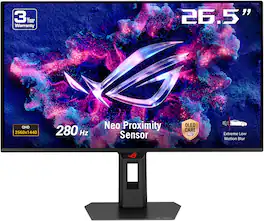
The ROG Strix OLED XG27ACDMS is a 27-inch, 280Hz QHD gaming monitor. With the addition of the Neo Proximity Sensor in the new ROG OLED Care Pro suite, the monitor transitions to a black screen when no user is detected, guarding against burn-in.

Elevate your gaming experience with the ROG Strix XG27ACMES, meticulously crafted for utility and performance. Immerse yourself in smooth, lifelike visuals boasting a 1440p resolution, 255Hz (OC) refresh rate, and lightning-fast 0.3ms response time (min.). Conquer challenges effortlessly with AI-powered features, and enhance your connectivity options with the inclusion of a versatile Type-C connection, ensuring you stay ahead while enjoying the convenience of modern connectivity.

The UltraGear 27GR83Q gaming monitor is a battlestation centerpiece that combines outrageous speed, performance, and loads of gaming-centric features. Gameplay looks amazing on the large 27” QHD (2560 x 1440) IPS display showcasing vivid color and contrast with up to DCI-P3 95% (Typ.) color gamut and VESA DisplayHDR 400. With a super-fast 240Hz refresh rate along NVIDIA G-SYNC compatibility and AMD FreeSync Premium the on-screen action is ultra-responsive and buttery smooth with reduced motion blur and lag. With aesthetic touches like a 3-side virtually borderless design along with tilt, heigh and pivot adjustability, this UltraGear monitor is the gaming screen upgrade you’ve been waiting for.
| Pros for ASUS - ROG Strix 27" 2K IPS 270Hz 1ms Gaming Monitor with FreeSync Premium and HDR (DisplayPort, HDMI) - Black | |||
|---|---|---|---|
| There were no pros for this product— | Refresh Rate, Overall Performance, OLED Quality, Proximity Sensor | Refresh Rate, Resolution, Color Accuracy | Overall Performance, Refresh Rate, Resolution, Price, Screen Size |
| Cons for ASUS - ROG Strix 27" 2K IPS 270Hz 1ms Gaming Monitor with FreeSync Premium and HDR (DisplayPort, HDMI) - Black | |||
| There were no cons for this product— | There were no cons for this product— | There were no cons for this product— | Dead Pixels, Ghosting, Panel |
Specs
Reviews
Customer Images
The vast majority of our reviews come from verified purchases. Reviews from customers may include My Best Buy members, employees, and Tech Insider Network members (as tagged). Select reviewers may receive discounted products, promotional considerations or entries into drawings for honest, helpful reviews.
- Rated 4 out of 5 stars
Must change settings to unlock potential
I removed a star because there are quite a few settings you have to change to get this monitor working as advertised 270hz and act displaying a good picture on display. I almost returned it, but Reddit posts had fixes and saved me from having to return the monitor (ASUS tech support had said it was not fixable and a characteristic of the monitor). The first major fix was to change a few settings to eliminate bright white distortions on black/ dark scenes. Attaching a picture of what it looked like before setting were changed which affected black/ dark scenarios. Colors are great, quick, and I have not noticed any screen tearing. The stand is really nice and I like the home slot. Charging USB-c seems outdated because the wattage is low. The rgb light isn’t that noticeable when the room is lit, since it is on the back, but it’s like a night lite in the dark. I would recommend this with an instruction book on changing the settings.
This review is from ASUS - ROG Strix 27" 2K IPS 270Hz 1ms Gaming Monitor with FreeSync Premium and HDR (DisplayPort, HDMI) - Black
Posted by Joey
- Rated 4 out of 5 stars
One problem, but otherwise great
Got on sale for $299, great monitor for the price. Easy to hook up, settings are sort of hard to understand if you aren't monitor savvy. The monitor does flicker periodically at 270hz, which you are advised of when you switch to it. I had problems initially with FreeSync as it caused flickering and visual artifacts at 240hz, but was fine at 270 and anything lower that 240. I have a Nvidia card, and once FreeSync was turned off, I have yet to have any more of the visual problems happening. Outside of that, I would recommend the monitor. It has a good range of monitor settings you can tinker with. Picture quality is amazing and feels very smooth for gaming.
This review is from ASUS - ROG Strix 27" 2K IPS 270Hz 1ms Gaming Monitor with FreeSync Premium and HDR (DisplayPort, HDMI) - Black
Posted by Kaitlin
- Rated 4 out of 5 stars
GSync doesn't work properly
Everything about this monitor is good, if you're looking for a smooth work monitor this is one of the best, screen moves in all direction and no complaints about the built quality at all, however 2 major issues: 1. I believe it uses a cheap VRR panel as when you Play games w Gsync on, the display flickers real bad, Gsync off the game works fine however not expected from a $400 monitor 2. DP cable only goes to max 240hz incl OC, no idea why 270 is marketed Go for it if you use Freesync/Amd sync while gaming, for Nvidea processors, I highly recommend switching off Gsync
This review is from ASUS - ROG Strix 27" 2K IPS 270Hz 1ms Gaming Monitor with FreeSync Premium and HDR (DisplayPort, HDMI) - Black
Posted by ShlokK