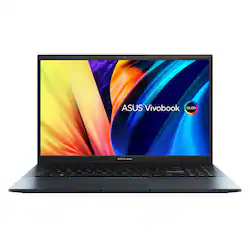
ASUS - Vivobook Pro 15.6" Laptop OLED - AMD Ryzen 9 7940HS with 32GB Memory - NVIDIA GeForce RTX 4060 - 1TB SSD - Quiet Blue
- Key Specs
- Screen Type: IPS
- Screen Size: 15.6 inches (Size of the screen, measured diagonally from corner to corner.)
- Screen Resolution: 2880 x 1620 (HD) (Screens come in a range of resolutions (measured in pixels, horizontal x vertical). The higher the resolution, the greater the picture quality.)
- Touch Screen: false (Touch-screen devices make navigating more intuitive. Using a touch-screen display, you can do things such as tap to select, hold and drag to move items, swipe to scroll, and pinch to zoom.)
- Refresh Rate: 120Hz (The number of frames per second the device can produce natively without enhancement. Higher rates help produce smooth, seamless pictures.)
- Brightness: 500 nits (A measure of the total light output.)
- Processor Model: AMD Ryzen 9 7000 Series (Your computer's processor is like its brain. Working in combination with system memory, the power of the processor determines the complexity of software you can run, how many programs you can have open at the same time, and how fast those programs will run. Most computers feature an AMD, Intel or Snapdragon processor.)
- CPU Base Clock Frequency: 4 gigahertz (Actual central processing unit (CPU) speed may vary by device configuration and design. The average rate at which the processor is able to execute tasks under normal operating conditions as asserted by the manufacturer.)
- Storage Type: SSD
- Total Storage Capacity: 1000 gigabytes
- System Memory (RAM): 32 gigabytes (Random-access memory (RAM) is a computing device's short-term data storage, which allows active information to be accessed quickly. The size and type of RAM determines how efficiently the device can handle large amounts of information at one time. For example, gaming or video editing requires more RAM for optimal performance.)
- Graphics: NVIDIA GeForce RTX 4060 (Often referred to as a "graphics processing unit" (GPU), this device is responsible for displaying image content and decoding/encoding video content in programs and games.)
- Display Connector(s): 1 x HDMI 2.1, Display connection via USB port (The number and type of connectors used to connect to an external display.)
- Backlit Keyboard: true (Integrated lights allow for visibility of the keys in low-light conditions.)
- General
- Product Name: Vivobook Pro 15.6" Laptop OLED - AMD Ryzen 9 7940HS with 32GB Memory - NVIDIA GeForce RTX 4060 - 1TB SSD
- Brand: ASUS
- Model Number: M6500XV-ES99
- Year of Release: 2024
- Color: Quiet Blue
- Display
- Display Type: OLED
- Screen Type: IPS
- Screen Size: 15.6 inches (Size of the screen, measured diagonally from corner to corner.)
- Screen Resolution: 2880 x 1620 (HD) (Screens come in a range of resolutions (measured in pixels, horizontal x vertical). The higher the resolution, the greater the picture quality.)
- Touch Screen: false (Touch-screen devices make navigating more intuitive. Using a touch-screen display, you can do things such as tap to select, hold and drag to move items, swipe to scroll, and pinch to zoom.)
- Refresh Rate: 120Hz (The number of frames per second the device can produce natively without enhancement. Higher rates help produce smooth, seamless pictures.)
- Brightness: 500 nits (A measure of the total light output.)
- Color Gamut (Standard RGB): 100 percent
- Processor
- Processor Brand: AMD
- Processor Model: AMD Ryzen 9 7000 Series (Your computer's processor is like its brain. Working in combination with system memory, the power of the processor determines the complexity of software you can run, how many programs you can have open at the same time, and how fast those programs will run. Most computers feature an AMD, Intel or Snapdragon processor.)
- Processor Model Number: 7940HS
- CPU Base Clock Frequency: 4 gigahertz (Actual central processing unit (CPU) speed may vary by device configuration and design. The average rate at which the processor is able to execute tasks under normal operating conditions as asserted by the manufacturer.)
- CPU Boost Clock Frequency: 5.2 gigahertz (Actual central processing unit (CPU) speed may vary by device configuration and design. The maximum rate at which the processor is able to execute tasks, typically only used for a short period of time as needed. This rate may temporarily boost the processor's performance, but may result in overheating, shutdown, or damage to equipment if sustained.)
- Number of CPU Cores: 8-core (A core, or "brain" of a CPU, allows it to receive and execute instructions. Each core can work independently or together to perform parallel operations.)
- Number of CPU Threads: 16 (Generally, the more threads, the faster and more responsive the operating system.)
- Neural Processing Unit (NPU): false (Whether the product comes with an integrated neural processing unit (NPU) that performs computations for AI (artificial intelligence) functions to increase proficiency of the CPU and reduce power consumption.)
- Storage
- Storage Type: SSD
- Total Storage Capacity: 1000 gigabytes
- Solid State Drive Capacity: 1000 gigabytes (The amount of data that can be stored on the device's solid state drive (SSD). SSD is a flash-based storage with faster speeds than a hard disk drive (HDD).)
- Solid State Drive Interface: PCIe 3.0 (Connects the solid state drive to the host system. PCI and SATA interfaces are the most common; PCI interfaces are typically faster, but SATA interfaces are compatible with a wider range of systems.)
- Memory
- System Memory (RAM): 32 gigabytes (Random-access memory (RAM) is a computing device's short-term data storage, which allows active information to be accessed quickly. The size and type of RAM determines how efficiently the device can handle large amounts of information at one time. For example, gaming or video editing requires more RAM for optimal performance.)
- Type of Memory (RAM): LPDDR5X (Each type of RAM delivers a different level of speed, bandwidth, energy efficiency and performance.)
- Graphics
- Graphics Type: Dedicated (Dedicated graphics uses a separate graphics card for processing video images. Because it does not use memory from the system's RAM, there is no extra burden on the CPU and graphics are processed more efficiently. Integrated graphics shares system RAM to process video images.)
- GPU Brand: NVIDIA
- Graphics: NVIDIA GeForce RTX 4060 (Often referred to as a "graphics processing unit" (GPU), this device is responsible for displaying image content and decoding/encoding video content in programs and games.)
- Advanced Graphics Rendering Technique(s): DLSS 3 (Deep Learning Super Sampling), Ray tracing (Imaging technology designed to improve graphics rendering.)
- GPU Video Memory (RAM): 8 gigabytes (Random-access memory (RAM) is a GPU’s, or graphics cards, short-term data storage, which allows active information to be accessed quickly. The size and type of RAM determines how efficiently the GPU can handle large amounts of information at one time. For example, larger amounts of RAM for gaming or video editing increases performance.)
- GPU Video Memory Type (RAM): GDDR6 (Each type of RAM delivers a different level of speed, bandwidth, energy efficiency and performance.)
- Compatibility
- Operating System: Windows 11 Home (The operating system manages all software and hardware, including files, memory and connected devices. Most importantly, it lets you interact with your device and your programs in a visual way; otherwise, you'd be typing computer code to get anything done.)
- Connectivity
- Display Connector(s): 1 x HDMI 2.1, Display connection via USB port (The number and type of connectors used to connect to an external display.)
- Number of HDMI Outputs (Total): 1
- USB Ports: 1 x USB-A 3.2, 2 x USB-A 2.0, 1 x USB-C 4 (The number and type of USB ports the product has.)
- Number of USB Ports (Total): 4
- Headphone Jack: true (The device features an interface that allows for the connection of headphones.)
- Microphone Input: true (The device features an input for connecting an external microphone.)
- Wireless Connectivity: Bluetooth, Wi-Fi (The manner in which a device sends data to another device over a short distance without the use of wires or cables.)
- Wireless Standard: AX (The wireless networking protocol used by the device. Each iteration of the protocol is based on the 802.11 standard developed by the Institute of Electrical and Electronics Engineers (IEEE) Standards Association. Denoted by letters following 802.11 (802.11a, 802.11ac, etc.), each version, published in alphabetical order, encompasses all previous versions.)
- Wireless Networking Standard: Wi-Fi 6E (The wireless networking standard used by the device. Each iteration of the standard developed by the Wi-Fi Alliance corresponds to an existing IEEE 802.11 protocol; for example, standard 802.11ac (or AC) is termed Wi-Fi 5. Refers specifically to the standard the device is designed to use, but ultimately determines product interoperability and backward compatibility including previous versions.)
- Power
- Power Supply Maximum Wattage: 150 watts
- Battery Cells: 3-cell
- Camera
- Front-Facing Camera: true
- Front Facing Camera Video Resolution: 1080p (Refers to the number of pixels, both horizontally and vertically, used by the camera facing the user to capture video. The higher the resolution the finer the video detail that can be seen.)
- Built-In Microphone: true
- Features
- Backlit Keyboard: true (Integrated lights allow for visibility of the keys in low-light conditions.)
- Media Card Reader: true (A hardware device that allows for access to data on a memory card and enables the transfer of its files to a computer. These devices may have one or multiple slots for various types of memory cards, and may be integrated into the computer or available as an external device.)
- Media Card Slot: microSD
- Audio Technology: Smart Amp
- Speaker Type: Built-in
- Security Features: Fingerprint reader, Privacy camera, Facial recognition
- Casing Material: Aluminum, Plastic
- Dimensions
- Product Height: 0.74 inches (The out of box height of the item. Height is measured as the vertical distance from the bottom of the item to the top as it would be primarily used or placed.)
- Product Width: 14.17 inches (The out of box width of the item. Width is measured as the horizontal distance from one side of the item to the other as it would be primarily used or placed.)
- Product Depth: 9.22 inches (The out of box depth of the item. Depth is measured as the distance from the front of the item to the back as it would be primarily used or placed.)
- Product Weight: 3.97 pounds (The out of box weight of the item.)
- Certifications Listings & Approvals
- ENERGY STAR Certified: true (Devices carrying the ENERGY STAR service mark, such as computer products and peripherals, kitchen appliances, and other products, generally use 20% to 30% less energy than required by federal standards.)
- EPEAT Qualified: false (The Electronic Product Environmental Assessment Tool (EPEAT) was designed to provide an environmental assessment tool for purchasers. In order to qualify for EPEAT, a product must meet all 23 required criteria.)
- Included
- Included Software: MyASUS
- Numeric Keypad: true
- Stylus Included: false
- Other
- UPC: 197105368675
This is ASUS Vivobook Pro 15. Thin, light, and powerful. Do more with the AMD Ryzen 9 7940HS Mobile Processor and 32GB LPDDR5 memory, plus 1TB PCIE G3 SSD. Ultra fast and modern, everything about Vivobook 15 is exactly what you need in an everyday laptop with next-gen smart software and striking design.
- Windows 11 Home: Windows 11 has all the power and security of Windows 10 with a redesigned and refreshed look. It also comes with new tools, sounds, and apps. Every detail has been considered. All of it comes together to bring you a refreshing experience on your PC.
- 15" 3K ASUS Lumina OLED Display: The 15" OLED 2880 x 1620 120Hz display creates gorgeous visuals with 500 nits peak brightness.
- AMD Ryzen 9 7940HS Mobile Processor: AMD Ryzen AI delivers the power of personal AI processing for accelerated multitasking, increased productivity, advanced collaboration and improved efficiency.
- NVIDIA GeForce RTX 4060 Laptop GPU: The GeForce RTX 4060 with 8GB GDDR6 lets you take on the latest games and apps with the ultra-efficient NVIDIA Ada Lovelace architecture. Experience immersive, AI-accelerated gaming with ray tracing and DLSS 3, and supercharge your creative process and productivity with NVIDIA Studio.
- 32GB RAM: 32GB LPDDR5X RAM of fast memory to run multiple apps, tabs, and everything in between all at once with ease.
- 1TB SSD: 1TB PCIE G3 SSD give you superior storage for large files and apps with zero fuss.
- 3.97 lb light and 0.78"thin: Weightless wonder in a laptop.
- ASUS ErgoSense keyboard: A sleek backlit keyboard with Num Key, complete with fingerprint login on the power key.
- 10 Hour, 70Wh Battery: Keep your stress levels low with an all-day battery, equipped with Fast-Charge technology that gets you to 60% in just 49 minutes, all through its versatile USB-C Easy port.*
- Windows Copilot AI Assistant: Meet Copilot in Windows – your AI-powered assistant for quick answers, creative inspiration, and focused tasks. Boost productivity with fast answers, image generation, and more. Elevate your Windows 11 experience and unleash creativity!
- ASUS AISense Front Camera: Stay sharp with its 1080p Full HD IR front camera featuring ASUS AiSense, enabling swift face login, AI-driven background blur, automatic framing, and eye-tracking. Ambient light sensors optimize the display for the truest image quality.
- Super-liner speakers tuned by Harman Kardon and Dolby Atmos: Indulge your senses in powerful, crystal-clear sound. Next-gen super-linear speakers, personalized with the Smart Amplifier and ASUS Audio Booster, are 2x louder. Tuned by Harman Kardon and Dolby Atmos, these speakers ensure an immersive audio experience.
- Ports: Stay connected with 1x USB 4.0 Gen 3 Type-C for display / power delivery, 1x USB 3.2 Gen 1 Type-A, 2x USB 2.0 Type-A, Micro SD card reader, 1x HDMI 2.1 FRL, 1x 3.5mm Combo Audio Jack, and 1x DC-in.
- Military-Grade Durability: Meeting MIL-STD 810H military standards, the Vivobook Pro 15 OLED ensures unmatched reliability in harsh conditions. This rigorous testing enhances longevity, ensuring your laptop is ready for work, travel, or relaxation today and in the future.
- What's Included: 150W AC Adapter, warranty, and manual.
Whats Included
- ASUS Vivobook Pro
- 150W AC Adapter
- Warranty Card
- Manual
Q: Can this laptop charge via USB-C or is it only through the DC-IN barrel connector?
A: The ASUS Vivobook Pro 15 OLED (M6500XV) primarily charges through the DC-IN barrel connector with a 150W AC adapter. However, it also features a USB-C port that supports power delivery, allowing for charging via USB-C as well.
A: I have the same issue with mine. It seems to have something to do with the sleep/hibernate mode. If I just close the laptop at the end of the day without shutting it down first, it will not startup the next day unless I do a hard reset on it. If I do a complete shutdown on it when I am down for the day, then it will startup just fine the next day.
Q: Is the screen fully laminated or is there space between the screen and screen protector?
A: The ASUS Vivobook Pro 15 OLED (M6500XV) features a fully laminated display.
A: The ASUS Vivobook Pro 15 OLED (M6500XV) has a PCIe Gen 4 slot for SSDs. However, the SSD that comes pre-installed in this model can be either a PCIe Gen 3 or PCIe Gen 4 SSD, depending on the specific configuration you choose.
A: No, This is a brand new laptop. No need to open it up for anything. What I have noticed is that this issue is somehow related to the computer going to sleep. If I do a complete shutdown it will start up just fine. If I just let it go to sleep on its own then it doesn't want to start up. I have to do a hard reset on it to get it to startup again after it went into sleep/hibernate mode overnight.
A: The battery life is approximately 10 hours of light workload. For heavy 3D gaming, or photo-editing, the battery life is approximately 3 hours.
Q: Does this laptop have a MUX switch?
A: The ASUS M6500XV laptop does not come with a built-in MUX switch.