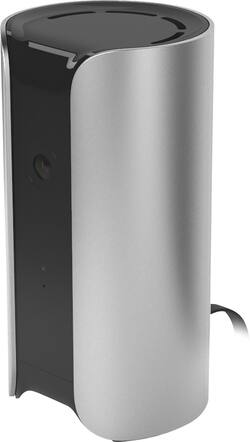
Canary - Indoor Wireless High-Definition All-In-One Home Security System - Silver
- Key Specs
- Camera Resolution: 1080 (Refers to the number of pixels, both horizontally and vertically, used to capture video/images. The higher the resolution the finer the detail that can be seen.)
- Field Of View: 147 degrees (The area of a target, measured as an angle from the location of viewing, that can be observed.)
- Night Vision: true
- Number Of Cameras Included: 1
- Camera Power Source: Plug-in
- Storage Type: Cloud
- Indoor Or Outdoor Use: Indoor (Indicates the appropriate environment product was designed to be used in.)
- Minimum Operating Temperature: 32 degrees fahrenheit (The lowest recommended ambient (surrounding) temperature in which the product can ideally operate stated by the manufacturer. Generally long-term exposure of the product to temperatures less than the minimum can result in ineffective operation.)
- Maximum Operating Temperature: 120 degrees fahrenheit (The highest recommended ambient (surrounding) temperature in which the product can ideally operate stated by the manufacturer. Generally long-term exposure of the product to temperatures more than the maximum can result in ineffective operation.)
- Audio Communication: 2-way (1-way communication devices allow a user to hear detected audio, while 2-way communication adds the ability for a user to talk back through the device.)
- General
- Product Name: Indoor Wireless High-Definition All-In-One Home Security System
- Brand: Canary
- Model Number: CAN100USSV
- Camera
- Camera Resolution: 1080 (Refers to the number of pixels, both horizontally and vertically, used to capture video/images. The higher the resolution the finer the detail that can be seen.)
- Field Of View: 147 degrees (The area of a target, measured as an angle from the location of viewing, that can be observed.)
- Night Vision: true
- Night Vision Distance: 25 feet
- Number Of Cameras Included: 1
- Day/Night Mode: true (Captures images/video with optimal clarity by automatically adjusting settings to various light levels.)
- IP Camera: WiFi (An Internet Protocol (IP) camera is able to record and display image/video data via the internet, without need for a local recording device.)
- Number of IR LEDs: 12 (Quantity of infrared (IR) LED lights for emitting IR light and allowing the camera to detect objects in low light.)
- Camera Iris: Automatic (The iris is the opening on a camera that controls how much light reaches its image sensor, which in turn affects image/video clarity. Fixed and manual irises are generally suited for locations with consistent levels of light. Automatic and "P" (precise) irises automatically adjust in response to changing levels of light and are suited for a wider variety of environments. "P" irises feature additional capabilities for improving footage clarity.)
- Image Sensor Type: CMOS (CCD and CMOS are the two main technologies used in image sensors. CCD, the older of the two types, turns analog light signals into digital pixels. This conversion happens without distortion, resulting in high-quality images. Newer CMOS sensors use transistors at each pixel to move electrical charges. CMOS sensors are typically less expensive, but also require more light to create distortion-free images.)
- Camera Mount Type: Other
- Power
- Camera Power Source: Plug-in
- Compatibility
- Camera Compatibility: Select Canary cameras
- Operating System Compatibility: Android, Apple iOS
- Connectivity
- Camera Connectivity: Wireless (Security system cameras can be set up in several ways. Wired cameras require cables for power and footage transmission, while wire-free cameras don't need cables for either. Wireless cameras still require cables for receiving power but are able to transmit footage via a wireless network.)
- Recording & Playback
- Streaming Video: true (The ability to transmit a live video feed from the product.)
- Records Audio: true
- Storage
- Storage Type: Cloud
- Performance
- Indoor Or Outdoor Use: Indoor (Indicates the appropriate environment product was designed to be used in.)
- Minimum Operating Temperature: 32 degrees fahrenheit (The lowest recommended ambient (surrounding) temperature in which the product can ideally operate stated by the manufacturer. Generally long-term exposure of the product to temperatures less than the minimum can result in ineffective operation.)
- Maximum Operating Temperature: 120 degrees fahrenheit (The highest recommended ambient (surrounding) temperature in which the product can ideally operate stated by the manufacturer. Generally long-term exposure of the product to temperatures more than the maximum can result in ineffective operation.)
- Features
- Audio Communication: 2-way (1-way communication devices allow a user to hear detected audio, while 2-way communication adds the ability for a user to talk back through the device.)
- Audio-Only Option: false
- Auto-On Detection: Motion
- Dimensions
- Camera Height: 6 inches
- Camera Width: 3 inches
- Camera Depth: 3 inches
- Camera Weight: 0.87 pounds
- Sensor
- Sensors: Motion sensor, Smoke sensor, Temperature sensor (Detects stimuli such as heat, light, sound, motion, or pressure and responds accordingly by operating a control or initiating a function of the device.)
- Display
- Camera Color Display: true
- Included
- Camera(s) Included: true
- DVR Included: false
- Monitor Included: false
- Cable(s) Included: true
- Other
- UPC: 855942005039
Canary CAN100USSV Indoor Wireless High-Definition All-In-One Home Security System: Keep your home safe and sound with motion-activated recording, HomeHealth Technology and a 90+ dB siren. Receive video notifications on your smartphone whenever the system detects something out of the ordinary, so you can respond.
- Notifications keep you informed: Receive motion-activated notifications that contain recorded footage and give you the options to live-stream or sound the 90+ dB siren.
- No installation necessary: Simply place the Canary system in a central indoor location, plug it in and connect to the Internet.
- Connect up to 4 devices in 1 location: Add more devices to ensure that your whole home is safe from intruders.
- Secure video storage and data encryption protect your footage: Record and store videos in the Canary Cloud for up to 30 days.
- Capture everything in HD: Vivid 1080p resolution with up to 3x digital zoom allows you to see small details on your screen.
- Infrared night vision lets you see in the dark: Keep an eye on things up to 25' away when there's little to no light.
- See more with the 147° field of view: Watch over a room with minimal blind spots.
- HomeHealth Technology looks after your well-being: Monitor the air quality, temperature and humidity in your home to stay comfortable and be more prepared to avoid safety issues like poor sleep and mold growth.
- Digital audio lets you feel like you're there: Hear everything clearly with the high-quality microphone.
- Stream live video from your home anytime: Canary's free mobile app let you see what's happening from anywhere with your iPhone® or Android smartphone. App download required.
Whats Included
- AC power adapter
- Indoor Wireless All-In-One Home Security System
- Micro USB cable
- Quick start guide
- Secure setup cable
Q: Do I need a monitoring contract?
A: No, it keeps records for twelve hours during which you can download them. For $50 a year you can have 48 hours if you need it. Other plans are also available, but you can stick with the free plan if 12 hours is sufficient.
Q: Can you turn the camera on and off from smart phone?
A: yes you have full access from your phone you can call the police from the canary site or set off an alarm if you see an intruder, right from the site. you can turn it on or off. you can give other people temp access while you are away, also. great if you have pets, you can check no them ....
Q: can this connect to a verizon mifi or do you need a wired home internet like windstream?
A: Hi Crazyhorselady, Thanks for your question. We recommend that Canary be connected to standard home broadband internet. Canary is not supported for use with Verizon MiFi or similar products. If you have further questions, please feel free to reach out to us 24/7 by phone at 1-888-271-0121 or by email at [email protected]. - Matt from Canary
A: It doesn't work that way. The recorded activity will delete after a set time frame dependent on how many units you have. If you want to save recorded events you need to save it to your PC. If you own one Canary they give 24 hours on the timeline free. But if you own two they penalize you and only give 12 hours free, the 24 hours is shared between the number of Canary's used. So the more you spend the less time allowed. Doesn't make sense to me but that is what I learned the hard way. One would think it would be 24 hours allowed no matter how many purchased that would be shared time if you own two or more.
A: Yes. But you don't have to sign up for it. You get a trial week. Mine works fine without it. It depends on if you want more storage bookmarks and video downloads.
A: Absolutely NOT. Let me tell you--as a Canary product owner (for over a year)--security is almost a false claim. It definitely will not detect breached entry-points. It also will do almost nothing that it's marketing sales-pitch claims (anymore), without a premium paid monthly subscription. And, unfortunately the quality of the service isn't even worth the money. There is--which is commonly reported all over the Internet--consistent and unacceptable lag of up to 10 seconds. This lag is even when simply opening the app to simply see one of your cameras; literally 10-15 seconds of wait time and buffering. Even on Wi-fi. It's literally terrible and ruins the experience. and the delay lag is typically about 3-7 seconds of live video. It's all awful and completely unacceptable when there's competitors like Netgear's Arlo available for years with solid reviews and completely competitive storage plans--even for FREE users! After spending $400, and then finding I was completely lied to and bait-and-switched by Canary, I am so eager to help others from making the same mistake! Hope this helps!
A: No, this is not Windows compatible.
Q: Does this record? And if so , up to how many hours ?
A: They change their policy as to how much recording you can have unless you pay a monthly fee. When I first bought it they allowed 24 hours of recording. It recording in the night mode and away mode. They changed it to 12 hours. Then they changed it to no recording in night mode. Now it only records in away mode. So it does not record at night unless you remember to set it to away mode. Awful......


















