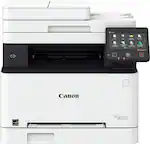
Canon - imageCLASS MF284dw Wireless Black-and- All-In-One Laser Printer with ADF - White
FREE shipping to
More Buying Options
Related Item

Specifications
- NetworkingWirelessENERGY STAR CertifiedYesPrinter TypeAll In One, Printer, Scanner, CopierDuty CycleUp to 2,500ISO Mono Print Speed35 pages per minuteMonochromatic/ColorMonochromatic
- Key Specs
- Networking: Wireless
- ENERGY STAR Certified: true (Devices carrying the ENERGY STAR service mark, such as computer products and peripherals, kitchen appliances, and other products, generally use 20% to 30% less energy than required by federal standards.)
- Printer Type: All In One, Printer, Scanner, Copier
- Duty Cycle: Up to 2,500 (The maximum number of pages per month that the device can produce without failing, as specified by the manufacturer.)
- ISO Mono Print Speed: 35 pages per minute (The number of black ink (grayscale) pages able to be printed per minute in the device's default single-side mode, as tested by the International Standards Organization (ISO).)
- Monochromatic/Color: Monochromatic
- General
- Brand: Canon
- Model Number: 6354C019
- Product Name: imageCLASS MF284dw Wireless Black-and-White All-In-One Laser Printer with ADF
- Color: White
- Display Screen: true
- Display Screen Size: 3 inches
- Dimensions
- Product Height: 15.5 inches (The out of box height of the item. Height is measured as the vertical distance from the bottom of the item to the top as it would be primarily used or placed.)
- Product Width: 15.4 inches (The out of box width of the item. Width is measured as the horizontal distance from one side of the item to the other as it would be primarily used or placed.)
- Product Depth: 15.7 inches (The out of box depth of the item. Depth is measured as the distance from the front of the item to the back as it would be primarily used or placed.)
- Product Weight: 27.6 pounds (The out of box weight of the item.)
- Features
- Automatic Document Feeder: true
- Photo Printing: false
- Touch Screen: true (Touch-screen devices make navigating more intuitive. Using a touch-screen display, you can do things such as tap to select, hold and drag to move items, swipe to scroll, and pinch to zoom.)
- Automatic Two-Sided Printing: true
- Wide Format Printing: false (Machines with this function support printing on media with widths between 18 and 100 inches, such as posters, banners, canvases, and more.)
- Wide Format Scanning: false
- Connectivity
- Wired Connectivity: USB-A
- Minimum System Requirements: Windows 10, Windows 11, Chrome OS, MacOS 10.14 or later, iOS, IPadOS
- Certifications Listings & Approvals
- EPEAT Qualified: true (The Electronic Product Environmental Assessment Tool (EPEAT) was designed to provide an environmental assessment tool for purchasers. In order to qualify for EPEAT, a product must meet all 23 required criteria.)
- EPEAT Level: Silver (The Electronic Product Environmental Assessment Tool (EPEAT) was designed to provide an environmental assessment tool for purchasers. In order to qualify for EPEAT, a product must meet all 23 required criteria. Products are rated Bronze, Silver or Gold based on how many of 28 optional criteria they meet (below 50%, 50%, 75%).)
- Paper Info
- Automatic Document Feeder Capacity: 35 sheets
- Maximum Document Length: 14 inches
- Maximum Document Width: 8.5 inches
- Paper Feeder: Cassette
- Supported Paper Sizes: Standard: 3 x 5 Inches to 8.5 x 14 Inches
- Tray Capacity: 250
- Ink
- Compatible Cartridges: Canon 072
- Ink Subscription Service Available: false (The printer monitors ink usage and alerts the subscription provider when levels are low. A purchased subscription provides refills of ink based on usage.)
- Ink Cartridges Required: 1 x Black (The quantity and color of ink cartridges required for the printer to operate.)
- Ink Cartridges Included: 1 x Black (The quantity and color of ink cartridges included.)
- Fax Info
- Integrated Fax: false
- Performance
- Approximate Page Yield (Black): 1400
- Printer Resolution (Black): Up to 1200 x 1200 (Refers to the number of pixels/dots, both horizontally and vertically, of the image produced by the printer in black ink. Generally, the higher the resolution, the sharper and cleaner the produced image.)
- Recommended Monthly Volume: 350-2500 (The maximum number of pages that can be printed per month, as recommended by the manufacturer. Printing in excess of this number may reduce the machine's overall lifespan or print quality over time.)
- First Page Out Time: 5 seconds (The time it takes the printer to print and deliver the first page in the output tray. May depend on the complexity of the copy being printed.)
- Scanner Info
- Scanner Resolution: Up to 300 x 600 (Refers to the number of pixels/dots, both horizontally and vertically, of the image produced by the scanner. Generally, the higher the resolution, the sharper and cleaner the produced image.)
- Other
- UPC: 013803372274
Designed for small office environments, the imageCLASS MF284dw model balances speedy performance and minimal maintenance. The MF284dw is easy to set up and offers media versatility to print on a variety of media types and sizes. Produce crisp, bold documents with fast print speeds of up to 35 pages per minute ¹, using high quality Canon Genuine Toner 072 / 072 H. The MF284dw offers paper capacity of up to 250 sheets in the paper tray and 35-sheet (1-sided) document feeder. The 5-line, adjustable touchscreen delivers an intuitive user experience. Easily connect and print through wirelessly from computers or mobile devices. Print using a variety of mobile apps, including the Canon PRINT app ² using your compatible mobile device. The MF284dw is also Chromebook compatible, so you can print schoolwork and other documents hassle-free. The MF284dw comes with a 1-year limited warranty ³ and is backed by Canon's Service and Support network.
- Prints up to 35 PPM: Produces documents quickly with a first print of approximately 4.9 seconds or less (letter).
- Up to 1200 x 1200 DPI for excellent print quality: Medium resolution for producing sharp text, even at 6 points or smaller, and graphics with thin lines and curves.
- Laser printers are best for high volume printing: They handle large volumes quickly and at a low cost per page. Toner (powder) is used instead of ink, so you get smudge-free images and text.
- Built-in duplex printing: Print on both sides of the page without turning it over manually, to minimize your printing costs and help the environment.
- Wireless printing: Wifi direct connection enables easy connection to mobile devices without a router.
- Mobile printing: Print on-the-go with Canon PRINT app, Apple Airprint, or Mopria Print Service.
- Toner compatibility: Compatible with Toner 072 and High Yield Toner cartridges.
- Large paper tray for high-volume printing: Reload less often with a the 250-sheet standard cassette.
- Chromebook compatible: · Chromebook compatible, so you can print schoolwork and other documents hassle-free.
- EPEAT Silver: Electronic Product Environmental Assessment Tool rating of silver. Silver-rated products meet all of the EPEAT required criteria and at least 50% of the optional criteria.
- Designed for small and medium size businesses: With the capabilities to print, scan, and copy with one machine the imageCLASS MF284dw is great for business use.
- Prints up to 35 PPM: Produces documents quickly with a first print of approximately 4.9 seconds or less (letter).
- Up to 1200 x 1200 DPI for excellent print quality: Medium resolution for producing sharp text, even at 6 points or smaller, and graphics with thin lines and curves.
- Laser printers are best for high volume printing: They handle large volumes quickly and at a low cost per page. Toner (powder) is used instead of ink, so you get smudge-free images and text.
- Built-in duplex printing: Print on both sides of the page without turning it over manually, to minimize your printing costs and help the environment.
- Wireless printing: Wifi direct connection enables easy connection to mobile devices without a router.
- Mobile printing: Print on-the-go with Canon PRINT app, Apple Airprint, or Mopria Print Service.
- Toner compatibility: Compatible with Toner 072 and High Yield Toner cartridges.
- Large paper tray for high-volume printing: Reload less often with a the 250-sheet standard cassette.
- Chromebook compatible: · Chromebook compatible, so you can print schoolwork and other documents hassle-free.
- EPEAT Silver: Electronic Product Environmental Assessment Tool rating of silver. Silver-rated products meet all of the EPEAT required criteria and at least 50% of the optional criteria.
- Designed for small and medium size businesses: With the capabilities to print, scan, and copy with one machine the imageCLASS MF284dw is great for business use.
Whats Included
- Canon imageCLASS MF284dw Wireless All-In-One Monochromatic Laser Printer
- Cartridge 072 Black Toner Cartridge Starter
- Power Cord
- Documentation
- Canon imageCLASS MF284dw Wireless All-In-One Monochromatic Laser Printer
- Cartridge 072 Black Toner Cartridge Starter
- Power Cord
- Documentation
Disclaimers
- [1] Print speed is based on internal testing. Print speed may vary, depending on the number of copies selected as well as the settings for size, type, and orientation of paper.
- [2] Canon PRINT is a free app available on the App Store and Google Play Store. For more information, including compatibility, please visit usa.canon.com/mobile-app. Please see the respective websites for Apple AirPrint and Mopria Print Service for compatibility and additional information.
- [3] Warranty program is subject to certain conditions and restrictions. See warranty card for details.
- The included Cartridge 072 is a starter size with approx 1,000 page yield.
- [1] Print speed is based on internal testing. Print speed may vary, depending on the number of copies selected as well as the settings for size, type, and orientation of paper.
- [2] Canon PRINT is a free app available on the App Store and Google Play Store. For more information, including compatibility, please visit usa.canon.com/mobile-app. Please see the respective websites for Apple AirPrint and Mopria Print Service for compatibility and additional information.
- [3] Warranty program is subject to certain conditions and restrictions. See warranty card for details.
- The included Cartridge 072 is a starter size with approx 1,000 page yield.
Q: Can I print wirelessly from my mobile device?
A: You can easily connect and print through wirelessly from computers or mobile devices.
Q: Does the printer have a touchscreen?
A: This printer does have a touchscreen.
Q: What is the maximum paper capacity of the printer?
A: The printer has a paper capacity of up to 250 sheets in the paper tray and a 35-sheet document feeder.
Q: What is the recommended monthly print volume for this printer?
A: The recommended monthly print volume for this printer is 350-2500 pages.
Q: What is the print speed of the printer?
A: The Canon imageCLASS MF284dw printer has a fast print speed of up to 35 pages per minute.
Q: What is the warranty on the printer?
A: The Canon imageCLASS MF284dw printer comes with a one-year limited warranty.
Q: Will this printer run on a Windows 7 system.
A: undefined
Q: Does this printer only do wireless connections.
A: Supports both types of connections
Compare similar products

Designed for small office environments, the imageCLASS MF284dw model balances speedy performance and minimal maintenance. The MF284dw is easy to set up and offers media versatility to print on a variety of media types and sizes. Produce crisp, bold documents with fast print speeds of up to 35 pages per minute ¹, using high quality Canon Genuine Toner 072 / 072 H. The MF284dw offers paper capacity of up to 250 sheets in the paper tray and 35-sheet (1-sided) document feeder. The 5-line, adjustable touchscreen delivers an intuitive user experience. Easily connect and print through wirelessly from computers or mobile devices. Print using a variety of mobile apps, including the Canon PRINT app ² using your compatible mobile device. The MF284dw is also Chromebook compatible, so you can print schoolwork and other documents hassle-free. The MF284dw comes with a 1-year limited warranty ³ and is backed by Canon's Service and Support network.
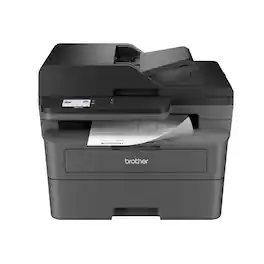
Best for small offices, the Brother MFC-L2820DW Wireless Compact Black & White (Monochrome) All-in-One Laser Printer is an affordable choice for high-volume printing, copying, scanning, and faxing. With print speeds up to 34 ISO pages per minute (1) (ppm) and automatic duplex printing, it quickly produces crisp, easy-to-read black & white prints. Versatile paper handling features like its 250-sheet paper tray (2) and 50-page auto document feeder (2) reduce the number of manual tasks in your day. The integrated 2.7” touchscreen makes navigation simple and allows you to print-from and scan-to popular cloud-based apps. (3) Flexible connection options include dual-band wireless, Ethernet, and USB 2.0 interfaces. Advanced security features provide peace of mind as they help safeguard your information and maintain secure connections while printing. An efficient, time-saving addition to any workspace, this affordable wireless printer combines four critical business functions into one compact footprint.

Designed for small and medium-size businesses, the imageCLASS MF273dw model balances speedy performance and minimal maintenance. The MF273dw is easy to set up and offers media versatility to print on a variety of media types and sizes, including envelopes. The 5-line, adjustable screen delivers an intuitive user experience. Produce crisp, bold documents with fast print speeds of up to 30 pages per minute 1, using high quality Canon Genuine Toner 071 / 071 H. The MF273dw offers paper capacity of up to 150 sheets in the paper tray and 35-sheet automatic document feeder. Easily connect and print through wirelessly2 from computers or mobile devices. Print using a variety of mobile apps, including the Canon PRINT Business app3 using your compatible mobile device. The MF273dw comes with a 1-year limited warranty4 and is backed by Canon's Service and Support network.
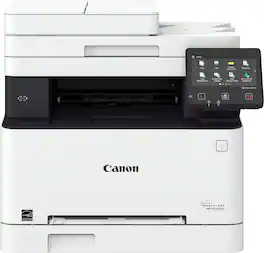
Designed for small and medium-size businesses, the imageCLASS MF654Cdw model balances speedy performance and minimal maintenance. The MF654Cdw is easy to set up and offers media versatility to print on a variety of media types and sizes, including envelopes, banners and more. The customizable, 5" color touchscreen delivers an intuitive user experience. Produce crisp, colorful documents with fast print speeds of up to 22 pages per minute1, using high quality Canon Genuine Toner 067 / 067 H. Use Poster Artist Online to create professional-posters, banners and signage. The MF654Cdw offers a plain paper capacity of up to 250 sheets, 1-sheet multipurpose tray, and 50-sheet simplex automatic document feeder. Easily connect and print through high-speed USB, Ethernet, or wirelessly from computers or mobile devices. Print using a variety of mobile apps, including the Canon PRINT Business app2 using your compatible mobile device. The MF654Cdw comes with a 3-year limited warranty3 and is backed by Canon's Service and Support network.
| Pros for Canon - imageCLASS MF284dw Wireless Black-and- All-In-One Laser Printer with ADF - White | |||
|---|---|---|---|
| There were no pros for this product— | Print Quality, Overall Performance, Ease of use, Setup, Connectivity | Print Quality, Overall Performance, Setup, Connectivity, Ease of Use | Print Quality, Ease of use, Overall Performance, Setup, Price |
| Cons for Canon - imageCLASS MF284dw Wireless Black-and- All-In-One Laser Printer with ADF - White | |||
| There were no cons for this product— | Noise Level | There were no cons for this product— | Noise Level, Size, Weight, Software |
Specs



Reviews
Customer Images
The vast majority of our reviews come from verified purchases. Reviews from customers may include My Best Buy members, employees, and Tech Insider Network members (as tagged). Select reviewers may receive discounted products, promotional considerations or entries into drawings for honest, helpful reviews.
- Rated 5 out of 5 stars
Awesome printer
This is my second Canon laser printer and is a definitely a much needed upgrade. The printer has all the features needed for today’s connectivity setup. My old printer wasn’t compatible with Windows 11 that’s why I had to replace it. I’m really glad I got this printer. I also enjoyed this beige color!
This review is from Canon - imageCLASS MF284dw Wireless Black-and- All-In-One Laser Printer with ADF - White
Posted by MarlonR
- Rated 5 out of 5 stars
Print, scan and copy!
I bought this All In One printer to replace a Brother one that I had for several years. Over the years, I have bought many printers. In the last ten years or so I have stuck with Canon printers. The old Brother one gave me a weird error message every time I wanted to use it "front door is open", so I was sick of that. I actually only really wanted this printer for the copying capability. I am one of those people who really likes to be able to make a copy when I need it. Sure I print to it once in a while just to use it, but it is in a room across the house, so I have to remember to turn it on first... I set this printer up all by myself, as usual. It did seem to take a bit to get it to work on my network, but I figured it out within 30 minutes. The commands seem to be intuitive. It does enlarge and reduce, and you can control the percentage with the numeric pad. The only thing I would say is a bit odd is when something prints, it sits in the dark opening in the middle without any part of the paper sticking out. It is not easy to see that there is anything there, I actually have to walk right up to it to see if my print job is there. Not a huge deal, but different than my old one. I like this Canon laser printer because I don't have to have a subscription for the toner, and I didn't want to pay a lot of money for color toner. Sure a color laser printer sounds cool but the reality is that I don't need it.
This review is from Canon - imageCLASS MF284dw Wireless Black-and- All-In-One Laser Printer with ADF - White
Posted by DaneG
- Rated 3 out of 5 stars
Inferior replacement for an older Canon all-in-one
This Canon MF284dw was purchased as a replacement for a MF229dw that lasted 9 years before the hinges broke. This new all-in-one (but without fax capability) seems flimsier, even though it is bulky and heavy. This device lacks a manual feed for envelopes and card stock and the non-touch display screen is small. Reviews on the Canon website comment on ease of setup (probably for Windows computers). This was not true in my case for an iMac, OS 12.7.2. I first tried connecting with a USB cable - the scan function worked from my computer but the print function did not despite replacing the printer driver several times. I then changed to a LAN wireless hookup. It was not intuitive to figure out how to do that and the online user manual was overly complex and ultimately of minimal help. Finally I was successful when I entered my network’s passcode where “Encrypt Key” was asked for. However, while the print function now works wirelessly, the scan function does not (even after replacing the scan driver). Meaning that I can print wirelessly but scanning requires the USB connection. In all, a less satisfactory product than my old ImageCLASS all-in-one.
This review is from Canon - imageCLASS MF284dw Wireless Black-and- All-In-One Laser Printer with ADF - White
Posted by elrol