Canon - PIXMA iX6820 Wireless Inkjet Printer - Black
Related Item

Specifications
- NetworkingWireless, WiredENERGY STAR CertifiedYesPrinter TypePrinterISO Color Print Speed10.4 pages per minuteISO Mono Print Speed14.5 pages per minute
- Key Specs
- Networking: Wireless, Wired
- ENERGY STAR Certified: true (Devices carrying the ENERGY STAR service mark, such as computer products and peripherals, kitchen appliances, and other products, generally use 20% to 30% less energy than required by federal standards.)
- Printer Type: Printer
- ISO Color Print Speed: 10.4 pages per minute (The number of color pages able to be printed per minute in the device's default single-side mode, as tested by the International Standards Organization (ISO).)
- ISO Mono Print Speed: 14.5 pages per minute (The number of black ink (grayscale) pages able to be printed per minute in the device's default single-side mode, as tested by the International Standards Organization (ISO).)
- General
- Brand: Canon
- Model Number: 8747B002
- Product Name: PIXMA iX6820 Wireless Inkjet Printer
- Color: Black
- Display Screen: false
- Dimensions
- Product Height: 6.3 inches (The out of box height of the item. Height is measured as the vertical distance from the bottom of the item to the top as it would be primarily used or placed.)
- Product Width: 23 inches (The out of box width of the item. Width is measured as the horizontal distance from one side of the item to the other as it would be primarily used or placed.)
- Product Depth: 12.3 inches (The out of box depth of the item. Depth is measured as the distance from the front of the item to the back as it would be primarily used or placed.)
- Product Weight: 17.9 pounds (The out of box weight of the item.)
- Features
- Automatic Document Feeder: false
- Photo Printing: true
- Wide Format Printing: false (Machines with this function support printing on media with widths between 18 and 100 inches, such as posters, banners, canvases, and more.)
- Wide Format Scanning: false
- Monochromatic/Color: Color
- Automatic Reduction/Enlargement: false
- Automatic Two-Sided Printing: false
- Tray Capacity: 150
- Duty Cycle: Unknown (The maximum number of pages per month that the device can produce without failing, as specified by the manufacturer.)
- Connectivity
- Wired Connectivity: Ethernet, USB-A
- Wireless Connectivity: Wi-Fi (The manner in which a device sends data to another device over a short distance without the use of wires or cables.)
- Minimum System Requirements: PC: Windows XP (32-bit, SP3), Vista (SP1, SP2), 7, 7 (SP1), 8 or 8.1; Mac: OS X v10.6.8 - 10.9
- Certifications Listings & Approvals
- EPEAT Qualified: false (The Electronic Product Environmental Assessment Tool (EPEAT) was designed to provide an environmental assessment tool for purchasers. In order to qualify for EPEAT, a product must meet all 23 required criteria.)
- Ink
- Compatible Cartridges: Canon PGI-250, Canon CLI-251
- Ink Subscription Service Available: false (The printer monitors ink usage and alerts the subscription provider when levels are low. A purchased subscription provides refills of ink based on usage.)
- Ink Cartridges Required: 1 x Pigment black, 1 x Blue, 1 x Cyan (The quantity and color of ink cartridges required for the printer to operate.)
- Ink Cartridges Included: 1 x Black, 1 x Black, 1 x Cyan, 1 x Yellow, 1 x Magenta (The quantity and color of ink cartridges included.)
- Ink Bags/Bottles Required: None (The quantity and color of ink bags/bottles required for the printer to operate.)
- Ink Bags/Bottles Included: None (The quantity and color of ink bags/bottles included.)
- Memory
- Memory Card Slot: false
- Paper Info
- Maximum Document Length: 19 inches
- Maximum Document Width: 13 inches
- Supported Paper Sizes: 4" x 6", 5" x 7", 8" x 10", 11" x 17", 13" x 19", letter, legal, U.S. #10 envelopes
- Paper Feeder: Tray loader
- Paper Handling: Input Tray: 150 Sheets
- Performance
- Printer Resolution (Black): Up to 9600 x 2400 (Refers to the number of pixels/dots, both horizontally and vertically, of the image produced by the printer in black ink. Generally, the higher the resolution, the sharper and cleaner the produced image.)
- Printer Resolution (Color): Up to 9600 x 2400 (Refers to the number of pixels/dots, both horizontally and vertically, of the image produced by the printer in colored ink. Generally, the higher the resolution, the sharper and cleaner the produced image.)
- Warranty
- Warranty - Parts: 1 year limited
- Warranty - Labor: 1 year limited
- Compatibility
- Works With: Amazon Alexa, Google Home (Compatible with or able to be connected to other smart devices or applications.)
- Other
- UPC: 013803230260
Generate high-quality photos and documents with this Canon Pixma iX6820 8747B002 printer, which features up to 9600 x 2400 optimized dpi resolution for crisp, detailed prints. Built-in wireless and Ethernet networking offer flexible connectivity options.
- Prints up to 14.5 ISO ipm* in black, up to 10.4 ISO ipm* in color: To generate documents quickly. Prints a borderless 4" x 6" photo in as little as 36 sec.*
- Be sure you have the right cartridge: Enter your printer's model number into our Ink and Toner Finder to find compatible cartridges. Get started ›
- Built-in wireless LAN (802.11b/g/n): Ensures fast data transfer from a wireless connection. Network-ready with a built-in Ethernet interface for simple connection to your home or office network.
- Up to 9600 x 2400 optimized dpi color resolution: Delivers crisp, detailed images.
- Produces 13" x 19" documents and photos: As well as 4" x 6", 5" x 7", 8" x 10", 11" x 17", letter and legal sizes and U.S. #10 envelopes to accommodate a variety of printing tasks.
- Prints photos without borders: Ideal for photo framing, scrapbooking and sending pictures to friends and family.
- ChromeLife100+ system: Utilizes enhanced FINE print technology to create long-lasting photos when using select Canon papers and inks (not included).
- Prints on plain, super-high gloss, glossy, semigloss, matte and chlorine-free paper: For versatile printing options.
- 150-sheet automatic input feeder: Lets you easily tackle large printing projects.
- USB interface: For simple connectivity.
- Prints up to 14.5 ISO ipm* in black, up to 10.4 ISO ipm* in color: To generate documents quickly. Prints a borderless 4" x 6" photo in as little as 36 sec.*
- Be sure you have the right cartridge: Enter your printer's model number into our Ink and Toner Finder to find compatible cartridges. Get started ›
- Built-in wireless LAN (802.11b/g/n): Ensures fast data transfer from a wireless connection. Network-ready with a built-in Ethernet interface for simple connection to your home or office network.
- Up to 9600 x 2400 optimized dpi color resolution: Delivers crisp, detailed images.
- Produces 13" x 19" documents and photos: As well as 4" x 6", 5" x 7", 8" x 10", 11" x 17", letter and legal sizes and U.S. #10 envelopes to accommodate a variety of printing tasks.
- Prints photos without borders: Ideal for photo framing, scrapbooking and sending pictures to friends and family.
- ChromeLife100+ system: Utilizes enhanced FINE print technology to create long-lasting photos when using select Canon papers and inks (not included).
- Prints on plain, super-high gloss, glossy, semigloss, matte and chlorine-free paper: For versatile printing options.
- 150-sheet automatic input feeder: Lets you easily tackle large printing projects.
- USB interface: For simple connectivity.
Whats Included
- Ink cartridges
- Owner's manual
- Pixma iX6820 Wireless Inkjet Printer
- Power cord
- Setup CD-ROM
- Ink cartridges
- Owner's manual
- Pixma iX6820 Wireless Inkjet Printer
- Power cord
- Setup CD-ROM
Product Manuals
Disclaimers
- *Requires a high-speed Internet connection.
- *Requires a high-speed Internet connection.
Q: What types of paper can I use with this printer?
A: This printer can print on plain, super-high gloss, glossy, semigloss, matte, and chlorine-free paper.
Q: How fast can this printer print a 4x6 photo?
A: This printer can print a borderless 4x6 photo in as little as 36 seconds.
Q: Does this printer have an automatic document feeder?
A: No, this printer does not have an automatic document feeder.
Q: Does this printer come with ink cartridges?
A: Yes, this printer comes with two black ink cartridges and three color ink cartridges.
Q: What is the maximum document size this Canon printer can handle?
A: This Canon printer can produce documents and photos up to 13 inches wide and 19 inches long.
Q: How many sheets of paper can the input tray hold?
A: The input tray can hold up to 150 sheets of paper.
Q: Will this printer print on 85 to 110lb cardstock?
A: YES. I only bought this printer to address postcards I had commercially printed. I use 14 point postcards, which are about equal to 114 pound card stock, maybe even 120 pound. It fed my first batch of 700 postcards without any misfeeds! You can load up to 30 or so sheets and it doesn't even choke! I think that since this printer is a wide format (can print up to 13 x 19 inch paper,) that they made it with a heavier feeding system, so it handles the heavy stock fairly easily.
A: Yes, all cartridges are included and it really is a great printer. I use it for photography and print full color prints, 11 x 14 and the ink lasts me a long time. It is just a printer, no other features. I would highly recommend. You can also try using generic ink on Canon printers that also has worked well for me and if all you are printing are documents it could work well for you and save money on cartridges. Worth trying it. I really do love the printer. Hope this helps.
Compare similar products

Generate high-quality photos and documents with this Canon Pixma iX6820 8747B002 printer, which features up to 9600 x 2400 optimized dpi resolution for crisp, detailed prints. Built-in wireless and Ethernet networking offer flexible connectivity options.

Print stunning, detailed photos with this Canon PIXMA iP8720 8746B002 photo printer, which features a color resolution up to 9600 x 2400 for crisp results. The built-in wireless LAN enables cord-free printing to simplify use.
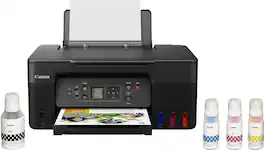
Designed for home and home offices, the Canon PIXMA G3270 MegaTank All-in-One inkjet printer delivers high-quality, low-cost printing, and outstanding wireless connectivity in a compact size. Get serious print productivity with a high page yield of up to 6,000 Black / 7,700 Color pages per full ink bottle1 set and a low cost per print - MegaTank means Mega Savings. The PIXMA G3270 comes with a full set of ink, so you can print with confidence. The PIXMA G3270 is easy to set up and maintain and offers great media versatility to print on a variety of media types and sizes, including photo paper, envelopes, banners and more. Use Poster Artist Online to create professional-posters, banners and signage. Print both documents and photos on a variety of paper types using a hybrid ink system with pigment black for sharp black text and dye-based colors for vivid borderless2 photos up to 8.5” x 11”. Produce crisp, colorful documents quickly and cost-effectively with fast print speeds and a high quality 4-color pigment-based ink system. Keep printing with a plain paper capacity of up to 100 sheets or 20 photo sheets (4”x6”). Easily connect and print through high-speed USB or wirelessly2 from computers or mobile devices. This comes with a 1-year limited warranty3 and is backed by Canon's Service and Support network.
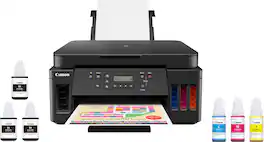
Canon PIXMA MegaTank G6020 Wireless All-In-One Printer: Save big on ink with this Canon PIXMA MegaTank inkjet printer. The MegaTank ink storage container can be easily refilled to offer over 30 times as much ink compared to standard cartridges. Tackle big print jobs with a page yield of up to 6,000 black or 7,700 color sheets from this Canon PIXMA MegaTank inkjet printer. Prints up to 13 ISO ipm* in black, up to 6.8 ISO ipm* in color
| Pros for Canon - PIXMA iX6820 Wireless Inkjet Printer - Black | |||
|---|---|---|---|
| Print Quality, Ease of use, Overall Performance, Price | There were no pros for this product— | Print Quality, Ease of use, Overall Performance, Setup, Connectivity | Print Quality, Ease of use, Overall Performance, Setup |
| Cons for Canon - PIXMA iX6820 Wireless Inkjet Printer - Black | |||
| Connectivity, Size, Setup | There were no cons for this product— | Noise Level, Automatic Document Feeder | Connectivity, Noise Level, Display, Control Panel |
Specs



Reviews
Customers are saying
Customers express satisfaction with the PIXMA iX6820 Wireless Inkjet Printer's excellent print quality, ease of use, and overall performance. The printer's price point is also appreciated by users. Some customers have reported minor connectivity issues and noted the printer's large size, especially considering it lacks a scanner or display. A few users found the initial setup process somewhat confusing.
Customer Images
The vast majority of our reviews come from verified purchases. Reviews from customers may include My Best Buy members, employees, and Tech Insider Network members (as tagged). Select reviewers may receive discounted products, promotional considerations or entries into drawings for honest, helpful reviews.
- Rated 5 out of 5 stars
SUPERB printer!
An absolute godsend! All my colors turn out great AND it works on a variety of materials- I've only just started playing around with it, but I'm really excited to test out some inkjet shrink film I ordered! Plus, it's great for making prints- I'm a digital artist, so I wanted to make sure I invested in a printer that could make my work shine, and this does the trick! My only complaint thus far has to do with how much desk space it eats up, but that's a me problem for sure- a bit of reorganizing should do the trick.
Posted by Ichi
- Rated 5 out of 5 stars
Canon baby
I love my Canon-Pixma iX6850. Initially I was concerned about the size but the quality of my prints made it all worth the purchase. This printer is high demand in the t-shirt industry for (beginners). Ease of use four stars as I normally have to ensure that the paper is place in tray correctly prior to printing.
Posted by Alda
- Rated 5 out of 5 stars
Best quality, best price best printer
 I bought a cricket machine that has all kinds of materials and printing out, decals onto vinyl or whatever type of printable material do they have. I’ll look at me printers all of them. Had one problem you get what you pay, for I considered a machine that was under $100 I guess it would work out really well but the print difference between $100 model and this model, I paid a little over 300 for  has very true to life colors. I compare the print to a actual photograph and obviously there’s no difference. I can pair the quality of the print with a picture I had on my computer, the print quality matched or exceeded the picture quality I  taken into account the fact that if your monitor doesn’t have a very good stream, the pictures are slightly off by colors because of the quality of your monitor  multicolored ink cartridges have enough texture and variance to make the pictures look so vibrant. I am reluctantly purchase this and now after I’ve used it for a month I don’t think I can get a bigger printer. I’ve been seeing some printers my friend has he paid $800 right painter I showed him one of my pictures that came out of my printer and I told him it came out of my canon and he couldn’t believe me so we tested it in the comparison was very close
Posted by Twodogs







