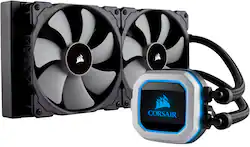
CORSAIR - Hydro Series 280mm Liquid Cooling System with RGB Lighting - Black/Gray
- Key Specs
- Airflow Volume: 55.4 cubic feet per minute
- Cooling System: Liquid (A computer's CPU generates heat while operating and requires a cooling system to keep internal components functioning properly. Air cooling uses fans to draw in cool air and exhaust hot air, while liquid cooling uses coolant-filled tubes and water blocks to regulate internal temperature more efficiently.)
- Fan Size: 140 millimeters
- Fan Speed: 1200 revolutions per minute
- Noise Level: 20.4 decibels adjusted
- Number of Fans Included: 2
- Lighting Type: RGB
- Product Height: 5.6 millimeters (The out of box height of the item. Height is measured as the vertical distance from the bottom of the item to the top as it would be primarily used or placed.)
- Product Width: 12.4 millimeters (The out of box width of the item. Width is measured as the horizontal distance from one side of the item to the other as it would be primarily used or placed.)
- Radiator Size: 280 millimeters (The overall size of the radiator based on the number of fans held within multiplied by the individual fan size.)
- General
- Product Name: Hydro Series 280mm Liquid Cooling System with RGB Lighting
- Brand: CORSAIR
- Model Number: CW-9060032-WW
- Color: Black/Gray
- Cooling
- Airflow Volume: 55.4 cubic feet per minute
- Cooling Fan Type: CPU
- Cooling System: Liquid (A computer's CPU generates heat while operating and requires a cooling system to keep internal components functioning properly. Air cooling uses fans to draw in cool air and exhaust hot air, while liquid cooling uses coolant-filled tubes and water blocks to regulate internal temperature more efficiently.)
- Fan Size: 140 millimeters
- Fan Speed: 1200 revolutions per minute
- Noise Level: 20.4 decibels adjusted
- Number of Fans Included: 2
- Heatsink Material: Aluminum with copper base
- Bearing Type: Magnetic bearing
- Features
- Lighting Type: RGB
- Customizable Lighting: true
- Dimensions
- Product Height: 5.6 millimeters (The out of box height of the item. Height is measured as the vertical distance from the bottom of the item to the top as it would be primarily used or placed.)
- Product Width: 12.4 millimeters (The out of box width of the item. Width is measured as the horizontal distance from one side of the item to the other as it would be primarily used or placed.)
- Product Length: 1.1 millimeters (The out of box length of the item. Length is measured as the longest dimension of the item.)
- Product Weight: 33.79 ounces (The out of box weight of the item.)
- Compatibility
- Radiator Size: 280 millimeters (The overall size of the radiator based on the number of fans held within multiplied by the individual fan size.)
- Other
- UPC: 843591026505
Keep sensitive electronic components from overheating with this CORSAIR Hydro Series CPU fan. Magnetic levitation provides maximum power and reduces noise, and the included CORSAIR Link software lets you adjust speeds, color and temperatures to your needs. This CORSAIR Hydro Series CPU fan shuts off at low temperatures to eliminate noise.
- Compatible with select Intel® and AMD processors: Including processors in an LGA1156, AM2, LGA1366, AM3, LGA1155, LGA2011, FM1, FM2, LGA1150, LGA2011-3, LGA1151, AM4 and LGA2066 socket.
- Dual 140mm PWM cooling fans: To transfer heat from components.
- Magnetic bearing design: Ensures long-lasting operation.
- 55.4 cfm airflow volume: Ensures efficient cooling.
- 20.4dBA noise level: Ensures quiet operation.
- 1200 rpm operating speed: For fast cooling.
- Customizable RGB backlit pump head: Provides vivid lighting effects to match your build.
- CORSAIR Link: Allows you to monitor the CPU and coolant temperature, adjust the fan speed and customize LED lighting using your desktop.
Whats Included
- Hydro Series H150i PRO RGB 280mm Liquid CPU Cooler
- Mounting kit for most modern CPU sockets
- Two ML Series PWM 120mm high performance fans
- USB cable for CORSAIR Link Integration
- Fan and radiator mounting screws
- Thermal compound (pre-applied)
- Quick Start Guide
A: the pump / CPU unit is completely square, so it can be mounted on the CPU in whatever direction (4 ways) that works best in your system. mine is 180deg
A: What I could tell after I installed the current one the H115i. My system itself runs pretty quite and I havent noticed any loud noises coming from the pump.
A: Hi, You'd have to measure the tubing and the space at the front to the CPU. If you have anything else we can help with, please reach out: support.corsair.com -Art
A: That's what they call a liquid cooling unit also known as an AIO which stands for all in one and it's a completely sealed unit you should not have to replace this item for at least 5 years I just gave my old cooling system to a friend and it's still going strong and it is 5 years old and I got this one for my new build, and it's non-refillable or expandable. Custom loop water cooling are those that have to be serviced every 3 to 6 months sometimes a year, You have to change out the fluids, and that can be either rigid tubing which you have to bend with a heat gun or flex tubing which you just have to cut the length.
Q: Does it come with the thermal paste already applied?
A: Yes, it is a thin layer. I scraped it off though because I have my own preference for thermal paste.
A: it's two 140mm fans
Q: Are the fans 140mm or 120mm? And in the included it said theirs 2 120mm fans.
A: they are 2 140mm fans
Q: This should keep my Ryzen 2700X Temperature nice and low while Overclocking correct?
A: You can keep a 2700X under load at around 65C. If you want results, get some other thermal paste.




















