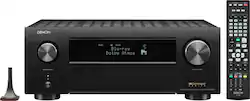
Denon - AVR-X4700H (125W X 9) 9.2-Ch. with HEOS and Dolby Atmos 8K Ultra HD HDR Compatible AV Home Theater Receiver with Alexa - Black
- Key Specs
- Number of Channels: 9.2 (The number of discrete channels of sound output. This can be a single number or multiple numbers separated by decimal(s). The first number is the primary, horizontally directed audio channels. The number after the first decimal, if applicable, is the number of subwoofer outputs or channels. The number after the second decimal, if applicable, is the number of height or atmospheric channels designed to immerse the listener by producing overhead sound effects.)
- Audio Only Inputs: 2 x Coaxial digital audio, 2 x Optical digital audio, 1 x Phono
- General
- Product Name: AVR-X4700H (125W X 9) 9.2-Ch. with HEOS and Dolby Atmos 8K Ultra HD HDR Compatible AV Home Theater Receiver with Alexa
- Brand: Denon
- Model Number: AVR-X4700H
- Color: Black
- Audio
- Number of Channels: 9.2 (The number of discrete channels of sound output. This can be a single number or multiple numbers separated by decimal(s). The first number is the primary, horizontally directed audio channels. The number after the first decimal, if applicable, is the number of subwoofer outputs or channels. The number after the second decimal, if applicable, is the number of height or atmospheric channels designed to immerse the listener by producing overhead sound effects.)
- Surround Sound Supported: DTS-HD Master Audio, DTS Neural:X, Dolby Surround, Auro 3D (Surround sound systems use multiple audio channels and speakers to create an immersive sound experience for the listener. There are also various proprietary technologies that imitate this kind of sound via a device's built-in speakers or soundbar.)
- Inputs
- Audio Only Inputs: 2 x Coaxial digital audio, 2 x Optical digital audio, 1 x Phono
- Video Only Inputs: 2 x Component video (The number and type of video signal only inputs the product has.)
- Number of HDMI Inputs (Total): 8
- Number of USB Inputs: 1
- Outputs
- Video Only Outputs: 1 x Component video (The number and type of video signal only outputs the product has.)
- Number of HDMI Outputs (Total): 3
- Features
- Remote Control Included: true
- Dimensions
- Product Height: 6.6 inches (The out of box height of the item. Height is measured as the vertical distance from the bottom of the item to the top as it would be primarily used or placed.)
- Product Width: 14.9 inches (The out of box width of the item. Width is measured as the horizontal distance from one side of the item to the other as it would be primarily used or placed.)
- Product Depth: 17.1 inches (The out of box depth of the item. Depth is measured as the distance from the front of the item to the back as it would be primarily used or placed.)
- Product Weight: 30.2 pounds (The out of box weight of the item.)
- Other
- UPC: 883795005067
Immerse yourself in high-power, precision-based home theater entertainment with the new Denon AVR-X4700H. With 125W per channel (8 ohms, 20Hz-20kHz, THD: 0.05%, 2 ch. driven) this performance-tuned Denon receiver delivers a truly immersive 3D audio experience with eARC support. The AVR-X4700H features the latest in 3D audio formats such as Dolby Atmos, Dolby Atmos Height Virtualization Technology, DTS:X, DTS Virtual:X, IMAX Enhanced and Auro-3D. The AVR-X4700H also supports the latest video technologies such as 8K/60Hz and 4K/120Hz* pass-through, Dolby Vision, HDR10, HDR10+, Dynamic HDR, HLG, as well as 8K upscaling and HDCP 2.3 support on all HDMI ports (8 in/3 out).
*Does not support pass-through from all 4K/120Hz media sources
- Unmatched 3D Realism: Bring your movies and music to life with immersive surround sound with Dolby Atmos Height Virtualization, Auro-3D, IMAX Enhanced, DTS Virtual:X and Dolby Atmos, and crisp, clean picture with advanced video processing, 8K/60Hz, and 4K/120Hz* pass-through
- 8K Ready Amplifier: Enjoy high quality 3D audio & video knowing that AVR-X4700H IS 8K READY WHEN YOU ARE. This high-power amplifier capable of 11.2 channel processing allows to build your choice of speaker configuration TO MEET YOUR EXCLUSIVE ENTERTAINMENT NEEDS
- Next Gen Gaming: Enjoy a smooth, lag-free gaming experience with spectacular imaging, reduced lag & frame tearing with 4K/120Hz* pass-through, Variable Refresh Rate (VRR), Quick Frame Transport (QFT), and Auto Low Latency Mode (ALLM)
- The Most Advanced Video Technologies: This 9.2-Ch receiver supports High Dynamic Range video format such as HDR10, Dolby Vision & HLG, and Quick Media Switching for eliminating video delays. Also supports Dynamic HDR, HDR10+ for more realistic imaging in supreme clarity, contrast & color
- Connect with any HD/Ultra HD TV, Subwoofer, Blu-Ray Player & Turntable for Incredible Stereo Sound: USB, 11 HDMI ports (8 In/ 3 Out) with HDCP 2.3 processing, Digital In, Phono input & Network support with a range of wireless connections
- Extend the Reach of your Music: Listen to music in any room in the house via Wi-Fi, Airplay 2 or Bluetooth with HEOS MULTI-ROOM WIRELESS SPEAKERS like the Denon Home series, without any extra hardware. Get Hi-Fi audio around your home with Pandora, Spotify, TuneIn & more
- Full Voice Control Compatibility with Amazon Alexa: Adjust the volume, change tracks & switch inputs absolutely hands-free with Amazon Alexa voice control. Also works with Google Assistant, Apple Siri & integrates with home-automation systems like Josh.ai & Control4 SDPP
- Award-Winning On-Screen Setup Assistant: Denon’s on-screen Setup Assistant provides simple, clear instructions to connect your TV, & Audyssey MultEQ XT32 (with 2 preset options) that accurately calibrates all speakers in your home setup & tunes the AVR for an optimal listening experience
- Note about 4K/120Hz pass-though: *Does not support pass-through from all 4K/120Hz media sources
Q: Does this receiver have the infamous HDMI 2.1 bug/flaw?
A: This has been fixed for all units manufactured since May of 2021. All models with serial numbers that end with serial numbers from 70001 (inclusive) upwards are what your looking for. After talking with customer support, they told me that all stock had been replaced, I took the gamble and ordered the AVR-X4700H on 8/17/21 and received one with 72xxx and have no problems with my series X or PS5.
A: Yes, the Denon units (I have the 4500 and 4700) run warm. The louder you play (more power from the amps) the warmer the unit will get. IMO, warm is not hot. Temp readings that I have taken range at the high end 112 - 120 degrees F. Certainly warm to the touch but not hot. My cable box DVR gets almost as hot. So a well ventilated cabinet with room above the unit should be fine. I would worry about temps if the temp got above 140/145 F, that would be considered hot. most consumer electronic IC's are rated to to 70 degrees C (158 degrees F). Don't forget that the Denon unit also has internal fans that will kick in. As far as which Aircom to go with depends entirely on your cabinet set up. Is you cabinet open in the front or is it open to the back. Depending on your answer should determine which direction Aircom you should get. I will say for my set up, I do not feel the necessity to add additional cooling. Additionally Denon has an eco mode that will help the unit get not as warm. I personally don't use Eco mode. Hope this answer helped.
A: Make sure the i/p Scaler is set correctly (GUI: Video - Output Settings) and the 4K/8K Signal Format is set to 8K Enhanced. (GUI: Video) I would also try setting the Resolution to 8K instead of Auto.
A: The latest production runs will not have the bug. For units with the bug, to the best of my knowledge Denon will not be fixing them, so the dongle and firmware update are still required. This article explains what serial numbered units are bug free: https://www.avforums.com/news/denon-and-marantz-avrs-made-after-may-2021-are-hdmi-2-1-bug-free.18985
Q: Does this have HDMI 2.0 or HDMI 2.1?
A: The X4700H is HDMI version 2.1.
A: If you have the space, I would suggest the 24" depth because you will be making cable connections behind the AVR with hdmi and speaker cables and you need adequate space behind the cabinet for all the cables and connections to run in and out. 18" depth may be a little tight. Enjoy!
A: As long as the amp's trigger is 12V based, then it will power on whenever you power on the AVR. You just need a 3.5 mm mono male to male cable for the trigger wire.
A: Hello, our Denon AVR-X4700H comes equipped with one 8K-4K 120HZ capable HDMI input. We offer the Denon AVS-3 8K HDMI switcher if more is required. (sold separately) The AVS-3 connects up to three 8K-4K 120HZ devices.




















