Epson - WorkForce WF-2960 All-in-One Inkjet Printer - Black
FREE shipping to
More Buying Options
Related Item

Specifications
- NetworkingWired, WirelessENERGY STAR CertifiedYesPrinter TypeAll In OneISO Color Print Speed7.5 pages per minuteISO Mono Print Speed14 pages per minuteTouch ScreenYes
- Key Specs
- Networking: Wired, Wireless
- ENERGY STAR Certified: true (Devices carrying the ENERGY STAR service mark, such as computer products and peripherals, kitchen appliances, and other products, generally use 20% to 30% less energy than required by federal standards.)
- Printer Type: All In One
- ISO Color Print Speed: 7.5 pages per minute (The number of color pages able to be printed per minute in the device's default single-side mode, as tested by the International Standards Organization (ISO).)
- ISO Mono Print Speed: 14 pages per minute (The number of black ink (grayscale) pages able to be printed per minute in the device's default single-side mode, as tested by the International Standards Organization (ISO).)
- Touch Screen: true (Touch-screen devices make navigating more intuitive. Using a touch-screen display, you can do things such as tap to select, hold and drag to move items, swipe to scroll, and pinch to zoom.)
- General
- Brand: Epson
- Model Number: C11CK60201
- Product Name: WorkForce WF-2960 All-in-One Inkjet Printer
- Color: Black
- Display Screen: true
- Display Screen Size: 2.4 inches
- Dimensions
- Product Height: 10 inches (The out of box height of the item. Height is measured as the vertical distance from the bottom of the item to the top as it would be primarily used or placed.)
- Product Width: 16.4 inches (The out of box width of the item. Width is measured as the horizontal distance from one side of the item to the other as it would be primarily used or placed.)
- Product Depth: 19.8 inches (The out of box depth of the item. Depth is measured as the distance from the front of the item to the back as it would be primarily used or placed.)
- Product Weight: 14.1 pounds (The out of box weight of the item.)
- Features
- Automatic Document Feeder: true
- Photo Printing: false
- Wide Format Scanning: false
- Monochromatic/Color: Color
- Automatic Reduction/Enlargement: true
- Automatic Two-Sided Printing: true
- Tray Capacity: 150
- Connectivity
- Wired Connectivity: USB-A
- Wireless Connectivity: Wi-Fi (The manner in which a device sends data to another device over a short distance without the use of wires or cables.)
- Minimum System Requirements: Windows 11/10/8.1/8/7 (32-bit, 64-bit), Windows Vista® (32-bit, 64-bit), Windows XP SP3 or later (32-bit), Windows XP Professional x64 Edition SP2 or later, Windows Server®2022/2019/2016/2012R2/2012/2008R2/2008/2003R2, 2003 SP2 or later
- Scanner Info
- Scanner Type: Flatbed
- Scanner Resolution: Up to 1200 x 2400 (Refers to the number of pixels/dots, both horizontally and vertically, of the image produced by the scanner. Generally, the higher the resolution, the sharper and cleaner the produced image.)
- Fax Info
- Integrated Fax: true
- Ink
- Compatible Cartridges: Epson T222
- Ink Cartridges Included: 1 x Black, 1 x Cyan, 1 x Magenta, 1 x Yellow (The quantity and color of ink cartridges included.)
- Ink Bags/Bottles Required: None (The quantity and color of ink bags/bottles required for the printer to operate.)
- Ink Bags/Bottles Included: None (The quantity and color of ink bags/bottles included.)
- Paper Info
- Automatic Document Feeder Capacity: 30 sheets
- Supported Paper Sizes: Letter, A4, Legal, 8" x 10", 5" x 7", 4" x 6", 3.5" x 5", Executive, Half Letter, A6, User Defined: 3.5" x 5" to 8.5" x 47.2"
- Paper Feeder: Tray loader
- Paper Handling: Supports Plain Paper/Bright White Paper, Ultra Premium Photo Paper Glossy, Premium Photo Paper Glossy, Photo Paper Glossy, Premium Photo Paper Semi-gloss, Presentation Paper Matte, Premium Presentation Paper Matte
- Certifications Listings & Approvals
- TWAIN Compliant: true (Products with this label are compliant with standards set by the TWAIN Working Group for regulating communication between software and digital imaging devices. Devices that are TWAIN compliant are compatible for use with each other without requiring additional software, even if they have different capabilities.)
- Performance
- Printer Resolution (Black): Up to 4800 x 1200 (Refers to the number of pixels/dots, both horizontally and vertically, of the image produced by the printer in black ink. Generally, the higher the resolution, the sharper and cleaner the produced image.)
- Printer Resolution (Color): Up to 4800 x 1200 (Refers to the number of pixels/dots, both horizontally and vertically, of the image produced by the printer in colored ink. Generally, the higher the resolution, the sharper and cleaner the produced image.)
- Copier Info
- Copier Resolution (Black): Up to 600 x 600 (Refers to the number of pixels/dots, both horizontally and vertically, of the image produced by the copier in black ink. Generally, the higher the resolution, the sharper and cleaner the produced image.)
- Copier Resolution (Color): Up to 600 x 600 (Refers to the number of pixels/dots, both horizontally and vertically, of the image produced by the copier in colored ink. Generally, the higher the resolution, the sharper and cleaner the produced image.)
- Compatibility
- Works With: Amazon Alexa, Siri (Compatible with or able to be connected to other smart devices or applications.)
- Other
- UPC: 010343968622
You have a lot on your plate and need a printer that’s going to give you great results without slowing you down. Our fastest WorkForce printer for home offices, the WorkForce WF-2960 delivers presentations, spreadsheets, flyers and more at remarkable speeds. Engineered with Epson’s leading-edge PrecisionCore technology, this all-in-one printer consistently produces professional-quality prints with rich, vibrant colors and crisp text. With a built-in scanner, copier, fax and Auto Document Feeder—plus, a large 2.4" color touchscreen display and 150-sheet paper tray—the WF-2960 is the ultimate printer for productive home offices.
- Professional-quality home office printing: Epson’s leading-edge PrecisionCore technology delivers sharp text and vibrant color graphics at fast speeds
- Our fastest WorkForce printer for home offices: Stress-free setup and operation
- Stress-free setup and operation: Features a large 2.4" color touchscreen display for effortless navigation, plus easy installation and operation through your smartphone or tablet using the Epson Smart Panel app
- Engineered for reliability: Consistently delivers high-quality prints with heat-free technology and a PrecisionCore permanent printhead designed to last the life of the printer
- Efficient, economical design: Automatic 2-sided printing helps you save paper and reduce paper waste
- Convenient connectivity: Supports easy wireless connections, Ethernet and printing from Android or iOS devices
- Easy, affordable color printing: Individual ink cartridges make it easy to only replace the ink you need
- Hands-free, voice-activated printing: Easily print on the go using Alexa and Siri
- Versatile functionality: Create searchable PDFs and more with included Epson ScanSmart scanning software
- Epson printing system is designed to be used exclusively with Epson genuine cartridges: Use of non-genuine ink could cause damage not covered under the printer’s limited warranty
- Professional-quality home office printing: Epson’s leading-edge PrecisionCore technology delivers sharp text and vibrant color graphics at fast speeds
- Our fastest WorkForce printer for home offices: Stress-free setup and operation
- Stress-free setup and operation: Features a large 2.4" color touchscreen display for effortless navigation, plus easy installation and operation through your smartphone or tablet using the Epson Smart Panel app
- Engineered for reliability: Consistently delivers high-quality prints with heat-free technology and a PrecisionCore permanent printhead designed to last the life of the printer
- Efficient, economical design: Automatic 2-sided printing helps you save paper and reduce paper waste
- Convenient connectivity: Supports easy wireless connections, Ethernet and printing from Android or iOS devices
- Easy, affordable color printing: Individual ink cartridges make it easy to only replace the ink you need
- Hands-free, voice-activated printing: Easily print on the go using Alexa and Siri
- Versatile functionality: Create searchable PDFs and more with included Epson ScanSmart scanning software
- Epson printing system is designed to be used exclusively with Epson genuine cartridges: Use of non-genuine ink could cause damage not covered under the printer’s limited warranty
Whats Included
- WorkForce WF-2960 All-in-One Printer
- power cord
- 4 Claria 222 Ink cartridges (1x Black ink cartridge and 3x color ink cartridges: 1x Cyan, 1x Magenta, 1x Yellow)
- Quick Start Guide
- WorkForce WF-2960 All-in-One Printer
- power cord
- 4 Claria 222 Ink cartridges (1x Black ink cartridge and 3x color ink cartridges: 1x Cyan, 1x Magenta, 1x Yellow)
- Quick Start Guide
Q: Why should I use Epson genuine cartridges?
A: The Epson printing system is designed to be used exclusively with Epson genuine cartridges. Use of non-genuine ink could cause damage not covered under the printer’s limited warranty.
Q: What is the paper tray capacity of this printer?
A: This printer has a 150-sheet paper tray capacity.
Q: Does this Epson printer have a scanner?
A: Yes, the Epson Workforce WF-2960 is an all-in-one printer that includes a built-in scanner.
Q: Does this printer use ink cartridges or ink bottles?
A: This model is compatible with Epson T222 ink cartridges and does not use ink bottles.
Q: How do you set up this printer?
A: This Epson printer offers stress-free setup and operation and can easily be installed and operated through your smartphone or tablet using the Epson Smart Panel app.
A: Yes, this printer supports easy wireless connections, Ethernet and printing from Android or iOS devices.
Q: What is the size of the touchscreen display?
A: The touchscreen display is 2.4 inches.
Q: Can this printer duplex scan to a PDF using the ADF and duplex copy using the ADF?
A: Hello Scott1962. The WF-2960 can do automatic 2-sided printing. Unfortunately, 2-sided scanning is not available on the printer. Regards, Kevin - The Epson Team.
Compare similar products

You have a lot on your plate and need a printer that’s going to give you great results without slowing you down. Our fastest WorkForce printer for home offices, the WorkForce WF-2960 delivers presentations, spreadsheets, flyers and more at remarkable speeds. Engineered with Epson’s leading-edge PrecisionCore technology, this all-in-one printer consistently produces professional-quality prints with rich, vibrant colors and crisp text. With a built-in scanner, copier, fax and Auto Document Feeder—plus, a large 2.4" color touchscreen display and 150-sheet paper tray—the WF-2960 is the ultimate printer for productive home offices.
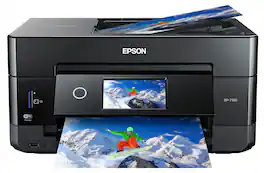
Get creative with this Epson Expression Premium XP-7100 Small-in-One printer. This compact device quickly prints gorgeous, durable photos with smudge-resistant Claria ink and lets you explore your creativity with specialty paper and DVD printing. This Epson Expression Premium XP-7100 Small-in-One printer gets the job done quickly with the 30-page auto document feeder and two-sided printing, scanning and copying.Fast print speeds up to 15.8 ISO ppm* in black, up to 11 ISO ppm* in color; creates a 4" x 6" photo-quality print in as little as 12 seconds.*
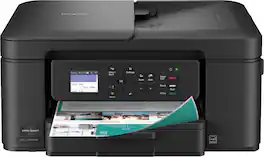
The Brother Work Smart 1360 Wireless All-in-One Refresh Subscription Eligible Inkjet Printer is the perfect choice for a reliable printer with robust efficiency-boosting features. With tools like automatic duplex (2-sided) printing, a 20-page single-sided automatic document feeder(1), and wireless(2) and Cloud connectivity(3) options available on the 1.8” color display, this multifunction printer helps you get your work done with simplicity and ease. Perfect for printing anything from to-do lists to business reports, this color inkjet printer outputs quality prints at fast speeds. Brother Page Gauge(4) monitors your ink usage so you know when you’re running low. When paired with the Brother Mobile Connect app(5), setup is quick and easy – plus, you’ll be able to print from virtually anywhere on your mobile device(6). Print Confidently with Brother Genuine LC501 Ink in your Brother Work Smart 1360 for reliable, consistent prints –it’s the only brand we recommend for your Brother printer.
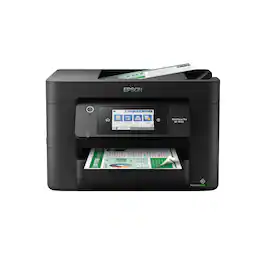
Experience the power of high-performance business printing with the WorkForce Pro WF-4820. Providing high-speed printing, the WF-4820 blazes through high-volume print jobs at an astounding 25 black/12 color ISO ppm†. Built for productivity, this reliable printer consistently delivers sharp, professional-quality prints with innovative PrecisionCore Heat-Free Technology and vivid DURABrite Ultra instant-dry pigment inks. An efficient, easy-to-use solution, the WF-4820 offers convenient features designed to enhance efficiency and streamline workflow, including a large, 4.3" color touchscreen for intuitive navigation, a 250-sheet paper capacity, auto 2-sided printing, wireless connectivity and more.
| Pros for Epson - WorkForce WF-2960 All-in-One Inkjet Printer - Black | |||
|---|---|---|---|
| There were no pros for this product— | Print Quality, Ease of use, Overall Performance, Size, Setup | Print Quality, Size, Setup Ease, Connectivity, Noise Level | Print Quality, Ease of use, Overall Performance, Setup, Size |
| Cons for Epson - WorkForce WF-2960 All-in-One Inkjet Printer - Black | |||
| There were no cons for this product— | Paper Tray | There were no cons for this product— | Scanning |
Specs
Reviews
Customer Images
The vast majority of our reviews come from verified purchases. Reviews from customers may include My Best Buy members, employees, and Tech Insider Network members (as tagged). Select reviewers may receive discounted products, promotional considerations or entries into drawings for honest, helpful reviews.
- Rated 3 out of 5 stars
ink lasts a month.
return window is insanely short. printer was delivered on march 25th & the date to return by was april 9th. that’s not even enough time to really test out all of its features, so I guess I’m keeping it or reselling it. from what I actually did get to do, which was print, again, I got the printer march 25th & here it is may 2nd & I’m already out of ink. I shouldn’t have to purchase ink every month or every other month. I try not to be harsh on reviews so I really don’t know if I would recommend this printer or not— this is my first time purchasing a printer.
This review is from Epson - WorkForce WF-2960 All-in-One Inkjet Printer - Black
Posted by Nikeva
- Rated 4 out of 5 stars
Workforce WF-2960
Just got it installed so I don't have much of an opinion but I liked my older epson all in one better and don't like that tiny touch screen on this machine, guess I'll get used to it
This review is from Epson - WorkForce WF-2960 All-in-One Inkjet Printer - Black
Posted by Mimi
- Rated 1 out of 5 stars
Do not buy!
Every time the printer does a system update, the current ink cartridges show an error and are useless. I am now buying new ink cartridges for the third time even though the ones I have are almost full. I have spent hours trying to troubkeshoot the issue. That is my one and only issue with the printer. I love everything else about it, so it is really disappointing to have this issue!
This review is from Epson - WorkForce WF-2960 All-in-One Inkjet Printer - Black
Posted by KMPo






