Fujitsu - ScanSnap iX1500 Touchscreen Scanner - Black
FREE shipping to
Related Item

Specifications
- Scan MethodSingle pass
- Key Specs
- Scan Method: Single pass
- General
- Brand: Fujitsu
- Model Number: PA03770-B315
- Product Name: Fujitsu ScanSnap iX1500 Touchscreen Scanner, Black
- Color: Black
- Connectivity
- Scanner Connectivity: USB 3.0, Wi-Fi
- Features
- Automatic Document Feeder Capacity: 50 sheets
- Automatic Document Feeder Included: true
- Scanner Type: Document, Business Card, Receipt Scanners
- Certifications Listings & Approvals
- ENERGY STAR Certified: true (Devices carrying the ENERGY STAR service mark, such as computer products and peripherals, kitchen appliances, and other products, generally use 20% to 30% less energy than required by federal standards.)
- Other
- UPC: 097564309656
The next-generation Wi-Fi Cloud-Enabled ScanSnap iX1500 scanner comes equipped with a smart touch screen, providing an easy to use interface with simple icons and an intuitive user experience. The ScanSnap iX1500 is equipped with a user-friendly 4.3 inch touch screen interface for enhanced usability and functionality. With Access Point Connect and Direct Connect modes, users can place the new scanner anywhere that is most convenient for them. The new intuitive scanner also comes with new ScanSnap Home software that combines all the popular functions of our business card, receipt, and document management apps into one interface for easier management and editing.
- Maximum Resolution: 600 dpi
- Sheet Capacity: 50
Whats Included
- Fujitsu ScanSnap iX1500 Touchscreen Scanner, Black
Q: What is the difference (other than color) between the black model and the white model?
A: Thank you for your interest in Fujitsu iX1500. There is no difference except the colour. Hardware specification are exactly the same, and the software that comes with them are both identical and available to download from our website. Product specifications link https://www.fujitsu.com/ca/en/products/computing/peripheral/scanners/soho/ix1500/ Software download link http://scansnap.fujitsu.com/global/dl/ Hope that helps.
Q: Does IX1500 suitable for pictures too. Can I use it to scan my older pictures?
A: Thank you for contacting PFU Canada support. The iX1500 can scan documents and pictures in five modes, Auto, Normal (150 dpi), Better (200 dpi), Best (300 dpi) and Excellent (600 dpi). The higher the dpi's (dots per inch) the slower the scanner goes to capture a higher resolution scan. Now scanning pictures is a loaded question, it would depend on how old the photographs are and the condition they are in. If the photographs are falling apart due to age, this scanner would not be the best candidate for you, as this scanner will contact/touch the photograph as it grabs the picture into the scanner. If the photos are crumbling, a flatbed model would be best for you. If most photographs, are in good condition, then yes, this scanner will do a great job for you.
A: Thank you for contacting PFU Canada support. You have the option to do either, depends on the settings you use in your profile. The scanner has an input sheet of 50 pages. If you put one page or 50, when the input chute empties, you have the option to continue to add more pages to the same PDF or complete the PDF. Continuous mode needs to be enabled in your profile to enable that.
Q: What type of toner replacement and what is cost?
A: Thank you for contacting PFU Canada support. The scanner requires consumables (roller set) to be replaced approximately every 200K pages scanned. The frequency also depends on the type of paper and what type of ink is used on the document. The consumable kit, which contains a pick and brake roller usually costs around $40.00. The iX1500 kit number is PA03656-0001 and it usually available through the stores that sell the scanner.
Q: Does this scanner scan front and back on a single scan or multiple scans.
A: Thank you for your interest in our Fujitsu ix1500. Yes, the scanner will scan both sides of the page in a single scan. This is called duplex scanning. The software can also be set to that if it detects a blank page, it will automatically delete that blank page to keep the PDF output smaller. This option can be turned on or off through the software panels.
Q: Is this scanner wireless? Will it send a PDF to my email? Do I need any accessories to go with this?
A: Thank you for contacting PFU Canada support. Yes, the ix1500 supports USB and wireless. You can create PDF and save them to folders or scan to email, as long as you have an email client installed on your pc. ie: Outlook. Here's our product brochure. http://origin.pfultd.com/downloads/IMAGE/catalog/ScanSnap_iX1500_Brochure_201912.pdf The scanning software is included with the product.
Compare similar products
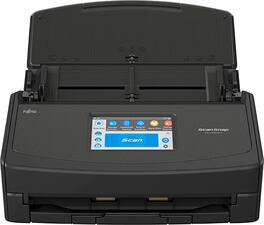
The next-generation Wi-Fi Cloud-Enabled ScanSnap iX1500 scanner comes equipped with a smart touch screen, providing an easy to use interface with simple icons and an intuitive user experience. The ScanSnap iX1500 is equipped with a user-friendly 4.3 inch touch screen interface for enhanced usability and functionality. With Access Point Connect and Direct Connect modes, users can place the new scanner anywhere that is most convenient for them. The new intuitive scanner also comes with new ScanSnap Home software that combines all the popular functions of our business card, receipt, and document management apps into one interface for easier management and editing.
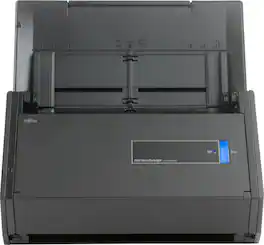
Scan numerous documents within moments with this Fujitsu document scanner. It takes just one button to create a PDF directly from the machine so that you can store receipts and everything else, and USB 3.0 connectivity keeps data running smoothly. With its advanced paper feeding system, this Fujitsu document scanner can handle numerous pieces of paper.

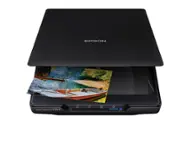
Preserve what’s priceless with the Epson FastFoto FF-680W — the World’s Fastest Personal Photo Scanner. Scan thousands of photos — as fast as 1 photo per second. Easily restore, save, organize and share photos, postcards, panoramas, documents and more. The convenient mobile app enables you to capture the voice of loved ones and create slideshows, so you can easily share stories about your photos right from your smartphone, from a firsthand perspective, for generations to come. Plus, FastFoto brings old photos to life with auto enhancement, color restoration and more. Offering the ultimate in versatility, it includes a variety of format options for quick sharing, archiving and enlargements
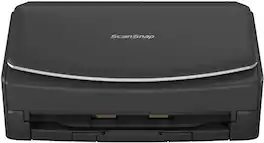
Secure soft copies of important documents with this Fujitsu ScanSnap wireless scanner. Wi-Fi and USB connectivity enable file transmission to computers and smart devices, and the 4.3-inch touch screen display simplifies operation. This Fujitsu ScanSnap wireless scanner processes up to 30 pages per minute and has a 50-page automatic document feeder for efficient performance.
| Pros for Fujitsu - ScanSnap iX1500 Touchscreen Scanner - Black | |||
|---|---|---|---|
| There were no pros for this product— | There were no pros for this product— | Scanning Speed, Ease of use, Image Quality, Software, Size | There were no pros for this product— |
| Cons for Fujitsu - ScanSnap iX1500 Touchscreen Scanner - Black | |||
| There were no cons for this product— | There were no cons for this product— | Price, Jamming, Connectivity, Compatibility | There were no cons for this product— |
Specs
Reviews
The vast majority of our reviews come from verified purchases. Reviews from customers may include My Best Buy members, employees, and Tech Insider Network members (as tagged). Select reviewers may receive discounted products, promotional considerations or entries into drawings for honest, helpful reviews.
- Rated 5 out of 5 stars
Worlds best scanner, hands down.
This scanner is the absolute best, if it's possible to love a scanner. Purchased as an upgrade from the previous model for the color touch screen. Cannot recommend enough, it scans both side, you can stack several pages at once, you can also scan business cards or thicker ID cards. It's not cheap but its worth every penny.
This review is from Fujitsu - ScanSnap iX1500 Touchscreen Scanner - Black
Posted by TMM22
- Rated 5 out of 5 stars
Best Scanner Ever
Fantastic Quality, Speed And Its Wireless Going To Buy Another One
This review is from Fujitsu - ScanSnap iX1500 Touchscreen Scanner - Black
Posted by Dracos
- Rated 5 out of 5 stars
Great Scanner for Professional and Home Use
Great scanner! Purchased for use in our dental office to quickly scan documents and patient information. It was easy to set up and install and works great! Very pleased with the quality and overall speed.
This review is from Fujitsu - ScanSnap iX1500 Touchscreen Scanner - Black
Posted by BAGHudson