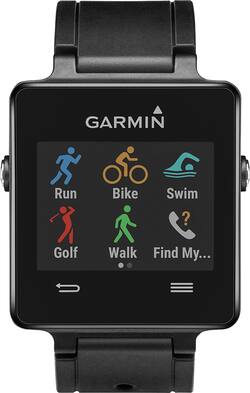
Garmin - vívoactive Smartwatch 28.6mm Plastic - Black Silicone
- Key Specs
- Screen Size: 1.13 millimeters (Size of the screen, measured diagonally from corner to corner.)
- Touch Screen: true (Touch-screen devices make navigating more intuitive. Using a touch-screen display, you can do things such as tap to select, hold and drag to move items, swipe to scroll, and pinch to zoom.)
- Operating System Compatibility: Android, Apple iOS
- Operating System: Garmin (The operating system manages all software and hardware, including files, memory and connected devices. Most importantly, it lets you interact with your device and your programs in a visual way; otherwise, you'd be typing computer code to get anything done.)
- Carrier: Unlocked
- Global Positioning: GPS (A system of satellites which enables a mobile receiver to determine its precise location based on signals received from satellites such as the US Global Positioning System (GPS), the Russian Global Navigation Satellite System (GLONASS), the European Global Navigation Satellite System (Galileo), or the Japanese Quasi-Zenith Satellite System (QZSS).)
- Metrics Measured: Activity vs. inactivity, Calories burned, Distance traveled, Other, Pace, Speed, Steps taken
- Maximum Depth of Water Resistance: 164 feet (Measurement of the maximum depth of water in which the product is able to resist some degree of water penetration.)
- Band Material: Silicone
- General
- Product Name: vívoactive Smartwatch 28.6mm Plastic
- Brand: Garmin
- Product Type: Smartwatch
- Form Factor: Wristwatch (The size, arrangement, and physical configuration of the product.)
- Model Family: Garmin vivoactive 3
- Model Number: 010-01297-00
- Dimensions
- Band Width: 0.9 millimeters
- Product Width: 1.6 inches (The out of box width of the item. Width is measured as the horizontal distance from one side of the item to the other as it would be primarily used or placed.)
- Minimum Wrist Size: 5.39 inches
- Maximum Wrist Size: 7.68 inches
- Design
- Clasp Type: Other
- Display
- Display Screen: true
- Screen Size: 1.13 millimeters (Size of the screen, measured diagonally from corner to corner.)
- Touch Screen: true (Touch-screen devices make navigating more intuitive. Using a touch-screen display, you can do things such as tap to select, hold and drag to move items, swipe to scroll, and pinch to zoom.)
- Screen Resolution: 205 x 148 (Screens come in a range of resolutions (measured in pixels, horizontal x vertical). The higher the resolution, the greater the picture quality.)
- Display Type: Digital
- Color Display: true
- Clock Display: true
- Backlit Display: false (Integrated lights allow for visibility of the display in low-light conditions.)
- Adjustable Brightness: true
- Compatibility
- Operating System Compatibility: Android, Apple iOS
- Operating System: Garmin (The operating system manages all software and hardware, including files, memory and connected devices. Most importantly, it lets you interact with your device and your programs in a visual way; otherwise, you'd be typing computer code to get anything done.)
- Connectivity
- Data Plan Required: false
- Carrier: Unlocked
- Bluetooth Version: Other (The Bluetooth specification formalized by the Bluetooth Special Interest Group. All versions of the Bluetooth standard are backwards compatible with previous versions.)
- Features
- Global Positioning: GPS (A system of satellites which enables a mobile receiver to determine its precise location based on signals received from satellites such as the US Global Positioning System (GPS), the Russian Global Navigation Satellite System (GLONASS), the European Global Navigation Satellite System (Galileo), or the Japanese Quasi-Zenith Satellite System (QZSS).)
- Mobile Notifications: true
- Alert Type: Vibration
- Music Player: true
- Built-In Microphone: false
- Activity
- Metrics Measured: Activity vs. inactivity, Calories burned, Distance traveled, Other, Pace, Speed, Steps taken
- Multi-Sport Tracking: true
- Sensors: Accelerometer (Detects stimuli such as heat, light, sound, motion, or pressure and responds accordingly by operating a control or initiating a function of the device.)
- Performance
- Maximum Depth of Water Resistance: 164 feet (Measurement of the maximum depth of water in which the product is able to resist some degree of water penetration.)
- Processor
- Processor Speed: 0 gigahertz (Actual central processing unit (CPU) speed may vary by device configuration and design. Also referred to as clock speed, this is how quickly the central processing unit (CPU) can receive and interpret instructions. The higher the number, the more operations per second that can be completed. Working in combination with system memory, the power of the processor determines the complexity of software you can run.)
- Power
- Rechargeable: true
- Charging Interface(s): USB (The connection for transmitting power to charge the device.)
- Material
- Band Material: Silicone
- Case Material: Plastic
- Other
- UPC: 753759128418
Garmin vívoactive Smartwatch: Stay motivated with real-time workout stats while you run, swim, bike or golf. The built-in GPS helps you navigate, while the move bar lets you know when you've been inactive for too long.
- Compatible with select Bluetooth-enabled iOS and Android devices: Get alerts for incoming calls, e-mails and social media notifications without having to dig in your pocket or purse.
- Built-in GPS enables simple navigation: Helps track your running, biking and swimming pace, distance and time.
- 8 mm ultrathin color touch-screen display: The high-resolution, sunlight-readable touch screen provides a clear view of the current time and notifications.
- Track and manage your fitness: Get real-time workout stats including steps taken and distance traveled. Built-in sports apps track your stats even when you're away from your phone.
- Get reminders to stay active throughout your day: The move bar appears after 1 hour of inactivity to let you know when you've been sitting too long.
- Classic and customizable style: Keep your look simple with the original black band, or personalize it by choosing different colors or a leather option (additional bands not included).
- Durable, water-resistant design: 5 ATM water rating withstands pressures equivalent to a depth of 50 meters, allowing you to swim, sweat and shower with it on.
- Rechargeable battery: Lithium-ion polymer battery can be charged with the included USB cable.
- 4MB internal memory: Provides self-contained storage space for your apps.
Whats Included
- Charging/data clip
- Owner's manual
- vivoactive Smartwatch 28.6mm Plastic
Q: GPS- can track location of person wearing?
A: I'm not sure if you're asking if a third party can track the location of the wearer or if the watch can track the GPS location of the wear while in use. I can say that it can and does track my walks/hikes/rides.
Q: Music?
A: Music is played thru your phone's app. I use Google Music, Spotify, and Pandora. The watch, when paired to your phone thru the Garmin Connect app will skip songs, repeat songs, pause/stop songs, volume control....like a remote control.
Q: Where is the port to charge the garmin vivoactive smartwatch?
A: Mike, the vívoactive comes with a Charging Data Cradle which clips on the back of the unit. The cord itself is USB, therefore you can connect it to the computer via USB or use a Garmin AC adapter to connect to the wall. Best regards. ~QKO
Q: Where can you buy replacement straps?
A: Currently, the strap for the vívoactive is available in one size. Third party strap use is not recommended or supported by Garmin. At your discretion, should you choose to use a third party band, please ensure proper fitment as to not lose or damage your vívoactive. ^DK
Q: DO YOU NEED A HEART RATE MONITOR STRAP?
A: This does track heart rate if you get the Heart Rate Monitor strap. See: http://sites.garmin.com/en-US/vivo/vivoactive/
Q: What does "(unlocked)" mean in the main title?
A: Unlocked means that it can be used with any mobile wireless carrier.
A: What I have found is the watch is very dependent on communications with the phone. If you have not sync'd in a day and try to use the GPS it behaves unreliably. I have found that I need to sync before I use the GPS, and if I have not recently sync'd, (a day or more) sometimes this requires me to reboot the watch. I have never used the watch and had to run with my phone; the GPS has worked perfectly every time as long as you have sync'd within a reasonable amount of time.
A: Just download the course details to your phone through the mobile app. When you open the golf function on the watch it will ask to confirm the course you are at. There is a built in score card and you can track your shot distances with the touch of a button. It is actually quite easy, I had it down after the first two holes.

















