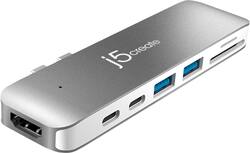
j5create - Ultra Drive Mini Dock for Select Apple MacBook Laptops - silver
- Key Specs
- Number of Thunderbolt Ports (Total): 1
- General
- Product Name: Ultra Drive Mini Dock for Select Apple MacBook Laptops
- Brand: j5create
- Model Number: JCD382
- Ports
- Number of Thunderbolt Ports (Total): 1
- Number of USB Ports (Total): 4
- Headphone Jack: false (The device features an interface that allows for the connection of headphones.)
- Memory Card Slot: true
- Memory Card Type: Secure Digital, microSD
- Compatibility
- System Requirements: Apple MacBook Pro 2016 or later 13" or 15" (The software that a product must have for it to be able to integrate with another product.)
- Brand Compatibility: Apple
- Model Compatibility: Apple MacBook Pro 2016 or later 13" or 15"
- Features
- Material: Aluminum
- Indicator Light(s): true
- Dimensions
- Product Height: 1.26 inches (The out of box height of the item. Height is measured as the vertical distance from the bottom of the item to the top as it would be primarily used or placed.)
- Product Length: 0.47 inches (The out of box length of the item. Length is measured as the longest dimension of the item.)
- Product Width: 4.73 inches (The out of box width of the item. Width is measured as the horizontal distance from one side of the item to the other as it would be primarily used or placed.)
- Product Weight: 2.08 ounces (The out of box weight of the item.)
- Other
- UPC: 847626002281
Only at Best Buy
Connect multiple peripherals to a Apple MacBook Pro 2016 or later 13" or 15" laptop with this seven-port j5create Ultra Drive dock. Its Thunderbolt 3 and HDMI ports support 4K resolution, and it has a USB 3.1 Type-C port and two USB-A ports for data syncing with external devices. This j5create Ultra Drive dock has SD and microSD card slots for accessing data.
- Designed for use with Apple MacBook Pro 2016 or later 13" and 15": For a precise fit.
- Transforms two USB-C ports on the MacBook Pro into seven ports: The Ultra Drive Dock has Thunderbolt 3, USB 3.1 Gen 1 Type-C, HDMI, two USB 3.1 Gen 1 Type-A ports, SD and microSD card slots.
- Supports Thunderbolt 3 display: Up to 5K at 60 Hz or dual 4K at 60 Hz, 40 Gbps data and max. 100W power delivery.
- Supports USB 3.1 Gen 1 Type-C downstream: With 5 Gbps data transfer rates.
- Supports HDMI: With resolution up to 4k at 30 Hz.
- Supports USB 3.1 Gen 1 Type-A SuperSpeed: Backwards compatible with USB 2.0 and USB 3.0.
- SD and microSD card slots: Enjoy an external memory card with up to 2TB capacity.
- Plug-and-play: For convenient use.
- Aluminum housing: Offers added durability.
Whats Included
- j5create Ultra Drive Dock for Select Apple MacBook Laptops
- Quick Installation Guide
Product Manuals
Q: does this allow for power passthrough?/can I charge my MacBook through the dock?
A: Yes. You will need to charge through the Thunderbolt port (the one closest to the HDMI port). The other one is just USB-C, and from my experience does not support charging through it. That is my experience at least
Q: Can I use this dock to connect a monitor to use as a second screen?
A: Yes, you are able to use this dock and connect a compatible monitor from the ports on the dock, whether direct or indirectly (daisy-chain).
Q: Will this work with the latest MacbookAir 13.3?
A: It should as long as it has the dual usb-c ports on the left side like the new MacBook Pro 13
Q: Hi, does this mini dock work with the new Macbook air apple M1 chip?
A: Yes, the JCD382 works with M1 Mac as it is plug-and-play.
Q: I just want to play music from my mac book pro. Can I do this with this dock
A: The JCD382 does not have any built in Audio out ports. You may be able to acomplish this by connecting via the HDMI port to a display with built in speakers however.
Q: Will this work on Mac Book Pro 16" ?
A: Yes, the JCD382 Ultra Drive Dock will work with a MacBook Pro 16.
Q: Will this dock work with magic keyboard/ipadpro2021?
A: If the Magic Keyboard has a wired USB cord, it will work. If it's a wireless keyboard with a dongle, you may come across leaky waves. If you have any questions, please give us a call and we'll be glad to assist you. j5create.
Q: Is this compatible with ASUS - ZenBook Flip S 2-in-1 13.3" Model:UX371EAXH77T???
A: If the computer has two USB-Cs next to each other and they are Thunderbolt capable; yes, the JCD382 should work for you.

















