j5create - USB-C Triple Display Docking Station with 100W PD Adapter
FREE shipping to

About This Item
- Key Specs
- Maximum Number of Displays Supported: 3
- Maximum Supported Resolution: 4K (2160p), Full HD (1080p)
- Number of DisplayPort Outputs (Total): 1
- Passthrough Power: true (Indicates whether the device allows power to passthrough, possibly with some loss, to another device, typically to charge that other device.)
- General
- Brand: j5create
- Model Number: JCD543P
- Product Name: USB-C Triple Display Docking Station with 100W PD Adapter
- Display
- Maximum Number of Displays Supported: 3
- Maximum Supported Resolution: 4K (2160p), Full HD (1080p)
- Ports
- Number of DisplayPort Outputs (Total): 1
- Number of HDMI Ports (Total): 2
- Number of VGA Ports: 1 (VGA (Video Graphics Adapter or Video Graphics Array) is a display standard that transmits via analog signals. This type of interface is typically used to connect a computer to a display device such as a monitor, projector, or TV.)
- Number Of Ethernet Ports: 1
- Number of USB Ports (Total): 5
- Headphone Jack: true (The device features an interface that allows for the connection of headphones.)
- Microphone Input: true (The device features an input for connecting an external microphone.)
- Memory Card Slot: true
- Memory Card Type: Secure Digital, microSD
- Power
- Powered: true
- Power Supply Included: true
- Power Supply Input: USB Type C
- Maximum Input Power: 100 watts (The maximum amount of power allowed to come into the device.)
- Passthrough Power: true (Indicates whether the device allows power to passthrough, possibly with some loss, to another device, typically to charge that other device.)
- Power Supply Output: USB Type C (The connector type(s) used by the device to send electrical power to another device.)
- Maximum Output Power: 100 watts (The maximum amount of power produced or allowed to flow through the device.)
- Compatibility
- System Requirements: Microsoft Windows 10 or later, macOS 10.11 or later. Available USB-C port that supports DisplayPort Alt Mode and USB Power Delivery 2.0 or 3.0 (The software that a product must have for it to be able to integrate with another product.)
- Brand Compatibility: Available USB-C port that supports DisplayPort Alt Mode and USB Power Delivery 2.0 or 3.0
- Model Compatibility: Available USB-C port that supports DisplayPort Alt Mode and USB Power Delivery 2.0 or 3.0
- Dimensions
- Product Height: 0.92 inches (The out of box height of the item. Height is measured as the vertical distance from the bottom of the item to the top as it would be primarily used or placed.)
- Product Length: 13.8 inches (The out of box length of the item. Length is measured as the longest dimension of the item.)
- Product Width: 3.24 inches (The out of box width of the item. Width is measured as the horizontal distance from one side of the item to the other as it would be primarily used or placed.)
- Product Weight: 10.6 ounces (The out of box weight of the item.)
- Other
- UPC: 847626003394
This triple display docking station turns your Mac or Windows laptop into a full workstation with a DisplayPort output, two HDMI outputs, and a VGA output, with resolution support up to 4K (3840 x 2160) on two displays and 1080p on the other one. You can also use your laptop screen for four displays in total, making it easy to access multiple applications at once. With 100W Power Delivery, three USB 3.0 ports, and a USB-C port, the docking station is perfect for your MacBook, Dell XPS, or other USB-C laptop requiring additional ports. This USB 3.0 docking station is also equipped with an RJ45 Gigabit Ethernet port, memory card reader/writer, and combo audio jack for maximum productivity. The elevated design assists with heat dissipation and, with its double-sided cable storage compartment, ensures an easy connection regardless of your USB-C port’s location. All 13 ports are combined into one slim docking station, so you’ll have all the connections you need to stay productive!
- Simultaneous DisplayPort, HDMI and VGA Output: Supports Mirror and Extended modes on both Mac & Windows. The easiest way to add a second or third display.
- HDMI/DisplayPort/VGA Output Port: DisplayPort Alt mode for HDMI or DisplayPort resolution of 4K @ 30 Hz. HDMI resolution of 4K @ 30 Hz and VGA resolution of 1920 x 1080 via dual output.
- USB-C 100W Power Delivery: With the attached USB-C cable, the dock will power and charge power-hungry laptops, with up to 100W Power Delivery and power your connected peripherals when it’s used with a USB-C power adapter.
- Multiple Connections: To support all of your USB peripherals, the dock provides a total of four USB 3.0 ports (1 USB-C and 3 USB Type-A ports), a Gigabit Ethernet port, SD/microSD card slots and a combo audio jack.
- BC 1.2 Fast Charging: One of the USB 3.0 Type-A ports is a fast-charge port, so you can charge your mobile devices faster than you can from a standard USB port.
- SD and microSD card reader: Enable external memory access.
Whats Included
- 1 - JCD543P USB-C Triple Display Docking Station
- 1 - JUP2290 100W USB-C Super Charger
- 1 - Quick Installation Guide
Product Manuals
Q: Do I need to download the driver to use the docking station?
A: The JCD543 can provide 1 additional display with not driver necessary. If you are trying to connect more then one display then yes, a driver is required.
A: Unfortunately, I would need the exact model number of your computer to see what type of ports your computer has. If the specifications say's that the computer has a Thunderbolt 3, then it will be compatible with JCD543P. Thank you, j5create.
A: The JCD543 is compatible with macOS Big Sur on the Intel based Macs. If you are in possession of an M1 chip Mac, we do not have compatible software at this time. We are placing all customers in this situation on an "On-Hold" list and once those drivers are available, they will be notified. If you would like to learn more about this on-hold list, please feel free to reach out to the support team and an agent will be glad to help.
A: The HDMI or DP port is Plug n Play and the other HDMI including VGA port requires a driver that you must download for proper functionality. So you will be able to use the HDMI, HDMI, VGA or DP, HDMI, VGA. Drivers are located on j5create website under the "Support" tab > "Downloads/Drivers". ** Feel free to contact j5create Technical Support if you require further assistance. Thank you.
A: Your Asus computer has the 1x Thunderbolt 4 support DisplayPort / power delivery therefore the JCD543P will work.
Q: Does this work with the HP Omnibook X flip laptop?
A: Since the dock relies on DisplayPort Alt Mode from your laptop to drive external displays, you’ll want to confirm that your X Flip’s USB-C port supports that feature (HP’s official specs indicate it does for at least one of the ports). You may also want to confirm USB Power Delivery to allow pass-through charge.
A: undefined
Reviews
The vast majority of our reviews come from verified purchases. Reviews from customers may include My Best Buy members, employees, and Tech Insider Network members (as tagged). Select reviewers may receive discounted products, promotional considerations or entries into drawings for honest, helpful reviews.
Compare similar products

This triple display docking station turns your Mac or Windows laptop into a full workstation with a DisplayPort output, two HDMI outputs, and a VGA output, with resolution support up to 4K (3840 x 2160) on two displays and 1080p on the other one. You can also use your laptop screen for four displays in total, making it easy to access multiple applications at once. With 100W Power Delivery, three USB 3.0 ports, and a USB-C port, the docking station is perfect for your MacBook, Dell XPS, or other USB-C laptop requiring additional ports. This USB 3.0 docking station is also equipped with an RJ45 Gigabit Ethernet port, memory card reader/writer, and combo audio jack for maximum productivity. The elevated design assists with heat dissipation and, with its double-sided cable storage compartment, ensures an easy connection regardless of your USB-C port’s location. All 13 ports are combined into one slim docking station, so you’ll have all the connections you need to stay productive!
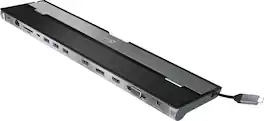
This triple display docking station turns your Mac or Windows laptop into a full workstation with a DisplayPort output, two HDMI outputs, and a VGA output, with resolution support up to 4K (3840 x 2160) on two displays and 1080p on the other one. You can also use your laptop screen for four displays in total, making it easy to access multiple applications at once. With 100W Power Delivery, three USB 3.0 ports, and a USB-C port, this docking station is perfect for your MacBook, Dell XPS, or other USB-C laptop requiring additional ports. This USB 3.0 docking station is also equipped with a RJ45 Gigabit Ethernet port, memory card reader/writer, and combo audio jack for maximum productivity. The elevated design assists with heat dissipation and, with its double-sided cable storage compartment, ensures an easy connection regardless of your USB-C port’s location. All 13 ports are combined into one slim docking station, so you’ll have all the connections you need to stay productive!
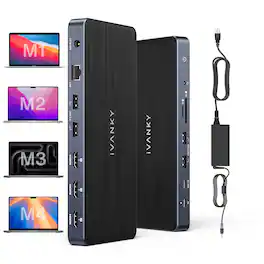
iVANKY 14-in-1 FusionDock Pro 1+ for M1/ M2/ M3/M4 MacBook DisplayLink Docking Station with 180W Power Adapter, Triple 4K@60Hz Monitor Mac mini Air Dock 3HDMI 2.0, 96W PD, 10Gbps, 2.5GbE, SD/TF 4.0

This high-performance USB4 Triple 4K Display Docking Station is the first USB-C docking to incorporate a USB4 controller from Intel, offering compatibility with Thunderbolt 4 and USB4 laptops. No driver installation is required for use making it an easy-to-use docking station solution. With up to 40Gbps of throughput and dynamic data and display bandwidth allocation for efficient display data flow, you can easily create a Triple-monitor setup with up 4K resolution using DisplayPortTM, HDMI or USB-C and access data faster without affecting system performance. Additionally, it has three USB 3.2 10Gbps ports (1 USB-C and 2 Type-A) for charging or connecting peripherals, as well as a USB-C Power Delivery port to charge your laptop and power your connected devices with up to 85W pass- through power. A USBTM 2.0 port is also included for connecting your wireless USB mouse or keyboard with reduced latency.
| Pros for j5create - USB-C Triple Display Docking Station with 100W PD Adapter | |||
|---|---|---|---|
| USB-C, Ease of use, Ports, Design, Monitor Support | Ease of use, USB-C, Overall Performance, Ports, Connectivity | There were no pros for this product— | Overall Performance, Size |
| Cons for j5create - USB-C Triple Display Docking Station with 100W PD Adapter | |||
| Compatibility | Compatibility, Power Supply | There were no cons for this product— | Power Supply, HDMI Port |