LG - UltraFine™evo 32” 6K Nano IPS Black Professional Monitor with Thunderbolt™ 5, USB-C, DisplayHDR 600 - Silver
More Buying Options
Related Item

Highlights
- Key Specs
- Refresh Rate: 60Hz (The number of frames per second the device can produce natively without enhancement. Higher rates help produce smooth, seamless pictures.)
- Maximum Resolution: 6144 x 3456 (Maximum resolution refers to the highest number of pixels that a screen can process and display. Higher resolution signals produce more detailed images.)
- Response Time: 5 milliseconds (The speed at which pixels can change colors is called response time. It is measured in milliseconds (ms).)
- Panel Type: IPS (Technology that affects response time and image quality.)
- Synchronization Technology: Not Applicable, Not Applicable (Generally, these technologies allow syncing between a computer/console game's frame rate and the device's refresh rate for a smoother display without tearing.)
- Screen Size: 31.5 inches (Size of the screen, measured diagonally from corner to corner.)
- Display Connector(s): 1 x DisplayPort 2.1, 2 x HDMI 2.1, 2 x Thunderbolt 5 (The number and type of connectors used to connect to an external display.)
- General
- Brand: LG
- Model Number: 32U990A-S
- Product Name: UltraFine™evo 32” 6K Nano IPS Black Professional Monitor with Thunderbolt™ 5, USB-C, DisplayHDR 600
- Color: Silver
- Operating System Compatibility: Not Applicable, Not Applicable, Not Applicable, Not Applicable, Not Applicable
- Display
- Refresh Rate: 60Hz (The number of frames per second the device can produce natively without enhancement. Higher rates help produce smooth, seamless pictures.)
- Maximum Resolution: 6144 x 3456 (Maximum resolution refers to the highest number of pixels that a screen can process and display. Higher resolution signals produce more detailed images.)
- Contrast Ratio: 2000:1 (Measured difference between a displayed image's brightest whites and darkest blacks. The larger the first number, the more detail and color that can be displayed.)
- Response Time: 5 milliseconds (The speed at which pixels can change colors is called response time. It is measured in milliseconds (ms).)
- Display Type: LED
- Panel Type: IPS (Technology that affects response time and image quality.)
- Synchronization Technology: Not Applicable, Not Applicable (Generally, these technologies allow syncing between a computer/console game's frame rate and the device's refresh rate for a smoother display without tearing.)
- Aspect Ratio: 16:9 (The measurement of the width of a screen compared to the height of a screen, expressed as a ratio.)
- Curved Screen: false
- Pixel Density: 224 pixels per inch (The number of pixels present per inch on the device's display. Higher pixel density improves the clarity and sharpness of the displayed image.)
- Brightness: 450 candela per square meter (A measure of the total light output.)
- Screen Size: 31.5 inches (Size of the screen, measured diagonally from corner to corner.)
- High Dynamic Range (HDR): true (An HDR-compatible 4K TV or other HDR-compatible product displays HDR video content when it's available from sources like 4K Ultra HD Blu-ray Discs and 4K streaming services.)
- High Dynamic Range Format: VESA Certified DisplayHDR 600, HDR 10 (There are a few HDR formats that tell the TV or other HDR-compatible product how to best utilize its capabilities to display HDR content. HDR technology can support one or multiple formats, each with various benefits to picture quality.)
- Horizontal Viewing Angle: 178 degrees (The maximum angle at which the display can be viewed with acceptable visual performance from either side.)
- Vertical Viewing Angle: 178 degrees (The maximum angle at which the display can be viewed with acceptable visual performance from above or below.)
- Connectivity
- Number of DisplayPort Inputs (Total): 1
- Number of HDMI Inputs (Total): 1
- Number of Thunderbolt Ports (Total): 2
- Display Connector(s): 1 x DisplayPort 2.1, 2 x HDMI 2.1, 2 x Thunderbolt 5 (The number and type of connectors used to connect to an external display.)
- Number of USB Ports (Total): 3
- USB Ports: 3 x USB-C (The number and type of USB ports the product has.)
- Compatibility
- Wall Mountable: true (The product is able to be secured to a wall. Some products are designed ready to mount, while others may require additional hardware/accessories for installation.)
- VESA Wall Mount Standard: 100mm x 100mm (VESA wall mount standards refer to the spacing of screw holes built into a TV in order to fit with standard TV wall mounts. These standards are implemented into most TVs and monitors.)
- Features
- Tiltable: true
- Adjustable Stand Height: true
- Built-In Webcam: false
- Integrated Speaker(s): true
- Dimensions
- Product Height With Stand: 22.9 inches
- Product Height Without Stand: 16.3 inches
- Product Width: 28.3 inches (The out of box width of the item. Width is measured as the horizontal distance from one side of the item to the other as it would be primarily used or placed.)
- Product Depth (With Stand): 7.8 inches
- Product Depth Without Stand: 1 inches
- Product Weight: 20.9 pounds (The out of box weight of the item.)
- Stand Included: true
- Certifications Listings & Approvals
- ENERGY STAR Certified: false (Devices carrying the ENERGY STAR service mark, such as computer products and peripherals, kitchen appliances, and other products, generally use 20% to 30% less energy than required by federal standards.)
- EPEAT Qualified: false (The Electronic Product Environmental Assessment Tool (EPEAT) was designed to provide an environmental assessment tool for purchasers. In order to qualify for EPEAT, a product must meet all 23 required criteria.)
- Warranty
- Warranty - Parts: 1 Year Parts and Labor
- Warranty - Labor: 1 Year Parts and Labor
- Other
- UPC: 195174134344
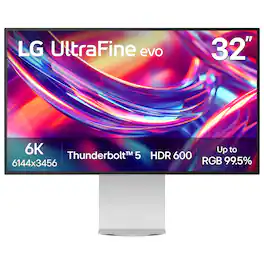
Bring your most ambitious ideas to life with the LG UltraFine evo 6K monitor—a cutting-edge display built for creative professionals who demand clarity, precision, and speed. Whether you’re editing 6K video, retouching large-format photography, building 3D assets, designing immersive websites, or training AI visuals, this display delivers studio-grade performance that keeps up with your vision. With Thunderbolt 5 and full Mac and Windows compatibility, you get ultra-fast data transfer, 96W charging, 6K daisy chaining, and support for DisplayPort 2.1—all through a single cable. The 32-inch Nano IPS Black panel boasts over 21 millions pixel for 6K resolution at 224 PPI, up to 99.5% AdobeRGB, 98% DCI-P3, Real 10-bit color depth, and VESA DisplayHDR 600—delivering cinematic contrast, rich tonal transitions, and incredible color fidelity across print, digital, and HDR content. A 2000:1 contrast ratio reveals deeper blacks, and sharp shadow detail, while TÜV 3-Star Eye Comfort certification means more comfortable during long editing or coding sessions. The LG Switch app enhances your workflow with personalized image settings, 11-screen layouts, and one-click video call launches. Add in ergonomic tilt, height, pivot, and 90° rotation, plus built-in speakers and a full suite of ports (USB-C, HDMI, DisplayPort 2.1 (UHBR 13.5 DSC)), and you have a powerful all-in-one hub for the way modern creatives work—fluent, focused, and flawlessly connected.
- The World’s First 6K Monitor with Thunderbolt 5: Crafted for creatives who demand more, the LG UltraFine evo brings 6K clarity, stunning clarity, and rich color to every frame. With Thunderbolt 5 and seamless Mac and Windows compatibility, it's the display your ideas deserve—and your tools demand.¹
- 6K Resolution and 224 PPI Ultra-High Pixel Density: With 6K resolution (6144 × 3456) and a razor-sharp 224 PPI, the LG UltraFine evo packs over 21 million pixels into a 32" panel—delivering 156% more pixels than standard 4K. UltraFine evo has has more working pixels in every inch—allowing you to view full-resolution content while keeping creative tools and editing interfaces clearly visible, sharp, and distortion-free.
- Performance and Precision for Creative Pros: Whether you’re editing 6K video, retouching photos, sculpting in 3D, designing responsive web layouts, or training AI visuals—the Mac and Windows compatible UltraFine evo display supports your craft with immaculate color and impeccable visual fidelity.
- Next-Gen Compatibility, Powered by Thunderbolt 5: Thunderbolt 5 empowers creators, editors, and AI professionals with ultra-fast transfer speeds- 2x faster than Thunderbolt 4, along with 6K daisy chaining support, and DisplayPort 2.1—all via one cable. With 96W power delivery, Mac and Windows support, Thunderbolt 5 bridges future-ready workflows with maximum scalability and efficiency.
- Versatile Connectivity for Pro-Level Setups: Compatible with both Mac and Windows, the LG UltraFine evo 6K monitor transforms into a powerful workstation hub with Thunderbolt 5, HDMI, DisplayPort 2.1 (UHBR 13.5 DSC), and USB Type-C ports—giving you seamless access to devices, drives, and displays.
- Studio Mode: Easy Color Tuning Compatible with Mac Computers: Built for Mac compatibility, Studio Mode² offers three calibrated color presets that fine-tune your UltraFine evo 6K display for a more consistent, unified viewing experience. It adjusts subtle tone variations, helping ensure your screen stays consistent with your creative intent—from edge to edge.
- High-PPI Clarity Compatible with Mac Creators: With 224 pixels per inch, UltraFine evo 6K delivers incredibly sharp visuals on a larger screen—ideal for photo editing, design, and precision work. Whether you're retouching images or rendering graphics, experience Mac-optimized clarity that brings every detail into focus.³
- Mac-Compatible Controls with M-Control: Adjust your display with ease using your Mac keyboard. With M-Control⁴ support, UltraFine evo 6K lets you fine-tune brightness and volume right from your keys—no on-screen menu diving.
- DisplayHDR 600: Visual Nuance Unlocked: VESA DisplayHDR 600 produces brilliant highlights, crisp contrast, and vibrant color accuracy—revealing every detail in your scene. Perfect for color grading, photo retouching, and 3D rendering where precision and realism matter most.
- Professional Color Mastery, Pixel by Pixel: For creators who demand precision and accuracy, the UltraFine evo displays up to 99.5% Adobe RGB, 98% DCI-P3, and Real 10-bit color depth. Expect ultra-smooth tonal transitions, deeper HDR detail, and consistent results from screen to print.
- Nano IPS Black with 2000:1 Contrast: Deeps Blacks & Rich Shadows: Nano IPS Black delivers up to a 2000:1 contrast ratio for deeper blacks, richer detailed shadows, and astounding detail—helping creative professionals maintain visual clarity, tonal depth, and consistent color expression across the screen.
- Eye Comfort Certified by TÜV Rheinland: With TÜV Rheinland Eye Comfort certification⁵, UltraFine evo 6K provides a more comfortable viewing experience even during long hours of work or media consumption.
- Ergonomic Adjustability with Virtually Borderless Design: The 4-sided, virtually borderless display maximizes screen space while the ergonomic stand allows tilt, height, pivot, and 90° rotation. Ideal for creative pros and multitaskers viewing large docs, coding, or setting up a streamlined multi-monitor workspace.
- Intuitive Screen Adjustments for Creative Workflows with LG Switch: LG Switch app⁶ streamlines your display setup so you can focus on creating. Use the picture wizard to fine-tune brightness and image quality for photo editing or color grading. Instantly launch video calls and organize windows across 11 flexible on-screen layouts.
- Built-In Sound for Streamlined Studio Setups: Integrated audio simplifies your workspace by eliminating the need for external speakers—ideal for video playback, remote meetings, and creative reviews. Designed to support your workflow with clear, reliable sound right from the display.
- The World’s First 6K Monitor with Thunderbolt 5: Crafted for creatives who demand more, the LG UltraFine evo brings 6K clarity, stunning clarity, and rich color to every frame. With Thunderbolt 5 and seamless Mac and Windows compatibility, it's the display your ideas deserve—and your tools demand.¹
- 6K Resolution and 224 PPI Ultra-High Pixel Density: With 6K resolution (6144 × 3456) and a razor-sharp 224 PPI, the LG UltraFine evo packs over 21 million pixels into a 32" panel—delivering 156% more pixels than standard 4K. UltraFine evo has has more working pixels in every inch—allowing you to view full-resolution content while keeping creative tools and editing interfaces clearly visible, sharp, and distortion-free.
- Performance and Precision for Creative Pros: Whether you’re editing 6K video, retouching photos, sculpting in 3D, designing responsive web layouts, or training AI visuals—the Mac and Windows compatible UltraFine evo display supports your craft with immaculate color and impeccable visual fidelity.
- Next-Gen Compatibility, Powered by Thunderbolt 5: Thunderbolt 5 empowers creators, editors, and AI professionals with ultra-fast transfer speeds- 2x faster than Thunderbolt 4, along with 6K daisy chaining support, and DisplayPort 2.1—all via one cable. With 96W power delivery, Mac and Windows support, Thunderbolt 5 bridges future-ready workflows with maximum scalability and efficiency.
- Versatile Connectivity for Pro-Level Setups: Compatible with both Mac and Windows, the LG UltraFine evo 6K monitor transforms into a powerful workstation hub with Thunderbolt 5, HDMI, DisplayPort 2.1 (UHBR 13.5 DSC), and USB Type-C ports—giving you seamless access to devices, drives, and displays.
- Studio Mode: Easy Color Tuning Compatible with Mac Computers: Built for Mac compatibility, Studio Mode² offers three calibrated color presets that fine-tune your UltraFine evo 6K display for a more consistent, unified viewing experience. It adjusts subtle tone variations, helping ensure your screen stays consistent with your creative intent—from edge to edge.
- High-PPI Clarity Compatible with Mac Creators: With 224 pixels per inch, UltraFine evo 6K delivers incredibly sharp visuals on a larger screen—ideal for photo editing, design, and precision work. Whether you're retouching images or rendering graphics, experience Mac-optimized clarity that brings every detail into focus.³
- Mac-Compatible Controls with M-Control: Adjust your display with ease using your Mac keyboard. With M-Control⁴ support, UltraFine evo 6K lets you fine-tune brightness and volume right from your keys—no on-screen menu diving.
- DisplayHDR 600: Visual Nuance Unlocked: VESA DisplayHDR 600 produces brilliant highlights, crisp contrast, and vibrant color accuracy—revealing every detail in your scene. Perfect for color grading, photo retouching, and 3D rendering where precision and realism matter most.
- Professional Color Mastery, Pixel by Pixel: For creators who demand precision and accuracy, the UltraFine evo displays up to 99.5% Adobe RGB, 98% DCI-P3, and Real 10-bit color depth. Expect ultra-smooth tonal transitions, deeper HDR detail, and consistent results from screen to print.
- Nano IPS Black with 2000:1 Contrast: Deeps Blacks & Rich Shadows: Nano IPS Black delivers up to a 2000:1 contrast ratio for deeper blacks, richer detailed shadows, and astounding detail—helping creative professionals maintain visual clarity, tonal depth, and consistent color expression across the screen.
- Eye Comfort Certified by TÜV Rheinland: With TÜV Rheinland Eye Comfort certification⁵, UltraFine evo 6K provides a more comfortable viewing experience even during long hours of work or media consumption.
- Ergonomic Adjustability with Virtually Borderless Design: The 4-sided, virtually borderless display maximizes screen space while the ergonomic stand allows tilt, height, pivot, and 90° rotation. Ideal for creative pros and multitaskers viewing large docs, coding, or setting up a streamlined multi-monitor workspace.
- Intuitive Screen Adjustments for Creative Workflows with LG Switch: LG Switch app⁶ streamlines your display setup so you can focus on creating. Use the picture wizard to fine-tune brightness and image quality for photo editing or color grading. Instantly launch video calls and organize windows across 11 flexible on-screen layouts.
- Built-In Sound for Streamlined Studio Setups: Integrated audio simplifies your workspace by eliminating the need for external speakers—ideal for video playback, remote meetings, and creative reviews. Designed to support your workflow with clear, reliable sound right from the display.
Whats Included
- Monitor
- Power Cable
- HDMI Cable
- DisplayPort Cable
- Thunderbolt Cable
- USB-C Cable
- Monitor
- Power Cable
- HDMI Cable
- DisplayPort Cable
- Thunderbolt Cable
- USB-C Cable
Product Manuals
Disclaimers
- ¹World’s First Thunderbolt 5 6K resolution monitor as of August 2025: https://www.thunderbolttechnology.net/products
- ²Studio Mode requires updating the monitor firmware to version 3.05 or later via the LG Switch software, available starting October 2025. The update can be performed automatically or manually when the computer is connected to the internet and the monitor using either: (1) a USB-C to A or USB-A to B cable, or (2) a USB-C to C or Thunderbolt cable.
- ³Mac is a trademark of Apple Inc., registered in the U.S. and other countries and regions. This product is not an Apple-affiliated product, and does not provide any Apple services or warranties.
- ⁴M-Control requires the use of the LG Switch software when turning the feature on or off. Mac is a trademark of Apple Inc., registered in the U.S. and other countries and regions. This product is not an Apple-affiliated product, and does not provide any Apple services or warranties.
- ⁵TÜV Rheinland certification ID (Eye Comfort): 1111305154 www.tuv.com.
- ⁶Software installation required. Visit Support on LG.com to download.
- ¹World’s First Thunderbolt 5 6K resolution monitor as of August 2025: https://www.thunderbolttechnology.net/products
- ²Studio Mode requires updating the monitor firmware to version 3.05 or later via the LG Switch software, available starting October 2025. The update can be performed automatically or manually when the computer is connected to the internet and the monitor using either: (1) a USB-C to A or USB-A to B cable, or (2) a USB-C to C or Thunderbolt cable.
- ³Mac is a trademark of Apple Inc., registered in the U.S. and other countries and regions. This product is not an Apple-affiliated product, and does not provide any Apple services or warranties.
- ⁴M-Control requires the use of the LG Switch software when turning the feature on or off. Mac is a trademark of Apple Inc., registered in the U.S. and other countries and regions. This product is not an Apple-affiliated product, and does not provide any Apple services or warranties.
- ⁵TÜV Rheinland certification ID (Eye Comfort): 1111305154 www.tuv.com.
- ⁶Software installation required. Visit Support on LG.com to download.
Q: How many Thunderbolt ports does this monitor have?
A: This monitor has two Thunderbolt ports in total.
Q: Does this monitor support high dynamic range?
A: Yes, this monitor supports high dynamic range with VESA Certified DisplayHDR 600.
Q: Can this monitor be mounted to a wall?
A: Yes, this monitor is wall mountable using a VESA standard.
Q: What is the refresh rate of this monitor?
A: The refresh rate of this monitor is 60Hz.
Q: Does this monitor have built-in speakers?
A: Yes, this monitor has integrated audio for streamlined studio setups.
Q: What is the response time of this monitor?
A: The response time of this monitor is 5 milliseconds.
Q: Is the stand height adjustable for this monitor?
A: Yes, the stand is adjustable in height for ergonomic use.
Q: Does this monitor have a camera for video conferencing?
A: Hi there. Thank you for sharing your inquiry with us. We understand your question about whether the LG 32U990A-S monitor has a camera for video conferencing. Based on the specifications, this monitor does not include a built-in camera. https://www.bestbuy.com/product/lg-ultrafineevo-32-6k-nano-ips-black-professional-monitor-with-thunderbolt-5-usb-c-displayhdr-600-silver/JJ8VPZKRFK If you have any further questions about its features, please send us a private message on Social Media @LGUSSupport, and our team will be more than happy to assist you. —Renzo
Compare similar products
Bring your most ambitious ideas to life with the LG UltraFine evo 6K monitor—a cutting-edge display built for creative professionals who demand clarity, precision, and speed. Whether you’re editing 6K video, retouching large-format photography, building 3D assets, designing immersive websites, or training AI visuals, this display delivers studio-grade performance that keeps up with your vision. With Thunderbolt 5 and full Mac and Windows compatibility, you get ultra-fast data transfer, 96W charging, 6K daisy chaining, and support for DisplayPort 2.1—all through a single cable. The 32-inch Nano IPS Black panel boasts over 21 millions pixel for 6K resolution at 224 PPI, up to 99.5% AdobeRGB, 98% DCI-P3, Real 10-bit color depth, and VESA DisplayHDR 600—delivering cinematic contrast, rich tonal transitions, and incredible color fidelity across print, digital, and HDR content. A 2000:1 contrast ratio reveals deeper blacks, and sharp shadow detail, while TÜV 3-Star Eye Comfort certification means more comfortable during long editing or coding sessions. The LG Switch app enhances your workflow with personalized image settings, 11-screen layouts, and one-click video call launches. Add in ergonomic tilt, height, pivot, and 90° rotation, plus built-in speakers and a full suite of ports (USB-C, HDMI, DisplayPort 2.1 (UHBR 13.5 DSC)), and you have a powerful all-in-one hub for the way modern creatives work—fluent, focused, and flawlessly connected.
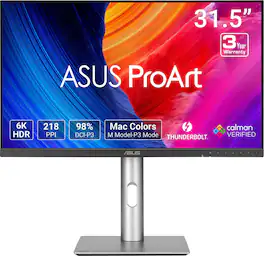
ASUS ProArt Display PA32QCV is a 31.5-inch 6K HDR monitor designed for professional content creators. This Calman Verified display boasts a wide gamut with 98% DCI-P3 coverage and Delta E<2 color accuracy. The ProArt Preset feature now includes the new M Model-P3 mode to deliver seamless and consistent colors when working with MacBook devices. Dual Thunderbolt™ 4 ports support daisy-chaining and enable superfast data transfers and 96-watt power delivery via a single cable.

Introducing Studio Display. An immersive 27-inch 5K Retina display* with a 12MP camera with Center Stage, studio-quality mics, and six-speaker sound system. Pairs beautifully with any Mac.
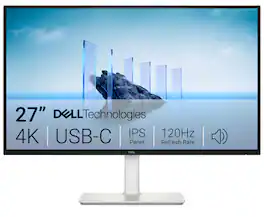
Dell 27 Plus 4K USB-C Monitor - S2725QC. Whether you're watching movies or playing games, enjoy an immersive viewing experience with improved eye comfort on a 4-star certified monitor*.
| Pros for LG - UltraFine™evo 32” 6K Nano IPS Black Professional Monitor with Thunderbolt™ 5, USB-C, DisplayHDR 600 - Silver | |||
|---|---|---|---|
| There were no pros for this product— | There were no pros for this product— | There were no pros for this product— | Screen Quality, Connectivity, Refresh Rate, Overall Performance, Port Count |
Specs




Reviews
Customer Images
The vast majority of our reviews come from verified purchases. Reviews from customers may include My Best Buy members, employees, and Tech Insider Network members (as tagged). Select reviewers may receive discounted products, promotional considerations or entries into drawings for honest, helpful reviews.
- Rated 5 out of 5 stars
Studio Grade Screen, Best Connection Flexibility
I am picky with my screens. I spend hours editing, reviewing, and creating content, so every pixel matters to me. That’s my gauge for approaching this LG UltraFine Monitor. Is it capable of delivering jaw-dropping detail? Yes. Does it make me forget about nitpicking brightness and color accuracy? Absolutely. DESIGN & BUILD First impression: sleek. The design is clean, modern, and feels premium right out of the box. The bezels are nice and thin. The build quality is solid—no creaks, no flimsy stand wobble. And the levels of tilting are serviceable. It’s the kind of monitor that looks like it belongs in a professional studio, but also doesn’t feel out of place in a home setup. The angular stand looks good from behind (although my set up is puts the monitor by the wall, but the stand gives me the ability to use that foot space for peripherals and accessories. Now, about that power brick. It’s huge. Like, I can use it to elevate my keyboard huge. But here’s the thing—it does power my device. My content creator PC, though, is a bit hungrier than what the brick can fully feed. It registers as a slow charger (my PC powerbrick is 230W). Still, the monitor’s powerbrick is functional especially if I am just using Canva or web graphic applications. If I am video editing, I still plug-in, with the TB5 connected. SCREEN PERFORMANCE This is where LG flexes. The detail on this 6K panel is stunning. Brightness is more than enough, even in a well-lit room, and the colors are consistent—matching my Asus ProArt OLED screen almost perfectly. For a content creator, that’s gold. No weird shifts, no guessing if the final export will look different on another device. What I see is what I get. The detail is crisp, even at font 8, I can see details at 20% zoom, with ease. Screen presets can be accessed using the behind-screen joystick and the settings are very useful. Studio 1, matches my OLED default for my ProArt screen. And it has a lot of presets that come in depending on what I am doing. If I am making a shirt, for example, I can easily switch the sRGB because that is what seems to follow my actual print hues—so I am not confused to what color the person will actually see when they receive my printed apparel. Then I switch to a custom mode, set to how the screen would usually look like to a normal shopper. Or I would switch to cinema, if I am making a clip, to see how cool my 8-seconders will look on a cinema grade setting. It is very responsive and easy to use depending on what media I am creating. CONNECTIVITY Straight up Thunderbolt 5. That’s future-proofing right there. My machine only runs Thunderbolt 4, but the monitor still connects seamlessly and powers my other devices. Tablet? Phone? No problem. I even fired up Samsung DeX, and it worked like a charm for my tablet. It’s not just a monitor—it’s a hub. It projects my smaller devices and it recognizes peripherals attached to it. If my devices are mirroring though and not at 6K resolution, it has this pop up notification. I love how I can use any device on my desktop without needing a separate hub, which I sometimes doubt if the hub actually translate the correct shade through my HDMI cables. The TB5 is direct and I trust it to lessen any degeneration that could be happening, if there is any. EXPERIENCE Using this monitor feels less like a chore and more like an upgrade to my workflow. The presets and connectivity options make it easy to adapt, whether I’m editing video, grading photos, or just streaming content. It’s the kind of tool that doesn’t get in the way—it just works. SUMMARY I like it. It’s a great monitor perfect for any content creator. Do I wish there is a touch screen version? Maybe—especially when I pixel peep and clean-up photos, because a stylus may be helpful. But maybe that is already a huge ask for a monitor that is already good on its own. If you want less hassle and more precision in your creative work, LG’s got you covered. Crisp detail, consistent colors, and connectivity that makes multitasking easy. Thanks LG for making screen time feel like an experience vs. a compromise.
Posted by DarR
- Rated 5 out of 5 stars
Content Creators' Dream Display
As a budding content creator, I’m always looking for hardware and software options that will allow me to continue to enhance my skillset and provide high-quality content. The LG 32” Ultrafine evo 6K monitor with Thunderbolt 5 is turning out to be an absolute game changer for me. I’m a Mac user and have been searching for a display that will support the next step in my developmental curve, and this monitor has checked all the boxes. Initial Unboxing and Setup The 32” Ultrafine evo 6K was packaged well by LG and there is minimal setup required. Once removed from the box, the base of the stand needs to be connected to the stand with 2 provided screws. Once that is completed, simply snap the monitor into place on the stand, that’s it. It is solidly built and although I have a midnight MacBook, the color matches with the other Apple equipment in my studio. The bezel is very small, so the monitor is essentially borderless and there is plenty of adjustability for height, angle and rotation. The matte finish efficiently reduces glare and give the monitor a professional look and feel. Connectivity The 32” Ultrafine evo 6K has several connection options that support both Macs and Window PCs, with the star of the show being the Thunderbolt 5 port. My MacBook only has Thunderbolt 3/4 support, but the 5 port is backwards compatible and is plug-and-play ready. I can also use it to connect my external Thunderbolt 5 SSD storage for fast access and storage with the full TB5 throughput. In addition to the two Thunderbolt 5 ports, there are 2 x USB-C down ports, 1 x USB-C up port, 1 x HDMI 2.1 port and 1 x DisplayPort 2.1. Essentially this monitor can be used to connect a wide variety of devices for your content creation needs. The Panel This is what it’s all about, and LG has always been known for their superior panels be it in the TV or Monitor markets. The 32” Ultrafine evo is exactly what I needed to be able to take my work to the next level. The 6K resolution, 224 PPI and VESA DisplayHDR™ 600 certification provide all the features needed for proper color grading, retouching images and producing output with the desired color and tones. For the Mac users out there, the 32” Ultrafine evo provides Studio Mode with 3 preset color settings to make it easier to produce the correct output as seen on the monitor. As mentioned previously, the screen is matted to cut glare and performs its role admirably. Additional Features The 32” Ultrafine evo includes eye comfort technology by TÜV Rheinland that helps reduce eye strain and discomfort during those long hour power sessions. The monitor also includes M-Control to allow support for brightness and volume directly from the Mac keyboard. The monitor also includes built-in speakers to assist in reducing clutter on your workspace by replacing external speakers. Pros: - Industry leading 6K resolution panel with VESA DisplayHDR™ 600 certification - Thunderbolt 5 connectivity, along with HDMI, USB-C and DisplayPort ports - High quality build on the panel and stand - Adjustability of the viewing angles provided by the heavy-duty stand - Direct support for Macs with M-Control and Studio Mode - The incredible output quality, crispness, rich colors and 224 PPI Cons: - The Power Brick is big, really BIG! Overall, the LG 32” Ultrafine evo 6K monitor has been a joy to work with for the incredible image quality, the array of Mac focused features and the overall design and build quality. I would certainly recommend this monitor for anyone looking to take their content creation to the next level or for the folks that are already at the next level! This monitor will change the way you approach video and photo editing or just streaming high def content.
Posted by mstanleynh
- Rated 5 out of 5 stars
Amazing picture with crazy good details
This review is for the LG - UltraFine 32" 6K Nano IPS Black 60Hz, 5ms Monitor with DisplayHDR 600 (HDMI, DP, Thunderbolt, USB-C) - Silver. Unboxing you will find that the monitor is packaged very well. And comes with ALL the cable you need to connect to virtually any device. But the one that makes this monitor stand out is the thunderbolt connection. Making this a great choice for Apple users like the Macbook Air or Pro. And also great for content creators with professional windows. On the back of the monitor you will find multiple ways to connect to it. Including one display port , one HDMI port, two thunderbolt ports, two USB-C ups and one USB-C down port. And a joystick type button to power on and off and navigate through the menus. The supplied stand is very sturdy and adjustable. It has about two and a half inches of travel up and down with the ability to tilt also. It is a very nice stand and the base has a small footprint on it. My first time powering this unit up I can see the difference in colors right away. I can see more details in the videos when editing. It is a night and day difference from my last monitor. Has a resolution of 6k 6144 x 3456. And it has a built-in speaker that I was very impressed with. Freeing up some space on my workstation without the need for an extra set of speakers. If you are in the market for a high-end monitor with a thunderbolt connection this should be one of your top contenders.
Posted by JustCuz