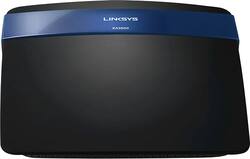
Linksys - Smart Wi-Fi Wireless-N Gigabit Router with 4-Port Ethernet Switch
- General
- Product Name: Smart Wi-Fi Wireless-N Gigabit Router with 4-Port Ethernet Switch
- Brand: Linksys
- Model Number: EA3500-NP
- Security
- Data Encryption: true
- Encryption Type: WPA2 (The security protocols or certification programs that protect the Wi-Fi network.)
- Firewall Type: SPI (The method the firewall uses to filter and process data to increase network security, primarily by blocking malicious traffic requests while allowing legitimate traffic through.)
- Parental Controls: true (Allows user to block unwanted content, signals, channels, networks, etc. from being received or accessed.)
- Network
- Quality Of Service (QoS) Traffic Prioritization: true (Allows a user to manage a device's network performance by configuring the types of traffic that receive top priority for transmission. High priority functions and applications receive maximum network performance, while low priority traffic receives minimum performance.)
- Ethernet Standard: 10/100 (Each standard is a variation of the IEEE 802.3 set of computer networking technologies known as Ethernet. New versions evolved to include higher bandwidth, different physical media, and other new and improved features. Standards are often denoted by speeds (in Megabits per second). For example, a 10/100/1000 Ethernet port transmits at 10 Mbps, 100 Mbps, and 1000 Mbps (1 Gbps).)
- Frequency Band: 2.4 GHz (Bands may be grouped into categories such as low- and high-band VHF (Very High Frequency), low- and high-band UHF (Ultra High Frequency), or certain frequency channels (measured in MHz or GHz). Generally, higher frequencies transmit information faster but have shorter range than lower frequencies.)
- Wireless Standard: N (The wireless networking protocol used by the device. Each iteration of the protocol is based on the 802.11 standard developed by the Institute of Electrical and Electronics Engineers (IEEE) Standards Association. Denoted by letters following 802.11 (802.11a, 802.11ac, etc.), each version, published in alphabetical order, encompasses all previous versions.)
- Ethernet Switch: true (Connects multiple devices to expand the Local Area Network (LAN).)
- Certifications Listings & Approvals
- ENERGY STAR Certified: false (Devices carrying the ENERGY STAR service mark, such as computer products and peripherals, kitchen appliances, and other products, generally use 20% to 30% less energy than required by federal standards.)
- Features
- Integrated Modem: true
- Wireless: true
- Ports
- Number Of WAN Ports: 1 (Number of devices able to be connected to the Wide Area Network (WAN). This type of port may simply be labeled "Internet," and it allows the device to share its internet connection with all devices connected to it via LAN ports.)
- Port Type(s): USB (USB 2.0 connects external drives, gaming controllers, smartphones, MP3 players and other accessories.USB 3.0 transfers data faster than USB 2.0, but only when used with USB 3.0 devices.USB Type-C provides fast speeds and versatile power, featuring connectors with identical ends that plug in upside down or right side up. Adapters allow for video as well as backward compatibility.Thunderbolt provides ultra-high bandwidth for fast data transfer between devices featuring a Thunderbolt or MiniDisplayPort connection.HDMI allows you to connect a projector or display HD media on your HDTV or monitor.Media card slots allow you to transfer photos from your digital camera or camcorder.)
- Speed
- Gigabit Ethernet Speed: true (Supports the gigabit Ethernet networking standard, which has a data rate of at least one gigabit per second, or 1,000 Mbps.)
- Compatibility
- System Requirements: PC: Windows XP (SP3), Vista (SP1) or 7; Mac: OS X Leopard 10.5.8 or later; Snow Leopard 10.6.1 or later or Lion 10.7 or later; Internet Explorer 7, Safari 4 or Firefox 3 or higher; CD or DVD drive (The software that a product must have for it to be able to integrate with another product.)
- Dimensions
- Product Height: 7.48 inches (The out of box height of the item. Height is measured as the vertical distance from the bottom of the item to the top as it would be primarily used or placed.)
- Product Length: 6.69 inches (The out of box length of the item. Length is measured as the longest dimension of the item.)
- Product Width: 0.98 inches (The out of box width of the item. Width is measured as the horizontal distance from one side of the item to the other as it would be primarily used or placed.)
- Product Weight: 0.48 pounds (The out of box weight of the item.)
- Warranty
- Manufacturer's Warranty - Parts: 1 year limited
- Manufacturer's Warranty - Labor: 1 year limited
- Other
- UPC: 745883596782
Linksys EA3500-NP Wireless-N Gigabit Smart Router: Easily connect computers, Internet-ready TVs, game consoles, smartphones and other Wi-Fi devices to this Wireless-N router. Its fast transfer rates and advanced security features create a powerful wireless home network for you and your family to enjoy.
- Wireless-N for a standard connection: Share, stream and access stored media across your network. Backward compatibility with 802.11 b/g networks means your old devices won't be left behind.
- Dual wireless bands reduce interference: Get signal speeds up to 300Mbps on the 2.4GHz radio frequency band and up to 450Mbps on the 5GHz band.
- Gigabit LAN ports for wired devices: Connect up to 4 devices at a time to your wired network using Ethernet cables.
- Parental controls and guest access: Block inappropriate sites to help keep your kids safe as they study, play and navigate the Internet. You can also create separate and secure network access for guests.
- Ensure your privacy: Prevent phishing and spyware with high-level Wi-Fi Protected Access, and SPI firewall protection.
- USB port for expanded functionality: USB port lets you add external storage devices for sharing content across your network.
- Easy to set up: Smart Wi-Fi software helps you install and manage your router quickly and easily.
Whats Included
- Linksys Smart Wi-Fi Wireless-N Gigabit Router with 4-Port Ethernet Switch
- Software CD-ROM
- Power adapter
- Ethernet cable
- Owner's manual
Q: Signal strength thru walls, multilevel home
A: We have a multilevel home too. Downstairs you will find cathedral ceilings. Insulated walls and thick carpet. So there is some distance involved here. I have not had any problems whatsoever. Not one dropped connection. No one has had any problem maintaining a connection.
Q: how do i connect my wireless desktop to my HDTV
A: If it's not a "smart TV", you'll need a "streaming stick" type of device, like a Chromecast to stream content from your PC to your TV.
Q: does this have a modem as well or do I need to buy a new modem also
A: You need a modem.
Q: Why is this router throttling my data?
A: These are good router for your basic in home DSL or cable providers, with the higher packages hitting homes now, to see max bandwith, you're going to have to go to a beefier router. The Asus RT-AC66R which BB also carries gave me what my modem could. They're not as cheap, but man they're work horses!
Q: what is the difference between a dsl and a ehthernet connection
A: DSL, or Digital Subscriber Line, is provided by your phone company and needs to be converted to an Ethernet signal through a DSL modem/gateway. Ethernet runs over Cat5 cable and is used for wired networking inside of your house or business. You can't plug a DSL line into your computer or printer, but you can plug an Ethernet line into them.
A: Hi, Ann. Thank you for your interest in our products. Aside from the number of the wireless devices that you've mentioned, we'd like to know more details about your network (physical obstructions, wireless/network range & distance between devices, and Internet/network usage) so we can recommend to you the router that will best suit your needs. Please send us an email at [email protected] with your contact details along with the link to this post for easy reference.
Q: don't have a place on laptop to insert cd rom, how do I set up?
A: You can connect this directly to your laptop and log into this unit via a browser.
A: This will work with laptops running on Windows Vista and can improve the performance of your network. However, if you have slower speed when connected to the modem, it's best if you'll contact your ISP first.














