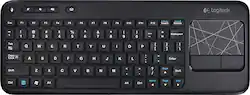
Logitech - K400 Tenkeyless (TKL) Wireless Membrane Keyboard - Black
- Key Specs
- Lighting Type: None
- Form Factor: Tenkeyless (TKL) (The size, arrangement, and physical configuration of the product.)
- Keyboard Technology: Membrane (Type of technology that detects a key press.)
- General
- Product Name: K400 Tenkeyless (TKL) Wireless Membrane Keyboard
- Brand: Logitech
- Model Number: 920-003070
- Features
- Lighting Type: None
- Numeric Keypad: false
- Touchpad: true
- Keyboard Type: Keypad
- Palm Rest: false
- Keyboard Features: Built-in 3.5" multitouch touchpad, USB connectivity, Up to 33' wireless range
- Foldable: false
- Functions
- Form Factor: Tenkeyless (TKL) (The size, arrangement, and physical configuration of the product.)
- Number Of Keys: 86
- Keyboard Technology: Membrane (Type of technology that detects a key press.)
- Dedicated Macro Keys: false (Perform shortcuts of key sequences to carry out commands with a single key. Key sequences may include key strokes, mouse actions, and/or menu actions.)
- Multimedia Keys: true
- Internet Keys: true
- Number Of Programmable Keys: 12
- Connectivity
- Maximum Wireless Range: 33 feet
- Compatibility
- Operating System Compatibility: Windows
- Plug and Play Operation: true
- System Requirements: Windows 10, 11 or later (The software that a product must have for it to be able to integrate with another product.)
- Power
- Battery Size: AA (The battery size required for operation.)
- Number of Batteries Required: 3
- Batteries Included: true (Indicates whether the product comes with the required batteries for its operation.)
- On/Off Switch: true
- Dimensions
- Product Height: 5.91 inches (The out of box height of the item. Height is measured as the vertical distance from the bottom of the item to the top as it would be primarily used or placed.)
- Product Width: 15.83 inches (The out of box width of the item. Width is measured as the horizontal distance from one side of the item to the other as it would be primarily used or placed.)
- Product Weight: 1.1 ounces (The out of box weight of the item.)
- Mouse
- Mouse Included: false
- Other
- UPC: 097855074928
Surf the Internet and navigate your laptop with ease with this Logitech K400 920-003070 wireless touch keyboard that features a built-in multitouch touchpad for simple Web browsing. Plug-and-play design allows immediate use.
- 86 sleek, low-profile keys: Ensure quiet typing and feature bold, easy-to-read characters. Multimedia keys provide quick access to entertainment
- Built-in 3.5" multitouch touchpad: Facilitates Web navigation
- USB connectivity: For simple plug-and-play connection
- Up to 33' wireless range: Offers convenient control when your laptop is connected to your TV
- Windows-based laptop compatible: For use with your existing laptop with Windows 8, 8 RT, Vista, 7 or XP
Whats Included
- Logitech K400 Wireless Touch Keyboard for Windows-Based Laptops
- USB receiver
- 2 AA batteries (pre-installed)
- Owner's manual
Q: is k400 compatible with samsung smart tv 5500
A: Am using it with Samsung 50HU8550 Smart TV. Right click on Mouse pad brings Tools where you can select Smart Hub, Search, Input Source, OnScreen remote, Power Off. Once you select Smart hub then you can select app using arrow keys and hit enter to open the application. The keyboard can't be used inside apps (YouTube, Netflix) to type. I use Search option to search videos which lists videos of YouTube, etc. Venkatx5
Q: Any way to get the keyboard to work within the Samsung Smart apps?
A: Unfortunately no the keyboard wont work with the apps. The apps are there own system and designed to work off the remote not the keyboard. If you do a google search you will find that hundreds of people have the same issue no matter what keyboard you use including the Samsung one.
Q: Is this keyboard compatible with Chromebox?
A: I'm using it with a chromebook. Since the chrome box uses chrome OS, I think you should be good.
Q: Will this keyboard work for a laptop with Windows 10? Thanks!
A: Yes, I use my K400r with an HP EliteBook running Windows 10 1909. Also works on Windows 7. No issues with either OS, and keyboard has been great.
Q: will this keyboard work with an apple ipad?
A: No, it cannot. This keyboard isn't Bluetooth, and requires you to plug in a USB receiver to the host computer. As the ipad has no USB ports, you can't plug in the receiver.
Q: Does this come with an on and off button to shut off the keyboard?
A: Yes it does have an off and on button. Very handy. I only use mine on the weekend. and you don't lose connectivity or need to reset it when you turn it off and on.
Q: Is there an indicator light for the caps lock?
A: No indicator light for CAPS LOCK.
Q: Will it work with windows 10?
A: Windows 10, 8.1, 8, 7, Vista as well as most Linux Distros, and I think Mac too. I've used it on those versions of Windows and a few Linux Distros personally.















![The text on the image reads:
888 DD DI DD 4 DSC i F2 F3 4 FS T6 ET 1. 1N IN F.. 11 1.. 114 1n F1 F12 118 in9 - a ee 1 8F 2 3 $ 4 % 5 A 6 & 7 . 8 I 9 I 0 ee I + = delete fn home page up clear - / + tab Q W E R T Y U I 0 P { [ ] ] | I delete end page down 7 8 9 ee caps lock A S D F G H J K L : I - return 4 5 6 + shift Z X C V N M < F > ? / shift a 1 2 3 control option 2 command 3 command option control Y - 0 enter
After grouping and correcting the text, it reads:
888 DD DI DD 4 DSC i F2 F3 4 FS T6 ET 1. 1N IN F.. 11 1.. 114 1n F1 F12 118 in9 - a ee 1 8F 2 3 $ 4 % 5 A 6 & 7 . 8 I 9 I 0 ee I + = delete fn home page up clear - / + tab Q W E R T Y U I 0 P { [ ] ] | I delete end page down 7 8 9 ee caps lock A S D F G H J K L : I - return 4 5 6 + shift Z X C V N M < F > ? / shift a 1 2 3 control option 2 command 3 command option control Y - 0 enter](https://pisces.bbystatic.com/image2/BestBuy_US/images/products/f4059d3a-0c2a-46ef-bcfd-4e11b9b26d5d.jpg;maxHeight=144;maxWidth=200?format=webp)
![esc ~ ! 1 tab caps lock shift ctrl F2 Fl # 2 3 Q W A S Z start opt L F3 $ 4 E D X alt cmd3 ) FS F4 A % 5 6 R T F G V C logi 44 HI & F9 FID FB F7 F6 * ) - - & 0 8 9 7 O P U I Y K L H J > < N M 1 B PM + = { [ : I ; ? I alt cmd D 2 4 300 3 1 F12 . * page I insert home up clear backspace 8 9 + 7 page A pg up end down home } I delete ] / 6 4 5 4 enter 2 3 enter 1 dn Pg end shift = 0 del ins etrl fn opt](https://pisces.bbystatic.com/image2/BestBuy_US/images/products/6539/6539505_sd.jpg;maxHeight=144;maxWidth=200?format=webp)




![The image shows a close-up of a black keyboard with white letters. The text on the image is as follows:
1.0% r FI3 FQ2 Fl F10 fn + delete - = - 3 I { / P [ ]
2. A return : I ; shift ? > I control option command
3. 2 10 300 3 F PS F1 page clear home up page 7 end down Q P F F8 = I 8 9 4 5 1 2 0 F9 * 1 + 6 3 enter
To group and correct the text, we can combine the sentences and correct any errors. Here's the corrected text:
1.0% r FI3 FQ2 Fl F10 fn + delete - = - 3 I { / P [ ] A return : I ; shift ? > I control option command
2. 2 10 300 3 F PS F1 page clear home up page 7 end down Q P F F8 = I 8 9 4 5 1 2 0 F9 * 1 + 6 3 enter
The corrected text is now grouped and organized for better understanding.](https://pisces.bbystatic.com/image2/BestBuy_US/images/products/6578/6578481_sd.jpg;maxHeight=144;maxWidth=200?format=webp)
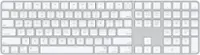
![The text on the image is a list of keys on a keyboard. Here is the grouped and corrected text:
1. Function keys: F1, F2, F3, F4, F5, F6, F7, F8, F9, F10, F11, F12
2. Numeric keys: 1, 2, 3, 4, 5, 6, 7, 8, 9, 0, -, =, +, (, )
3. Modifier keys: shift, control, option, command, caps lock, and return
4. Navigation keys: arrow keys (up, down, left, and right), and home and end keys
5. Punctuation keys: [, ], |, /, and ;
6. Numeric keypad keys: 7, 8, 9, *, -, and =
7. Other keys: tab, Q, W, E, R, T, Y, U, I, O, P, J, K, L, and Z
This list includes all the keys on a standard keyboard, grouped by their functions and types.](https://pisces.bbystatic.com/image2/BestBuy_US/images/products/eba31cb9-2606-42ab-9643-ed4280533545.jpg;maxHeight=144;maxWidth=200?format=webp)