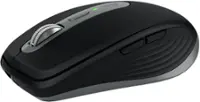
Logitech - MX Anywhere 3S Wireless Bluetooth Optical Fast Scrolling Mouse with Programmable Buttons - Wireless - Pale Gray
Color
Pale Gray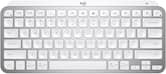 Logitech - MX Keys Mini TKL Wireless Bluetooth Scissor Keyboard with Backlit Keys - Pale Gray$99.99
More Buying Options

Specifications
- Lighting TypeNoneMaximum Sensitivity8000 dots per inchNumber of Buttons (Total)6Connection TypeWireless
- Key Specs
- Lighting Type: None
- Maximum Sensitivity: 8000 dots per inch (Mouse sensitivity is measured in dots per inch (DPI). The higher the DPI, the more sensitive the mouse is and may be more useful for high-density pixel screens. Lower DPI typically means more precision and accuracy in mouse movement.)
- Number of Buttons (Total): 6
- Connection Type: Wireless
- General
- Brand: Logitech
- Model Number: 910-006926
- Product Name: MX Anywhere 3S Wireless Bluetooth Optical Fast Scrolling Mouse with Programmable Buttons
- Color: Pale Gray
- System Requirements: Requires Bluetooth Low Energy technology, Windows 10, 11 or later, macOS 10.15 or later, Linux, Chrome OS, iPadOS 14 or later, Android 8.0 or later (The software that a product must have for it to be able to integrate with another product.)
- Features
- Mouse Type: Compact
- Lighting Type: None
- Performance
- Mouse Operation: Button(s), Scroll wheel
- Mouse Grip Style: Standard (In comparison to many palm and claw grips, ergonomic grip mice are designed for a specific handedness and put the hand and wrist in a position to promote comfort. Customizable grips feature buttons/keys that can be configured to perform specific actions and may also have customizable calibration and sensitivity settings.)
- Handedness: Right-handed
- Tracking Method: Optical (There are several types of computer mice, optical and laser being among the most common. Optical mice detect less detail and provide more precise and accurate movement. Laser mice detect more detail and can be used on a wider variety of surfaces, but are more sensitive to small movements.)
- Maximum Sensitivity: 8000 dots per inch (Mouse sensitivity is measured in dots per inch (DPI). The higher the DPI, the more sensitive the mouse is and may be more useful for high-density pixel screens. Lower DPI typically means more precision and accuracy in mouse movement.)
- Minimum Sensitivity: 200 dots per inch (Mouse sensitivity is measured in dots per inch (DPI). The higher the DPI, the more sensitive the mouse is. Lower DPI typically means more precision and accuracy in mouse movement, but higher DPI may be useful for high-density pixel screens.)
- Number of Buttons (Total): 6
- Number of Thumb Buttons: 2
- Number of Programmable Buttons: 6
- Connectivity
- Connection Type: Wireless
- Wireless Connectivity: Bluetooth, Radio Frequency (RF - 2.4 Ghz/Low Latency) (The manner in which a device sends data to another device over a short distance without the use of wires or cables.)
- Maximum Wireless Range: 33 feet
- Operating System Compatibility: Windows, Mac, Apple iPadOS, Chrome, Linux, Android
- Power
- Mouse Power Source: Battery-powered
- On/Off Switch: true
- Rechargeable Battery (Mouse): true
- Wireless Charging: false
- Charging Interface(s): USB-A (The connection for transmitting power to charge the device.)
- Battery Chemistry: Lithium
- Dimensions
- Product Height: 3.96 inches (The out of box height of the item. Height is measured as the vertical distance from the bottom of the item to the top as it would be primarily used or placed.)
- Product Length: 1.35 inches (The out of box length of the item. Length is measured as the longest dimension of the item.)
- Product Width: 2.56 inches (The out of box width of the item. Width is measured as the horizontal distance from one side of the item to the other as it would be primarily used or placed.)
- Product Weight: 99 grams (The out of box weight of the item.)
- Warranty
- Warranty - Parts: 1 year
- Warranty - Labor: None
- Other
- UPC: 097855184016
Introducing Logitech MX Anywhere 3S Mouse, a beloved compact wireless mouse with next-level precision and control – now with 8K DPI Any-Surface Tracking and Quiet Clicks so you can master your work anywhere.
- Tracks аnywhere, goes еverywhere: Work on any surface, even glass, with MX Anywhere 3S Bluetooth Mouse – now with an 8K DPI sensor so you can cover more ground with subtle movement.¹
- Deeper flow with quiet clicks: MX Anywhere 3S Wireless Mouse introduces Quiet Clicks – the same satisfying feel but with less click noise (than MX Anywhere 3) for less distraction and more focus.
- Scroll 1000 lines per second: With MagSpeed, Logitech’s fastest and most precise scroll wheel.
- Multi-device, multi-OS wireless mouse: Connect with up to 3 devices via Bluetooth on Windows, macOS, Chrome OS or Linux. Compatible with Logi Bolt USB receiver only (receiver not included).²
- Seamless connectivity: MX Anywhere 3S portable mouse is Engineered for Intel Evo which verifies it meets technical specifications for optimal Bluetooth connection: no dongles, no wires, no hassle.
- Optimize your workflow with MX Anywhere 3S mouse for PC and Mac: Work across devices, set tracking speed, customize buttons and use ready-made app-specific customizations with Logi Options+ (Logi Options+ app available for Windows and macOS)
- USB-C quick charging, long-lasting cordless mouse: Stays powered for up to 70 days on a full charge and lasts up to 3 hours off a 1-minute charge; charge with the included USB C cable.³
- Made with recycled plastic: Plastic parts in MX Anywhere 3S include certified post-consumer recycled plastic – 78% for Black and 61% for Pale Grey. (Excludes plastic in printed wiring assembly (PWA), receiver, wire, FFC cable, and packaging.)
- 1-month of Adobe Creative Cloud on us (a value of $59.99)*: Pair two of the world’s top creative tools. Buy one MX Master 3S and claim your free 1-month Adobe Creative Cloud membership. *Value calculated based on Adobe Creative Cloud All Apps monthly value of $59.99 valid on Adobe.com on Sept 12, 2024. Terms & Conditions apply.¹ ² ³
Whats Included
- MX Anywhere 3S Mouse
- USB-C charging cable (USB-A to USB-C)
- User documentation
Q: Does this work with levono yoga 7.1 or 2
A: The system requirements for Mx Anywhere 3S are Requires Bluetooth Low Energy Technology Engineered for Intel® Evo™ Laptops Windows® 10, 11 or later macOS 10.15 or later Linux® ? ChromeOS™ ? iPadOS 14 or later Android™ ? 8.0 or later.
Q: Will it side scroll with the top roller button?
A: Yes, you cal click down on the scroll wheele and it turns into an arrow, then move the mouse to go up or down your page. Nicely integrated.
A: You need the MX anywhere software the mouse documentation guides you to. Once installed it is quick and easy to change them.
Q: Does this mouse have a button to switch between computers?
A: It is actually a 3 way switch to switch between 3 different devices easily.
Compare similar products

Introducing Logitech MX Anywhere 3S Mouse, a beloved compact wireless mouse with next-level precision and control – now with 8K DPI Any-Surface Tracking and Quiet Clicks so you can master your work anywhere.

Magic Mouse is wireless and rechargeable, with an optimized foot design that lets it glide smoothly across your desk. The Multi-Touch surface allows you to perform simple gestures such as swiping between web pages and scrolling through documents. The rechargeable battery will power your Magic Mouse for about a month or more between charges.* It’s ready to go right out of the box and pairs automatically with your Mac. It features a USB-C port and includes a woven USB-C Charge Cable that lets you pair and charge by connecting to a USB-C port on your Mac, so you can charge all of your favorite devices with just a single cable.


G305 features the next-gen HERO sensor with 12,000 DPI sensitivity and LIGHTSPEED wireless 1 ms performance. It’s long-lasting with 250 gaming hours from one AA battery (an indicator light reminds you before you need a new AA), ultra-portable with built-in nano receiver storage, lightweight weighing in at 99 grams, and ready to game with 6 programmable buttons. G305 is the LIGHTSPEED wireless mouse for all.
| Pros for Logitech - MX Anywhere 3S Wireless Bluetooth Optical Fast Scrolling Mouse with Programmable Buttons - Wireless - Pale Gray | |||
|---|---|---|---|
| Overall Performance, Battery Life, Connectivity, Portability, Size | Overall Performance, Battery Life, Connectivity, Ease of Use, Design | Battery Life, Button Functionality, Ergonomics, Haptic Feedback, Build Quality | Overall Performance, Battery Life, Weight, Ease of use, Price |
| Cons for Logitech - MX Anywhere 3S Wireless Bluetooth Optical Fast Scrolling Mouse with Programmable Buttons - Wireless - Pale Gray | |||
| Click Sound | Size, Port Placement, Scrolling | Size, Weight | Lag, Scroll Wheel, Side Buttons, Ergonomics |
Specs
Reviews
Customers are saying
Customers have good things to say about the MX Anywhere 3S Wireless Mouse, particularly its portability and overall performance, making it a worthwhile investment. Users appreciate the long-lasting battery and the mouse's comfortable size. The mouse's connectivity is also a plus, with users noting its ability to connect to multiple computers.
Customer Images
The vast majority of our reviews come from verified purchases. Reviews from customers may include My Best Buy members, employees, and Tech Insider Network members (as tagged). Select reviewers may receive discounted products, promotional considerations or entries into drawings for honest, helpful reviews.
- Rated 5 out of 5 stars
So far so good!
It’s really easy to use. I haven’t figured out how to configure the middle button yet — but I’m sure it’s simple. I’m glad that the charging port is on the front, unlike the Mac magic mouse which I was debating on… this one seems to have a better grip which is important if I wanted to work for hours! Only negative is the off switch — it’s on the bottom so I half the time I forget to turn it on or off. I wish that button was in a better place.
Posted by Stephanie
- Rated 5 out of 5 stars
Nice product.
Fast blueteeth connection. Portable and good looking. You can always trust Logi.
Posted by YiZ1
- Rated 5 out of 5 stars
Work Travel Laptop Mouse
Works great with my work laptop. It's rugged and easy to use and pack. Holds a great charge
Posted by TroyL