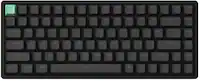
Logitech - MX Keys Mini TKL Wireless Bluetooth Scissor Keyboard with Backlit Keys - Black
Color
Black- Logitech - MX Anywhere 3S Wireless Bluetooth Optical Fast Scrolling Mouse with Programmable Buttons - Wireless - Black$84.99$89.99

More Buying Options
Related Item

Specifications
- Lighting TypeSingle colorForm FactorTenkeyless (TKL)Keyboard TechnologyScissorConnection TypeWireless
- Key Specs
- Lighting Type: Single color
- Form Factor: Tenkeyless (TKL) (The size, arrangement, and physical configuration of the product.)
- Keyboard Technology: Scissor (Type of technology that detects a key press.)
- Connection Type: Wireless
- General
- Brand: Logitech
- Model Number: 920-010475
- Product Name: MX Keys Mini TKL Wireless Bluetooth Scissor Keyboard with Backlit Keys
- Color: Black
- Features
- Lighting Type: Single color
- Customizable Lighting: false
- Numeric Keypad: false
- Touchpad: false
- Keyboard Type: Programmable
- Palm Rest: false
- Spill Resistant: false (Designed to resist some degree of accidental liquid spill. The level of spill-resistance is indicated by the product manufacturer, but the degree of protection may not be guaranteed after normal wear of the product.)
- Keyboard Features: Compact design, Spherically dished keys, Smart illumination, Programmable keys, Smart Keys layout, Easy Switch to pair with up to 3 devices
- Foldable: false
- Keycap Material: ABS
- Functions
- Form Factor: Tenkeyless (TKL) (The size, arrangement, and physical configuration of the product.)
- Keyboard Technology: Scissor (Type of technology that detects a key press.)
- Dedicated Macro Keys: false (Perform shortcuts of key sequences to carry out commands with a single key. Key sequences may include key strokes, mouse actions, and/or menu actions.)
- Adjustable Tilt Function: false
- Multimedia Keys: true
- Internet Keys: false
- Connectivity
- Connection Type: Wireless
- Wireless Connectivity: Radio Frequency (RF), Bluetooth (The manner in which a device sends data to another device over a short distance without the use of wires or cables.)
- Maximum Wireless Range: 33 feet
- Number Of USB Port(s): 1 (The total number of USB ports including all generations and versions.)
- Number of Devices Connectable Simultaneously: 3
- Compatibility
- Operating System Compatibility: Windows, Mac, Chrome, Linux, Apple iPadOS, Apple iPadOS, Android
- Plug and Play Operation: true
- System Requirements: Requires Bluetooth low energy technology,Windows 10 or later, macOS 10.15 or later, Linux, Chrome OS, iOS 13.4 or later, iPadOS 14 or later, Android 5.0 or later (The software that a product must have for it to be able to integrate with another product.)
- Power
- Rechargeable Battery: true
- Number of Batteries Required: 1
- Battery Chemistry: Lithium-polymer
- Batteries Included: true (Indicates whether the product comes with the required batteries for its operation.)
- On/Off Switch: true
- Dimensions
- Product Height: 0.82 inches (The out of box height of the item. Height is measured as the vertical distance from the bottom of the item to the top as it would be primarily used or placed.)
- Product Width: 11.65 inches (The out of box width of the item. Width is measured as the horizontal distance from one side of the item to the other as it would be primarily used or placed.)
- Product Depth: 5.19 inches (The out of box depth of the item. Depth is measured as the distance from the front of the item to the back as it would be primarily used or placed.)
- Product Weight: 17.86 ounces (The out of box weight of the item.)
- Mouse
- Mouse Included: false
- Warranty
- Warranty - Parts: 1 year
- Warranty - Labor: None
- Other
- UPC: 097855169617
Introducing MX Keys Mini, a smaller, smarter, and mightier minimalist wireless keyboard made for creators. The minimalist form factor provides improved ergonomics by aligning your shoulders and allowing you to place your mouse closer to your keyboard for less arm reaching, more comfort, and better body posture. Perfect Stroke keys are shaped for your fingertips with optimal key stability and tactile responsiveness to keep you oriented and in your flow. The backlit keys light up the moment your hands approach, and automatically adjust to suit changing lighting conditions. Smart Dictation, Mic Mute/Unmute and Emoji keys streamline your workflow even further.
- Perfect stroke typing with smart keys: Type on keys shaped for your fingertips, with voice to text Dictation, Mic Mute/Unmute, and Emoji keys.¹
- Mini size, mighty powerful: A layout designed for effortless precision, with a minimalist form for an ergonomic keyboard that's portable and can travel wherever you get work done.
- Smart illumination: The wireless keyboard's backlit keys light up the moment your hands approach, and automatically adjust to suit changing lighting conditions.
- Multi-device cordless keyboard: Pair MX Keys Mini compact keyboard with up to 3 devices on nearly any operating system via Bluetooth Low Energy and switch between them seamlessly.
- Multiple computers, one flow: Team the slim MX Keys Mini with MX Master 3 or MX Anywhere 3 and type across multiple computers or laptops in one fluid workflow with Logi Options+ app.¹
- USB-C rechargeable: MX Keys Mini Bluetooth keyboard stays powered up to 10 days on a full charge or up to 5 months with the backlighting turned off. ²
- Sustainability: Plastic parts in MX Keys Mini include certified post consumer recycled plastic (Black: 30%, Pale Gray and Rose 12%(5)).³
- Product carbon footprint: Product carbon footprint: 10.78 kg CO2e.
- 1-month of Adobe Creative Cloud on us (a value of $59.99)*: Pair two of the world’s top creative tools. Buy one MX Keys Mini and claim your free 1-month Adobe Creative Cloud membership. *Value calculated based on Adobe Creative Cloud All Apps monthly value of $59.99 valid on Adobe.com on Sept 12, 2024. Terms & Conditions apply.¹ ² ³
Whats Included
- MX Keys Mini Keyboard
- Charging cable
- User documentation
Disclaimers
- ¹ Requires Logitech Options+ software, available for Windows and macOS.
- ² Battery life may vary based on user and computing conditions.
- ³ Excludes packaging, printed circuit board (PCB).
A: Hey RickyRicardo! When you download the free Logitech Options software https://www.logitech.com/en-us/software/options.html, you'll be able to edit what the F4 to F12 keys do to your preference. Now, not all every possible function will be listed there obviously, so in your case, the Page Up/Down/Home features can be done by pressing the FN key + one of the arrows (up, down, left, right).
A: I haven't had this issue but the keys can fall off and won't snap back on. You should take it for a replacement if you're within the manufacturer's or GS warranty period
A: Not really sure about android but I use it on Mac and Windows and it works great.
Q: How to take screenshot using this keyboard in Windows.
A: Hey there! The easiest way to take a screenshot is by holding Windows+shift+S. That should allow you to select a portion of the screen for a screen shot, or the whole screen if you prefer. -Weston from Logitech
Q: Hello. I am wondering, what is the physical size of this keyboard?
A: Hello, Joe! The MX Keys Mini is 5.19 in (131.95 mm) from bottom to top by 11.65 in (295.99 mm) from left to right by 0.82 in (20.97 mm) back to front.
Q: is the mouse sold separately for the wierless version of this keyboard
A: Yes, the mouse is sold separately.
A: It worked with windows 10 for me on my lenovo thinkpad
Compare similar products

Introducing MX Keys Mini, a smaller, smarter, and mightier minimalist wireless keyboard made for creators. The minimalist form factor provides improved ergonomics by aligning your shoulders and allowing you to place your mouse closer to your keyboard for less arm reaching, more comfort, and better body posture. Perfect Stroke keys are shaped for your fingertips with optimal key stability and tactile responsiveness to keep you oriented and in your flow. The backlit keys light up the moment your hands approach, and automatically adjust to suit changing lighting conditions. Smart Dictation, Mic Mute/Unmute and Emoji keys streamline your workflow even further.

The slim profile and minimalist design transform your keyboard and mouse into a visual statement that elevates your desk setup. A slim profile and compact design make typing and mousing a pleasure. Low-profile keys give you that laptop-like typing experience you know and love. Whisper-quiet keys and a 90% noise-reduced mouse let you power through in near-silence. Long battery life and an easy plug-and-play 2.4GHz USB receiver ensure a reliable, hassle-free experience.
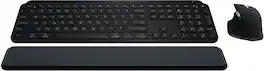
Master your flow with the MX Keys S Combo Wireless Mouse and Keyboard — the ultimate combo that combines the power of the fluid, fast precision typing of MX Keys S Wireless Keyboard with the precise, fast scrolling experience of MX Master 3S Wireless Mouse.

Defy Boring with Pebble Keys 2 K380s minimalist keyboard made with recycled plastic. Its minimalist, streamlined shape and sleek curves make it as iconic as you and super portable. Hop across 3 devices with the Easy-Switch buttons on the Bluetooth keyboard and work faster with the Fn shortcut keys like screen capture, search, and more. Customize the 10 keyboard Fn shortcut keys to work how you want and save time with shortcuts in Logi Options+ App.
| Pros for Logitech - MX Keys Mini TKL Wireless Bluetooth Scissor Keyboard with Backlit Keys - Black | |||
|---|---|---|---|
| Keyboard Quality, Ease of use, Battery Life, Size, Key Feel | Keyboard Quality, Ease of use, Size, Design, Weight | There were no pros for this product— | Keyboard Quality, Size, Battery Life, Portability, Connectivity |
| Cons for Logitech - MX Keys Mini TKL Wireless Bluetooth Scissor Keyboard with Backlit Keys - Black | |||
| Number Pad, Compatibility, Price, Noise Level | Compatibility, Caps Lock Indicator | There were no cons for this product— | Number Pad |
Specs
Reviews
Customers are saying
Customers are delighted by the MX Keys Mini TKL Wireless Bluetooth Scissor Keyboard with Backlit Keys, particularly the keyboard quality, ease of use, and long battery life. The compact size, satisfying key feel, and versatile connectivity options also receive positive feedback. Some customers find the price a bit high and wish for a number pad, while a few desire a quieter keyboard. Additionally, a small number of users noted compatibility issues with certain technologies.
Customer Images
The vast majority of our reviews come from verified purchases. Reviews from customers may include My Best Buy members, employees, and Tech Insider Network members (as tagged). Select reviewers may receive discounted products, promotional considerations or entries into drawings for honest, helpful reviews.