Logitech - MX Mechanical Mini for Mac Compact Wireless Mechanical Tactile Switch Keyboard for macOS/iPadOS/iOS with Backlit Keys - Space Gray
Color
Space GrayFREE shipping to
More Buying Options
Related Item

Specifications
- Lighting TypeSingle colorForm FactorCompact (60%)Keyboard TechnologyMechanicalKey Switch BehaviorTactileConnection TypeWireless
- Key Specs
- Lighting Type: Single color
- Form Factor: Compact (60%) (The size, arrangement, and physical configuration of the product.)
- Keyboard Technology: Mechanical (Type of technology that detects a key press.)
- Key Switch Behavior: Tactile (Refers to the mechanisms under the keycaps on a keyboard that enable you to type faster and more precisely. Linear switches move straight up and down without any sound or bump. Tactile switches provide a noticeable bump in the key press, and no sound. Clicky switches provide a bump in the key press and "clicky" sound.)
- Connection Type: Wireless
- General
- Brand: Logitech
- Model Number: 920-010831
- Product Name: MX Mechanical Mini for Mac Compact Wireless Mechanical Tactile Switch Keyboard for macOS/iPadOS/iOS with Backlit Keys
- Color: Space Gray
- Features
- Lighting Type: Single color
- Numeric Keypad: false
- Touchpad: false
- Palm Rest: false
- Spill Resistant: false (Designed to resist some degree of accidental liquid spill. The level of spill-resistance is indicated by the product manufacturer, but the degree of protection may not be guaranteed after normal wear of the product.)
- Foldable: false
- Functions
- Form Factor: Compact (60%) (The size, arrangement, and physical configuration of the product.)
- Keyboard Technology: Mechanical (Type of technology that detects a key press.)
- Adjustable Tilt Function: false
- Key Switch Behavior: Tactile (Refers to the mechanisms under the keycaps on a keyboard that enable you to type faster and more precisely. Linear switches move straight up and down without any sound or bump. Tactile switches provide a noticeable bump in the key press, and no sound. Clicky switches provide a bump in the key press and "clicky" sound.)
- Multimedia Keys: true
- Connectivity
- Connection Type: Wireless
- Wireless Connectivity: Bluetooth, Radio Frequency (RF) (The manner in which a device sends data to another device over a short distance without the use of wires or cables.)
- Maximum Wireless Range: 33 feet
- Number Of USB Port(s): 1 (The total number of USB ports including all generations and versions.)
- Number of Devices Connectable Simultaneously: 3
- Compatibility
- Operating System Compatibility: Mac, Apple iPadOS, Apple iOS
- System Requirements: Bluetooth Low Energy technology enabled device: macOS 10.15 or later, iPadOS 14 or later, iOS 14 or later; Internet connection for software download of Logi Options+ (The software that a product must have for it to be able to integrate with another product.)
- Power
- Rechargeable Battery: true
- Battery Chemistry: Lithium
- On/Off Switch: true
- Dimensions
- Product Height: 1.02 inches (The out of box height of the item. Height is measured as the vertical distance from the bottom of the item to the top as it would be primarily used or placed.)
- Product Width: 12.3 inches (The out of box width of the item. Width is measured as the horizontal distance from one side of the item to the other as it would be primarily used or placed.)
- Product Depth: 5.17 inches (The out of box depth of the item. Depth is measured as the distance from the front of the item to the back as it would be primarily used or placed.)
- Product Weight: 21.58 ounces (The out of box weight of the item.)
- Mouse
- Mouse Included: false
- Warranty
- Warranty - Parts: 1 year
- Warranty - Labor: None
- Other
- UPC: 097855174727
A minimalist keyboard mastered for Mac with extraordinary feel, precision, and performance. Low-profile mechanical switches deliver a satisfying and quiet typing experience. Dual colored keycaps with a key layout for Mac computers help improve precision through your peripheral vision. Plus, get a complimentary 1-month Creative Cloud subscription with your purchase of MX Mechanical Mini For Mac and create, make, and do like never before.
- Mastered for Mac: MX Mechanical Mini for Mac Bluetooth keyboard features a key layout for Mac designed for feel and productivity, optimized for macOS and compatible with iPadOS and iOS.¹
- Precise and quiet typing: Mechanical Tactile Quiet switches have a satisfying tactile bump you feel but barely hear, for precise feedback, reactive key reset, and a fluid typing experience.
- Mini size with low-profile keys and ergonomic comfort: Experience more comfort with the minimalist, compact form factor featuring low-profile mechanical keys, for effortless precision and better ergonomics.
- Smart illumination: Backlit keys light up the moment your hands approach the cordless keyboard and automatically adjust to suit changing lighting conditions.
- Multi-device connectivity, optimised for iMac, MacBook and iPad: Pair MX Mechanical Mini for Mac multi-device keyboard via Bluetooth Low Energy with up to 3 Mac computers or iPads and switch between them seamlessly.
- Faster workflow, more customization: Customize Fn keys, assign backlighting effects, enable Flow cross-computer control with MX Master 3S for Mac, and more in the improved Logi Options+.²
- USB-C to USB-C rechargeable: MX Mechanical Mini for Mac stays powered up to 15 days on a full charge or up to 10 months with the backlighting turned off.³
- Sustainable design: Plastic parts in MX Mechanical Mini for Mac include certified post-consumer recycled plastic - Pale Gray: 36% and Space Gray: 47% (excludes plastic in printed wiring assembly (PWA), cables, and packaging.). Certified carbon neutral.
Whats Included
- MX Mechanical Mini Keyboard for Mac
- USB-C charging cable (USB-A to USB-C)
- User documentation
Q: HOW DOES THE KEYBOARD LIGHT UP?
A: Great
A: My Logitech MX Mech Mini has only 1 USB C and that is used for charging. There is an on and off switch also and no other connections or switches.
Q: Would this work with the 2022 ipad 10th gen?
A: Yes it would
A: Hey! A next-level low-profile quieter mechanical typing experience with Tactile Quiet switches on a Mac key layout that offer a satisfying tactile bump you feel for precise feedback, reactive key reset, and less noise.
Compare similar products
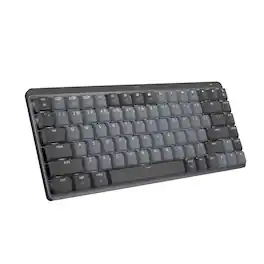
A minimalist keyboard mastered for Mac with extraordinary feel, precision, and performance. Low-profile mechanical switches deliver a satisfying and quiet typing experience. Dual colored keycaps with a key layout for Mac computers help improve precision through your peripheral vision. Plus, get a complimentary 1-month Creative Cloud subscription with your purchase of MX Mechanical Mini For Mac and create, make, and do like never before.

Introducing MX Mechanical Mini- a minimalist keyboard with extraordinary feel, precision, and performance. Low-profile mechanical typing delivers satisfying feedback in your choice of key switches – Tactile Quiet, Clicky, or Linear. MX Mechanical Mini is crafted for ergonomic comfort, with smart illumination and Easy-Switch – allowing you to connect up to 3 devices and stay in your flow for hours.

Introducing MX Keys Mini, a smaller, smarter, and mightier minimalist wireless keyboard made for creators. The minimalist form factor provides improved ergonomics by aligning your shoulders and allowing you to place your mouse closer to your keyboard for less arm reaching, more comfort, and better body posture. Perfect Stroke keys are shaped for your fingertips with optimal key stability and tactile responsiveness to keep you oriented and in your flow. The backlit keys light up the moment your hands approach, and automatically adjust to suit changing lighting conditions. Smart Dictation, Mic Mute/Unmute and Emoji keys streamline your workflow even further.
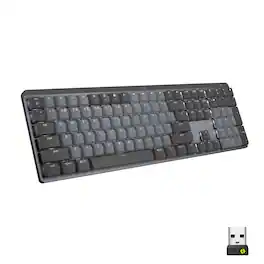
Introducing MX Mechanical - a full-size keyboard with extraordinary feel, precision, and performance. Low-profile mechanical typing delivers satisfying feedback in your choice of key switches – Tactile Quiet, Clicky, or Linear. MX Mechanical is crafted for ergonomic comfort, with smart illumination and easy-switch – allowing you to connect up to 3 devices and stay in your flow for hours.
| Pros for Logitech - MX Mechanical Mini for Mac Compact Wireless Mechanical Tactile Switch Keyboard for macOS/iPadOS/iOS with Backlit Keys - Space Gray | |||
|---|---|---|---|
| There were no pros for this product— | Keyboard Quality, Battery Life, Key Feel, Size, Connectivity | Keyboard Quality, Ease of use, Battery Life, Size, Key Feel | Keyboard Quality, Battery Life, Key Feel, Connectivity, Ease of use |
| Cons for Logitech - MX Mechanical Mini for Mac Compact Wireless Mechanical Tactile Switch Keyboard for macOS/iPadOS/iOS with Backlit Keys - Space Gray | |||
| There were no cons for this product— | Price, Number Pad, Weight | Price, Number Pad, Noise Level, Compatibility | Price, Noise Level, Software, Space Bar |
Specs
Reviews
Customer Images
The vast majority of our reviews come from verified purchases. Reviews from customers may include My Best Buy members, employees, and Tech Insider Network members (as tagged). Select reviewers may receive discounted products, promotional considerations or entries into drawings for honest, helpful reviews.
- Rated 5 out of 5 stars
Logitech MX vs. Keychron K3 and Apple Magic Keyboa
It's been 4 days and I'm enjoying this keyboard more and more every time I use it. My previous keyboards were a Keychron K3 and an Apple Magic Keyboard. What most people don't talk about with any of these keyboards is keyboard angle. This keyboard seems to feel better than my Keychron K3 or the Apple Magic Keyboard. Let me describe more of what I'm talking about. Check out my photos. On the far right is an Apple Magic Keyboard. It's almost completely flat on a desk. The Keychron in the middle is angled and the Logitech MX is on the far left. The Logitech's angle is perfect. It feels comfortable when I type, basically allowing me to rest my palms on the desk as I type. I would've preferred more curved keys, but I'll get used to it. The Keychron has the more curved keys I like, but it's not angled quite the same way as the Logitech MX. Kudos to Keychron for provided two angles you can choose from, but both angles miss the mark. I had to curl my fingers more to type on the Keychron. Now the Apple Magic Keyboard. There is nothing magical about this. It has no ability to adjust its angle. What idiot designed this? Nobody wants to type for extended periods of time on a keyboard that is basically flat on the desk. You have to curl your fingers most of all to type on this one. Now let's speak about typing quality. The Logitech has a soft click, almost gummy feel when you press the keys. It's gummy in a good way. I hear a little squeak every 5th keypress or so which is a little annoying, but I will chalk this up to the keyboard being brand new and I have to just keep using it to get the squeaks out. The Keychron has a satisfying click sound. I got the red key version so it doesn't clack like its blue counterpart. I would say the Keychron edges the Logitech out in this category, but I've used the Keychron for almost a year so this is not the fairest comparison. The Apple Magic Keyboard has a click sound with each keypress, but the key travel (how far you push down) is extremely limited making it feel more like expensive calculator keys rather than a high end keyboard. Long-term typing yields different heights on each key. You can visibly see which keys you've pressed more often than others after many months of use. Not what I'd expect from a premium keyboard. Still, I would say that the typing quality is very satisfying because of the click, I wish there was more travel, but the angle of the keyboard on my desk just detracts from a good typing experience. Let's talk about battery life. Realistically, I do not want to have to perioidcally recharge my accessories. Battery drain is excellent on the MX. Based on its drain so far, I might not have to recharge for two months. My Magic Keyboard was not quite two months. The K3... silly thing had to be recharged every 7-10 days. A neat feature of non-Apple keyboards is the backlight feature. This is really useful in low-light situations. I poked fun of it at first, but then found it seriously useful when I was DJing in dim lighting. The Apple Magic keyboard does not have any backlighting. Overall, I would say the Logitech MX is the best of all three. Here's the thing... I don't even like Logitech. I've hated many of their keyboards and mice over the years, but this one feels solid. Big thumbs up. It's a little pricey but a much better value than the Apple Magic Keyboard. The Keychron is going to have its fans, but mine died within a year. Logitech stuff lasts. I've had old Logitech products from >10 years ago that still work fine.
This review is from Logitech - MX Mechanical Mini for Mac Compact Wireless Mechanical Tactile Switch Keyboard for macOS/iPadOS/iOS with Backlit Keys - Space Gray
Posted by Clare
- Rated 5 out of 5 stars
Absolutely Beautiful
It's a very sleek design. Connected great to my Mac and absolutely no lag. Charging qas also pretty fast and after whole day of work it just down 10 points of charging. One thing i liked was secured Bluetooth connection. Not a big feature but loved that they thought of it. It was greatly packed with bubble wrap and multiple boxes to prevent any shipping damage.
This review is from Logitech - MX Mechanical Mini for Mac Compact Wireless Mechanical Tactile Switch Keyboard for macOS/iPadOS/iOS with Backlit Keys - Space Gray
Posted by IndraniE
- Rated 5 out of 5 stars
It's a mechanical keyboard for the mac
It says the switches are clicky, but mine are brown tactile. It's what it was described on the box. Imo, they're more quieter compared to red or blue switches. Honestly, the only reason you'd buy this was because you needed a mechanical keyboard for the Mac in particular. Can't be disappointed here
This review is from Logitech - MX Mechanical Mini for Mac Compact Wireless Mechanical Tactile Switch Keyboard for macOS/iPadOS/iOS with Backlit Keys - Space Gray
Posted by Hyden