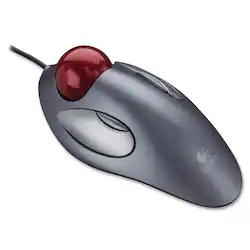
Logitech - Trackman Trackball Mouse - Silver
- Key Specs
- Maximum Sensitivity: 300 dots per inch (Mouse sensitivity is measured in dots per inch (DPI). The higher the DPI, the more sensitive the mouse is and may be more useful for high-density pixel screens. Lower DPI typically means more precision and accuracy in mouse movement.)
- Number of Buttons (Total): 4
- General
- Product Name: Trackman Trackball Mouse
- Brand: Logitech
- Model Number: 910-000806
- Features
- Mouse Type: Compact
- Performance
- Mouse Operation: Button(s)
- Handedness: Ambidextrous
- Tracking Method: Optical (There are several types of computer mice, optical and laser being among the most common. Optical mice detect less detail and provide more precise and accurate movement. Laser mice detect more detail and can be used on a wider variety of surfaces, but are more sensitive to small movements.)
- Maximum Sensitivity: 300 dots per inch (Mouse sensitivity is measured in dots per inch (DPI). The higher the DPI, the more sensitive the mouse is and may be more useful for high-density pixel screens. Lower DPI typically means more precision and accuracy in mouse movement.)
- Number of Buttons (Total): 4
- Connectivity
- Wired Connectivity: USB
- Operating System Compatibility: Mac, Windows
- Power
- Mouse Power Source: Wired
- Dimensions
- Product Height: 8.98 inches (The out of box height of the item. Height is measured as the vertical distance from the bottom of the item to the top as it would be primarily used or placed.)
- Product Width: 2.72 inches (The out of box width of the item. Width is measured as the horizontal distance from one side of the item to the other as it would be primarily used or placed.)
- Product Weight: 25.51 grams (The out of box weight of the item.)
- Warranty
- Manufacturer's Warranty - Parts: 3 years
- Manufacturer's Warranty - Labor: None
- Other
- UPC: 097855052483
Logitech Trackman Trackball Mouse: Stay comfortable while navigating features on your computer with this ergonomic trackball mouse, which reduces hand and wrist motion. Accommodate multiple users in your household, since the ambidextrous design allows right- and left-handed operation.
- Trackball mouse with reliable optical tracking: Trackball mice require less wrist movement than traditional mice, since they track the motion of the built-in ball instead of the movement of the entire mouse.
- 2-button mouse design: Customize the buttons using the included MouseWare software. WebWheel software optimizes Web browsing.
- Ergonomic, symmetrical, ambidextrous design: Can be used comfortably whether you're right- or left-handed. The large trackball improves control while reducing hand and wrist motion.
- Compatible with most Windows and Mac computers: Works across a wide array of computers.
Whats Included
- Trackman Trackball
Q: DOES IT THE BALL LIGHT UP ON THE WIRED MOUSE?
A: No, the ball on the Trackman mouse does not light up.
Q: looking 4 logitechmarblemouse P/N 804360-1000 M/N T 8818
A: Really enjoy the trackball, but make sure that it has a scrolling wheel on it or you end up losing a lot of functionality with programs.
A: I've used this trackball device for years. The ball pops out easily. Bring it to the washroom, lather up your hands with ordinary handsoap and wash the ball twice with the lather on your hands to remove the oils that invisibly accumulate on the ball. Also, remove the dust on the three points that the ball rests on. If you travel with the trackball, keep it in a ziplock bag inside your laptop case.
A: By default they mimic page-up and page-down. But we can set that using the driver Logitech adds.
Q: compatible with my Dell / Windows ; is there sftw I have to download?
A: No: software is included in the package. For regular use you shouldn't need the software. I have a Dell latitude with Windows 10: it recognized the mouse immediately. The software helps set the extra mouse buttons to custom functions.
Q: Can I use this mouse on my Mac laptop?
A: Yes: if your Mac has a standard USB2 or 3 port.
A: No. It's wired.