Microsoft - Surface Book 3 13.5" Touch-Screen - 2-in-1 Laptop - Intel Core i7 - 32GB Memory - GeForce GTX 1650 Max-Q - 512GB SSD - Platinum
FREE shipping to
More Buying Options
Specifications
- Screen TypePixelSenseScreen Size13.5 inchesScreen Resolution3000 x 2000Touch ScreenYesProcessor ModelIntel 10th Generation Core i7CPU Base Clock Frequency1.3 gigahertz
- Key Specs
- Screen Type: PixelSense
- Screen Size: 13.5 inches (Size of the screen, measured diagonally from corner to corner.)
- Screen Resolution: 3000 x 2000 (Screens come in a range of resolutions (measured in pixels, horizontal x vertical). The higher the resolution, the greater the picture quality.)
- Touch Screen: true (Touch-screen devices make navigating more intuitive. Using a touch-screen display, you can do things such as tap to select, hold and drag to move items, swipe to scroll, and pinch to zoom.)
- Processor Model: Intel 10th Generation Core i7 (Your computer's processor is like its brain. Working in combination with system memory, the power of the processor determines the complexity of software you can run, how many programs you can have open at the same time, and how fast those programs will run. Most computers feature an AMD, Intel or Snapdragon processor.)
- CPU Base Clock Frequency: 1.3 gigahertz (Actual central processing unit (CPU) speed may vary by device configuration and design. The average rate at which the processor is able to execute tasks under normal operating conditions as asserted by the manufacturer.)
- Storage Type: SSD
- Total Storage Capacity: 512 gigabytes
- System Memory (RAM): 32 gigabytes (Random-access memory (RAM) is a computing device's short-term data storage, which allows active information to be accessed quickly. The size and type of RAM determines how efficiently the device can handle large amounts of information at one time. For example, gaming or video editing requires more RAM for optimal performance.)
- Graphics: NVIDIA GeForce GTX 1650 Max-Q (Often referred to as a "graphics processing unit" (GPU), this device is responsible for displaying image content and decoding/encoding video content in programs and games.)
- Display Connector(s): Display connection via USB port (The number and type of connectors used to connect to an external display.)
- Battery Life (up to): 15.5 hours (Battery life will vary depending on the product configuration, product model, applications loaded on the product, power management setting of the product and the product features used by the customer. As with all batteries, the maximum capacity of this battery will decrease with time and usage.)
- Battery Chemistry: Lithium-ion
- 2-in-1 Design: true (A laptop and a tablet combined in one lightweight, portable device. Sometimes referred to as "convertible" or "hybrid" laptops, these devices deliver the processing power and keyboard of a laptop. When you're ready to play, either detach the screen or fold your 2-in-1 into tablet mode to comfortably watch movies, play games, read an e-book and more.)
- Backlit Keyboard: true (Integrated lights allow for visibility of the keys in low-light conditions.)
- General
- Brand: Microsoft
- Model Number: SLK-00001
- Product Name: Surface Book 3 13.5" Touch-Screen - 2-in-1 Laptop - Intel Core i7 - 32GB Memory - GeForce GTX 1650 Max-Q - 512GB SSD
- Color: Platinum
- Year of Release: 2020
- Display
- Display Type: LCD
- Screen Type: PixelSense
- Screen Size: 13.5 inches (Size of the screen, measured diagonally from corner to corner.)
- Screen Resolution: 3000 x 2000 (Screens come in a range of resolutions (measured in pixels, horizontal x vertical). The higher the resolution, the greater the picture quality.)
- Stylus Input: Built for Windows Ink (Active) (An active stylus/pen is able to communicate directly with a compatible device; active electromagnetic resonance (EMR) pens are powered via a device's screen and active electrostatic (AES) pens require an additional power source. A passive stylus does not have electronic features and is compatible with most capacitative touch screens.)
- Touch Screen: true (Touch-screen devices make navigating more intuitive. Using a touch-screen display, you can do things such as tap to select, hold and drag to move items, swipe to scroll, and pinch to zoom.)
- Processor
- Processor Brand: Intel
- Processor Model: Intel 10th Generation Core i7 (Your computer's processor is like its brain. Working in combination with system memory, the power of the processor determines the complexity of software you can run, how many programs you can have open at the same time, and how fast those programs will run. Most computers feature an AMD, Intel or Snapdragon processor.)
- Processor Model Number: 1065G7
- CPU Base Clock Frequency: 1.3 gigahertz (Actual central processing unit (CPU) speed may vary by device configuration and design. The average rate at which the processor is able to execute tasks under normal operating conditions as asserted by the manufacturer.)
- Number of CPU Cores: 4-core (quad-core) (A core, or "brain" of a CPU, allows it to receive and execute instructions. Each core can work independently or together to perform parallel operations.)
- Storage
- Storage Type: SSD
- Total Storage Capacity: 512 gigabytes
- Solid State Drive Capacity: 512 gigabytes (The amount of data that can be stored on the device's solid state drive (SSD). SSD is a flash-based storage with faster speeds than a hard disk drive (HDD).)
- Memory
- System Memory (RAM): 32 gigabytes (Random-access memory (RAM) is a computing device's short-term data storage, which allows active information to be accessed quickly. The size and type of RAM determines how efficiently the device can handle large amounts of information at one time. For example, gaming or video editing requires more RAM for optimal performance.)
- Type of Memory (RAM): LPDDR4X (Each type of RAM delivers a different level of speed, bandwidth, energy efficiency and performance.)
- System Memory RAM Speed: 3733 megahertz (How fast the information-storing hardware operates. The faster the RAM, the faster memory can be transferred to other system components. Ultimately, faster RAM improves operational efficiency.)
- Graphics
- Graphics Type: Integrated (Dedicated graphics uses a separate graphics card for processing video images. Because it does not use memory from the system's RAM, there is no extra burden on the CPU and graphics are processed more efficiently. Integrated graphics shares system RAM to process video images.)
- GPU Brand: NVIDIA
- Graphics: NVIDIA GeForce GTX 1650 Max-Q (Often referred to as a "graphics processing unit" (GPU), this device is responsible for displaying image content and decoding/encoding video content in programs and games.)
- Compatibility
- Operating System: Windows 10 Home (The operating system manages all software and hardware, including files, memory and connected devices. Most importantly, it lets you interact with your device and your programs in a visual way; otherwise, you'd be typing computer code to get anything done.)
- Connectivity
- Display Connector(s): Display connection via USB port (The number and type of connectors used to connect to an external display.)
- Number of HDMI Outputs (Total): 0
- Number of DisplayPort Outputs (Total): 0
- Number of Thunderbolt Ports (Total): 0
- USB Ports: 2 x USB-A 3.1, 1 x USB-C 3.1 (The number and type of USB ports the product has.)
- Number of USB Ports (Total): 3
- Headphone Jack: true (The device features an interface that allows for the connection of headphones.)
- Wireless Connectivity: Wi-Fi (The manner in which a device sends data to another device over a short distance without the use of wires or cables.)
- Wireless Standard: AX (The wireless networking protocol used by the device. Each iteration of the protocol is based on the 802.11 standard developed by the Institute of Electrical and Electronics Engineers (IEEE) Standards Association. Denoted by letters following 802.11 (802.11a, 802.11ac, etc.), each version, published in alphabetical order, encompasses all previous versions.)
- Number Of Ethernet Ports: 0
- Cooling
- CPU Cooling System: Air
- Power
- Power Supply Maximum Wattage: 102 watts
- Battery Life (up to): 15.5 hours (Battery life will vary depending on the product configuration, product model, applications loaded on the product, power management setting of the product and the product features used by the customer. As with all batteries, the maximum capacity of this battery will decrease with time and usage.)
- Battery Chemistry: Lithium-ion
- Camera
- Front-Facing Camera: true
- Front Facing Camera Megapixels: 5 megapixels (The more megapixels, the more detail that the camera facing the user can capture.)
- Front Facing Camera Video Resolution: 1080p (Refers to the number of pixels, both horizontally and vertically, used by the camera facing the user to capture video. The higher the resolution the finer the video detail that can be seen.)
- Built-In Microphone: true
- Features
- 2-in-1 Design: true (A laptop and a tablet combined in one lightweight, portable device. Sometimes referred to as "convertible" or "hybrid" laptops, these devices deliver the processing power and keyboard of a laptop. When you're ready to play, either detach the screen or fold your 2-in-1 into tablet mode to comfortably watch movies, play games, read an e-book and more.)
- Backlit Keyboard: true (Integrated lights allow for visibility of the keys in low-light conditions.)
- GPS Enabled: false
- Media Card Reader: true (A hardware device that allows for access to data on a memory card and enables the transfer of its files to a computer. These devices may have one or multiple slots for various types of memory cards, and may be integrated into the computer or available as an external device.)
- Audio Technology: Dolby Atmos
- Speaker Type: Stereo
- Security Features: Facial recognition
- Cable Lock Slot: None
- Stylus Dock: None
- Casing Material: Magnesium alloy
- Dimensions
- Product Height: 0.91 inches (The out of box height of the item. Height is measured as the vertical distance from the bottom of the item to the top as it would be primarily used or placed.)
- Product Width: 12.3 inches (The out of box width of the item. Width is measured as the horizontal distance from one side of the item to the other as it would be primarily used or placed.)
- Product Depth: 9.14 inches (The out of box depth of the item. Depth is measured as the distance from the front of the item to the back as it would be primarily used or placed.)
- Product Weight: 3.62 pounds (The out of box weight of the item.)
- Certifications Listings & Approvals
- ENERGY STAR Certified: true (Devices carrying the ENERGY STAR service mark, such as computer products and peripherals, kitchen appliances, and other products, generally use 20% to 30% less energy than required by federal standards.)
- EPEAT Qualified: true (The Electronic Product Environmental Assessment Tool (EPEAT) was designed to provide an environmental assessment tool for purchasers. In order to qualify for EPEAT, a product must meet all 23 required criteria.)
- EPEAT Level: Silver (The Electronic Product Environmental Assessment Tool (EPEAT) was designed to provide an environmental assessment tool for purchasers. In order to qualify for EPEAT, a product must meet all 23 required criteria. Products are rated Bronze, Silver or Gold based on how many of 28 optional criteria they meet (below 50%, 50%, 75%).)
- Included
- Included Software: Microsoft Office 365 30-day trial
- Optical Drive Type: None (An optical disk drive (ODD) uses a laser light to read data from or write data to an optical disc. These discs include CDs, DVDs, and Blu-ray Discs. This allows you to play music or watch movies using prerecorded discs.)
- Numeric Keypad: false
- Stylus Included: false
- Warranty
- Warranty - Parts: 1-year limited hardware warranty
- Warranty - Labor: 1 year
- Other
- UPC: 889842597110
Performance meets versatility. From intensive video and graphics files to high-octane gaming, the most powerful Surface laptop yet combines speed, graphics, and long battery life with the versatility of a laptop, tablet, and portable studio. Tackle your biggest demands with quadcore powered 10th Gen Intel Core processors, blazing NVIDIA graphics, and high-resolution PixelSense Display designed for Surface Pen* and touch.
- Unleash your best ideas: With the fastest graphics on any Surface, powered by the latest NVIDIA GTX GeForce GPU, Surface Book 3 13.5" has 40% more graphics performance than Surface Book 2 13.5".
- Power when you need it: Get up to 15.5 hours¹ battery life — plus get back to work when you’re ready with improved standby that extends battery life when you’re away.
- High-resolution PixelSense display: Breathe new life into your creations on the vibrant, PixelSense touchscreen display that combines Surface Pen,* touch, and Surface Dial.* Also available in 15”.
- Show them what you’re made of with the most immersive gaming on any Surface laptop: Pair your Xbox Wireless controller* to enjoy the latest titles with Xbox Game Pass for PC.* *Some accessories and software sold separately.
- Video calls and virtual meetings come to life: With spectacular audio and video with far-field Studio Mics, Dolby Audio sound, and HD cameras.
- Robust laptop, powerful tablet, and portable studio in one: Home office, kitchen table or living room couch, choose the way your work best with three versatile modes of use.
- Laptop mode: Get productive with a robust laptop featuring full keyboard and large, responsive trackpad, while navigating naturally on the touchscreen.
- Studio mode: Draw, write and sketch with precision using Surface Pen* with Surface Dial* and high-end graphics, at the perfect angle for you.
- Tablet mode: Detach the touchscreen to swipe through photos and browse the web with a powerful 13.5” tablet.
- From music and podcasts to movies: Experience movies, music, and virtual meetings with astonishing detail, richness, and depth with Dolby Atmos sound.
- All the connections you need for multiple devices and accessories: Includes USB-A and versatile USB-C ports, plus a full-size SD card slot.
- Do more with the Windows you know: Comes with Windows 10 Home, giving you familiar features, trusted security, and automatic updates.
- Unleash your best ideas: With the fastest graphics on any Surface, powered by the latest NVIDIA GTX GeForce GPU, Surface Book 3 13.5" has 40% more graphics performance than Surface Book 2 13.5".
- Power when you need it: Get up to 15.5 hours¹ battery life — plus get back to work when you’re ready with improved standby that extends battery life when you’re away.
- High-resolution PixelSense display: Breathe new life into your creations on the vibrant, PixelSense touchscreen display that combines Surface Pen,* touch, and Surface Dial.* Also available in 15”.
- Show them what you’re made of with the most immersive gaming on any Surface laptop: Pair your Xbox Wireless controller* to enjoy the latest titles with Xbox Game Pass for PC.* *Some accessories and software sold separately.
- Video calls and virtual meetings come to life: With spectacular audio and video with far-field Studio Mics, Dolby Audio sound, and HD cameras.
- Robust laptop, powerful tablet, and portable studio in one: Home office, kitchen table or living room couch, choose the way your work best with three versatile modes of use.
- Laptop mode: Get productive with a robust laptop featuring full keyboard and large, responsive trackpad, while navigating naturally on the touchscreen.
- Studio mode: Draw, write and sketch with precision using Surface Pen* with Surface Dial* and high-end graphics, at the perfect angle for you.
- Tablet mode: Detach the touchscreen to swipe through photos and browse the web with a powerful 13.5” tablet.
- From music and podcasts to movies: Experience movies, music, and virtual meetings with astonishing detail, richness, and depth with Dolby Atmos sound.
- All the connections you need for multiple devices and accessories: Includes USB-A and versatile USB-C ports, plus a full-size SD card slot.
- Do more with the Windows you know: Comes with Windows 10 Home, giving you familiar features, trusted security, and automatic updates.
Whats Included
- Microsoft Surface Book 3
- 102W Surface Power Supply w/USB-A (7W) charging port
- Quick Start Guide
- Safety and Warranty documents
- Microsoft Surface Book 3
- 102W Surface Power Supply w/USB-A (7W) charging port
- Quick Start Guide
- Safety and Warranty documents
A: If this was an issue, think it has been resolved. I can tell you that when I pulled this out of the box, there was not only WinOS updates, but did see firmware updates come across. I have had this thing for almost two weeks and have been pushing the system to its limits with all of my photo and video editing; have yet to experience this issue.
Q: Will the Surface Book 3 work with my Surface Dock (original)?
A: Surface Book 3 is compatible with Surface Dock 2 and Surface USB-C Travel Hub.
Q: What are the differences between Surface Book 2 and Surface Book 3?
A: Surface Book 3 is our most powerful laptop ever, pairing an Intel 10th generation CPU with an NVIDIA discrete GPU and up to 32GB of RAM. Still thin and light, this powerhouse laptop provides up more performance Surface Book 2 and has the longest battery life of any Surface device. We kept the world-class all-glass precision trackpad and keyboard that our customers love, and the beautifully crisp, high-DPI PixelSense display now detaches from the keyboard base up to three times faster than Surface Book 2. Surface Book 3 13.5” is more than 50% faster and has 40% more graphics performance than Surface Book 2 13.5”.
A: 1. Win10 Home to Pro upgrade can be done. Best Buy does carry Windows 10 Pro Upgrade (SKU:6383106). You can schedule an appointment with GeekSquad to have the key update done or accomplish at home as there will be additional pieces of the Windows Operating System that will have to be downloaded to complete the process and if not done correctly, you will have to reload the WinOS. 2. The most current docking station is carried by Best Buy; Microsoft - Surface Dock 2 (SKU:6408935) and is compatible with the latest gen Surface Book.
Q: Will this support windows 11?
A: Yes, Surface Book 3 will support Windows 11.
Q: Does this come with a computer case or protective, padded sleeve?
A: No, however there are plenty of options out there to allow you to get what you need. Note, if you get the pen, it will magnetically attach to the side of the computer.
A: In my opinion, these are fairly heavy. The specs on the page say it weighs 3.62 pounds. The operating system is Windows 10 Home so if you're going to domain connect it you will need to upgrade it to Windows 10 Pro. From what I have read, it uses DDR4 RAM. For storage, you can get 256GB, 512GB, 1000GB or 2000GB options. I purchased the 512GB but in doing so the RAM increases from 16GB to 32GB.
Q: DO ALL SURFACE KEYBOARDS HAVE WHITE LIGHTS?
A: I believe the answer is yes. I've never seen any Surface Pro keyboard or Surface Book keyboard with any other color lights.
Compare similar products
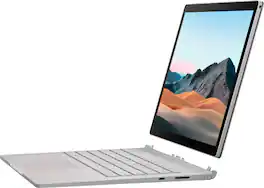
Performance meets versatility. From intensive video and graphics files to high-octane gaming, the most powerful Surface laptop yet combines speed, graphics, and long battery life with the versatility of a laptop, tablet, and portable studio. Tackle your biggest demands with quadcore powered 10th Gen Intel Core processors, blazing NVIDIA graphics, and high-resolution PixelSense Display designed for Surface Pen* and touch.

Fuel your creativity with a device that’s powerfully fast and powerfully smart. Built for modern makers, Galaxy Book5 Pro 360 is more than just a laptop. It’s a 2-in-1 powerhouse designed to accelerate your workflow — whether you’re jumping between editing platforms, searching online for inspiration or sketching concepts with the included S Pen. Book5 Pro 360 is built with the latest AI-powered Intel Core Ultra 7 - Series 2 chipset, which intelligently powers through every task so you can maintain focus. Stay in your flow with AI Select*, which helps you quickly find answers with a simple click, circle or highlight on your touchscreen. Book5 Pro 360 doesn’t just improve your efficiency; it also helps you work comfortably. Create on the vivid 16" AMOLED display, featuring 3K resolution and an antireflective coating that helps give you the clarity to see and refine every detail with ease. From editing new reels to designing creative assets and everything in between, Galaxy Book5 Pro 360 clears the way for you to effortlessly turn big ideas into executions with huge impact.

Exceptionally powerful, ultrathin laptop — The new Surface Laptop is not just faster—it's smarter. Get the most out of your day with accelerated performance that unlocks a new AI era to enable Copilot experiences that transform the way you work, enhancing productivity and creativity. Experience visuals like never before on its stunning and modern Razor-thin touchscreen display.
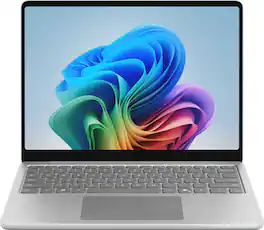
Meet Surface Laptop 13", a Copilot+ PC and the most portable Surface Laptop. With built-in AI experiences and plenty of colors, it delivers unbeatable intelligence, value, and style. And you can leave your charger at home because this 13" touchscreen powerhouse boasts all-day battery life¹.
| Pros for Microsoft - Surface Book 3 13.5" Touch-Screen - 2-in-1 Laptop - Intel Core i7 - 32GB Memory - GeForce GTX 1650 Max-Q - 512GB SSD - Platinum | |||
|---|---|---|---|
| There were no pros for this product— | Processor Speed, Battery Life, Portability, Overall Performance, Screen Quality | There were no pros for this product— | Portability, Battery Life, Processor Speed, Build Quality, Touchscreen |
| Cons for Microsoft - Surface Book 3 13.5" Touch-Screen - 2-in-1 Laptop - Intel Core i7 - 32GB Memory - GeForce GTX 1650 Max-Q - 512GB SSD - Platinum | |||
| There were no cons for this product— | RAM | There were no cons for this product— | Storage Capacity |
Specs
Reviews
Customer Images
The vast majority of our reviews come from verified purchases. Reviews from customers may include My Best Buy members, employees, and Tech Insider Network members (as tagged). Select reviewers may receive discounted products, promotional considerations or entries into drawings for honest, helpful reviews.
- Rated 5 out of 5 stars
Well worth spending the extra $$$
Full disclosure, I’m a Mac guy. Mac OS is far better than Windows. I had a virtual machine running windows because a few of my content authoring applications only run on the OS. I am an instructional designer/director at my college. I have a MacBook Pro, i7, 16 GB of Ram. It’s Ok. I have a command center that is a gaming pc desktop. I wanted to be more mobile, so I bought the surface book 3. It’s an i7, 32GB RAM, 500GB hard Drive with a GTX 1650. I like to take notes so the fact that is a touch screen helps out. I am a lefty, so I have the claw when I write. It works extremely well. There is no bloat ware, as it’s a pure Microsoft product. The laptop is VERY fast. I am extremely happy with it. All zoom sessions run so well The only issue I had was the warranty. Best Buy wanted over 200 bucks for one year. I bought two years directly from Microsoft. I like the surfacebook’s keyboard. It’s not the crappy flimsy keyboard. I can recline and work on it, as the keyboard is more like a traditional laptop. You will love this laptop. It’s a bit expensive, but well worth the $$. If you go low end, you’ll be lucky to get one or two years. Spend the extra money. You won’t be disappointed!
This review is from Microsoft - Surface Book 3 13.5" Touch-Screen - 2-in-1 Laptop - Intel Core i7 - 32GB Memory - GeForce GTX 1650 Max-Q - 512GB SSD - Platinum
Posted by Tekguy761
- Rated 4 out of 5 stars
Powerful machine with few compromises
tl;dr Overall, this is a great option for those looking for serious desktop power in a laptop sized case with touch screen. There are very few compromises made with this clearly premium 2 in 1 laptop. If you’re heavy into graphics and are tired of being chained to a desk, this should be near the top of your list. A couple of annoyances bring it down a star. The Surface Book 3 is the machine I’ve finally been waiting for. I’m an avid hobbyist photographer who likes to touch up my work from time to time. I’ve been using Photoshop and Lightroom for a number of years to organize my pictures and tweak the ones I really like. Up until now, I’ve accepted that I had to use a desktop to manage some of the more compute intensive tasks such as panorama and blurring, two of my favorite techniques. I’d switch to a laptop with a pen for fine line edits, only my laptop didn’t always have the memory to edit files without them being flattened first. The Surface Book 3 is powerful enough to perform all my edits, with a large, sharp screen. This version also packs 32GB RAM which helps a lot when editing larger files. There’s virtually no lag at all when moving to different areas of a photo. I couldn’t even always say that on my desktop with 12 GB of RAM and a dedicated graphics card! Merging photos was significantly faster than the ultrabook I have, a 2019 HP x360 Spectre. One panorama made up of 25 photos took 2 minutes and 30 seconds to merge on the Surface Book vs. 5:12 for the same image on the HP (8GB RAM). Editing it after the merge on the HP was nearly impossible. While the Surface is a little larger than the HP machine for carrying around, it’s nice that I don’t have to switch back and forth to different machines, depending on the work I’m doing. This will also be great on vacation where I can edit my photos while I’m still in the moment. One of the best features of the Surface is the detachable tablet mode. This makes editing using a pen incredibly comfortable. The tablet portion houses nearly all the compute power (minus the video card). While there’s no keyboard, it’s also half the weight of the overall unit. Detaching is as easy as touching a button. While certain edits were slightly slower, all the RAM is in the tablet. That goes a long way towards making editing practical. It then becomes your choice if you want the convenience of a tablet vs the power of a dedicated video card. The only caveat is you can’t detach if you have a file open from a connected source (i.e. USB drive). All the ports are in the keyboard. The keyboard also quadruples the battery capacity. The tablet can be docked as a laptop or in flipped mode where it will fold to the keyboard with the screen on the outside. Since I have an active pen that came with my HP, I didn’t purchase the MS Surface pen. The HP pen worked very well for all I want to do, including easy photo editing. I could right click to get context sensitive menus. I didn’t have the eraser function that MS touts for its Surface pen. It’s a shame that at this price, MS, unlike its competitors, declined to include such a vital accessory. The keyboard is extremely comfortable to use with great key travel and good feedback. However, the Home, End, PgUp, and PgDn keys are awkwardly placed as alternates to function keys. (i.e. Fn-F9 = Home). Sound is clear and friends on a video conference had no trouble hearing me. The SSD drive is faster than any other OEM drive I’ve used, clocking transfers at 2.2GBs read speed in my tests. The docked machine should last well over 6 hours in power saving mode. I was disappointed with the lack of Thunderbolt ports. It comes with 1 USB-C port and 2 USB-A ports rated for 3.0 speeds. MS sells its proprietary docking station with all the ports you need. It’s one of your few options if you want to hook up to more than one external monitor. The standard power plug has a proprietary connector which clips on with a magnet. That’s nice to avoid testing gravity with your machine. You can also charge from a friend’s USB-C if you forget your charger. A 65W charger I have for another laptop was nearly as fast as the plug MS includes. As great as this machine is, I feel I have to take off a star for the awkward keyboard, lack of pen and maintaining proprietary ports. Small changes could have made this much better. I received this machine as part of Best Buy’s Tech Insider Network. Reviewers in this invitation-only program are provided products for the purpose of writing honest, unbiased reviews.
This review is from Microsoft - Surface Book 3 13.5" Touch-Screen - 2-in-1 Laptop - Intel Core i7 - 32GB Memory - GeForce GTX 1650 Max-Q - 512GB SSD - Platinum
Posted by Dan0Sterling
- Rated 5 out of 5 stars
Just as good as my Ryzen 7 desktop
“Reviewers in this invitation-only program are provided products for the purpose of writing honest, unbiased reviews.” The model I’m reviewing is the 13.5” Intel 10th edition i7-1065G7 @130GHz w/ 32GB memory, and the Nvidia GeForce GTX 1650 4GB w/ Max-Q Design. Opening box: Opening the well-constructed box includes the Surface 3 laptop and the power cable. The charging cable includes a brick, but it’s very small when compared to other current laptops that I own or have looked at. It’s also magnetic, so it’s easy to connect, but also easy to pop off. I do like this option though because it’s not like the connection of old where it’s possible to snap the connector. I’ll gladly reconnect the cord rather than having to buy a replacement or fix the charging port down the road. The brick is fairly light and measures 4 3/8” w x 2 1/8” h x 1 1/8” thick. That said, the laptop itself feels stout and heavy. Stated weight on Microsoft’s webpage is 2.79 lbs. If so, it’s a solid 2.79…not that I’m complaining. It feels well built, so I’m not afraid of using it as it should be used and not having to baby it. The casing is magnesium alloy or is it aluminum? I’ve read both and I’m not sure, but the color is platinum if that helps, lol. Turning it on for the first time is exactly what I expected, except for the lack of bloatware (thank you Microsoft). After going through the initial setup and getting my Wi-Fi network connected, I expect to go to the Apps settings and start the tedious task of removing unwanted programs. But I only removed Office 365 setup because I already have an existing account. I may have removed an anti-virus program, but if I did, it was so quick that I don’t really remember. I immediately installed Bitdefender which I use on my desktop PC, Mac mini, and my Android phone. I had one install left, so I emailed myself a link and setup was uneventful. I also installed Bitdefender’s VPN which I also have an account for. After that, I installed Office 365 and the applications my account is signed up for. Obviously, Microsoft Word was needed to work on this review, and it works as it should. Once I signed into my Microsoft account, all my shared documents were available to me and I was able to work on this review from any of my PCs, which is so handy. Oh, did I mention it has facial recognition software for signing in? It worked well until I installed Bitdefender and clicked to fast to let it control the camera. Now I need to go find out how to disable that, so I don’t need to use my pin or password to log in. Edit: I found the camera/mic settings in Bitdefender and a simple click to allow Windows access and a restart got it working properly. Did I mention it has a camera on each side of the tablet? I’m guessing they are considered front facing since the tablet can be used either way, normal, or in the 2 in 1 mode. So, what to install to test out this Surface Book 3. I’ll start with Photoshop. Installation was simple and it has no issues loading. I added a few filters to the application, but no brushes yet. I clicked on a CR2/raw file and the Surface Book 3 w/ Windows 10 loaded the application and photo into Camera Raw in 15 seconds. To compare, my Ryzen 7 2700 Eight-Core 3.2GHz with 16GB memory and a Radeon RX580 took 78 seconds to load the same raw photo into Camera Raw. I then chose a black and white filter and tried them on both machines. The desktop took 22 seconds to process the filter and the laptop took 27. That’s great considering it’s a laptop vs. a desktop. Also, the Surface is a quad-core and the desktop is eight (4 core plus 4 virtual vs 8 core plus 8 virtual) and it loads faster and almost performs as well! Then I just used the Surface Book 3 and tested what I feel is Photoshop's most demanding included filter, liquify. The Surface Book 3 can process the filter with little to no problem if the strokes aren’t very large. After about 3-4 swirls, the process hesitates as it tries to keep up. The lag is very short and acceptable. As I said, it’s a pretty demanding filter/process. All the user needs to do is watch the cursor. It will stay an arrow as it’s processing and then revert to the Photoshop circle to begin the next task. I wanted to try a game that uses a lot of resources. I chose Civilization VI because my desktop fan whirls when I play a long game. I installed the game on the Surface Book 3 via the Epic Games app and copied my latest save to the My Games folder in Documents. I opened the city which is on the largest map, I already won, and I’m finished with all tech upgrades. I just like playing to see how much of the map I can take once the game is over. The Surface Book 3 had no issues running the game. It appears to have the same wait time between turns, and I didn’t notice any hesitation or stutter in any of the movements such as the light spinning in the lighthouse. Except for the size of the playfield (not the 13.5 screens fault) the game is totally playable. I just prefer it on a larger monitor, yeah, I’m old! Windows Update is amazingly fast installing system updates. Downloading was fast too via my Wi-Fi home network. It took 2 restarts to complete the needed updates including the windows 1909 update. Speakers…well laptops aren’t the best when it comes to speakers and the Surface Book 3 lives up to that. The speakers do what they need to do and that’s about it. I listened to a few mp3’s and they sounded clear but lack any kind of bass. I wouldn’t say tinny, but like I forgot to turn on the subwoofer on my 5.1 home theater. Still, for doing daily tasks that require sound, the spoken voice should be above acceptable in my opinion. The Surface Book 3 does include Dolby Atmos for both the speakers and headphones, but it only offers on/off in the sound settings. No other options or app is installed. I did check full-range speaker option, but whether that did anything could be up for debate. I think it helped a bit, so it stays checked for now. Using a good set of headphones (I used a wired Rig set) through the port on the tablet and it sounded much better. Adding that bit of bass worked. I imagine it would be the same for gaming. I’ll add it in once I install and play a game on the laptop. Reading Epub’s and PDFs: Reading Epub’s on the tablet works great. If you have the screen attached, you can use the arrow keys in Calibre to scroll pages back and forth. You get a two-page view like a dead tree version. I tried getting Windows to default to Edge for reading Epub’s, but it wasn’t a listed app and I couldn’t locate the right .exe file in the Windows system app folder, so Calibre it is. It works very well for a 3rd party app. Also, if the screen is attached or detached, you can swipe or touch to turn pages, just like an e-reader. Page turns are nice and fast with no lag. For whatever reason, Edge was still the default PDF reader (I guess I clicked make Calibre the default for Epub’s) and it works. It only shows single page view and I haven’t figured out if I can change that to a two-page view. It is very snappy with page turns and looks great like a PDF should. Edge does give me the option to stretch the PDF to full page width, thus making it easier to read and enjoy the pictures. The detachable tablet has an awesome connection between the keyboard and the tablet. Very sturdy and the release key with the green notice on screen makes it very simple. This is the first detachable tablet/laptop I’ve had, and it works great. I wondered if Windows would work just as if it were docked/attached. Yup, I inserted a USB stick to see if it would show up in explorer and tada, no problem. Windows worked as it should. Edit: I read after typing this that Microsoft engineered everything except the batteries and GPU into the tablet, that’s why Windows 10 can operate with all its functions. It makes a great e-reader also. I have a paperwhite e-reader and several other e-ink readers and using this is nice and big. What else? Well, the unit I was sent has 2 USB-A ports, an SD card reader, a USB-c port, and a headphone jack. It’s a bummer it doesn’t support thunderbolt USB-c, but from what I read, Microsoft feels Thunderbolt has security issues that haven’t been fully fixed or addressed. Battery life seems good. I’ve had this on and off all day doing this review, installing and running apps and it still has 51% life with 77% on battery 1 and 42% on battery 2. My battery setting is leaning towards best battery life, but not all the way to the left. Maybe about 60/40. So overall impression. This 2 in 1 has several pros, including the reversible tablet when attached to the keyboard. Better yet, being able to use the tablet stand-alone with Windows 10 fully operational. The connection between the keyboard and the tablet is solid and doesn’t feel like I need to worry about it falling off. The green disconnect/attached popup is a welcome sight for new convertible tablet users like me. The charging cable is a 2 prong (nice) lightweight cord with a small brick making it nice and portable. The lack of bloatware was an unexpected and welcome surprise. The speakers being hidden behind the bezel and up on the tablet make for a better laptop listening experience, but with no subwoofer, the sound is less than ideal for any type of music. As for watching videos, presentations, or other spoken-word uses, they are up to the task. Nice that they didn’t put the speakers under the keyboard. I guess that wouldn’t work well with the tablet unless the keyboard was in the same area as the user. I do wish it could use Thunderbolt 3 so I could try out some of my adapters, such as additional ports or USB-c to projector, but I get that security issues must take precedence. If left to a short answer, I’d recommend the Surface Book 3 to my friends, especially the creative types, ones who need a touch screen or pen for work or school or those who f
This review is from Microsoft - Surface Book 3 13.5" Touch-Screen - 2-in-1 Laptop - Intel Core i7 - 32GB Memory - GeForce GTX 1650 Max-Q - 512GB SSD - Platinum
Posted by RandallFlagg