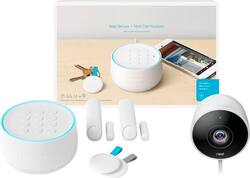
Google - Nest Secure Alarm System with Nest Cam Outdoor
- Key Specs
- Camera Resolution: 1920 x 1080 (Refers to the number of pixels, both horizontally and vertically, used to capture video/images. The higher the resolution the finer the detail that can be seen.)
- Field Of View: 90 degrees (The area of a target, measured as an angle from the location of viewing, that can be observed.)
- Night Vision: true
- Number Of Cameras Included: 1
- Works With: Google Assistant, Nest (Compatible with or able to be connected to other smart devices or applications.)
- Storage Type: Cloud
- Indoor Or Outdoor Use: Outdoor (Indicates the appropriate environment product was designed to be used in.)
- Minimum Operating Temperature: 32 degrees fahrenheit (The lowest recommended ambient (surrounding) temperature in which the product can ideally operate stated by the manufacturer. Generally long-term exposure of the product to temperatures less than the minimum can result in ineffective operation.)
- Maximum Operating Temperature: 104 degrees fahrenheit (The highest recommended ambient (surrounding) temperature in which the product can ideally operate stated by the manufacturer. Generally long-term exposure of the product to temperatures more than the maximum can result in ineffective operation.)
- General
- Product Name: Nest Secure Alarm System with Nest Cam Outdoor
- Brand: Google
- Model Number: B01234-US
- Camera
- Camera Resolution: 1920 x 1080 (Refers to the number of pixels, both horizontally and vertically, used to capture video/images. The higher the resolution the finer the detail that can be seen.)
- Field Of View: 90 degrees (The area of a target, measured as an angle from the location of viewing, that can be observed.)
- Night Vision: true
- Number Of Cameras Included: 1
- Frame Rate: 30 frames per second (The frequency at which consecutive images can be captured. The higher the frame rate, the more detail that can be captured.)
- Camera Iris: Automatic (The iris is the opening on a camera that controls how much light reaches its image sensor, which in turn affects image/video clarity. Fixed and manual irises are generally suited for locations with consistent levels of light. Automatic and "P" (precise) irises automatically adjust in response to changing levels of light and are suited for a wider variety of environments. "P" irises feature additional capabilities for improving footage clarity.)
- Camera Mount Type: Wall mount
- Power
- Sensor Power Source: Battery-powered
- Compatibility
- Camera Compatibility: true
- Operating System Compatibility: Android, Apple iOS
- Works With: Google Assistant, Nest (Compatible with or able to be connected to other smart devices or applications.)
- Voice Assistant Built-in: No (A digital assistant built into the device that uses voice commands to answer questions and control smart devices.)
- Connectivity
- Camera Connectivity: Wireless (Security system cameras can be set up in several ways. Wired cameras require cables for power and footage transmission, while wire-free cameras don't need cables for either. Wireless cameras still require cables for receiving power but are able to transmit footage via a wireless network.)
- Frequency Band: 2.4 GHz (Bands may be grouped into categories such as low- and high-band VHF (Very High Frequency), low- and high-band UHF (Ultra High Frequency), or certain frequency channels (measured in MHz or GHz). Generally, higher frequencies transmit information faster but have shorter range than lower frequencies.)
- Recording & Playback
- Streaming Video: true (The ability to transmit a live video feed from the product.)
- Records Audio: true
- Storage
- Storage Type: Cloud
- Performance
- Indoor Or Outdoor Use: Outdoor (Indicates the appropriate environment product was designed to be used in.)
- Minimum Operating Temperature: 32 degrees fahrenheit (The lowest recommended ambient (surrounding) temperature in which the product can ideally operate stated by the manufacturer. Generally long-term exposure of the product to temperatures less than the minimum can result in ineffective operation.)
- Maximum Operating Temperature: 104 degrees fahrenheit (The highest recommended ambient (surrounding) temperature in which the product can ideally operate stated by the manufacturer. Generally long-term exposure of the product to temperatures more than the maximum can result in ineffective operation.)
- Features
- Mobile Notifications: true
- 3-Axis Adjustable: false
- Auto-On Detection: Motion
- Dimension
- Camera Height: 2.1 inches
- Camera Width: 2.8 inches
- Camera Depth: 3.7 inches
- Camera Weight: 0.688 pounds
- Sensor
- Sensors: Motion sensor, Proximity sensor (Detects stimuli such as heat, light, sound, motion, or pressure and responds accordingly by operating a control or initiating a function of the device.)
- Motion Detection Range: 10 feet
- Number Of Sensors Included: 2
- Included
- Camera(s) Included: true
- Cable(s) Included: true
- Warranty
- Manufacturer's Warranty - Parts: 2-year limited warranty
- Manufacturer's Warranty - Labor: 2-year limited warranty
- Other
- UPC: 813917021194
Tough on bad guys. Easy on you.
The Nest Secure alarm system is easy to live with every day. The included Nest Cam Outdoor gives you 24/7 peace of mind. Just tap Nest Tag on Nest Guard to arm and disarm the alarm – no passcode needed. Nest Detect sensors look out for doors, windows and rooms. And with the Nest app, you’ll always know what’s happening at home.
- Includes Nest Cam Outdoor: It stands watch 24/7, rain or shine. Plugs into power, sends alerts to your phone when it detects activity, and lets you talk back through the Nest app.
- Arm and disarm however you like: Use the Nest app from anywhere, tap Nest Tag on Nest Guard or enter a passcode. Or just say, "Hey Google, set security to Away and guarding," and the built-in Google Assistant will arm for you.
- Get Remind Me alerts: If you forget to arm your alarm, you can get a Remind Me alert on your phone so you can arm right from the Nest app.*
- Look out for doors, windows and rooms: Nest Detect is a sensor that does many things. Stick it on a window, and it detects open/close. Stick it on a wall, and it senses motion. On a door, it does both. With a built-in motion sensor, Nest Guard also protects a room.
- Open quietly: Press the button on Nest Detect to open a door without setting off the alarm. The house stays armed and the alarm stays silent.
- It's easy for everyone: Tap Nest Tag on Nest Guard to arm and disarm the alarm. Without a passcode. Put one on your keychain and give one to someone you trust. And give one to someone you trust.
- Know what's happening at home: With the free Nest app, you can arm and disarm from anywhere. Check in on your home anytime. And if the alarm goes off, you’ll get a security alert.
- Just ask Google.: The built-in Google Assistant can help you manage tasks, get answers and control your home.
Whats Included
- Google Nest Secure Alarm System with Nest Cam Outdoor
A: There is a wall cover for the plug that screws into the electrical box. But the cable to the detect can be removed. Note when this happens the battery kicks in. If and when monitoring by a third party is added, it will notify the monitoring station as well as the app. That's why they added the battery backup :)
A: You can add as many cameras as you'd like. The cameras record to the cloud, but you have to pay for this service. $100/year for 7 days of storage.
A: The Nest Secure has a customizable range from 30 seconds to 5 minutes before the alarm will sound. Once a door or window is opened while in Home and Guarding or Away and Guarding, you’ll receive a heads up on the Nest Guard and the countdown will begin before the alarm goes off. More details can be found here: https://nest.com/support/article/Learn-about-Nest-Secure-alarm-levels-Home-and-Guarding-Away-and-Guarding-and-Off
Q: So you pay over $100/yr. If you have more then one camera?
A: Each additional camera cost $50 per year to have 10 Day Video History. I have 3 different cameras, so it costs me $200 per year.
Q: why are you calling this an alarm system when in fact it is a “delayed” alarm system.?
A: If there wasn't a delay, the screeching alarm would go 9ff every time you open the door when system is armed. It give you time to get in the house and turn off the alarm.
A: The Nest Secure is designed with a 12 hour battery backup in case power goes out. There is also a cellular backup option to ensure you still receive alerts if WiFi is lost. More details here: https://nest.com/support/article/Frequently-asked-questions-about-Nest-Secure
A: While Nest leverages motion detected by Nest Protect and Nest Thermostat for Home/Away assist, the requirements for security and intrusion are more stringent in order to reduce false alarms. That’s the difference between detecting occupancy versus detecting intrusion. With intrusion we need to be more certain that it is a person in the room to avoid false alarms. Also, devices must be certified for security in order to sound the alarm.