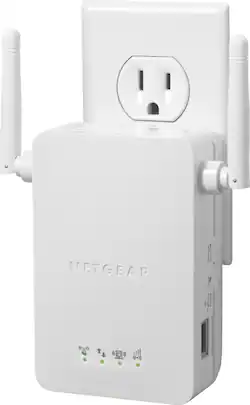
NETGEAR - Universal Wi-Fi Range Extender with Ethernet port
- Key Specs
- Wireless Standard: N (The wireless networking protocol used by the device. Each iteration of the protocol is based on the 802.11 standard developed by the Institute of Electrical and Electronics Engineers (IEEE) Standards Association. Denoted by letters following 802.11 (802.11a, 802.11ac, etc.), each version, published in alphabetical order, encompasses all previous versions.)
- Frequency Band: 2.4 GHz (Bands may be grouped into categories such as low- and high-band VHF (Very High Frequency), low- and high-band UHF (Ultra High Frequency), or certain frequency channels (measured in MHz or GHz). Generally, higher frequencies transmit information faster but have shorter range than lower frequencies.)
- Antenna Type: External
- Number of Antennas: 2
- Number of LAN Ports: 1 (Number of devices able to be connected to the Local Area Network (LAN). LAN ports allow wired connections to other networking devices (wireless access points, range extenders, etc.) in order to share the internet connection received through a WAN port.)
- Number of PoE (Power over Ethernet) Ports: 1 (Allow connection of a single cable that provides both data connection and electrical power (Power over Ethernet).)
- General
- Product Name: Universal Wi-Fi Range Extender with Ethernet port
- Brand: NETGEAR
- Model Number: WN3000RP
- Network
- Attached Antenna: true
- Maximum Coverage Area: 0 square feet
- Compatibility
- System Requirements: Windows 7, Vista, XP, 2000; Mac OS; Unix or Linux; Microsoft Internet Explorer 5.0, Firefox 2.0 or Safari 1.4 or higher (The software that a product must have for it to be able to integrate with another product.)
- Security
- Security Features: WPA-PSK, WPA2-PSK, mixed mode and WEP encryption
- Dimensions
- Product Height: 5.7 inches (The out of box height of the item. Height is measured as the vertical distance from the bottom of the item to the top as it would be primarily used or placed.)
- Product Length: 4 inches (The out of box length of the item. Length is measured as the longest dimension of the item.)
- Product Width: 7.1 inches (The out of box width of the item. Width is measured as the horizontal distance from one side of the item to the other as it would be primarily used or placed.)
- Product Weight: 0.75 pounds (The out of box weight of the item.)
- Warranty
- Manufacturer's Warranty - Parts: 1 year
- Manufacturer's Warranty - Labor: 1 year
- Other
- UPC: 606449076936
NETGEAR Universal Wi-Fi Range Extender: Broaden your network connection with a range extender that gives you extra Wi-Fi coverage in your home. Smart LED indicators will direct you to the optimal location to plug the extender into the wall, so you can easily enjoy improved range and speed on your mobile and wired devices. Save on data usage by connecting your smartphone or tablet to your home network.
- Boost your existing Wi-Fi network: Stay connected as this range extender reduces dead zones throughout your home. External antennas provide even more coverage and speed.
- iOS and Android compatible: Improve wireless range for smartphones, tablets, laptops and other mobile devices.
- Connect wired devices: The fast Ethernet port allows you to integrate your Blu-ray player, game console, Smart TV or other streaming player into your Wi-Fi network.
- Enjoy optimal coverage: Smart LED indicators help you find the best location to plug the device into an electrical outlet and expand your network.
- Ensure your privacy with CD-less installation: Connect with the push of a button using Wi-Fi Protected Setup (WPS) and Wi-Fi Protected Access.
- Download the Wi-Fi Analytics App from Google Play: Check the status of your network signal and identify channel interference to optimize your network speeds and strength.
- Works with NETGEAR and other brands: Repeats the Wi-Fi signals from select wireless b/g/n routers and gateways.
Whats Included
- NETGEAR Universal Wi-Fi Range Extender with Ethernet port
- Owner's manual
Q: where should i put the device next to my router or the opposite side of the house
A: The device setup next to your router is redundant and pointless. Your main router is already there. You want the extension, so yes, plug in after setup any room in center of the home or opposite side of the house. Try different outlets until you get the desired results. You will! This device is phenomenal. Works all day long with same signal strength strength presently supplied from your ISP provider. Hope that helps! God Bless Woody
Q: is this a different wifi network or does it just increase the signal strength?
A: It extends your exiting network, but it also creates an EXT SSID name as well.
Q: Do WiFi boosters work for Hughes net satilite net
A: WiFI boosters will boost the signal from any router, including Hughes Net, to extend the range of the router.
A: There are quite a few. The AC750 uses a different wireless standard then the Universal one (802.11ac vs 802.11n). Also, the AC750 has dual band 2.4 GHz and 5.0 GHz, while the Universal only uses 2.4. For the average home user the AC750 is overkill as most computers coming from Dell, Toshiba and other big box suppliers aren't coming equipped with networking cards that support the extra speed and range of wireless 802.11ac. I'd go with the Universal if you are an average home user. If you are above average there are other dual band range extenders that may be cheaper or the same price that isn't using the 802.11ac standard. Likewise, if you are a power user, on the cutting edge of technology and know that your card is capable of 802.11ac and would like the new technology, then the 750 is great! Any questions about wireless standards can be found by searching about it on Google or Wikipedia.
Q: Does this device also increase the internet speed?
A: Your speed is determined by your plan through your ISP provider. It will not increase speed therefore, but will increase the signal from your main router anywhere in your home. You can simply plug it in anywhere and if you have more rooms than we had, buy a second or a third. For the price, it's unmatched and works like a champ 100% reliable. Hope this helped as well. God Bless Woody
Q: Support more than one extender?
A: Yes and hope you can see my other posts as well. Pairing not an issue. They all work the same way. Just a quick setup next to your router and the device picks up all necessary info and then just go plug it in any outlet, anywhere. Hope this helped! Best 49 bucks I've ever spent to solve similar problem. Regards, God Bless Woody
A: Ethernet cable not necessary unless you desire a direct connect. Back bedroom is router, 1000 ft. away is this device. I now have wifi in garage and backyard.
A: This device worked well to extend signal inside a metal walled office, (with door open), where signal had been poor, or none. I was quite pleased to note that this Netgear device worked with two laptops running Linux Mint operating systems, which i switched to recently. No configuration necessary to run in Linux.














