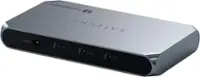
Plugable - USB C Triple Display Docking Station with Laptop Charging - Thunderbolt,USB4,USB C - Windows, macOS, ChromeOS - Black
FREE shipping to
Related Item

About This Item
- Key Specs
- Maximum Number of Displays Supported: 3
- Number of DisplayPort Outputs (Total): 0
- General
- Brand: Plugable
- Model Number: UD-3900PDZ
- Product Name: USB C Triple Display Docking Station with Laptop Charging - Thunderbolt,USB4,USB C - Windows, macOS, ChromeOS
- Color: Black
- Display
- Maximum Number of Displays Supported: 3
- Ports
- Display Connector(s): 3 x HDMI (The number and type of connectors used to connect to an external display.)
- Number of DisplayPort Outputs (Total): 0
- Number of HDMI Ports (Total): 3
- Number of VGA Ports: 0 (VGA (Video Graphics Adapter or Video Graphics Array) is a display standard that transmits via analog signals. This type of interface is typically used to connect a computer to a display device such as a monitor, projector, or TV.)
- Number Of Ethernet Ports: 1
- USB Ports: 5 x USB-A (The number and type of USB ports the product has.)
- Headphone Jack: true (The device features an interface that allows for the connection of headphones.)
- Microphone Input: true (The device features an input for connecting an external microphone.)
- Memory Card Slot: false
- Power
- Powered: true
- Power Supply Included: true
- Compatibility
- Brand Compatibility: Chrome, Mac, Windows
- Model Compatibility: Windows 10/11, macOS 10.15+, ChromeOS 100+ support USB-C, USB4, Thunderbolt 3/4 incl. M1/M2 Macs, Intel TB3 Macs (2016+), Dell XPS/Latitude/Inspiron, Surface, HP ProBook/EliteBook/Spectre, Lenovo ThinkPad/IdeaPad/Yoga, LG Gram
- Dimensions
- Product Height: 1.2 inches (The out of box height of the item. Height is measured as the vertical distance from the bottom of the item to the top as it would be primarily used or placed.)
- Product Length: 3.3 inches (The out of box length of the item. Length is measured as the longest dimension of the item.)
- Product Width: 7.9 inches (The out of box width of the item. Width is measured as the horizontal distance from one side of the item to the other as it would be primarily used or placed.)
- Product Weight: 8.5 ounces (The out of box weight of the item.)
- Warranty
- Warranty - Parts: 2 Year Limited Parts
- Warranty - Labor: 2 Year Limited Labor
- Other
- UPC: 819927012023
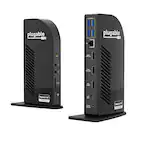
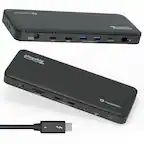
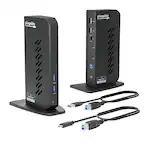
The Plugable UD-3900PDZ USB-C Docking Station supports up to three HDMI displays via a combination of USB-C DisplayPort Alternate Mode ("Alt Mode") and DisplayLink USB graphics. Host charging to 100W via USB-C Power Delivery ("PD"), Gigabit Ethernet, audio, and 6x USB device connectivity. All through a single USB-C cable. See important notes regarding Alt Mode and PD compatibility below. HDMI 1 utilizes USB-C Alt Mode which has a direct "pipeline" to the host graphics processor (GPU), and connected monitor will perform as if connected directly to the computer. The 2nd and 3rd HDMI ports utilize DisplayLink DL-3900 USB graphics which leverage the host GPU & CPU; these outputs are ideal for office and web browsing work but may not perform well for 2D or 3D graphics applications, full screen video, or video editing software and are not recommended for gaming. Alt Mode video supported on select systems including Dell XPS 9350, 9360, 9370, 9380, 9550, 9560, 9570, 9580, Dell Precision 5510, HP Spectre 13" x360 13t and many more. This dock can replace a USB-C power supply rated up to 100W on compatible host systems with USB-C Power Delivery (PD). Cannot be mixed with non-DisplayLink USB graphics adapters and drivers (e.g. MCT, j5, or SMSC). HDCP/Blu-ray playback not supported. Not compatible: macOS (version 10.13.6 and older), ChromeOS, Linux, or Android. Not compatible with phones or iPad or Android tablets. ASMedia USB 3.1 controllers do not support Alt Mode at this time. Not recommended for use with Desktop computers. In the Box: UD-3900PDZ dock, 0.8m USB-C cable, and 135W (20V, 4.5A) power adapter with US power plug.
- 12-in-1 Expansion: With a compatible USB-C, USB4 or Thunderbolt laptop running Windows, macOS, or ChromeOS, this laptop docking station can charge your device, connect up to 3 HDMI monitors while providing Gigabit Ethernet, 3.5mm combo audio jack, and 6x USB 3.0 ports
- Triple Display Docking Station: This USB C docking station features 3 HDMI video outputs including 1x HDMI output capable of 4K 30Hz, and 2x HDMI outputs capable of 1080p 60Hz using DisplayLink USB Graphics Technology. Supports 3 extended displays even on systems that would otherwise support 1, like Apple M1, M2, M3, and M4 systems
- USB-C Features: Along with DisplayLink graphics technology, this triple monitor docking station supports native USB-C video path ("Alt Mode”) for an external display at the full native performance of your system's graphics processor, and USB-C Power Delivery to charge the connected system
- Compatibility: Compatible with USB Type-C, USB4, and Thunderbolt Macs (macOS 11 and newer, with driver installation), Windows , ChromeOS 100 and newer, and other laptops which support USB-C Alt Mode and Power Delivery. Not supported with Linux. HDCP is not supported.
- 2-Year Coverage, Lifetime Support: Every Plugable product, including this USB C docking station, is covered against defects for 2 years and comes with lifetime support. If you ever have questions, contact our North American-based team - even before purchase
Q: Will this docking station charge my MacBook Air M3?
A: undefined
Reviews
The vast majority of our reviews come from verified purchases. Reviews from customers may include My Best Buy members, employees, and Tech Insider Network members (as tagged). Select reviewers may receive discounted products, promotional considerations or entries into drawings for honest, helpful reviews.
Compare similar products

The Plugable UD-3900PDZ USB-C Docking Station supports up to three HDMI displays via a combination of USB-C DisplayPort Alternate Mode ("Alt Mode") and DisplayLink USB graphics. Host charging to 100W via USB-C Power Delivery ("PD"), Gigabit Ethernet, audio, and 6x USB device connectivity. All through a single USB-C cable. See important notes regarding Alt Mode and PD compatibility below. HDMI 1 utilizes USB-C Alt Mode which has a direct "pipeline" to the host graphics processor (GPU), and connected monitor will perform as if connected directly to the computer. The 2nd and 3rd HDMI ports utilize DisplayLink DL-3900 USB graphics which leverage the host GPU & CPU; these outputs are ideal for office and web browsing work but may not perform well for 2D or 3D graphics applications, full screen video, or video editing software and are not recommended for gaming. Alt Mode video supported on select systems including Dell XPS 9350, 9360, 9370, 9380, 9550, 9560, 9570, 9580, Dell Precision 5510, HP Spectre 13" x360 13t and many more. This dock can replace a USB-C power supply rated up to 100W on compatible host systems with USB-C Power Delivery (PD). Cannot be mixed with non-DisplayLink USB graphics adapters and drivers (e.g. MCT, j5, or SMSC). HDCP/Blu-ray playback not supported. Not compatible: macOS (version 10.13.6 and older), ChromeOS, Linux, or Android. Not compatible with phones or iPad or Android tablets. ASMedia USB 3.1 controllers do not support Alt Mode at this time. Not recommended for use with Desktop computers. In the Box: UD-3900PDZ dock, 0.8m USB-C cable, and 135W (20V, 4.5A) power adapter with US power plug.
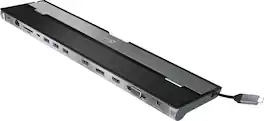
This triple display docking station turns your Mac or Windows laptop into a full workstation with a DisplayPort output, two HDMI outputs, and a VGA output, with resolution support up to 4K (3840 x 2160) on two displays and 1080p on the other one. You can also use your laptop screen for four displays in total, making it easy to access multiple applications at once. With 100W Power Delivery, three USB 3.0 ports, and a USB-C port, this docking station is perfect for your MacBook, Dell XPS, or other USB-C laptop requiring additional ports. This USB 3.0 docking station is also equipped with a RJ45 Gigabit Ethernet port, memory card reader/writer, and combo audio jack for maximum productivity. The elevated design assists with heat dissipation and, with its double-sided cable storage compartment, ensures an easy connection regardless of your USB-C port’s location. All 13 ports are combined into one slim docking station, so you’ll have all the connections you need to stay productive!
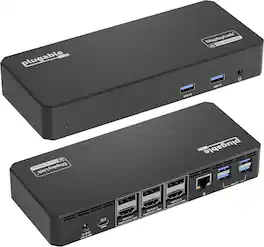
More than just screen count, it is about usability. This triple monitor docking station helps provide the space to get work done. Use the external displays for reference material, have multiple documents open side-by-side, or monitor your email while working on other tasks. Optimized for portable computers, this laptop docking stations uses a single connection to the computer for displays, USB devices, and powering the computer with a Thunderbolt dock. Enabled by the new USB Type-C port, this Thunderbolt 4 Dock replaces at least three connections to the host computer with a single cable, making it easy to start working in the morning, and take the computer with you in the evening. HDMI or DisplayPort, Both? Three HDMI monitors, three DisplayPort Monitors, or a combination of both. This three 4K HDMI Ports, and three 4K DisplayPort docking station enables you to mix and match up to three monitors — no adapters necessary. Of course, the UD-6950PDZ lets you connect more than screens. With an Ethernet port, an audio jack, and 6x USB-A ports, this USB-C Docking Station has room to pair all of your peripherals with a single connection back to your computer. Will it charge my laptop? This triple display docking station provides 100W charging to laptops that support power Delivery. You’ll want to take a look at your laptop’s specifications to determine if the USB-C port supports Power Delivery
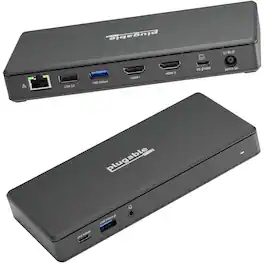
Walk up to this docking station for laptop, plug in, and get to work. The Plugable USB-C computer hub docking station with 65W Power Delivery (UD-MSTH2) has everything you need for productivity. Starting with 2x HDMI ports, each ready for a 4K 60hz monitor so you can give a screen to your email and still dedicate a screen to your spreadsheets (or scrolling). You can even connect your iPhone 15, of course, it’ll only extend to one display. Screens aren’t the only thing you’ll be connecting to this Plugable USB docking station dual monitor. A USB-C port (5 Gbps) for your modern devices, 2x USB (5 Gbps), and a USB 2.0 (480Mbps) for your legacy devices. And of course, ethernet and an audio jack – between flaky Wi-Fi and wireless headphones that never seem to be charged, sometimes it’s best to have a backup.
| Pros for Plugable - USB C Triple Display Docking Station with Laptop Charging - Thunderbolt,USB4,USB C - Windows, macOS, ChromeOS - Black | |||
|---|---|---|---|
| There were no pros for this product— | Ease of use, USB-C, Overall Performance, Ports, Connectivity | There were no pros for this product— | There were no pros for this product— |
| Cons for Plugable - USB C Triple Display Docking Station with Laptop Charging - Thunderbolt,USB4,USB C - Windows, macOS, ChromeOS - Black | |||
| There were no cons for this product— | Compatibility, Power Supply | There were no cons for this product— | There were no cons for this product— |