DoorBOOsters are hereExclusions apply. Ends 11/2/25.Shop now

Main Content

Questions & Answers

Your price for this item is $349.99
Page Showing 21-40 of 54 questions
  • QuestionIs the touchscreen working?

    Asked by Gech.

    • Answer The LG 34" WQHD 100Hz 5ms Smart Monitor with HDR10 (HDMI, USB-A) - Black, Model # 34SR60QC-B, does not have a touchscreen...^Ivan.

      Answered by LG Digital Customer Care

  • QuestionDoes this monitor have picture by picture?

    Asked by Bonnev659.

    • Answer The LG 34-inch Smart Monitor WQHD 1440P Curved Screen 100Hz with webOS, Model # 34SR60QC-B, does not support PBP (Picture-by-Picture)...^Ivan.

      Answered by LG Digital Customer Care

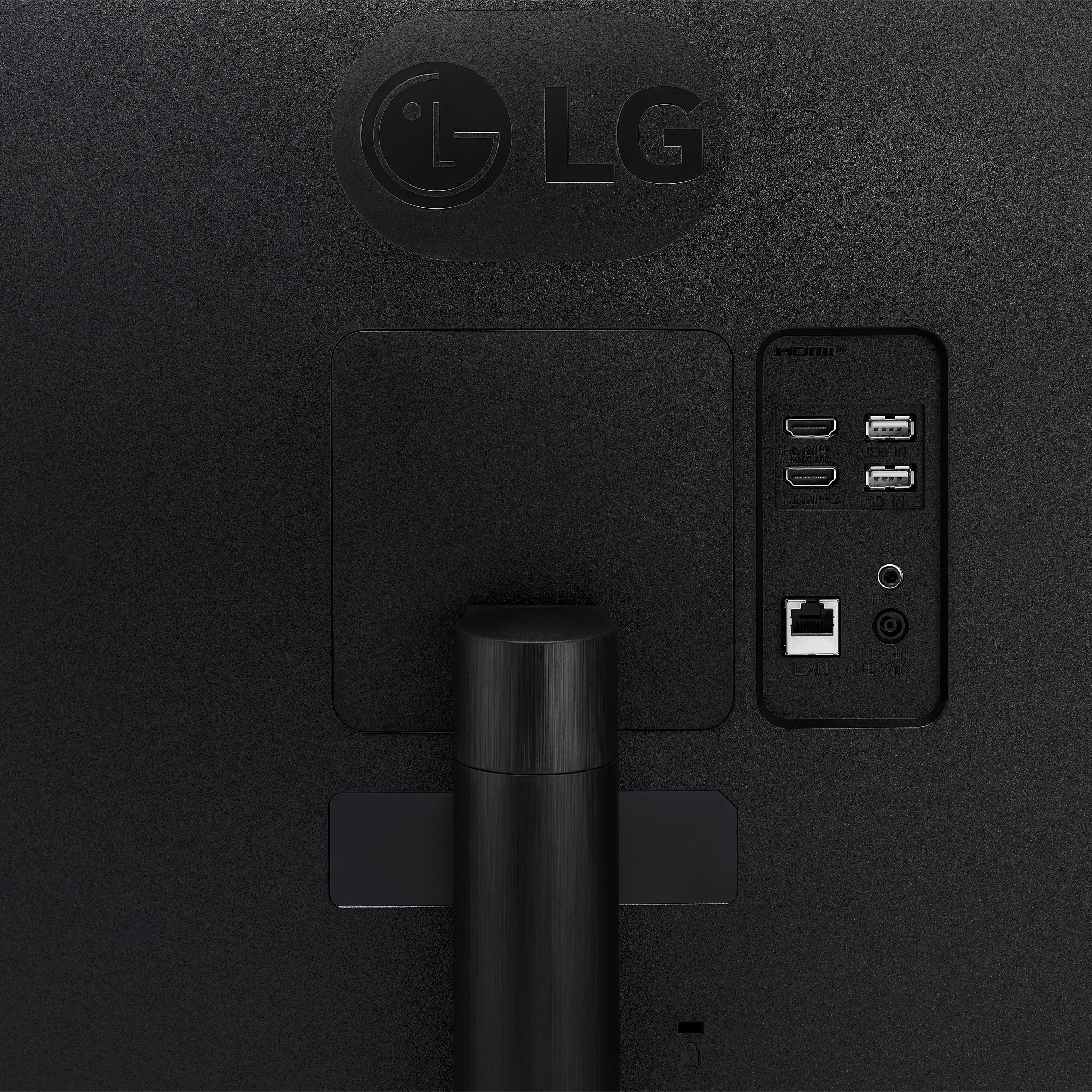
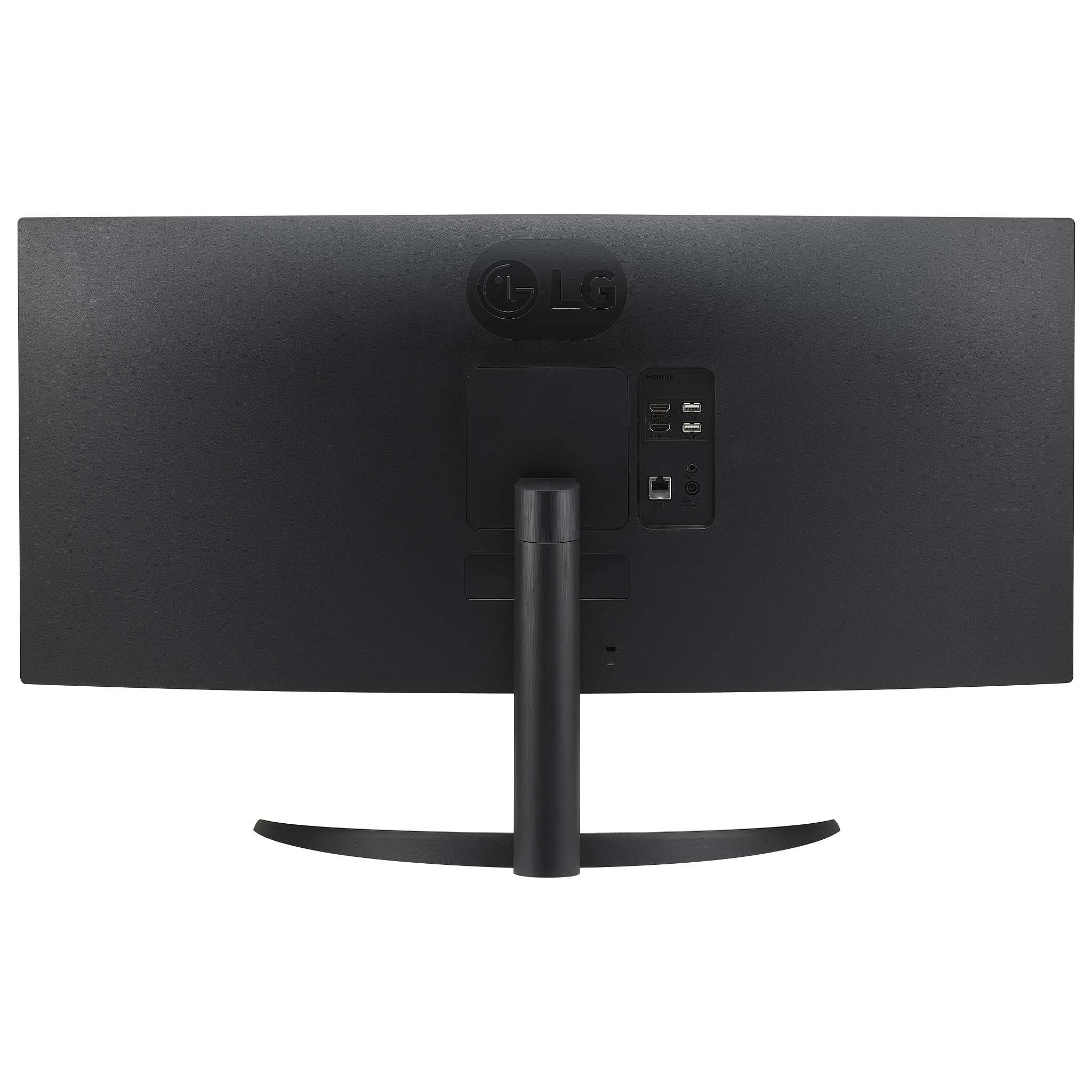
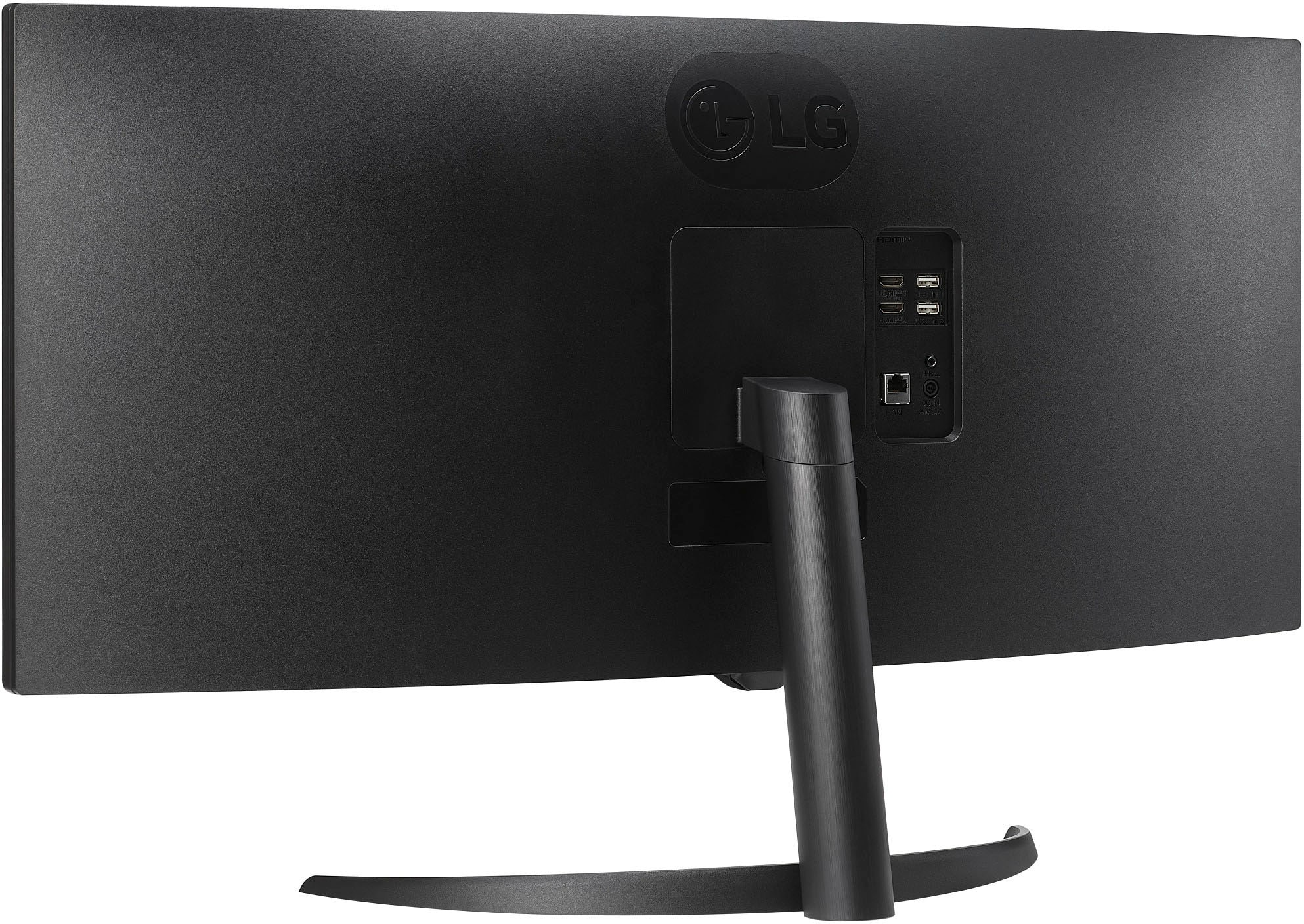
  • QuestionI am viewing the photos of the back of the monitor. I dont see where you can attach arm mount, but I see previously answered questions that it can be mounted. Is it truly compatible with arm mount? Expected to see 4 screw holes in the back

    Asked by TVJJ36.

    • Answer Hello there. Thank you for sharing your experience with the 34SR60QC-B monitor. We understand your inquiry about its compatibility with an arm mount. The monitor is designed to be wall mountable and supports the VESA Wall Mount Standard of 100mm x 100mm. If you require further assistance or would like us to provide you with additional information, please send us a private message on Social Media @LGUSSupport and our team will be more than happy to explore possible solutions. https://www.bestbuy.com/site/lg-myview-34-wqhd-100hz-5ms-smart-monitor-with-hdr10-black/6595424.p?skuId=6595424 We appreciate your patience. —Renzo

      Answered by LG Digital Customer Care

  • QuestionDoes this monitor have a built in webcam

    Asked by Anonymous.

    • Answer No web cam.

      Answered by RogerS

  • QuestionCan this monitor stretch normal TV or app streaming to fill screen or it's still going to show black bars on sides

    Asked by Snake307.

    • Answer Hi there. We understand your inquiry about the LG MyView 34" WQHD Smart Monitor (34SR60QC-B) and how it handles different aspect ratios. This monitor has a 21:9 aspect ratio, which is ideal for content created in that format, such as cinematic movies. When streaming content that has a different aspect ratio, such as 16:9, there may be black bars on the sides of the screen. Please send us a private message on Social Media @LGUSSupport and our team will be more than happy to explore possible solutions. https://www.bestbuy.com/site/lg-myview-34-wqhd-100hz-5ms-smart-monitor-with-hdr10-black/6595424.p?skuId=6595424 We appreciate your patience. —Renzo

      Answered by LG Digital Customer Care

  • QuestionCan I remove the included stand after I’ve attached it and switch to a monitor arm?

    Asked by Anonymous.

    • Answer You can always take the stand off the LG MyView 34-inch Smart Monitor WQHD 1440P Curved Screen 100Hz with webOS, and HDR10, Model # 34SR60QC-B, after attaching it. The monitor is VESA-Compliant display with a 100 x 100 mm VESA Mount Pattern that can be used to mount the monitor on a VESA-compliant Wall Mount or a VESA-Compliant monitor arm that supports that pattern...^Ivan.

      Answered by LG Digital Customer Care

  • QuestionIs this monitor comparable with apple iMac m3 processor

    Asked by GHJ.

    • Answer What connectivity does your iMac M3 processor have, and what resolutions does its graphics card support? The LG 34-inch Smart Monitor WQHD 1440P Curved Screen 100Hz with webOS, Model # 34SR60QC-B, supports Plug and Play, which is a feature that enables a PC to recognize devices attached by the user without device configuration or user intervention when powering up. Connectivity for the monitor includes two HDMI inputs and two USB Down-stream ports. The monitor has a native WQHD (3440 x 1440) resolution, so it is compatible with any PC or laptop that has a graphics card that supports its native resolution and one that can be connected to the monitor's ports...^Ivan.

      Answered by LG Digital Customer Care

  • QuestionCan it be controlled without the remote (e.g. phone app or manual buttons or ??)

    Asked by Lyneius.

    • Answer The LG 34 Inch Smart Monitor WQHD 1440P Curved Screen 100Hz with webOS, Model # 34SR60QC-B has a joystick button under the middle of the panel where the LG logo is that can be used to turn the monitor On/Off, switch inputs or adjust the volume up/down with. You need the remote for all other functions...^Ivan.
      Answered by LG Digital Customer Care

  • QuestionCan you attach monitor arms to this monitor?

    Asked by Lemon.

    • Answer The LG 34-inch Smart Monitor WQHD 1440P Curved Screen 100Hz with webOS, Model # 34SR60QC-B is a VESA-compliant display with a 100 x 100 mm VESA Mount Pattern that can be used with a VESA-compliant Wall Mount or Monitor arm that supports the monitor's VESA Mount Pattern. The monitor has a weight of 11.2 lbs so check the specifications for your monitor arm to see what maximum weight it supports...^Ivan.

      Answered by LG Digital Customer Care

  • QuestionCan this run a cable box for TV AND a computer at the same time with the two HDMI inputs?

    Asked by Dixie.

    • Answer Hello there, Dixie. We understand your inquiry about whether the LG MyView 34″ WQHD 100 Hz Smart Monitor (Model 34SR60QC-B.AUS) can run a cable box and a computer at the same time via its two HDMI inputs. Here’s how it works: Dual HDMI Inputs, Single Active Viewport: Your 34SR60QC-B monitor does indeed have two HDMI ports, so you can connect both a cable box (for TV) and a computer simultaneously. However, this model does not support Picture-by-Picture (PBP) or Picture-in-Picture (PiP) modes—meaning you cannot display both sources on the screen at once. Instead, whichever HDMI input you select will take over the full screen. Troubleshooting Step – Switching Between Inputs: To toggle between your cable box and computer feed, press the joystick button (located at the bottom of the monitor) or use the remote to open the on-screen menu, then navigate to “Input” and choose either HDMI 1 or HDMI 2—whichever port your device is plugged into. If you find that switching inputs isn’t working or the monitor occasionally “sticks” on one source, try this: Power-off both devices (cable box and computer) and the monitor. Unplug the HDMI cables for 30 seconds, then firmly re-seat each end of both HDMI cables. Power on the monitor first, then turn on the cable box and the computer one at a time. Use the joystick or remote to select the correct HDMI input again. This ensures a fresh “handshake” between each device and the monitor, which often resolves any input-switching issues. Why It Can’t Show Both at Once: While the two HDMI ports let you keep both devices connected, the monitor’s firmware is designed to display only one input at a time. If you try to activate a second source, it automatically drops the first source off. This prevents signal conflict and maintains the crisp 34″ WQHD image for whichever device is active. Alternative Solution: If you really need to view both your cable feed and your computer simultaneously—say, watching a game while checking email—you could invest in a small HDMI switcher or an external PBP-capable device. You’d connect both your cable box and computer into the switcher, then out to the monitor. The switcher would handle splitting the inputs side by side, effectively “tricking” the monitor into seeing a single combined signal. However, keep in mind that any external splitter must support 3440 × 1440 @ 60 Hz (or higher), and you may see a slight drop in frame rate or image quality if it isn’t rated correctly for ultrawide QHD. https://www.bestbuy.com/site/lg-myview-34-wqhd-100hz-5ms-smart-monitor-with-hdr10-black-black/6595424.p?skuId=6595424 If you have any additional questions about setup, compatible HDMI switchers, or need further assistance toggling inputs, please send us a private message on social media @LGUSSupport. Our team will be happy to guide you through each step and help you achieve the best viewing experience. We appreciate your patience and look forward to helping you get the most out of your LG 34SR60QC-B.AUS. —Renzo

      Answered by LG Digital Customer Care

  • QuestionSince this lg doesn’t have an intergrated mic and camera do you have a list of compatible cameras that can be plugged in that has not just camera but microphone all in one? We tried one and got an alert that it wasn’t compatible with this smart monitor.

    Asked by Mercyliz.

    • Answer Regrettably, we do not have a list of compatible webcams or webcams with an integrated microphone for the LG 34" MyView Smart Monitor WQHD 1440P Curved Screen 100Hz with webOS and HDR10, Model # 34SR60QC-B. Most current laptops, if not all, have a built-in webcam and microphone that can be used with the monitor when they are connected to the monitor and you can always use an external webcam or one with an integrated microphone that is compatible with your PC...^Ivan.

      Answered by LG Digital Customer Care

  • QuestionHi! I see that this has an Ethernet port. Any chance it's a gigabit port? If not, anybody know the speeds it would top out at? Thanks! 👍

    Asked by ccosborne3.

    • Answer Hi there! We understand your inquiry about the Ethernet port on your 34SR60QC-B smart monitor. According to the LG spec sheet, the monitor includes an RJ-45 LAN port, but it does not specify gigabit speeds—this is a Fast Ethernet (10/100 Mbps) port, so it will top out at around 100 Mbps. Troubleshooting Step: To confirm the negotiated speed, please connect your monitor with a CAT5e or CAT6 cable to a known gigabit-capable router or switch, then on the monitor navigate to Settings > Network > Wired LAN > Network Status. There you’ll see the “Link Speed” value (e.g., 100 Mbps). https://www.bestbuy.com/site/lg-myview-34-wqhd-100hz-5ms-smart-monitor-with-hdr10-black-black/6595424.p?skuId=6595424 We’re here to make sure your setup meets your needs. Please send us a private message on social media @LGUSSupport with your monitor’s serial number and any network-status screenshots, and our team will be happy to verify your configuration or explore alternative connection options. We appreciate your patience and look forward to helping you get the most from your MyView monitor!

      Answered by LG Digital Customer Care

  • Questiondoes this monitor have touch screen feature?

    Asked by mary.

    • Answer No, this monitor doesn't have touch screen capability.

      Answered by DavidH

  • QuestionDoes this monitor have a built-in microphone or camera for virtual meetings?

    Asked by Houseclan.

    • Answer Hello there, Houseclan. Thank you for sharing your inquiry regarding the LG 34SR60QC-B ultrawide monitor. We understand your situation and appreciate your focus on finding the best solution for your virtual meetings. Based on the official LG resources, this monitor does not include a built-in microphone or camera. As a troubleshooting step, we recommend pairing your monitor with an external webcam and microphone to ensure a complete setup for your virtual meetings. Additionally, please verify that all cables and connections are properly secured and that your video conferencing software is configured to recognize your external devices. This approach can help ensure optimal performance during your meetings. https://www.lg.com/us/monitors/lg-34sr60qc-b-ultrawide-monitor#pdp_specs Please send us a private message on Social Media @LGUSSupport so our team can further assist you with any additional questions or guidance. We appreciate your patience. —Renzo

      Answered by LG Digital Customer Care

  • QuestionDo the smart features work on the t? V, when it's on vertical mode and can the smart feature work on dual mode on vertical

    Asked by Rob.

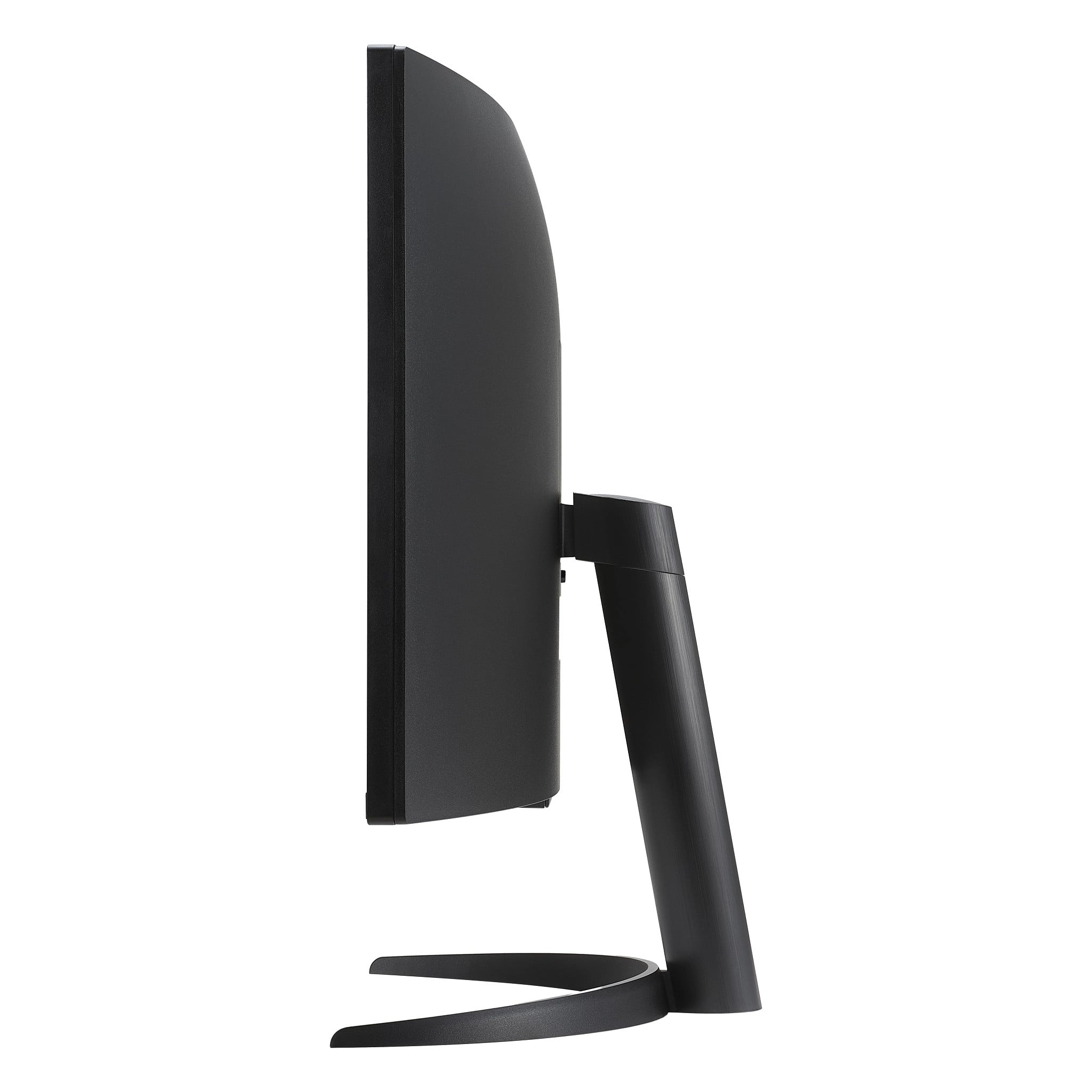
    • Answer Hello, Rob. As indicated in its title, the LG 34" MyView Smart Monitor WQHD Curved Screen 100Hz with webOS, Model # 34SR60QC-B, is not a TV but a computer monitor. It can only be tilted forward or backward from -5° to 15° and it cannot be pivoted 90° from landscape mode to portrait mode (vertical mode), nor does the monitor support PBP (Picture-by-Picture (if that is what you are referring to as dual mode)...^Ivan.

      Answered by LG Digital Customer Care

  • QuestionDoes this monitor work with Apple products?

    Asked by Ann.

    • Answer Hi there, Ann. Thank you for your question. Yes, the LG 34SR60QC-B Ultrawide Monitor is compatible with Apple products. It supports AirPlay 2, which allows you to wirelessly mirror or stream content from your Apple devices to the monitor. Additionally, you can also utilize Screen Share and Bluetooth to connect your Apple products. https://www.lg.com/us/monitors/lg-34sr60qc-b-ultrawide-monitor#pdp_specs If you need further assistance or have specific questions about setup, please feel free to send us a private message on Social Media @LGUSSupport, and we’ll be happy to assist you further. We appreciate your interest in LG products! —Renzo

      Answered by LG Digital Customer Care

  • QuestionCould this be mounted to the wall with a monitor wall mount?

    Asked by Sophia.

    • Answer Hi there, Sophia. Thank you for your question! The LG 34SR60QC-B UltraWide Monitor is compatible with a wall mount, as it supports a VESA mount size of 100 x 100 mm. To ensure a secure and proper fit, we recommend using a VESA-compliant wall mount that supports the monitor’s weight and size. https://www.lg.com/us/monitors/lg-34sr60qc-b-ultrawide-monitor#pdp_specs If you need further assistance selecting a wall mount or setting it up, feel free to send us a private message on social media @LGUSSupport, and our team will be happy to help! —Renzo

      Answered by LG Digital Customer Care

  • QuestionDo you have to have an external device connect to use the computer features. For example I’m a student and if I want to use the monitor for study and homework do I have ri have my laptop connected to monitor or can you use the monitor on its own .

    Asked by Keke.

    • Answer Hello there! Thanks for reaching out with your question. For the LG 34SR60QC-B Ultrawide Monitor, you will need an external device, such as a laptop or desktop, to use the monitor. While the monitor has some smart features, such as a built-in web browser and screen share via Wi-Fi mirroring, it does not function as a standalone computer. You’ll still need to connect it to a device for typical study and homework use. The monitor is designed to provide a large workspace with a high resolution (3440 x 1440), ideal for multitasking and studying, but you’ll need your laptop or another external device to access files, documents, and applications. https://www.lg.com/us/monitors/lg-34sr60qc-b-ultrawide-monitor#pdp_specs If you need further assistance or setup advice, feel free to reach out to us via @LGUSSupport on social media. —Renzo

      Answered by LG Digital Customer Care

  • QuestionOn the Best Buy specs details for the monitor it says there is a display port, where is it located on the monitor?

    Asked by Anonymous.

    • Answer The Best Buy specifications showing that the LG 34" MyView Smart Monitor WQHD Curved Screen 100Hz with webOS, Model # 34SR60QC-B has a DisplayPort are not correct, and that is an error. This monitor does not have a DisplayPort...^Ivan.

      Answered by LG Digital Customer Care

  • QuestionIf i wanted to connect mybswitch tonplay cozy games would it play good?

    Asked by Sol.

    • Answer Hi, Sol. Thank you for reaching out with your question. We understand you're interested in connecting your Nintendo Switch to the LG Monitor (34SR60QC-B) model to play cozy games. This unit is a great choice for gaming with its large, immersive screen and high-quality display. If you're connecting your Switch via HDMI, you should have a smooth experience playing cozy games. The monitor’s wide 21:9 aspect ratio will give you a more expansive view, but it’s important to note that your Switch will output in a 16:9 aspect ratio, so the image may have black bars on the sides, depending on the game. To ensure the best experience, we recommend checking the video output settings on your Switch to make sure it’s set to the right resolution for the monitor. For more information, you may visit https://www.lg.com/us/monitors/lg-34sr60qc-b-ultrawide-monitor. If you need further assistance or have any other questions, please send us a private message on social media @LGUSSupport and we’ll be happy to guide you through the setup. ^Juvy

      Answered by LG Digital Customer Care