A:AnswerThe Sony ICDPX312 Digital Voice Recorder supports Memory Cards of Class 4 or higher.
If you are connecting a plug in power type microphone, then power will be supplied to it from the Sony Recorder and therefore battery discharge will be faster.
There is no specific length limit for the Microphone cord. If a Microphone is provided with a longer cord, then it must also be designed to transmit the signals for that distance. So, the length will not affect the quality of sound received in the Recorder.
You can use any brand of Microphone with a stereo mini jack apart from the Sony Microphones mentioned in the Manual.
A:AnswerThis IC Recorder does not have the Auto Play back feature; so that it’ll automatically start playing back recording right after being recorded. It might happen if we’ll press the PLAY button accidentally.
A:AnswerThe Sony ICDPX312 Digital Voice Recorder is not compatible with other file formats other than MP3.
It can be used to play MP3 files transferred from a Computer.
A:AnswerYes, the .DVF files should be recognized with the Sound Organizer Software supplied with the Sony ICDPX312 Digital Voice Recorder.
You can also install the .DVF Windows Media Player plug-in and play them in the Windows Media Player Software. Refer the following link to download the plug-in.
http://esupport.sony.com/US/perl/swu-download.pl?upd_id=5501&SMB=YES
A:AnswerYes, the Sony ICDPX312 Digital Voice Recorder is compatible with the Windows 8 Operating System. The operation is verified in Desktop mode only.
A:AnswerThe available recording time in the Sony ICDPX312 Digital Voice Recorder would vary according to the battery used and the recording mode set.
When using Sony LR03 (SG) (size AAA) alkaline batteries:
192kbps(MONO) (SHQ) 55 hr.
128kbps(MONO) (HQ) 55 hr.
48kbps(MONO) (SP) 60 hr.
8kbps(MONO) (LP) 72 hr.
When using Sony NH-AAA-B2KN rechargeable batteries:
192kbps(MONO) (SHQ) 37 hr.
128kbps(MONO) (HQ) 37 hr.
48kbps(MONO) (SP) 39 hr.
8kbps(MONO) (LP) 50 hr.
Note that the battery life is measured in testing using methods proprietary to Sony. The battery life may shorten depending on how you operate the Sony Recorder.
Also note the available recording time in all the folders of the Sony Recorder. The recording time available when using the built-in memory and a 2 GB Memory Card is: 22 hours and 20 minutes in 192kbps (MONO) (SHQ) mode while it is 33 hours and 30 minutes in 128kbps (MONO) (HQ), 89 hours and 25 minutes in (SP) and 536 hr. in 8kbps (MONO) (LP) modes respectively. When using 4 GB Card, recording time will be double of that available when using 2 GB Card and so on.
The best mode to record will be either SHQ or HQ. You may wish to use a Memory Card of 4 GB or more to ensure that recording space is always available.
A:AnswerThe Files recorded on the Sony ICDPX312 IC recorder cannot be arranged in a specific order. It’ll playback the files from the last recording. You can transfer the files from the IC recorder to the Computer and then rearrange the files.
A:AnswerIf the Computer has a 32 bit version Windows Operating System, then, uninstall the Digital Voice Editor Software and reinstall it.
During the installation, keep the Sony Digital Voice Recorder disconnected.
Ensure to select “Yes” when the option: “Do you have a P series IC Recorder?” appears during the installation.
A:AnswerYes, you can use the ECM-TL1 headphone-type electret condenser microphone (not supplied) to record sound from a telephone or a cell phone to the IC Recorder (ICDPX312).
A:AnswerThe Dragon Voice Recognition (version 11) is compatible all the latest voice recorders. Please review the following link for the list of IC recorders that are compatible with the Windows 7 computer..
http://esupport.sony.com/US/p/swu-matrix.pl?upd_id=7089
All the recorders have the same functionality with difference in some features. Please visit the nearest BestBuy Store to go through their features and the cost of the IC recorders so that you can select the best.
A:AnswerThe digital Voice Editor software for your ICD-P520 is not compatible with Windows 7.
The Software for the ICDPX312 is not compatible with your older device.
Yes! you can record files without using the computer by recording sound from other equipment such as your older recorder connected to this IC recorder. using a 3.5mm cord from the headphones jack of your ICD-P520 to the microphone jack of the ICDPX312 and select “Audio IN” in the “Scene Select” menu.
A:AnswerMic Sensitivity Sets the microphone sensitivity.
High:
To record a sound far away from the IC recorder or a low
sound, such as recording in a spacious room (displayed as
“ a mic with 3 bars ” in the window).
Medium*:
To record the sound of a normal conversation or meeting,
such as recording in a meeting space or during interview
(displayed as “a mic with two bars ” in the window).
Low:
To record dictation with a microphone in front of your
mouth, a sound near the IC recorder, or a loud sound
(displayed as “a mic with one bar ” in the window).
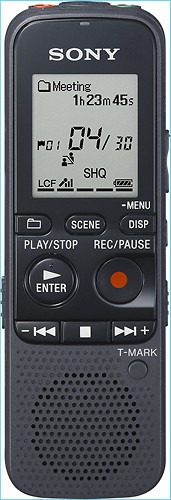
A:AnswerThe ICD-PX312 Digital Voice Recorder does not include the Dragon NaturallySpeaking software unlike the model # ICDPX312D. Please check with the vendor selling our product for availability. There should be a "Contact Us" link on the website to address this question.
A:AnswerThere are two ways to record using your tape recorder. You can use the ECM-TL1 headphone-type
electret condenser microphone (not supplied) to record sound from a telephone or a cell phone, as you have suggested, or when you select “Audio IN” in the “Scene Select” menu, the settings suitable for recording from other equipment are already selected.
A:AnswerThe recording date and time will be part of the recorded file information. To determine the stop time, just add the duration time with start time which is also included with the file information.














