Questions & Answers
- Model:
- STRDH590
- |
- SKU:
- 6187502
Q: QuestionCan a Sony STRDH 590 5.2 be used with a Vizio 2K TV or is it only to be used with 4K TVs?
Asked by Frakh.
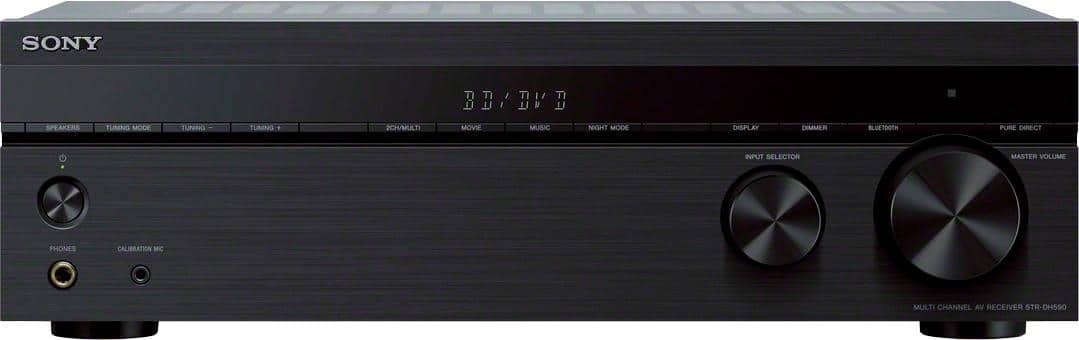
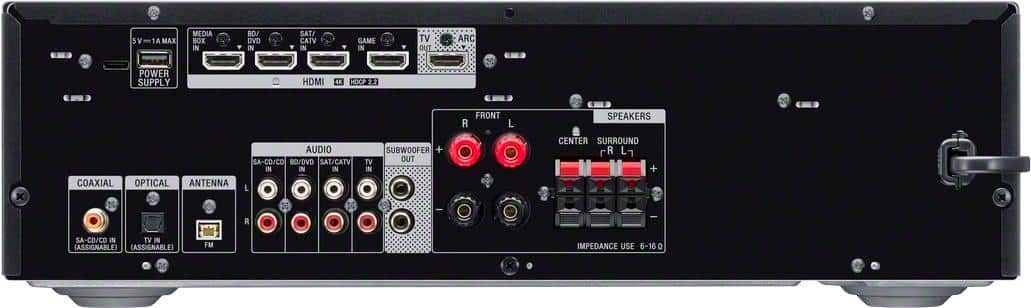
- A:Answer Hi Frakh, Thanks for your question. Yes, you can still connect this receiver to a non-4K TV via HDMI. The HDMI connections of this AV Receiver are backwards compatible. However, it is recommended to use a 4K TV to enjoy the receiver's full capabilities. If your TV supports HDMI ARC, there's no need to connect optical cable since HDMI ARC output both audio and video. However, if your TV doesn't support HDMI ARC, you need two connections. HDMI cable for video and optical cable for audio. Upgrade your home entertainment system to work with the latest 4K TVs and HDR picture. Equipped with 4 HDMI inputs, HDCP 2.2 signal handling, and a host of advanced features the DH590 is the perfect combination of high performance video capability and superb Sonic fidelity. High-Resolution Audio compatible. Regards, Jess
Answered by SonyListens

Q: QuestionThe Geek Squad suggested I buy a receiver with an eARC capability. Does this particular model have an eARC?
Asked by Anonymous.
- A:Answer Hi there, Thank you for the inquiry! The STR-DH590 doesn't support eARC. It only supports ARC for HDMI connection. You may want to consider the STR-DH790 which supports eARC via software update. Upgrade your home entertainment system to work with the latest 4K TVs and HDR picture. Equipped with 4 HDMI inputs, HDCP 2.2 signal handling, and a host of advanced features the DH590 is the perfect combination of high performance video capability and superb Sonic fidelity. High-Resolution Audio compatible. Regards, Jess
Answered by SonyListens

Q: QuestionCan I use this with my Technics turntable?
Asked by David.
- A:Answer Hi David, Thank you for your question. If your Technics turntable only has a PHONO output jack, you need to connect a phono equalizer (not supplied) between the turntable and this receiver. However, if your turntable has an RCA jack, then you should be able to connect it to any of the audio IN jack of the receiver. *The Sony STR-DH190 receiver has a dedicated PHONO input for connecting a turntable directly to the receiver. Experience the bigger, clearer picture when you upgrade your home cinema setup with the STR-DH590. The 5.2ch AV receiver brings movies to life with 4K HDR pass through, Dolby® Vision and flexible surround sound. Bring all your devices together with BLUETOOTH® connectivity and multiple inputs. Regards, Jess
Answered by SonyListens

Q: QuestionCan I add a turntable as well as DVD and cable box inputs?
Asked by John.
- A:Answer Hi John, Thanks for your inquiry. Depending on the supported connections of the external devices, the receiver will support audio/video devices via Bluetooth, HDMI, RCA analog inputs, coaxial, and optical connection. To connect a turntable to directly to the receiver, the stereo system should have a PHONO input. Since the receiver doesn't have a PHONO input, the turntable must have a built-in amplifier or an in-line amplifier must be used to connect the turntable to another input on the stereo system. *The Sony STRDH190 receiver has a dedicated PHONO input for connecting a turntable directly to the receiver. For more information about the receiver, please refer to our official website. Experience the bigger, clearer picture when you upgrade your home cinema setup with the STR-DH590. The 5.2ch AV receiver brings movies to life with 4K HDR pass through, Dolby® Vision and flexible surround sound. Bring all your devices together with BLUETOOTH® connectivity and multiple inputs. Regards, Jess
Answered by SonyListens

Q: QuestionWhy does my fire stuck restart my receiver?. I have now purchased 3 different fire sticks with same problem. Last fire stick I plugged directly into another TV with no problem. Can you help? Thanks
Asked by Byrd.
- A:Answer Hi Byrd, Our sincerest apology for the inconvenience this caused you. We're sorry to hear the receiver is not working properly and it restarts by itself when the firestick is connected. We want to confirm if the issue happens only on the smart hub or any external devices connected as well. This issue might be caused by a setting on the AV Receiver or connected device. If the firestick is the only one having the issue, disable the Control for HDMI or BRAVIA Sync on the AV Receiver and CEC functions on the firestick. Verify if the issue is resolved. If not, try the following: - Perform a power reset on the AV Receiver and connected device. - Try connecting the playback deice to a different HDMI port on the receiver. - Check that your AV Receiver and playback device are running the latest firmware. In case you need further assistance, please let us know. Unfortunately, due to the current Best Buy phishing protocol for your protection, we cannot provide a direct link, email or phone number for customer support as of now. Please find Sony Electronics' Support information: Go to our support website > click on “Support” > scroll down click on “Contact Support” > click on "Home Audio" and from there you'll see different ways to reach us. Regards, Jess
Answered by SonyListens

Q: QuestionThe setting for Surround sound will not work for streaming services but will work for the adds on them. Will only play the background music but no dialog. I can change the setting & will work with only front speakers. Surround works for everything else.
Asked by Wyatt.
- A:Answer Hi Wyatt, Thanks for choosing and purchasing our product. We're sorry to hear that you have an issue with your Sony unit. If you are not able to get any surround sound effects when playing audio, there may be a problem with your hookup or there may be an incorrect setting. Please follow these troubleshooting steps to isolate the issue: -Be sure to select the optimal sound field for the content. For details on the sound fields, see “Selectable sound fields and their effects.” -If you still have the same problem after changing the sound field, make sure the speakers are securely and properly connected to the A/V stereo receiver. -Check that the speaker settings are appropriate for the setup using “AUTO CAL” in the “<A.CAL>” menu or “PATTERN” in the “<SPKR>” menu. Then check that sound is output from each speaker correctly using “T. TONE” in the “<LEVEL>” menu. -Perform a test tone operation to check if the speakers are functioning correctly. -Increase the volume level of the speakers. -Try selecting a different size (small or large) for the surround speakers in the menu. -Select the correct speaker pattern on the Audio/Video (A/V) receiver. For more information on setting up or to fully enjoy theater-like multi-channel surround sound (5.1 channel), please check the Operating instructions of this unit found on our Sony Support Site. (page 15-17). If you need further assistance, please let us know so we can turn your experience around. Unfortunately, due to the current Best Buy phishing protocol for your protection, we cannot provide a direct link, email or phone number for customer support as of now. Please find Sony Electronics' Support information: Go to our support website > click on “Support” > scroll down click on “Contact Support” > click on "Home Audio" and from there you'll see different ways to reach us. Regards, Jess
Answered by SonyListens

Q: QuestionWill an old Sony Subwoofer, Model LN40B610A5FXZA, work with this unit?
Asked by Jim.
- A:Answer Hi Jim, Thanks for your question. This seems to be an incomplete model number. However, only an active subwoofer can be connected to the SUBWOOFER PRE OUT on the STR-DH590. You need to a monaural audio cable (not supplied) so you can connect a subwoofer to the terminal port. The STR-DH590 is compatible with speakers with impedances of 6 to 16 ohms. Please take note that matching speakers and subwoofer with lower impedance (ohms) and watts than what the A/V receiver is rated may cause damage to the receiver and is not recommended. For more information on how to connect the subwoofer to an amplifier/receiver, please refer to the manuals (operating instructions) of the subwoofer and your receiver model at our Sony Support website. Unfortunately, due to the current Best Buy phishing protocol for your protection, we cannot provide a direct link of the manuals as of now. Hope this helps. Regards, Jess
Answered by SonyListens

Q: QuestionDoes the Edifier - R1280T Powered bookshelf Speakers work with the receiver
Asked by Simon1284.
- A:Answer Hi Simon1284, Thanks for your inquiry. The receiver is designed to support speakers with an impedance of 6-16 ohms. To check the impedances of the speakers, check the back of the speakers or the supplied manual. Speakers are also connected using standard speaker wires (bare wire). Only the STR-DH190 Bluetooth stereo receiver has an audio analog output for an active speaker or soundbar connection. *Please take note that matching speakers and subwoofers with lower impedance (ohms) and watts than what the A/V receiver is rated may cause damage to the receiver and is not recommended. You may want to consider the STR-DN1080 receiver which is capable of supporting Bluetooth headphones/speakers. The STRDH590 is a great receiver. Equipped with 4 HDMI inputs, Bluetooth, and a host of advanced features, your new receiver is ready for whatever and wherever your content takes you. Regards, Jess
Answered by SonyListens

Q: QuestionDoes this reciever have an aux port to plug an mp3 player in or is it only bluetooth?
Asked by Skitzo.
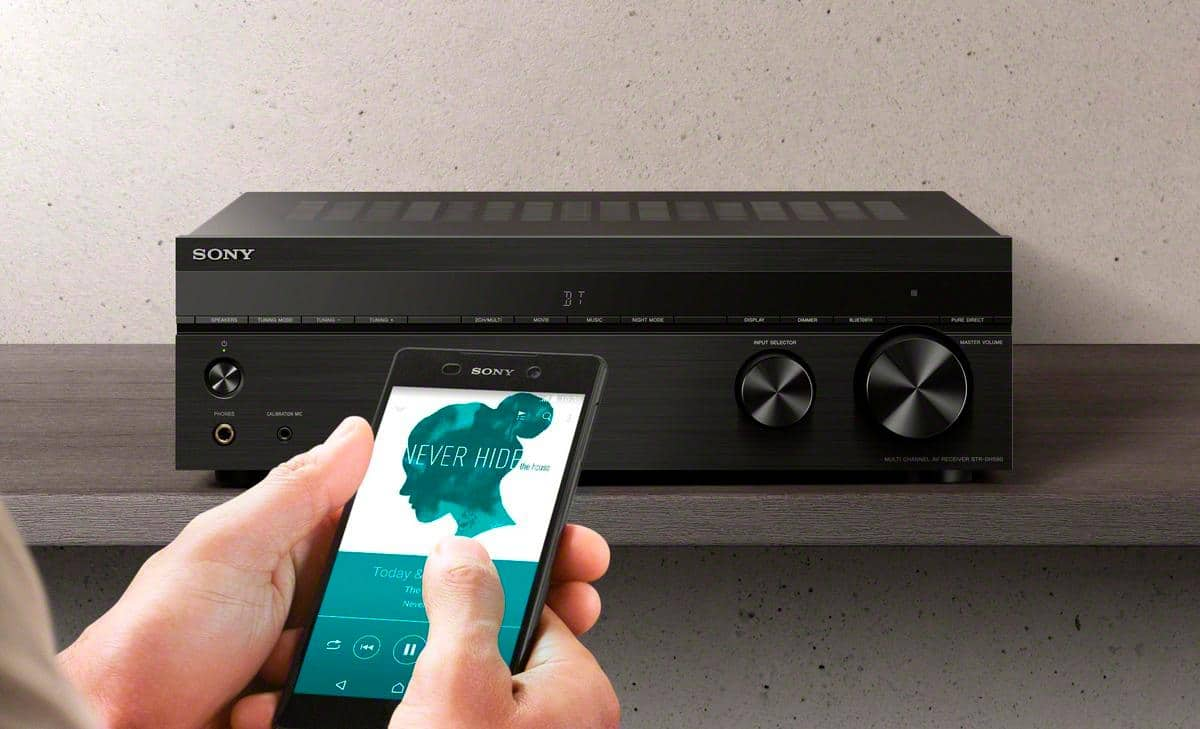
- A:Answer Hi Skitz, Thanks for your question. The 3.5mm headphone port is for calibration of the speakers. We only recommend using headphones to the AV receiver. Full operation is not guaranteed when you connect an AUX cord to the unit. You can listen wirelessly via Bluetooth connection on your devices. If it supports A2DP connection, it will definitely work. You may consider checking out the STRDH190. This Stereo Receiver supports 3.5mm port where you can connect your portable audio device to play music. Regards, Jess
Answered by SonyListens

Q: QuestionHow do I select the 5 channel stereo setting
Asked by baldeagle68.
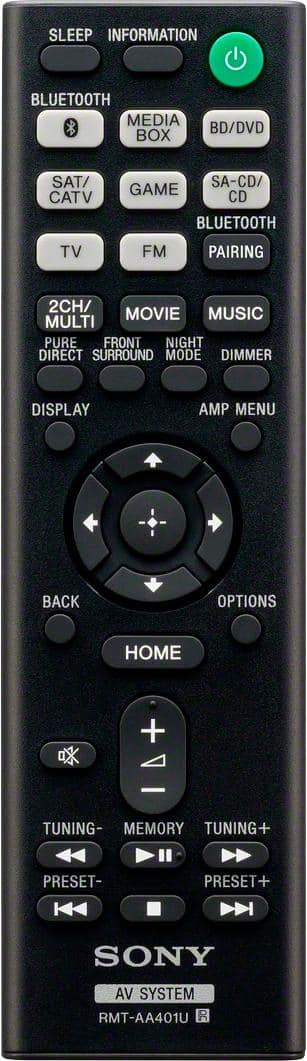
- A:Answer Hi Baldeagle68, Thanks for your question. The output sound of this STR-DH590 is depending on the speaker pattern setting and content to be played back. There is a Multi Channel Stereo setting which outputs sound from all connected speakers without adding any surround effects. You can select this mode by pressing the 2CH/MULTI button on the remote control until MULTI ST is displayed on the front of the receiver. Additional info: Experience the bigger, clearer picture when you upgrade your home cinema setup with the STR-DH590. The 5.2ch AV receiver brings movies to life with 4K HDR pass through, Dolby® Vision and flexible surround sound. Bring all your devices together with BLUETOOTH® connectivity and multiple inputs. Regards, Jess
Answered by SonyListens

Q: QuestionDoes it have ARC
Asked by Bijay.
- A:Answer Hi Bijay, Thank you for the inquiry! Great news! The receiver supports HDMI ARC. Upgrade your home entertainment system to work with the latest 4K TVs and HDR picture. Equipped with 4 HDMI inputs, HDCP 2.2 signal handling, and a host of advanced features the DH590 is the perfect combination of high performance video capability and superb sonic fidelity. Regards, Jess
Answered by SonyListens

Q: QuestionHi. Can this receiver be connected to a sound bar via HDMI versus speakers?
Asked by Anonymous.
- A:Answer Hi there, Thanks for your inquiry! We apologize, you cannot connect a soundbar to this AV Receiver. The HDMI port is used to connect audio/video devices such as TV, BD player, game console, media box and, cable box. This AV receiver only supports regular speakers. Only the STR-DH190 Bluetooth stereo receiver has an audio analog output for an active speaker or soundbar connection. Hope this helps. Regards, Jess
Answered by SonyListens

Q: Questiondoes it support DTS-X ?
Asked by Broly.
- A:Answer Hi Broly, Thank you so much for your inquiry. We are sorry, but the STR-DH590 doesn't support DTS:X. You can only enjoy High Bitrate Audio (DTS-HD Master Audio and Dolby TrueHD), DSD and Multi Channel Linear PCM with an HDMI connection. If playing object-based audio formats (DTS:X and Dolby Atmos) is your priority, you may want to consider getting the STR-DH790, STR-DN1080 or STRAN1000, STRAZ1000ES, STRAZ3000ES, STRAZ5000ES, STRAZ7000ES A/V receiver models. These receivers support the latest three-dimensional surround sound formats including Dolby Atmos and DTS: X, drawing you into the middle of the action you see on screen. Regards, Jess
Answered by SonyListens

Q: QuestionI have a Hysence tv with Bluetooth will I be able to connect to this receiver?
Asked by Ted.
- A:Answer Hi Ted, Thank you for your inquiry! If your TV supports A2DP (Advanced Audio Distribution Profile) Bluetooth profile, you should be able to connect it with this receiver. For more on "Playing Back Sound on a BLUETOOTH Device", see pages 31-32 of the manuals below. https://www.sony.com/electronics/support/res/manuals/4726/55cd375e0f9e7103f2b6baa747ed9072/47269061M.pdf Experience the bigger, clearer picture when you upgrade your home cinema setup with the STR-DH590. The 5.2ch AV receiver brings movies to life with 4K HDR pass through, Dolby® Vision and flexible surround sound. Bring all your devices together with BLUETOOTH® connectivity and multiple inputs. Regards, Jess
Answered by SonyListens

Q: QuestionHey!! Just bought this exact sound system and the sony turntable! Do these not pair together? I cannot seem to connect the music from the turntable to the speakers. What to do?!
Asked by KoolKat.
- A:Answer Hi KoolKat, We're sorry to hear this issue with your Sony STR-DH590 and turntable. To connect a turntable to directly to the receiver, the AV system should have a PHONO input. Since this AV receiver doesn't have a PHONO input, if the turntable is connected either through an audio input, the turntable signal will need amplification from an external pre-amplifier (or an inline amplifier). Without amplification of the turntable signal, low or no audio will occur. *The Sony STR-DH190 receiver has a dedicated PHONO input for connecting a turntable directly to the receiver. For us to better assist you with troubleshooting, can you tell us about your current setup? For this, you can email us at [email protected] with the following details: Name: Best Buy Username: Model Number: Issue: Telephone Number: Regards, Jess
Answered by SonyListens

Q: QuestionDoes this unit pass a Digital output from Live TV and/or Streaming to exterior Bose Speakers?
Asked by BB.
- A:Answer Hi BB, Thanks for your question! You can connect speakers with a nominal impedance of 6 ohms to 16 ohms on this unit. The STRDH590 receiver has the capability to pass digital audio signals through its optical, coaxial or HDMI inputs to connected speakers. However, the ability to pass a digital output from live TV streaming to external speakers may depend on the specific setup and features of your TV. If your TV has a digital audio output (optical or coaxial), you can connect it to the corresponding input on the STR-DH590. Set the audio output settings on your TV or streaming device to optical, coaxial, or HDMI depending on the cable you're using, and the receiver should be able to pass the digital audio signal to your connected external speakers. Regards, Jess
Answered by SonyListens

Q: QuestionCan I get a STR-DH590 to work with a Pioneer elite tv if I use a hdmi to DVI-D cord? I have it set up and it does not seem to be working.
Asked by Mathew.
- A:Answer Hi Mathew, Thanks for reaching out to us. We're sorry you've been running into difficulty. HDMI-DVI conversion cable is not recommended. If you connect an HDMI-DVI conversion cable to a DVI-D device, you may lose audio and/or image. If the audio is not output correctly, connect the audio cable or digital connection cable and set the input jack again. If you connect to a TV that is not compatible with the Audio Return Channel (ARC) function or you want to select an audio signal using a cable other than an HDMI cable (e.g. via an optical digital cable or an audio cable), switch the audio input mode. For details, visit the help guide of our STR-DH590 on our Sony Support website and search for the following article: “Switching between digital and analog audio “IN MODE”.”. Unfortunately, due to the current Best Buy phishing protocol for your protection, we cannot provide a direct link of the help guide of the product as of now. If your TV does not support the System Audio Control function, press AMP MENU, then set “<HDMI>” - “AUDIO.OUT” to “TV+AMP” on the display panel to output the sound of the TV from the TV speaker and the speakers connected to the receiver. Regards, Jess
Answered by SonyListens

Q: QuestionJust bought this unit . The remote that came with it will not work . Changed the batteries. But the unit will respond to the Hisense TV remote . But I can or properly set up unit with TV remote. What can I do to fix ?? Help ! Thanks
Asked by FredE.
- A:Answer Hi FredE We're sorry to hear that the remote doesn't work. Allow us to help and turn your experience around. Check the remote control after each step to determine if it is working. If you need model-specific information, check your manuals . 1. Remove any objects that may block the IR signal between your remote control and the device. 2. Check if the LED on the front of your device (TV) is blinking when pressing a remote button. If the LED blinks/flashes when pressing your remote buttons, the remote is sending a signal and the device is receiving it. 3. Reset the remote control. 4. Perform a power reset of the device. Additional troubleshooting is available on our support website. Please look for "The remote control doesn't work" article for more details. For further assistance, please email us at [email protected]. Regards, Erin
Answered by SonyListens

Q: QuestionCan this reveiver be used with Bose surround s I und speakers that are already hard wired on my living room walls?
Asked by Anonymous.
- A:Answer Hi there, Thank you so much for your inquiry. If your Bose speakers supports a standard speaker wire connection and has a nominal impedance of 6 ohms to 16 ohms, yes, you can. We also recommend using speaker wires that are anywhere between 12 to 16 gauge. These are most commonly used for connecting speakers to an amplifier or an Audio/Video (A/V) receiver Experience the bigger, clearer picture when you upgrade your home cinema setup with the STR-DH590. The 5.2ch AV receiver brings movies to life with 4K HDR pass through, Dolby® Vision and flexible surround sound. Bring all your devices together with BLUETOOTH® connectivity and multiple inputs. Regards, Jess
Answered by SonyListens

Best-selling receivers
- $199.99Your price for this item is $199.99$249.99The comparable value for this item is $249.99
- $429.00Your price for this item is $429.00$449.00The comparable value for this item is $449.00
- $719.00Your price for this item is $719.00$849.00The comparable value for this item is $849.00
- $849.99Your price for this item is $849.99$1,049.99The comparable value for this item is $1,049.99
- $849.00Your price for this item is $849.00$949.00The comparable value for this item is $949.00
- $669.00Your price for this item is $669.00$749.00The comparable value for this item is $749.00
- $439.95Your price for this item is $439.95$549.95The comparable value for this item is $549.95
- $549.99Your price for this item is $549.99
- $219.95Your price for this item is $219.95
- $335.99Your price for this item is $335.99$399.95The comparable value for this item is $399.95
- $1,299.00Your price for this item is $1,299.00
- $499.95Your price for this item is $499.95$659.95The comparable value for this item is $659.95
- $689.99Your price for this item is $689.99$799.95The comparable value for this item is $799.95
- $699.99Your price for this item is $699.99$849.99The comparable value for this item is $849.99
- $1,799.00Your price for this item is $1,799.00
- $969.90Your price for this item is $969.90$1,249.99The comparable value for this item is $1,249.99
- $849.00Your price for this item is $849.00$1,399.00The comparable value for this item is $1,399.00
- $619.00Your price for this item is $619.00$649.00The comparable value for this item is $649.00
- $1,800.00Your price for this item is $1,800.00
- $1,699.00Your price for this item is $1,699.00$2,999.00The comparable value for this item is $2,999.00