Customer Ratings & Reviews











- Model:
- ADO951800F207
- SKU:
- 6517208
to a friend
Customers are saying
Customers consistently note the ease of use and intuitive interface of Photoshop Elements 2023, making it accessible for both beginners and experienced photo editors. Many appreciate the powerful photo editing tools and the addition of new features in each version, while also praising its affordability compared to other software options. The software's performance is also highlighted as a positive aspect, with users reporting smooth operation and quick processing times.
This summary was generated by AI based on customer reviews.
- Pros mentioned:Ease of use

Great software.
|Posted .This reviewer received promo considerations or sweepstakes entry for writing a review.Adobe Photoshop is the greatest photo enhancing/altering program that has ever existed and continues to be untouched by any rival software companies. For context: I am working off of a Macbook Air M2 and the software is not clunky or lagging at all. It works effortlessly. I am also not a professional photoshop user and really, I should be considered a beginner. The software is super easy to use and is catered toward beginners. Having the autonomy to create and help edit is super useful and helped me with all the photos that I wanted to touch up. Adobe offers tutorials to help you along the way and they also offer these on their website. Their are also a ton of YouTube videos that can assist you along the way. I certainly struggled at first as I got to know and play around with the software, it becomes fairly easy as you use it more and more. It is not overwhelming at all and quite comprehensive. I really would recommend this to anyone with basic to no photoshop understanding and for those who want to enhance or touch up wonderful photos.
I would recommend this to a friend - Pros mentioned:Ease of use
An Easy Way to Make Your Photos Sparkle
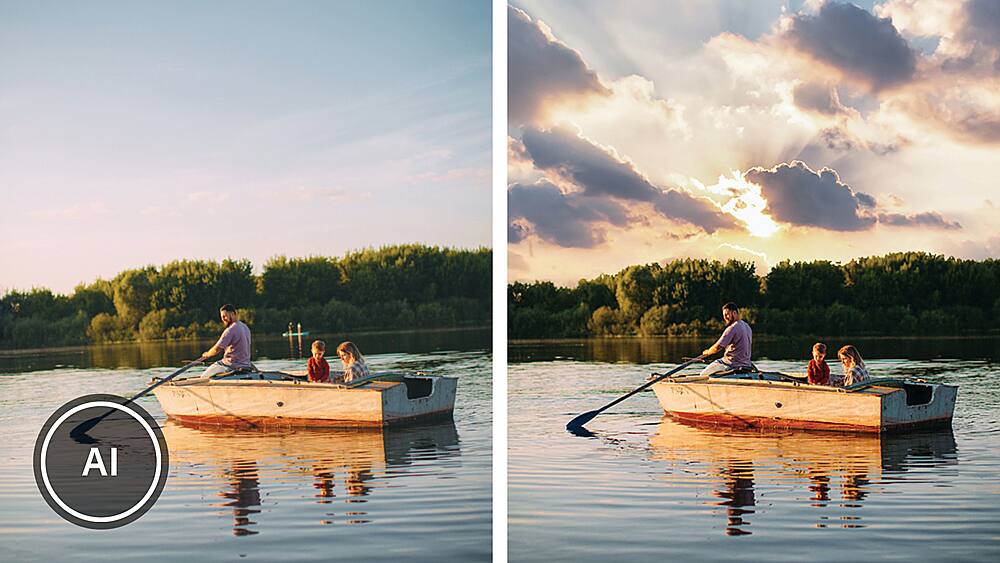
|Posted .This reviewer received promo considerations or sweepstakes entry for writing a review.I’m reviewing this from the standpoint of a long time 35mm analog photographer who is learning to edit on the computer. In the old days, I’d have my heavy photo enlarger, my stack of Kodak photosensitive paper, the analog timer, etc. ALL that is gone of course, you’ll find that stuff in museums. Editing now takes a totally different set of skills, and with just a program like Photoshop Elements 2023 for under $100 you can get even better results than you could with thousands of dollars’ worth of equipment in the old days. When digital editing was first introduced years ago, a friend purchased Photoshop and I was excited to learn it. I tried it and it was like learning a foreign language. I’m glad I tried using his program before ordering mine. I thought digital editing was not for me. Later, Adobe released Photoshop ELEMENTS for the rest of us. I bought my first copy years ago, and each year it gets better and becomes more intuitive. It actually takes you by the hand at first, examines your photo and makes suggestions on how to make it better. Three different levels are offered, ‘quick,’ ‘guided’ and ‘expert.’ As you’d expect, with ‘quick’ you just put in your photo and basically you are asking the program “what do you think? Just fix it.” With ‘guided’ it makes suggestions but you get to ‘participate’ more in the process. Using ‘expert", the training wheels are still there if you need them, but you do most of the work. This 2023 version offers you more options for the perfect photo with more different ‘guided edits' than last year. For example, Elements offers you “Perfect Landscape.” Let’s say the day was drab when you took your picture. No problem; you can select a beautiful sky background. Last year’s version offered you 12 different skies, now you have 36 to choose from. So basically the 2023 version is very similar to last year’s, you just have more options of each feature to choose from. Most important, the price for all these “AI” features is very inexpensive for what you’re getting. Also realize that you buy Elements outright. There’s no ‘subscription’ requirement as there is in regular Photoshop. This means you can use your copy of Elements forever and not pay another dime. Bottom line, if you’re a long time photographer as I am, and want better, more professional photos without a great learning curve or expense, and don’t want to spend time looking at dozens of YouTube videos to get the ‘hang of it,’ I think you’ll like your investment in Photoshop Elements 2023.
I would recommend this to a friend 2023 --> 45% faster w/Apple Silicon; AI Sensi tops
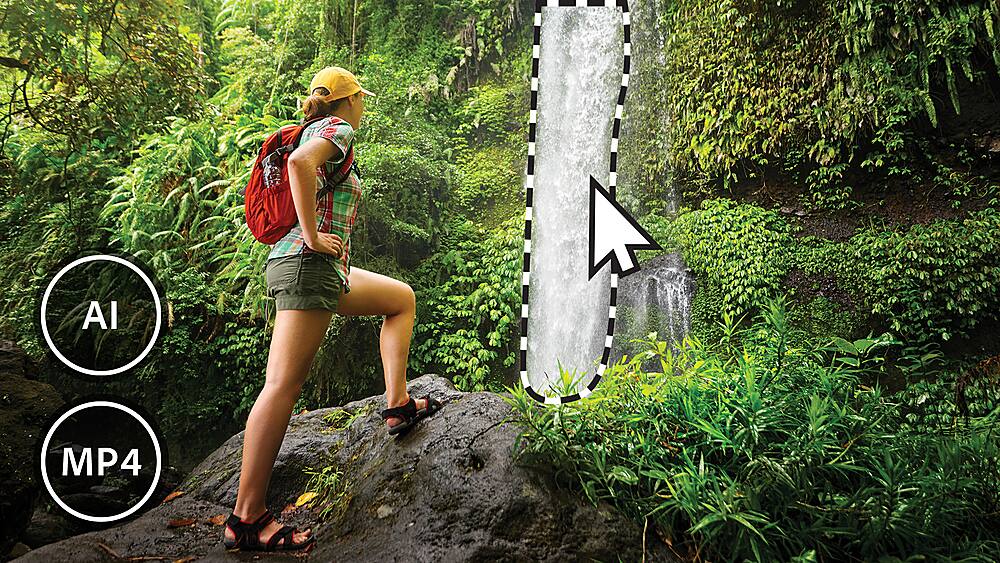
|Posted .This reviewer received promo considerations or sweepstakes entry for writing a review.This review is based on running the program as a "free trial" version, so limited to one month of using it. The scope and depth of the product is incredible for the hobbyist photographer, so a month is not a full evaluation of all that is possible. I am only hitting the highlights. I defaulted to the trial version in that my installation of the program was stalled by receiving a Windows installation code for a Macintosh product; still working with Adobe support to rectify this issue. Adobe states that optimization for Apple M1 and M2 Silicon processors offers a 35% faster performance. And evolving Artificial Intelligence ( which Adobe introduced in the 2022 version, naming it Sensi) with new animation effects, Elements earns its price over cheaper programs. The use of Sensi automatically performs editing tasks that might normally require hours of work. And cutting out a busy background and pasting in a flowing waterfall will totally change the finished photograph. Adobe has taken technology from the professional version of Photoshop, avoiding the complexity, price, and time investment, to reap the rewards desired for the hobbyist to semi-pro photographer. Still in beta version, there is a mobile phone app version included in the package, since the number of photos taken with phones over dedicated separate cameras probably is heavily weighted to the mobile phone platform. My quick web search stated that digital camera sales have dropped by 85% since 2010, and as such 85% of photos taken in 2017 were taken by mobile phones rather than dedicated cameras. So having a photo editing app on your phone just makes sense. When you download the app, there is a notice of an expiration of this trial phone app, which suggests to me that it will be replaced with a permanent replacement, but that is to be announced. The program is a single price, avoiding the subscription model of the full version of Photoshop (currently one Andrew Jackson a month). Elements pricing was dropped for Black Friday, so keep your eyes open for such promotions. The app has always had a selection of filter effects that could make photos look like paintings, simulating such as oil paints or watercolors. With the AI Sensei, they introduced a new set of effects that aims to generate different artistic styles, such as cubist and post-impressionist. These effects were not that compelling to me; you shouldn’t do up a relative’s photo portrait in such a modification. Your mother-in-law might not appreciate her photo on the mantle looking like a Picasso, for example. But you can apply the artistic effect just to the background, which serves as a nice foil to the central focus of a photo. Simple animated effects – known as Overlays – such as falling snowflakes or flickering flames, can be added to your photos and then save your work as a short video clip that you can upload to social media, which becomes a great venue to display your artistic images. Another nice trick was Guided Edits, which give you step-by-step help. One Guided Edit is the ability to alter the aspect ratio of a photo by extending the background of a photo. If you’ve got a photo with an attractive background, such as a beach or some a background of mountains, then you can select part of the background and use it as a clone image to extend the background further. So a simple beach snapshot is transformed into a sweeping panorama of a wide beach with your subject in the center. An Instagram favorite, your pets, are given their due as well in Guided Edits. You can do a virtual shampoo and remove mud splatters from the fur, the demonic reflection from their eyes due to flash, soft focus to vignette their pose, and adjust the color of backgrounds, etc. I did not use the motion effects, but the demo clips were quite impressive. A skateboarder traveling down the street, a stationary hiker with a moving waterfall in the background, and a child playing in the winter with snowflakes falling were examples to spark your creative juices.
I would recommend this to a friendGold standard for photo editing by the hobbyist
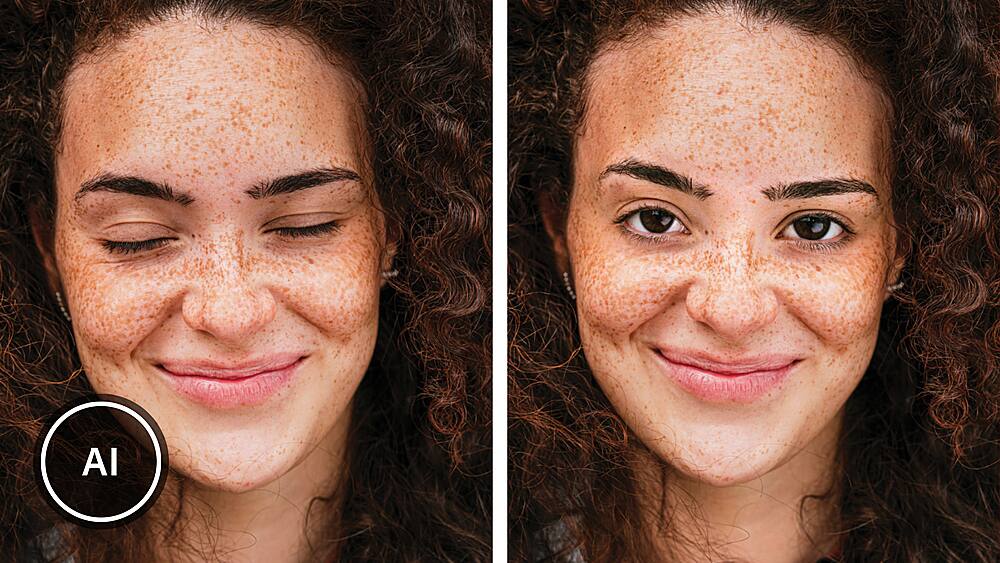
|Posted .This reviewer received promo considerations or sweepstakes entry for writing a review.As a photography hobbyist, PS Elements is the perfect editor for me. I have used Photoshop for the past 19 years, but 11 years ago I realized that PS Elements could do all I needed to do, without the labor-intensive editing of full-fat Photoshop. For 2023, there is not much new for simple photo editing since the previous version of Elements. There are some very clever guided editing features that will be especially useful for those who post to social media. Innovations have also been made to add motion to static images. I appreciate in particular the ability to extend the background of a photo with a single click. I have yet to experiment with motion overlays, but the ability to add falling snowflakes, smoke, or sparks to a photo looks very intriguing. Expert mode is of course where there are all the editing features. Layers, histogram analysis, selection options and transformations are all there. Usually, there are several ways of performing the same task, because the result with one tool may be better than with another. New for 2022 is further refinement of the facial adjustments: not only can one open closed eyes and create smiles, but now one can tilt, rotate, and elevate the head of a subject. This is very slick. I have been able to transform some ordinary shots into works of art with the artistic effects. These are quite beautiful. You will want to use a computer with a fast CPU, at least 8gb RAM, and the ability to input with a stylus is a definite plus, but not essential. Please note that I was not able to install this program on a Surface Pro X. If you already have PS Elements 2021 or 2022, you may want to look closely at the new features in 2023 to see if they are useful to you. On the other hand, anyone who has been working regularly with an older version of PS Elements would not go wrong with upgrading now to the latest version. PROS: - Full-featured photo editor, IMHO best in class for consumers - Fun and very satisfying to use - Multiple options for fine-tuning all aspects of the digital image - Excellent printing options - New features for 2023 work well and are useful, particularly for anyone who is posting photos to social media CONS: - With flexibility comes complexity, and it takes some time to learn the fine points - Works best on high-end computers; fast CPU, >8Gb RAM, hi-res display - May not work properly on computers with ARM processors
I would recommend this to a friend- Pros mentioned:Ease of use
Good tool for basic photo editing
|Posted .This reviewer received promo considerations or sweepstakes entry for writing a review.Photoshop Elements is a very different beast than Photoshop. Most of the complexity of the full version has been abstracted away into a much more guided, user friendly experience that can lead you to decent results even if you don't have much skill with graphic design or technology in general. And this is simultaneously its best and worst feature. To give a bit of context, I'm pretty far from a power user. I have occasionally needed to engage with full Photoshop for work when reviewing cover designs for books, but this didn't involve much actual design work. In contrast my girlfriend is a professional who designed movie posters. For me, I would describe Elements as offering a decent experience overall. I ran into a few issues getting it started up, as instead of just launching into Photoshop when you click the icon for it you have to go through a guided launcher that wants you to select what you're using the product for which I found to be overly cumbersome and a little vague, but once I was in and dialed down the hand holding a little it did everything I needed. I can manipulate photos, apply effects, arrange layers, and get rust I considered to be very good results. And the guided processes, while perhaps a little gimmicky, were easy to follow and helped me produce effects I never would have thought to try on my own and certainly wouldn't have been able to figure out without a few hours of experimentation. So it was overall a fairly satisfying experience. My girlfriend, however, hated it. It doesn't support CMYK color spaces, so she couldn't load any of her work files into it. The interface didn't give her immediate access to all the tools and settings she was accustomed to, so it slowed down her work. And she was unimpressed by the automatic features, because she knew she could do better. So, my ultimate conclusion is that this is a great product for a very specific kind of consumer. Specifically, hobbyists. This isn't the product for freelancers looking for a more affordable alternative to a creative suite subscription. It is a tool for the Redditors, the parents, and the grandparents. The ones for whom "good enough" doesn't sound like an admission of defeat. If you fall into that category, I think you'll find this latest version of Elements to be a great (if at times somewhat intrusive) product.
I would recommend this to a friend - Pros mentioned:Ease of use
A good photo manipulation program reasonable cost
|Posted .This reviewer received promo considerations or sweepstakes entry for writing a review.Photoshop Elements 2023 This is a good photo manipulation program without a high cost. It has a lot of automation features to help out in photoshoping helping to make you a wizard at manipulation. Once you have learned how to use the program you have a lot of the abilities of Photoshop at your fingertips. New users to photoshop type programs: This is an excellent program for working with photos of either people or scenery. The menu named Enhance has a lot of tools to use to make your photo better. Auto Smart Fix – modifies photos does a lot of changes to improve color balances Auto Haze Removal – brightens the photo – taking out any haze you might have Auto Red Eye Fix – does what it says Smooth Skin – takes out minor color changes or artifacts you can see in skin Adjust Facial Feature – this one is fun – you can modify the different parts of the face, mouth, lips, eyes, etc. – making it easy to make a fun meme out of someone’s face Another feature that is new is the Subject Selection tool in the Select menu – this does a really good job of isolating an element (person, face, object) from the background. It has a pretty impressive algorithm. For those familiar with Photoshop: The Edit, Image, Layer, Filter, View, and Window menus are set up like Photoshop and offer many of the same tools. The Select menu has many of the tools Photoshop has but the Subject Selection tool is much better than Photoshop in isolating an object. While the program focuses on photo manipulation the basic elements that are part of Photoshop’s drawing and painting tools are available. One pain in the neck part of the program is that you don’t launch Photoshop Elements directly but go through a Adobe interface first. Plus second time I used it, the program made me re-insert my serial number for the second time. So, Keep the serial number handy on your computer.
I would recommend this to a friend Empty box, stolen CD??
||Posted . Owned for 3 weeks when reviewed.This reviewer received promo considerations or sweepstakes entry for writing a review.Bought online for pickup, box was EMPTY! Only the card remained. Took hours for Adobe to get my software running and I STILL do not have the physical media I paid for. What the heck, best Buy??
I would recommend this to a friend- Pros mentioned:Photo editing
Photoshop Elements 2023
Posted .This reviewer received promo considerations or sweepstakes entry for writing a review.Well, first, i had to return this as it would not work on my older iMac which has a hard disk drive and is intel based, not the newer M series chips. But based on my previous versions of Photoshop Elements, it is great at editing photos although it does crash at times, and since there is no auto-save, I lose hours and hours of work
I would recommend this to a friend A great tool for photo management and editing
|Posted .This reviewer received promo considerations or sweepstakes entry for writing a review.I have a massive library of images, from my cell phone, DSLR photography, scans etc. I unfortunately have many duplicate photos after trying to manage everything for the past 13 years. What really drew me to Adobe Photoshop Elements was its ability to catalog all 120.000 images across all my drives. I have tried other applications to manage my library and try to clean it up, but most of these other programs crash after running out of memory, sometimes losing all your progress. I was able to import everything into Photoshop Elements 2023 through their Organizer tool that is found once you launch the program. It can take a while to catalog everything, then creating thumbnails, while also scanning faces that you can choose to add tags to, such as a name for example. As you can imagine, a library of this size takes quite a while to process and once you have done this, you can easily select any photo in your library to apply the array of filters and other tools available through their Photo Editor portion of the software. I’m not big on editing my photos, but there aren’t too many reputable companies that make a solid product to catalog very large photo collections and then offer an easy way to edit them. Just peeking around though the Photo Editor, there are an array of drawing tools, picture filters and some other advance guided tools for more difficult things, like removing an object or person from an existing photo. I’ve used this software on several computers, most of which have at least 32GB of RAM and at least 8 cores or more. I have cataloged files from SSDs and HDDs, and drive speed really makes a difference for this initial step and how long it will take to catalog. I have found that Adobe Photoshop Elements 2023 is a robust and capable program to handle most, if not all my photo management and editing needs. I may not be the typical Photoshop user, but it’s nice to be able to find potentially misplaced images that are scattered across multiple sources and be able to edit or delete them with ease.
I would recommend this to a friend- Pros mentioned:Ease of use
Content editing made easier and more user friendly
|Posted .This reviewer received promo considerations or sweepstakes entry for writing a review.As someone who produces and publishes a lot of still pictures and video content for various on pages, sites and for advertisers and customers, this upgraded version of PE is making my workday easier. With three different modes Quick, Guided and Expert, the user interface and intuitiveness. These are not new, but some of the functions inside these modes are new and are welcome upgrades. Moving Elements allows you to select a part of a still image and turn it into and animation. This sounds like a small change, but in the era of gifs and memes we are currently in, it makes the creation of these type of images easier. Perfect Landscape is another my favorite tools. It existed before but has received a significant upgrade to the interface and toolbox. Changing, cleaning up and replacing backgrounds and landscapes in photo images now has 3 times the amount of options as the last version. This is super helpful in producing stunning images needed for backgrounds, screen savers and website placeholders. Guided Edits is the way this industry can start to bring in more users who may be intimidated or think they do not know enough about editing to try. This is like diy training that can build your confidence and knowledge of editing. The best part of this is its one time price feature to plug and play versus the subscription fees they charge for the Creative Cloud suite of tools.
I would recommend this to a friend - Pros mentioned:Ease of use
The leader in image processing gets better
|Posted .This reviewer received promo considerations or sweepstakes entry for writing a review.I’m a long-time user of Adobe Photoshop Elements, and always look for the latest enhancements in the product. Photoshop Elements 2023 delivers, with new features that range from useful to gimmicks. The first thing you’ll notice is the faster boot time from older images. If you’re like me, you’ll open an image, close the editor, and then open the next one. In older versions it was a chore to wait for Elements to re-open, even on a fast machine. This version loads much faster, a welcome improvement. While powerful, the main advantage of Elements has always been its ease of use. For the most part, it’s simple to figure out how to get things done in the tool. When you get stuck, however, it can be challenging to sort out how to find the option you want from among the multitude of features. Elements 2023 takes a big step in the right direction with Guided Edit Search, a tool that makes suggestions on what would commonly be done next, and allows you to type in what you want to do either by searching on keywords or using the explore option. The new peek-through option allows you to add depth to flat-looking images by overlaying items in front of the subject. It’s handy if you’re creating an image for a card or possibly social media. On the gimmicky front, you now have the ability to animate portions of your image, like a stream, waterfall, or sky, and to save this as a video file. The other big improvement here is the addition of more background and skies to add to you images (if you didn’t know, yes, you can replace the sky in your image with a nicer-looking stock sky). Photoshop Elements has evolved into an indispensable tool for me, and the 2023 version adds even more great features.
I would recommend this to a friend - Pros mentioned:Ease of use
The Best Photo Editing Software Available
|Posted .This reviewer received promo considerations or sweepstakes entry for writing a review.I wouldn't consider myself a power-user of Photoshop at all. I've used the professional version of Photoshop off and on for decades, but I don't need all the power and complexity that comes with the full blown version. So when I decided that I needed to use something more powerful than some of the free apps that I could find on the App Store or on the web, I decided to pull the trigger on this Photoshop Elements 2023 offering by Adobe and have been quite pleased with the application. I think one of the things that I found most useful and helpful is that Adobe has been able to combine some of its most powerful Photoshop editing tools into a user-friendly interface that makes it easy for an occasional user and amateur photographer like myself to achieve excellent results with my photo editing undertakings. From the automated editing tasks that their build AI delivers to a great selection of filter effects, to the Overlays (animated effects), I've been able to add some cool animations to my photos and create short video clips that I share with my family and my daughter's soccer teammates of some of their game photos. I also love the guided edits functionality, which helps applying some of the app's most powerful tools, super easy to accomplish.
I would recommend this to a friend - Pros mentioned:Ease of use
An Elemental Yet Powerful Image Editor
|Posted .This reviewer received promo considerations or sweepstakes entry for writing a review.Adobe Photoshop Elements is a superb digital photography editor for photographers who don't want to pay for more complex applications, upgrade hardware, or learn numerous and complex digital editing techniques. It provides numerous advanced guidance techniques for aid in stepping through many complex editing tasks using embedded image-manipulation tools. The image catalog provides a powerful search function and includes very functional and easy to use face and geo tagging capabilities. It has less capability than some of the more expensive editors out there but shines with popular functions that are quite sophisticated, including AI(Sensei) driven task solvers. It is primarily aimed at casual or first-time users that are just getting their feet wet. It can also be an inexpensive way to augment the full-blown version of photoshop on additional computers. It is a one-time purchase – not a subscription-based app, meaning it is yours to use as long as you desire. It is easy to migrate to using the full-blown version of photoshop. You should check the specifications to make sure your equipment can handle Photoshop Express’ needs. Photoshop Elements is an easy to use yet powerful image editor.
I would recommend this to a friend Same layout, some new features
|Posted .This reviewer received promo considerations or sweepstakes entry for writing a review.My last version of Adobe Elements was 2019 and this version (Adobe Elements 2023) has improved some. The layout is the same familiar one but Adobe added a few new features. However, from the first time I opened the app, it crashed. I think I tried to import too many photos and videos. The first thing that stood out was an overall lag when opening it up. The feature I was most exited about is the new "Colorizing" feature, which lets you colorize a B&W photos. However, the auto colorizing feature leaves a lot to be desired and it barely colors the images in a spotty manner. Thankfully, the manual feature was better, though it took me patience and time to learn, but I was happy with the results. I have old photos of my parents/grandparents I'd like to bring to color, so this feature is the one I will use most in this version. There is a new "web app" that enables you to edit photos on your browser, but it only includes a 30 day trial. From the windows app you can tweet photos and videos. Runs a bit slow when opening up the organizer too. Of course that also depends on how many photos you have. Even though I have 32GB RAM, a good graphics card and a TB of NVME space, I expected a little quicker response, but it's tolerable since I have probably half a TB of photos. The app also identifies people's faces, which, although not groundbreaking, adds to its organizational features. In addition, it looks for "people, places, events, and more." Depending on what you are searching for, it can be hit or miss. I searched "parks," and it basically showed me photos with a lot of grass in them. I had better luck when typed "beach" and it found pics of me and the family by the water. Searching "car" was easy for the algorithm. Elements 2023 has an overwhelming amount of features, so I'll be exploring much more in depth. You could probably take a class on this app alone. I wish it was a little snappier, but I think it's what you'd expect from Adobe. A good app.
I would recommend this to a friend- Pros mentioned:Photo editing
Excellent Program
Posted .This reviewer received promo considerations or sweepstakes entry for writing a review.Adobe Photoshop Elements 2023 is a powerful and versatile photo editing tool.
I would recommend this to a friend Adobe Photoshop Elements 2023 serial number
Posted .This reviewer received promo considerations or sweepstakes entry for writing a review.Purchased Adobe Photoshop Elements 2023 from online Best Buy. Adobe has excellent photo software. Had problem locating 24 digit serial number needed to activate the software. After a few stumbles contacted the Best Buy digital team. Outstanding response, guided me through locating the serial number. Then quickly activated Adobe Photoshop Elements 2023,
I would recommend this to a friendit worked, but it only has the pass codes.
Posted .This reviewer received promo considerations or sweepstakes entry for writing a review.only has the passcode, no CD included. It will work, but i could have downloaded the code and saved 2 days with the store pick up.
I would recommend this to a friendNot bad at all
Posted .This reviewer received promo considerations or sweepstakes entry for writing a review.I have barely used it so far. I do like it but you have to have exact matches or very close to other pictures
I would recommend this to a friendHappy
Posted .This reviewer received promo considerations or sweepstakes entry for writing a review.It is a little complicated to understand how to work it correctly. I would recommend it to those in more advance photo editing.
I would recommend this to a friendPhotoshop Elements is standard of the industry
Posted .This reviewer received promo considerations or sweepstakes entry for writing a review.Adobe Photoshop Elements is the standard image processing software that every home user owns. It is nothing special.
I would recommend this to a friend