Customer Ratings & Reviews
- Model:
- D570
- |
- SKU:
- 5848300
Customer reviews
Rating 4.4 out of 5 stars with 1265 reviews
(1,265 customer reviews)Rating by feature
- Value4.5
Rating 4.5 out of 5 stars
- Quality4.5
Rating 4.5 out of 5 stars
- Ease of Use4.3
Rating 4.3 out of 5 stars
Customers are saying
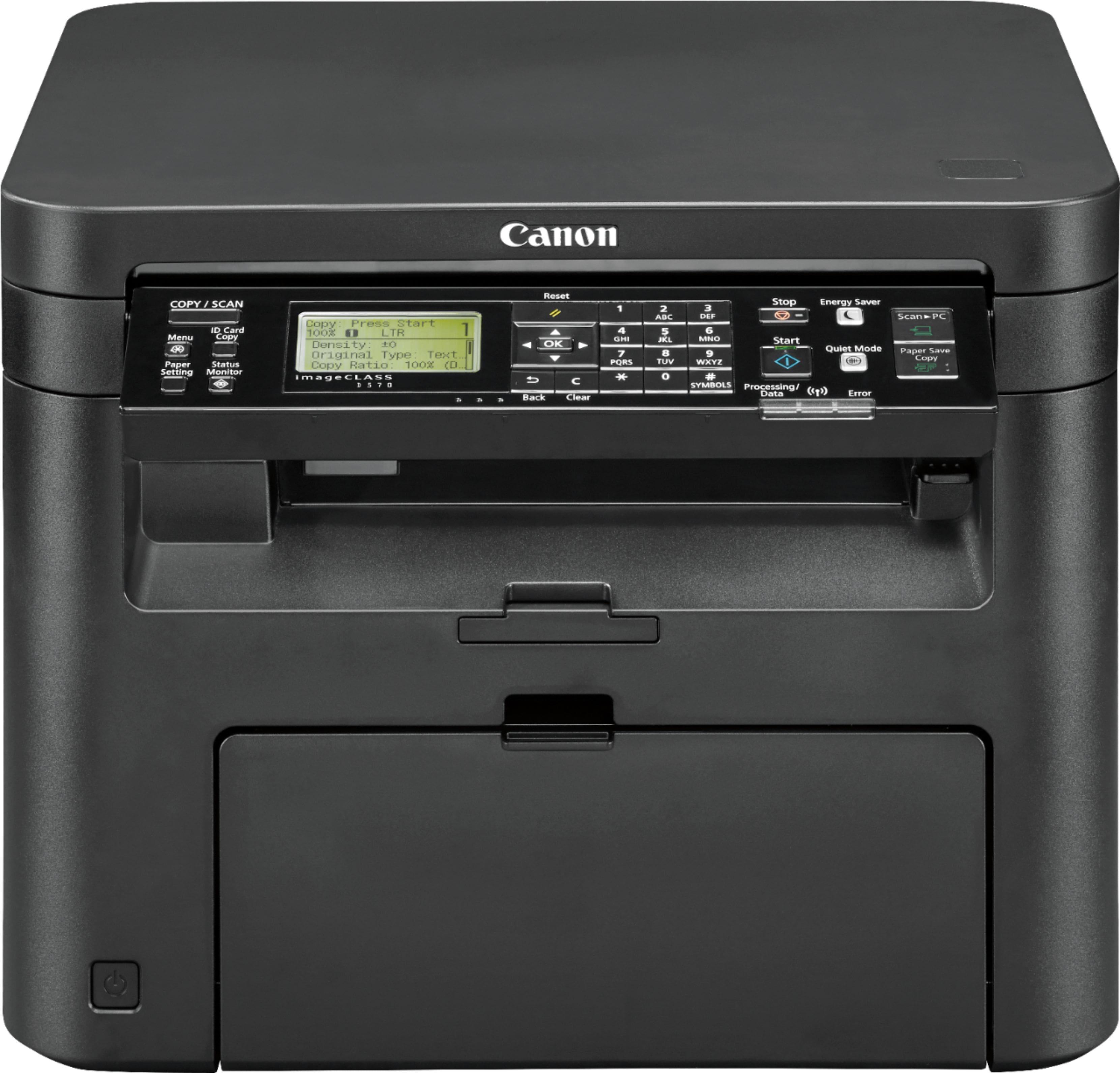
Customers often highlight the Canon imageCLASS D570's excellent print quality, ease of use, and compact size. Many appreciate its wireless functionality and the generally straightforward setup process, finding it a good value for the price. However, some users express dissatisfaction with the paper tray design and find the instructions less than helpful.
This summary was generated by AI based on customer reviews.
- Pros mentioned:Print quality
Rated 5 out of 5 stars
Fast printr, dbl side, long lasting laser cartridg
||Posted . Owned for 3 weeks when reviewed.This reviewer received promo considerations or sweepstakes entry for writing a review.Relative fast compact printer, good scanner and copier. Able to print on both sides of the paper. Can connect via cable to laptop for printing documents or use wireless. Very versatile. The most money saving feature of this Canon Image Class D570 printer is its longer lasting laser cartridge which can print up to 2,800 documents per cartridge. Other printers like Brother printers get the unaware consumer with lower price printers which use laser cartridges that need to be replaced after 300 printed documents and is a scam. But, Canon printers are reliable printers with longer lasting cartridges. I had a Canon ImageClass D320 printer for 13 years until I replaced it recently with the newer D570 model and I love it. Very pleased with it and its configuration.
I would recommend this to a friend - Pros mentioned:Ease of use, Print quality
Rated 5 out of 5 stars
Perfect for home use
||Posted . Owned for less than 1 week when reviewed.This reviewer received promo considerations or sweepstakes entry for writing a review.Although this sells as entry level, it has everything I need for a home laser printer. Setup was very easy and the test page perfectly acceptable. Scanning and copying are very simple. I do not use a printer very often so I happy to avoid the ink jet problems going forward. My only chagrin was that I wanted to print out the user manual, but at 431 pages, I will stick with a PDF on my screen.
I would recommend this to a friend - Pros mentioned:Ease of use, Price
Rated 4 out of 5 stars
Good Budget Option
||Posted . Owned for 3 weeks when reviewed.This reviewer received promo considerations or sweepstakes entry for writing a review.This printer if a good deal if you are looking for a lazer printer on a budget. The scanner tends to lighten things and doesn't pick up lighter, thinner lines very well, and the printer can also wash out very thin lines, but these are minor problems. Overall it is easy to set up and easy to use if you just need to print documents reliably.
I would recommend this to a friend - Pros mentioned:Print quality, Wireless
Rated 5 out of 5 stars
Paper for less
||Posted . Owned for more than 2 years when reviewed.This reviewer received promo considerations or sweepstakes entry for writing a review.The Canon imageCLASS D570 is a reliable and efficient all-in-one laser printer that offers impressive performance for both home and small office use. As a satisfied user, here's my review: Design and Build: The printer's sleek black design blends well with any office environment. It has a compact footprint, making it easy to fit on a desk or shelf. The build quality is solid, and the control panel is intuitively laid out for easy navigation. Performance: The D570 shines when it comes to performance. Its laser printing technology delivers sharp and crisp black-and-white prints with a maximum resolution of 600 x 600 dpi. Whether you're printing text documents or graphics, the quality is consistently impressive. The printer is also reasonably fast, with a rated print speed of up to 28 pages per minute, which is quite impressive for a machine in this price range. Scanning and Copying: One of the standout features of this all-in-one printer is its scanning and copying capabilities. The flatbed scanner can handle letter-sized documents and offers a maximum optical resolution of 600 x 600 dpi. It's perfect for digitizing documents or making copies with ease. Wireless Connectivity: The D570 offers wireless connectivity, which is a significant advantage. You can easily print from your smartphone or tablet using Canon's mobile printing app. This feature adds convenience and flexibility to your printing tasks. Paper Handling: With a 250-sheet paper tray, this printer can handle a decent amount of printing without the need for constant paper refills. It also has a manual feed slot for envelopes or special paper types. Ease of Use: Setting up the D570 is straightforward, and the user-friendly control panel simplifies the printing process. The LCD screen provides clear instructions and status updates. Overall, the Canon imageCLASS D570 is an excellent choice for those in need of a reliable and efficient black-and-white laser printer. Its impressive print quality, scanning capabilities, wireless connectivity, and ease of use make it a valuable addition to any home office or small business. While it may not have color printing, it excels at what it does, making it a solid investment for those who primarily print text documents.
I would recommend this to a friend - Pros mentioned:Print quality, Setup
Rated 5 out of 5 stars
Good value printer
||Posted .This reviewer received promo considerations or sweepstakes entry for writing a review.Easy to set up and easy to print and scan. Don't force me to write extra, don't have a minimum amount that's coercion
I would recommend this to a friend - Pros mentioned:Ease of use, Price, Print quality
Rated 5 out of 5 stars
Canon D570 Laser Printer
||Posted . Owned for 3 weeks when reviewed.This reviewer received promo considerations or sweepstakes entry for writing a review.This printer is great and convenient. Easy set-up and connects to my Wi-Fi Network easily. Functions are easy and the software you can download from Canon or if you have Windows 11 Pro, Installation is automatic once you select the printer in your add device. Scan works great and the copier is easy to use and as a printer, it prints nice. Yo can easily adjust the density settings right on the front panel. What's really great is the price. Worth way more than I paid for a mono laser printer. Great buy.
I would recommend this to a friend - Pros mentioned:Ease of use, Setup
Rated 5 out of 5 stars
Love it
||Posted .This reviewer received promo considerations or sweepstakes entry for writing a review.Nice printer, easy to setup and use. No issues connecting to my home network, love scanning to PC feature.
I would recommend this to a friend - Pros mentioned:Ease of use
Rated 5 out of 5 stars
Best Black Ink Printer
Posted .This reviewer received promo considerations or sweepstakes entry for writing a review.Best printer for small home office or personal printer. Not for photographs. It can do multitask, but as far as printing, you have black ink. Perfect for documents copy you do that one page at a time you can fax with it. One page at a time just for a small office nothing big nothing fancy easy to install does not take long comes with an installed disc for the Macintosh computer, but for regular windows , you can download the app through your cell phone at your App Store and then you’re up and running. I got mine it took me 15 minutes to install. It connected to the Internet works perfect I have no complaints 
I would recommend this to a friend - Pros mentioned:Ease of use, Print qualityCons mentioned:Software
Rated 5 out of 5 stars
Fast, easy to use printer that actually works.
||Posted . Owned for 2 weeks when reviewed.This reviewer received promo considerations or sweepstakes entry for writing a review.Tired of inkjet crap that never works when you go to use it? Looking for an easy to use printer that just works? Not willing to throw down $500 for a decent laser color AIO just to print everyday household stuff? Look no further, this thing is a boss at this price. My only complaint was that the full driver package doesn’t come with the software to scan to a computer over wireless. But it’s easy to download and coming from an HP with major software bloat, this is close to being a positive.
I would recommend this to a friend - Pros mentioned:Print quality, Wireless
Rated 5 out of 5 stars
Reliable, quick and affordable
||Posted . Owned for 3 weeks when reviewed.This reviewer received promo considerations or sweepstakes entry for writing a review.We’ve had this laser printer in our home for about 3 weeks now and it’s worked pretty much flawlessly. My gf is a teacher so she needed something to print quickly, reliably and most importantly .. affordably. The “starter” toner cartridge that comes includes has yielded about 1000 pages before finally giving us the “low ink” message. Even so, it is still printing pretty good. We purchased a toner cartridge already that is supposed to yield 2400 pages for about $90. We figured it’ll cost us about 3/4 cents a page included paper to print if the numbers hold true. Not too bad if you ask me. The printer itself feels pretty premium for the money. Hard solid plastic everywhere. The paper is easy to load, the toner cartridge was easy to install and it was super easy to connect to our home wifi with the press of the wps button on the router and printer. It can print pages very quickly, not sure on the exact numbers but it’ll spit out 50 sheets in about a minute or so. The papers comes out nice and warm just like a big office printer lol. We haven’t used many of the other features but the scan and copy function works great. We haven’t figured out how to get back and front prints with the scanner but it will print on front and back of a page when printing from your computer or smart phone / tablet. One thing to keep in mind is that this only prints in black and white but that is totally fine with us.
I would recommend this to a friend - Pros mentioned:Price, Print quality
Rated 5 out of 5 stars
Great price for multi-function laser
||Posted . Owned for 3 weeks when reviewed.This reviewer received promo considerations or sweepstakes entry for writing a review.This is a fantastic deal for price. All the function needed for a black and white laser multi-function machine for $130? Also of note -- aftermarket toner cartridges for this model are readily available that bring the cost of printing down to less than a penny per print. Cost of consumables is a key factor with lower end printers and this is one of the best modern multi-functions in that category. I installed one at the reception desk of my company to lower our printing costs and save them time from having to go back and forth to our mailroom to collect prints from our larger printer. Being able to make copies at their desk for customers is an added bonus.
I would recommend this to a friend - Pros mentioned:Ease of use, Wireless
Rated 5 out of 5 stars
Easy, reliable printer/ scanner
||Posted . Owned for 3 weeks when reviewed.This reviewer received promo considerations or sweepstakes entry for writing a review.Great (black and white) printer for the money. The toner lasts along time, easy to replace. The Info display makes set up quick and easy. Easily connects wirelessly to the network. Use ours in a medical office and it’s very reliable and durable. We had the previous version of this printer for 8 yrs with no issues. A power surge during an outage scrambled the wireless capabilities so we bought this one as a replacement for the previous. The newer model was twice the price as the older but if it lasts as long it will be worth it.
I would recommend this to a friend - Pros mentioned:Print quality, Setup
Rated 5 out of 5 stars
TRI
||Posted . Owned for 3 weeks when reviewed.This reviewer received promo considerations or sweepstakes entry for writing a review.GOOD PRODUCT , EASY TO SETUP , GOOD QUALITY PRINT OUT , SPACE SAVER PRINTER AND COPIER.
I would recommend this to a friend - Pros mentioned:Print quality
Rated 5 out of 5 stars
Excellent Printer - My Daily Drivers @ 2
||Posted . Owned for 10 months when reviewed.This reviewer received promo considerations or sweepstakes entry for writing a review.Even at regular price, which I paid first time I bought the Cannon D570, I was already a fan. This printer when set to 1200 DPI has phenomenal print, very solid mechanical function, and is easy to maintenance. I print a lot of network labels along with large quantities of work documents and it has never disappointed. I had one minor issue that was not really the printer's fault. Labels came off the paper got caught in an inaccessible area where there is no option for disassembly. Since this unit isn't a 1500.00 commercial unit, I understand every portion of the printer does not have disassembly supported. I utilized Best Buy Total membership and Best Buy honored my return graciously and I picked up a new printer the same day. I have two D570's and am very pleased with both. Rarely do I break out my inkjet printer. When I do use it for color images, I have to do maintenance every time to get print right. This isn't an issue with the laser printer since we all know inkjet limitations. "Drying ink and can't print proper labels" to name two. Cons: No such thing as infinite ink. Argument: Easy to change cartridge and it's not costly to do so.
I would recommend this to a friend - Pros mentioned:Setup
Rated 5 out of 5 stars
Old guy sets up wireless printer
||Posted . Owned for 3 weeks when reviewed.This reviewer received promo considerations or sweepstakes entry for writing a review.This is rare. I never give five stars. First laser printer. First all in one. First wireless printer. Was a little worried after reading the reviews about people having trouble connecting wirelessly as I had never done this before. Went ahead and ordered anyway figuring I could connect through USB if wireless failed. Not really true. The printers USB receptacle is a configuration I have never seen before and would require ordering the special cable. It may be a bit premature in that I haven't used it much and don't know how long it will last but everything has been perfect. From ordering on Friday evening to it being on my porch Sunday with free shipping. Sunday. Free! Unpacked and set up. Installed the drivers and manuals. Spent time reading the manuals, quite a bit actually. But was fascinated with how much this thing can do. Waited till Monday to connect. Got it done. Not going to say simple but not too bad. Printed a copy of my taxes and made a copy of a couple other things to make sure it works. And after living without a printer for 10 years it is nice to have the option to hit print a copy. So start to finish; informative Best Buy website. Easy ordering. Fast delivery. Good set up directions. To working. It's the rare FIVE STAR RATING!
I would recommend this to a friend - Pros mentioned:Ease of use, Print quality, Setup
Rated 5 out of 5 stars
Good printer
||Posted . Owned for 3 months when reviewed.This reviewer received promo considerations or sweepstakes entry for writing a review.Love this printer, so easy to set up and prints great.
I would recommend this to a friend - Pros mentioned:Print quality, Setup, Wireless
Rated 4 out of 5 stars
Great Printer for the Price
||Posted . Owned for 3 weeks when reviewed.This reviewer received promo considerations or sweepstakes entry for writing a review.Fairly easily setup. Print quality is a little less than what I was hoping for but still acceptable; especially for the price. New cartridges are reasonable too. Fast printing. Easy setup to print from my phone.
I would recommend this to a friend - Pros mentioned:Wireless
Rated 5 out of 5 stars
Happy Camper
||Posted .This reviewer received promo considerations or sweepstakes entry for writing a review.Very pleased with home delivery and product. Had to download drivers for Mac but I’m used to that. They worked well. Just followed the manual to connect to my Xfinity gateway wirelessly. I t found my gateway and all I had to do was select it and then put in the password. Instant connection to my wireless network and available on AirPrint for iPhone and iPad. Works well and quietly. Very pleased for first day. You really have to read the manual for these devices with print, copy and scan. Tried the copy and it’s a one button affair.
I would recommend this to a friend - Pros mentioned:Ease of use, Print quality
Rated 5 out of 5 stars
Quality at a bargain
||Posted . Owned for 3 weeks when reviewed.This reviewer received promo considerations or sweepstakes entry for writing a review.Prints fast. Scanning is easy. Fairly easy setup. Great features, like the automatic two-sided printing. Other printers with similar features cost 2 to 3 times as much. It's on the large side, but I'm glad I bought it.
I would recommend this to a friend - Pros mentioned:Print quality
Rated 5 out of 5 stars
Love our D570!
||Posted . Owned for 1 month when reviewed.This reviewer received promo considerations or sweepstakes entry for writing a review.We never printed in color so buying an inkjet didn't seem to make that much sense. The D570 is inexpensive as laser printers go and competitively priced with inkjets. Print quality is excellent. It's fast and two sided printing is painless. We have it setup with an old USB cable and a wireless connection. It has never lost the wifi connection even after power cycles. The printer easily uses different toner cartridge brands so shop them well, the savings can be substantial. My wife loves printing from her iPhone. Paper quality is your choice, premium paper is not required for good looking results. We leave it on all of the time. It switches to a low power mode after a few minutes of activity and "wakes up" automatically when it gets a print job input. We have a very good flatbed scanner so the scanner in the D570 has not been used. On the downside, the output tray, if you can call it that, is not much. I would not leave a large print job unattended. A substantial detachable tray would be a real improvement. There is no USB cable furnished if you want a USB connection. Takes a USB A to USB B cable. The cartridge furnished will demonstrate how good this printer is, but doesn't last long.
I would recommend this to a friend
People also viewed
- $144.00Your price for this item is $144.00$215.00The comparable value for this item is $215.00
- $139.99Your price for this item is $139.99
- $237.99Your price for this item is $237.99$306.18The comparable value for this item is $306.18
- $169.00Your price for this item is $169.00$209.00The comparable value for this item is $209.00
- $209.98Your price for this item is $209.98$209.99The comparable value for this item is $209.99
- $129.99Your price for this item is $129.99$194.99The comparable value for this item is $194.99
- $429.99Your price for this item is $429.99$659.00The comparable value for this item is $659.00
- $432.99Your price for this item is $432.99
- $469.00Your price for this item is $469.00$539.00The comparable value for this item is $539.00
- $169.44Your price for this item is $169.44$182.00The comparable value for this item is $182.00
- $299.99Your price for this item is $299.99$379.99The comparable value for this item is $379.99
- $324.82Your price for this item is $324.82
- $549.00Your price for this item is $549.00$702.00The comparable value for this item is $702.00
- $59.99Your price for this item is $59.99$99.99The comparable value for this item is $99.99
- $954.27Your price for this item is $954.27$1,035.15The comparable value for this item is $1,035.15
- $499.99Your price for this item is $499.99$538.26The comparable value for this item is $538.26
- $69.00Your price for this item is $69.00$107.00The comparable value for this item is $107.00
- $249.99Your price for this item is $249.99$323.00The comparable value for this item is $323.00