Customer Ratings & Reviews
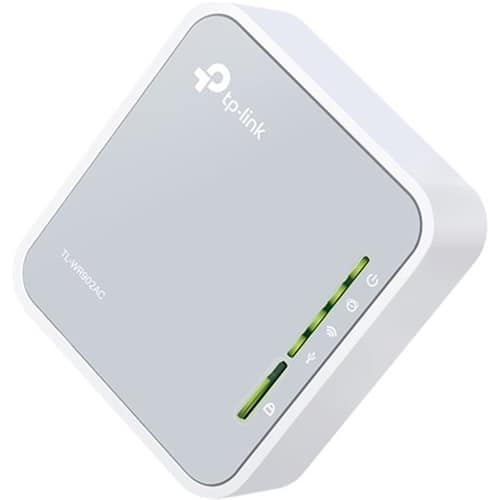
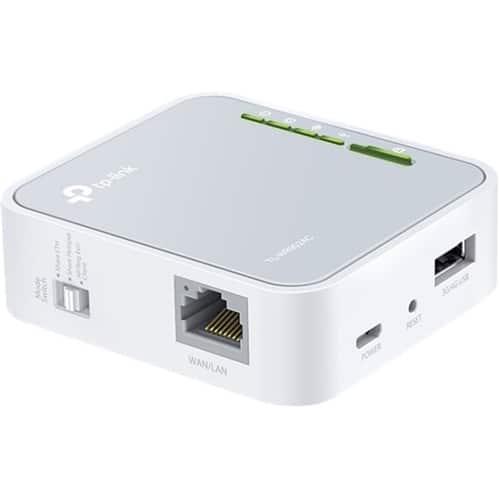


- Model:
- TL-WR902AC
- SKU:
- 10926697
Rating by feature
- Value
Rating 4.0 out of 5 stars
- Quality
Rating 4.0 out of 5 stars
- Ease of Use
Rating 3.5 out of 5 stars
tp-lonk
||Posted .This reviewer received promo considerations or sweepstakes entry for writing a review.I bought this item to use with my I pad but I cant figure it out.
No, I would not recommend this to a friendDidn't operate as expected.
||Posted .This reviewer received promo considerations or sweepstakes entry for writing a review.The band wifi router did not meet its wifi capacity.
No, I would not recommend this to a friendVery easy to use.
||Posted . Owned for 4 months when reviewed.This reviewer received promo considerations or sweepstakes entry for writing a review.It is very versátil and easy to use it's got ample compatibility with many devices.
I would recommend this to a friendPower / WiFi Drops
||Posted .This reviewer received promo considerations or sweepstakes entry for writing a review.Power supply issue, will not stay .. Wireless Drops.
No, I would not recommend this to a friendBrand response from TPLinkSupport
Posted .Hi,
Thank you for your review. Your TP-Link WiFi Router comes with a 2-year warranty, and we would greatly appreciate the opportunity to follow up with you and address your concerns. At your earliest convenience, please reach out to our free support team using any of the resources included with the product, or from our official website, and we'll gladly have a Support Agent follow up with you directly.
Thank you,
TP-Link Support
Did not work for me
||Posted .This reviewer received promo considerations or sweepstakes entry for writing a review.I tried every possible scenario to set up the device and even contacted customer support a number of times to no avail.
No, I would not recommend this to a friendBrand response from TPLinkSupport
Posted .Hi,
Thank you for your review. If the concerns you have regarding setup are that you do not have Internet after installation, it could be that your cable modem's MAC (Media Access Control) binding needs to be released and renewed so it can provide an IP address (and Internet) to the Router. This can typically be done using the following steps:
1. Unplug the power from both your router and cable modem
2. Unplug the coax cable from the modem
3. Re-connect power ONLY to your cable modem
4. Wait until the cable modem is fully booted, then re-connect coax
5. Re-connect power to the router and connect it to the modem via Ethernet
This process should release and renew the MAC binding so your modem can provide connectivity to the router. If you'd like assistance with any of these steps, please send an e-mail with your contact information and a link to this review to [email protected] and we'll gladly have a Support Agent follow up with you directly.
Thank You,
TP-Link Support
Returned
||Posted . Owned for 1 month when reviewed.This reviewer received promo considerations or sweepstakes entry for writing a review.Couldn't get it to work, had to return to retailer
No, I would not recommend this to a friendBrand response from TPLinkSupport
Posted .Hi,
Thank you for your review. The TL-WR902AC is designed to provide a convenient, compact, versatile networking solution for various scenarios.
We have a wealth of helpful information and FAQs for the TL-WR902AC on our official website here: https://www.tp-link.com/us/support/download/tl-wr902ac/#FAQs
If you'd like assistance with the product, please send an e-mail with your contact information and a link to this review to [email protected] and we'll gladly have a Support Agent follow up with you directly.
Thank you,
TP-Link Support
No Connection
||Posted .This reviewer received promo considerations or sweepstakes entry for writing a review.It wouldn't connect to anything. The direction were not easy to follow.
No, I would not recommend this to a friendBrand response from TPLinkSupport
Posted .Hi,
Thank you for sharing your experience with our product. It sounds like your cable modem's MAC (Media Access Control) binding may need to be released and renewed so it can provide an IP address (and Internet) to the Router. This can typically be done using the following steps:
1. Unplug the power from both your router and cable modem
2. Unplug the coax cable from the modem
3. Re-connect power ONLY to your cable modem
4. Wait until the cable modem is fully booted, then re-connect coax
5. Re-connect power to the router and connect it to the modem via Ethernet
This process should release and renew the MAC binding so your modem can provide connectivity to the router. If you'd like assistance with any of these steps, please reach out to our free support team using any of the resources included with the product, or from our official website, and we'll gladly have a Support Agent follow up with you directly.
Thank you,
TP-Link Support
Waste of money and time
Posted .This reviewer received promo considerations or sweepstakes entry for writing a review.I don’t know if the other reviews were paid to review this device, but it is not worth the time and effort to get it set up. Typical of tp-link products, this unit was not just difficult, but IMPOSSIBLE to set up with either my IPad nor smart phone. I’m no illiterate with electronics and set ups, but with the given passwords Assad’s, and instructions, after 1 1/2 hours of repeating each step, I gave up. It told me repeatedly, that the (provided) sign in and passwords were incorrect. Don’t bother with this, unless you are a masochist.
No, I would not recommend this to a friendBrand response from TPLinkSupport
Posted .Hi Zookeeper,
Thank you for your review. Our TL-WR902AC is designed to provide versatile, convenient, compact Wi-Fi networking solutions for various scenarios. Can you please provide more detail regarding which Operating Mode you were attempting to set up the device in? Depending on your type of implementation for the device, setup steps may vary. We would greatly appreciate the opportunity to follow up with you and help address your concerns. At your earliest convenience, please send an e-mail with your contact information and a link to this review to [email protected] and we'll gladly have a Support Agent follow up with you directly.
Thank You,
TP-Link Support