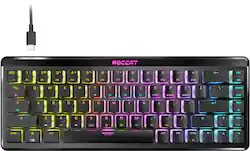
ROCCAT - Vulcan II Mini Air 65% Wireless Optical Mechanical Gaming Keyboard with RGB Illumination - Black
- Key Specs
- Form Factor: 65%, Tenkeyless (TKL) (The size, arrangement, and physical configuration of the product.)
- Connection Type: Wireless
- General
- Product Name: Vulcan II Mini Air 65% Wireless Optical Mechanical Gaming Keyboard with RGB Illumination
- Brand: ROCCAT
- Model Number: ROC-27-002
- Color: Black
- Functions
- Form Factor: 65%, Tenkeyless (TKL) (The size, arrangement, and physical configuration of the product.)
- Connectivity
- Connection Type: Wireless
- Wireless Connectivity: Radio Frequency (RF - 2.4 Ghz/Low Latency) (The manner in which a device sends data to another device over a short distance without the use of wires or cables.)
- Compatibility
- Operating System Compatibility: Windows
- Dimensions
- Product Width: 1.3 inches (The out of box width of the item. Width is measured as the horizontal distance from one side of the item to the other as it would be primarily used or placed.)
- Product Depth: 12.8 inches (The out of box depth of the item. Depth is measured as the distance from the front of the item to the back as it would be primarily used or placed.)
- Product Weight: 1.36 ounces (The out of box weight of the item.)
- Other
- UPC: 731855570027
The Vulcan II Air Mini Optical-Mechanical Gaming Keyboard packs performance, durability, and functionality into a wireless mini form factor allowing for a small footprint on your desk while maintaining the functionality of a full-sized keyboard. Enjoy wireless freedom with 2.4GHz gaming grade Stellar Wireless and seamlessly swap between 3 unique Bluetooth devices. Proximity sensor detect when you are away from the keyboard and automatically adjusts lighting to maximize battery life for up to 240 hours. Exclusive TITAN II Optical Switches have ultra-fast actuation and incredible durability with a 150 million keypress cycle, offering a competitive edge game after game. Enter game mode to access Easy-Shift[+] button duplicator technology and unlock a second function layer which can be programmed into near limitless options. Feel confident in your keystrokes with 29 multi-function smart keys featuring a dual LED to indicate when secondary functions are active. The Vulcan II Mini Air’s anodized aluminum backplate reinforces its structural integrity and sets the stage for ROCCAT’s AIMO lighting technology which produces vibrant RGB lighting displays right out of the box and can sync with other compatible AIMO-enabled products for an immersive lighting display.
- 65% form factor: The mini 65% form factor allows for a small footprint on your desk and maintains the functionality of arrow keys.
- 2 wireless modes: Enjoy wireless freedom with 2.4GHz gaming grade Stellar Wireless or seamlessly swap between 3 unique bluetooth devices.
- Roccat Titan II optical switches: Exclusive TITAN II Optical Switches have a smooth linear, ultra-fast actuation and incredible durability with a 150 million click life cycle, offering a competitive edge game after game.
- Adaptive battery life: Proximity sensor detects when you are away from the keyboard and automatically adjusts lighting to maximize battery life for up to 240 hours.
- Smart keys: Feel confident in your keystrokes with 29 multi-function smart keys featuring a dual LED to indicate when secondary functions are active.
- Easy shift: Enter game mode to access Easy-Shift[+] button duplicator technology and unlock a second function layer which can be programmed to expand the capability of each keystroke.
- Aluminum top plate: Anodized aluminum plate reinforces its structural integrity and protects against wear and tear.
- On board profiles: Save up to 5 profiles of custom lighting, key reassignment and more directly on your keyboard.
- Customizable: Customize your look, compatible with many third party cross shaped mount keycaps and USB-C cables.
- AIMO illumination: Roccat AIMO produces vibrant lighting displays in 16.8 million colors right out of the box. It also syncs with other compatible AIMO products for illumination scenarios that flow from device to device.
Whats Included
- Vulcan II Mini Air Gaming Keyboard
- Detachable USB-C to USB-A cable
- Stellar Wireless Dongle
- Quick-Start Guide
Q: I'm wondering is this compatible with a PS5?
A: The Vulcan II Mini Air can be connected to the PlayStation and used like any other keyboard, however both the console and the active game or application need to support keyboards. Advanced functions that require Swarm to be active however are not available on console.
Q: Is this keyboard compatible with Xbox series S?
A: The Vulcan II Mini Air can be connected to the Xbox and used like any other keyboard, however both the console and the active game or application need to support keyboards. Advanced functions that require Swarm to be active however are not available on console.
Q: is there a Spanish layout version?
A: Hi and thanks for your interest in our product. Unfortunately, there is no Spanish layout version of the Vulcan II Mini Air.
Q: How does it charge? Or is it external battery powered
A: Hi Matt and thanks for your question. The Vulcan II Mini Air has a built-in battery that can be charged by connecting the keyboard to the PC via cable from time to time. The keyboard's battery takes about 6 hours to charge from empty to full, but it lasts for at least 240 hours. However, turning illumination on reduces the battery life significantly.
Q: Does it come with a wireless USB thing
A: Hi and thanks for your interest in one of our products. The Vulcan II Mini Air's packaging's contents include a USB-A transmitter that needs to be connected to the PC to establish a wireless connection. The transmitter can be stored in a slot in the keyboard itself. Also, the keyboard needs to be turned on and in 2.4 GHz wireless mode instead of Bluetooth for it to properly connect to the transmitter.















![Sure, here is the corrected and grouped text from the image:
**Top Row:**
- ESC
- F1
- F2
- F3
- F4
- F5
- F6
- F7
- F8
- F9
- F10
- F11
- F12
- PRTSC
- DEL
**Number Row:**
- 1
- 2
- 3
- 4
- 5
- 6
- 7
- 8
- 9
- 0
- -
- =
- \
**Letter Row:**
- TAB
- Q
- W
- E
- R
- T
- Y
- U
- I
- O
- P
- [
- ]
- \
**Letter Row:**
- CAPS
- A
- S
- D
- F
- G
- H
- J
- K
- L
- ;
- '
**Letter Row:**
- SHIFT
- Z
- X
- C
- V
- B
- N
- M
- ,
- .
- /
**Function Row:**
-](https://pisces.bbystatic.com/image2/BestBuy_US/images/products/9be10b95-8e90-4a5d-b85f-cbc6a7d8e8df.png;maxHeight=144;maxWidth=200?format=webp)



![esc 1! 2@ 3# 4$ 5% 6^ 7& 8* 9( 0) - _ + del tab Q W E R T Y U I O P [ { ] } pg up caps A S D F G H J K L ; : ' enter pg dn shift Z X C V B N M , . / ? shift ins ctrl alt fn ctrl](https://pisces.bbystatic.com/image2/BestBuy_US/images/products/df61bb42-fb75-4886-b839-2ea6cc541ed7.jpg;maxHeight=144;maxWidth=200?format=webp)

![esc F1 F2 F3 F4 F5 F6 F7 F8 F9 F10 F11 F12
Num Caps Mac Win
1 2 3 4 5 6 7 8 9 0 - = backspace
tab Q W E R T Y U I O P [ ] \
caps lock A S D F G H J K L ; '
shift Z X C V B N M , . /
control option fn control
del home pgup num clear / * -
end pgdn 7 8 9 +
enter 4 5 6
shift 1 2 3 enter
control option 28
option fn control
> o](https://pisces.bbystatic.com/image2/BestBuy_US/images/products/71a1417b-3d5f-45c1-99f0-24ab3c6d41b9.png;maxHeight=144;maxWidth=200?format=webp)
![Sure, here is the corrected and grouped text from the image:
---
3 : ESC : 1 1 2 3 4 5 6 7 8 9 0 - = DEL
1 : TAB Q W E R T Y U I O P [ ] \
2 : CAPS A S D F G H J K L ; ' ENTER
3 : SHIFT Z X C V B N M , . / SHIFT
4 : CTRL ALT FN CORSAIR VLM
5 : CORSAIR
---
This text corresponds to the layout of the keyboard shown in the image.](https://pisces.bbystatic.com/image2/BestBuy_US/images/products/aa5ad82f-7c1b-49ab-9f1c-74419b440e4e.png;maxHeight=144;maxWidth=200?format=webp)
![M1 M2 M3 M4
esc F1 F2 F3 F4 F5 F6 F7 F8 F9 F10 F11 F12
prtsc scrLk pause
ins home pgup num / del end pgdn
tab Q W E R T Y U I O P [ ] \
caps A S D F G H J K L : '
enter shift Z X C V B N M , . -
shift 1 2 3 4 5 6 7 8 9 0 - =
ctrl alt fn ctrl
alt RAZER](https://pisces.bbystatic.com/image2/BestBuy_US/images/products/1f0f75c8-00e1-4042-907e-218cb4928c79.jpg;maxHeight=144;maxWidth=200?format=webp)