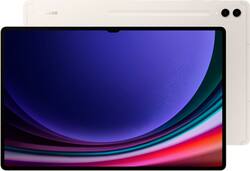
Samsung - Galaxy Tab S9 Ultra - 14.6" 512GB - Wi-Fi - with S-Pen - Beige
- Key Specs
- Screen Size: 14.6 inches (Size of the screen, measured diagonally from corner to corner.)
- Screen Resolution: 2960 x 1848 (Screens come in a range of resolutions (measured in pixels, horizontal x vertical). The higher the resolution, the greater the picture quality.)
- Processor Model: Qualcomm Snapdragon® 8 Gen 2 (Your computer's processor is like its brain. Working in combination with system memory, the power of the processor determines the complexity of software you can run, how many programs you can have open at the same time, and how fast those programs will run. Most computers feature an AMD, Intel or Snapdragon processor.)
- Total Storage Capacity: 512 gigabytes
- Operating System: Android 13 (The operating system manages all software and hardware, including files, memory and connected devices. Most importantly, it lets you interact with your device and your programs in a visual way; otherwise, you'd be typing computer code to get anything done.)
- Voice Assistant Built-in: Bixby (A digital assistant built into the device that uses voice commands to answer questions and control smart devices.)
- Works With: Amazon Alexa, Google Home, Ring, SmartThings, Nest (Compatible with or able to be connected to other smart devices or applications.)
- Wireless Connectivity: Wi-Fi, Bluetooth (The manner in which a device sends data to another device over a short distance without the use of wires or cables.)
- Battery Chemistry: Lithium-ion
- 2-in-1 Design: false (A laptop and a tablet combined in one lightweight, portable device. Sometimes referred to as "convertible" or "hybrid" laptops, these devices deliver the processing power and keyboard of a laptop. When you're ready to play, either detach the screen or fold your 2-in-1 into tablet mode to comfortably watch movies, play games, read an e-book and more.)
- Security Features: Facial recognition, Fingerprint reader, Password Protection
- General
- Brand: Samsung
- Model Number: SM-X910NZEEXAR
- Product Name: Galaxy Tab S9 Ultra - 14.6" 512GB - Wi-Fi - with S-Pen
- Color: Beige
- Model Family: Samsung Galaxy Tab S9 Ultra
- Year of Release: 2023
- Display
- Display Type: LED
- Screen Type: AMOLED
- Screen Size: 14.6 inches (Size of the screen, measured diagonally from corner to corner.)
- Screen Resolution: 2960 x 1848 (Screens come in a range of resolutions (measured in pixels, horizontal x vertical). The higher the resolution, the greater the picture quality.)
- Stylus Input: Active (An active stylus/pen is able to communicate directly with a compatible device; active electromagnetic resonance (EMR) pens are powered via a device's screen and active electrostatic (AES) pens require an additional power source. A passive stylus does not have electronic features and is compatible with most capacitative touch screens.)
- High Dynamic Range (HDR): true (An HDR-compatible 4K TV or other HDR-compatible product displays HDR video content when it's available from sources like 4K Ultra HD Blu-ray Discs and 4K streaming services.)
- Processor
- Processor Brand: Snapdragon
- Processor Model: Qualcomm Snapdragon® 8 Gen 2 (Your computer's processor is like its brain. Working in combination with system memory, the power of the processor determines the complexity of software you can run, how many programs you can have open at the same time, and how fast those programs will run. Most computers feature an AMD, Intel or Snapdragon processor.)
- Storage
- Total Storage Capacity: 512 gigabytes
- Memory
- System Memory (RAM): 12 gigabytes (Random-access memory (RAM) is a computing device's short-term data storage, which allows active information to be accessed quickly. The size and type of RAM determines how efficiently the device can handle large amounts of information at one time. For example, gaming or video editing requires more RAM for optimal performance.)
- Expandable Memory Compatibility: microSD
- Compatibility
- Operating System: Android 13 (The operating system manages all software and hardware, including files, memory and connected devices. Most importantly, it lets you interact with your device and your programs in a visual way; otherwise, you'd be typing computer code to get anything done.)
- Operating System Compatibility: Android
- Voice Assistant Built-in: Bixby (A digital assistant built into the device that uses voice commands to answer questions and control smart devices.)
- Works With: Amazon Alexa, Google Home, Ring, SmartThings, Nest (Compatible with or able to be connected to other smart devices or applications.)
- Connectivity
- Display Connector(s): No external display connection (The number and type of connectors used to connect to an external display.)
- Wireless Connectivity: Wi-Fi, Bluetooth (The manner in which a device sends data to another device over a short distance without the use of wires or cables.)
- Network Connectivity: None (The manner in which a device sends data to another device over a long distance using a cellular network.)
- Compatible Wireless Standard(s): Wireless-A, Wireless-B, Wireless-G, Wireless-N, Wireless-AC, Wireless-AX (The wireless networking standard(s) the device is backwards compatible with. This includes networking protocols based on the IEEE 802.11 standard (alphabetically ascending) and the Wi-Fi Alliance standard (numerically ascending), both of which provide high-throughput wireless local area networks (WLANs). Devices designed to work with specific standard(s) will be backwards compatible with previous versions but may not run at optimal performance when using earlier iterations.)
- Headphone Jack: false (The device features an interface that allows for the connection of headphones.)
- Bluetooth Version: 5.3 (The Bluetooth specification formalized by the Bluetooth Special Interest Group. All versions of the Bluetooth standard are backwards compatible with previous versions.)
- USB Ports: 1 x USB-C 3.2 (The number and type of USB ports the product has.)
- GPS Enabled: true
- Interface(s): USB-C (Refers to the types of connections that devices use to interact and communicate with each other.)
- Number of USB Ports (Total): 1
- Data Plan Required: false
- Power
- Power Supply Input: USB-C
- Charging Interface(s): USB-C (The connection for transmitting power to charge the device.)
- Battery Life (up to): 16 hours (Battery life will vary depending on the product configuration, product model, applications loaded on the product, power management setting of the product and the product features used by the customer. As with all batteries, the maximum capacity of this battery will decrease with time and usage.)
- Battery Capacity: 11200 milliampere hours (The amount of energy stored in the battery.)
- Battery Chemistry: Lithium-ion
- Camera
- Front-Facing Camera: true
- Front Facing Camera Megapixels: 12 megapixels (The more megapixels, the more detail that the camera facing the user can capture.)
- Rear-Facing Camera: true
- Rear Facing Camera Megapixels: 13 megapixels (The more megapixels, the more detail that the camera facing away from the user can capture.)
- Rear Facing Camera Video Resolution: UHD 4K (3840 x 2160)@30fps (Refers to the number of pixels, both horizontally and vertically, used by the camera facing away from the user to capture video. The higher the resolution the finer the video detail that can be seen.)
- Built-In Microphone: true
- Features
- 2-in-1 Design: false (A laptop and a tablet combined in one lightweight, portable device. Sometimes referred to as "convertible" or "hybrid" laptops, these devices deliver the processing power and keyboard of a laptop. When you're ready to play, either detach the screen or fold your 2-in-1 into tablet mode to comfortably watch movies, play games, read an e-book and more.)
- Keyboard Included: false
- Security Features: Facial recognition, Fingerprint reader, Password Protection
- Stylus Dock: Charging
- Dimensions
- Product Height: 8.21 inches (The out of box height of the item. Height is measured as the vertical distance from the bottom of the item to the top as it would be primarily used or placed.)
- Product Width: 12.85 inches (The out of box width of the item. Width is measured as the horizontal distance from one side of the item to the other as it would be primarily used or placed.)
- Product Depth: 0.21 inches (The out of box depth of the item. Depth is measured as the distance from the front of the item to the back as it would be primarily used or placed.)
- Product Weight: 25.8 ounces (The out of box weight of the item.)
- Certifications Listings & Approvals
- ENERGY STAR Certified: false (Devices carrying the ENERGY STAR service mark, such as computer products and peripherals, kitchen appliances, and other products, generally use 20% to 30% less energy than required by federal standards.)
- EPEAT Qualified: false (The Electronic Product Environmental Assessment Tool (EPEAT) was designed to provide an environmental assessment tool for purchasers. In order to qualify for EPEAT, a product must meet all 23 required criteria.)
- Ingress Protection (IP) Rating: IP68 (A 4 to 6 character code classifying a product's degree of protection against intrusion of solid particles and liquids as well as impact. Each number in the IP Code denotes a level of protection, determined through testing and published by the International Electrotechnical Commission (IEC). The first digit represents the degree of protection against solid foreign objects or particles and the second digit represents the degree of protection against water ingress.)
- Included
- Stylus Included: true
- Warranty
- Warranty - Parts: 1 year
- Warranty - Labor: 1 year
- Other
- UPC: 887276777061
Galaxy AI is here. Search like never before¹, let transcript assist² take the notes for you, format your notes into a clear summary,³ and effortlessly edit your photos⁴ -all from your tablet, all with AI. With great power comes great productivity. Backed by our mighty Snapdragon 8 Gen 2 processor and a long-lasting battery that can keep up with your dynamic lifestyle, Galaxy Tab S9 Ultra, now with Galaxy AI, redefines how you conquer your to-do list. With the ultra-large 14.6" screen, you can work like a boss. There’s enough space to open and toggle between multiple windows and collaborate with teammates over video chat. You can also pair Tab S9 Ultra with the rest of your Galaxy to reach even greater heights —quickly share files from your phone to your tablet or use it as a second screen with your PC.
- Circle to Search: Search for anything you see on your Galaxy Tab S9 Series screen simply by circling it. From discovering where to buy those awesome shoes to getting a recipe based on a dish your friend just posted, find answers fast using Circle to Search with Google.¹
- Transcript Assist with Galaxy AI: Be present in meetings and let Transcript Assist² with Galaxy AI⁵ do the hard work of taking notes for you. It creates fast and easy transcripts of recorded meetings, lectures and conversations and summarizes them instantly. Transcript Assist with Galaxy AI can even translate to other available languages, just like that.
- Photo Assist with Galaxy AI: Turn your photos into masterpieces with pro editing suggestions from Photo Assist⁴ with Galaxy AI.⁵ First, snap a pic on your phone and Quick Share it to your Tab to edit on the big screen with S Pen precision. Then, let Photo Assist with Galaxy AI perfect your pic, just like that.
- Note Assist with Galaxy AI: Focus on capturing your notes and spend less time perfecting them. Note Assist³,⁴ will summarize and format them instantly with Galaxy AI.⁵ All your notes are organized neatly so you can find what you need, just like that.
- Chat Assist with Galaxy AI: Say the right thing at the right time in no time using Chat Assist¹ with Galaxy AI⁵ on Galaxy Tab S9 Series. Get real-time text options to make your writing sound more professional or conversational. Focus on what you want to say and let Chat Assist with Galaxy AI handle the rest.
- Power and performance: Whether you’re bringing an idea to life or streaming your favorite show, unleash greatness in every experience with a superfast Snapdragon 8 Gen 2 chip, our most powerful tablet processor yet.⁶
- TS9 Ultra Screen size and quality: Make every experience ultra-amazing on a 14.6" Dynamic AMOLED 2X screen —our largest on the Tab S9 Series. Get ready for intense colors, deep contrasts and unbelievable brilliance.
- Durability: Confidently take your Tab S9 Ultra with you everywhere. With an Armor Aluminum frame, it’s designed to protect against bumps. And now with an IP68 rating, it’s one of the only water-and dust-resistant tablets on the market.⁸
- Battery: Get inspired and unleash your creativity without worrying about battery life. And when you do need to recharge, do it quickly and keep going with Super Fast Charging.⁹
- Design: Minimalistic and sleek, Galaxy Tab S9 Ultra delivers an innovative look and feel. The ultra-slim bezels and refined Armor Aluminum finish make for a Tab that’s designed to inspire.
- Connectivity: Stay connected with reliable, fast Wi-Fi 6E and enjoy smooth streaming, fast downloads and gaming with virtually no lag.⁹
- Touchscreen / S Pen: Love to sketch or take notes by hand? The S Pen included with your Tab S9 Ultra feels like a real pen, giving you a fun and innovative way to capture ideas on the fly.
- Sound and camera: Whether you’re gaming with friends or collaborating with a coworker, look sharp on video calls with high-resolution front cameras and keep the focus on you with Auto Framing.
- DeX Mode: Get the best of both worlds with DeX Mode, a PC-like experience on your Tab. Turn on DeX Mode and open multiple windows and folders at once, work from a taskbar, easily drag and drop files and more.
- Storage: Whether it’s movies, music, photos, games or creative projects, store what you want with up to 1TB of storage.¹⁰
- Circle to Search: Search for anything you see on your Galaxy Tab S9 Series screen simply by circling it. From discovering where to buy those awesome shoes to getting a recipe based on a dish your friend just posted, find answers fast using Circle to Search with Google.¹
- Transcript Assist with Galaxy AI: Be present in meetings and let Transcript Assist² with Galaxy AI⁵ do the hard work of taking notes for you. It creates fast and easy transcripts of recorded meetings, lectures and conversations and summarizes them instantly. Transcript Assist with Galaxy AI can even translate to other available languages, just like that.
- Photo Assist with Galaxy AI: Turn your photos into masterpieces with pro editing suggestions from Photo Assist⁴ with Galaxy AI.⁵ First, snap a pic on your phone and Quick Share it to your Tab to edit on the big screen with S Pen precision. Then, let Photo Assist with Galaxy AI perfect your pic, just like that.
- Note Assist with Galaxy AI: Focus on capturing your notes and spend less time perfecting them. Note Assist³,⁴ will summarize and format them instantly with Galaxy AI.⁵ All your notes are organized neatly so you can find what you need, just like that.
- Chat Assist with Galaxy AI: Say the right thing at the right time in no time using Chat Assist¹ with Galaxy AI⁵ on Galaxy Tab S9 Series. Get real-time text options to make your writing sound more professional or conversational. Focus on what you want to say and let Chat Assist with Galaxy AI handle the rest.
- Power and performance: Whether you’re bringing an idea to life or streaming your favorite show, unleash greatness in every experience with a superfast Snapdragon 8 Gen 2 chip, our most powerful tablet processor yet.⁶
- TS9 Ultra Screen size and quality: Make every experience ultra-amazing on a 14.6" Dynamic AMOLED 2X screen —our largest on the Tab S9 Series. Get ready for intense colors, deep contrasts and unbelievable brilliance.
- Durability: Confidently take your Tab S9 Ultra with you everywhere. With an Armor Aluminum frame, it’s designed to protect against bumps. And now with an IP68 rating, it’s one of the only water-and dust-resistant tablets on the market.⁸
- Battery: Get inspired and unleash your creativity without worrying about battery life. And when you do need to recharge, do it quickly and keep going with Super Fast Charging.⁹
- Design: Minimalistic and sleek, Galaxy Tab S9 Ultra delivers an innovative look and feel. The ultra-slim bezels and refined Armor Aluminum finish make for a Tab that’s designed to inspire.
- Connectivity: Stay connected with reliable, fast Wi-Fi 6E and enjoy smooth streaming, fast downloads and gaming with virtually no lag.⁹
- Touchscreen / S Pen: Love to sketch or take notes by hand? The S Pen included with your Tab S9 Ultra feels like a real pen, giving you a fun and innovative way to capture ideas on the fly.
- Sound and camera: Whether you’re gaming with friends or collaborating with a coworker, look sharp on video calls with high-resolution front cameras and keep the focus on you with Auto Framing.
- DeX Mode: Get the best of both worlds with DeX Mode, a PC-like experience on your Tab. Turn on DeX Mode and open multiple windows and folders at once, work from a taskbar, easily drag and drop files and more.
- Storage: Whether it’s movies, music, photos, games or creative projects, store what you want with up to 1TB of storage.¹⁰
Whats Included
- Galaxy Tab S9 Ultra - 14.6" 512GB - Wi-Fi Tablet
- S-Pen
- USB-C cable
- User Manual
- Galaxy Tab S9 Ultra - 14.6" 512GB - Wi-Fi Tablet
- S-Pen
- USB-C cable
- User Manual
Product Manuals
Disclaimers
- ¹Requires internet connection; results may vary by uniqueness, clarity and framing of circled image and related factors. Tab S9 FE models do not support AI features.
- ²Transcript Assist available only with audio files under 3 hours and recorded using the Samsung Voice Recorder app. Summarizing feature available for text in Samsung Notes only (200-4,000 characters). Translation feature requires language preset (English and Spanish pre-installed; other languages require free download. Samsung account login and internet connection required.
- ³For text in Samsung Notes only (200 - 4,000 characters); requires Samsung account login and internet connection.
- ⁴Requires Samsung account login and internet connection.
- ⁵Galaxy AI features by Samsung will be provided for free until the end of 2025 on supported Samsung Galaxy devices.
- ⁶Qualcomm is a product of Qualcomm Technologies, Inc. and/or its subsidiaries. Qualcomm is a trademark of Qualcomm Incorporated, registered in the United States and other countries.
- ⁷Measured diagonally, the Galaxy Tab S9 Ultra screen size is 14.6" in the full rectangle and 14.5" accounting for the rounded corners. Actual viewable area is less due to the rounded corners.
- ⁸Consistent with IP68 rating, water resistant in up to 5 feet of water for up to 30 minutes. Rinse residue / dry after wet.
- ⁹Wall charger sold separately; use only Samsung approved chargers and cables. To avoid injury or damage to your device, do not use incompatible, worn or damaged batteries, chargers or cables. Supports up to 45W charging.
- ¹⁰Portion of storage / memory occupied by existing content.
- ¹Requires internet connection; results may vary by uniqueness, clarity and framing of circled image and related factors. Tab S9 FE models do not support AI features.
- ²Transcript Assist available only with audio files under 3 hours and recorded using the Samsung Voice Recorder app. Summarizing feature available for text in Samsung Notes only (200-4,000 characters). Translation feature requires language preset (English and Spanish pre-installed; other languages require free download. Samsung account login and internet connection required.
- ³For text in Samsung Notes only (200 - 4,000 characters); requires Samsung account login and internet connection.
- ⁴Requires Samsung account login and internet connection.
- ⁵Galaxy AI features by Samsung will be provided for free until the end of 2025 on supported Samsung Galaxy devices.
- ⁶Qualcomm is a product of Qualcomm Technologies, Inc. and/or its subsidiaries. Qualcomm is a trademark of Qualcomm Incorporated, registered in the United States and other countries.
- ⁷Measured diagonally, the Galaxy Tab S9 Ultra screen size is 14.6" in the full rectangle and 14.5" accounting for the rounded corners. Actual viewable area is less due to the rounded corners.
- ⁸Consistent with IP68 rating, water resistant in up to 5 feet of water for up to 30 minutes. Rinse residue / dry after wet.
- ⁹Wall charger sold separately; use only Samsung approved chargers and cables. To avoid injury or damage to your device, do not use incompatible, worn or damaged batteries, chargers or cables. Supports up to 45W charging.
- ¹⁰Portion of storage / memory occupied by existing content.
Q: Does it have a MicroSD slot? If it does, up to how many GB?
A: Yes, up to 1 TB. Be sure to get a decent, fast micro SD card for best performance.
Q: How big of an SD card can you use
A: Hi there Diana, thanks for taking the opportunity to ask us your question about the Samsung Galaxy Tab S9 Ultra. The Galaxy Tab S9 Ultra has expandable storage up to 1TB when you add a microSD card. MicroSD cards come in multiple classes. Other than storage capacity, there are different factors that separate them. Some also come with extra features that give them distinct classifications. MicroSD cards offer capacity up to 2GB. MicroSDHC (High Capacity) cards offer capacity up to 32GB. MicroSDXC (Extended Capacity) cards offer capacity from over 32GB and up to 2TB. Each type of card has a speed rating of 2, 4, 6, 8, or 10, from slowest to fastest. While you can use any class of microSD cards in your phone or tablet, the microSDXC card is recommended for high-resolution video recording, due to its large storage capacity and high-speed read and write capability. For less demanding use, such as still photography, regular microSD or microSDHC cards will be sufficient. Hope that information helps answer your original question! Let us know if you have any other questions for us by contacting Samsung Support. Thank you for being a loyal Samsung customer. - Debra
A: Hi there Togotooner, thanks for taking the time out of your day to ask us your question about the Samsung Galaxy Tab S9 Ultra. Yes, the Tab S9 Ultra allows for expandable storage, up to 1TB, when you add a microSD card to this device. The microSD card tray will be completely flush with the side of the tablet once it has been placed back into its designated slot. If you have any other questions for us, let us know by contacting Samsung Support. Thank you for being a faithful Samsung customer. - Debra
Q: Does the tablet come with a keyboard or do you have to buy it separately?
A: Aloha Bet, thanks for taking the available time out of your busy day to ask us your question about the Samsung Galaxy Tab S9 Ultra. Here's what's included in the box when you purchase this tablet: Galaxy Tab S9 Ultra - 14.6" 512GB - Wi-Fi Tablet, S-Pen, USB-C cable, and the User Manual. All other accessories would need to be purchased separately. If you have any other questions for us, feel free to reach out to Samsung Support. Thank you for being a steadfast Samsung customer. - Debra
A: Yes Ram Plus can be turned off in Android. Settings, Device Care, tap on memory to turn off Ram Plus.
Q: So if I buy it off of here will it be unlocked so if I wanted to put it on a carrier could i
A: In the USA, only the Tab S9 model has 5G. This means that the Galaxy Tab S9 Ultra does not have that option. It is already unlocked. Good luck.
Q: Does this have an OLED screen?
A: I believe Samsung calls it Super AMOLED, so, yes, it has their absolute best screen with the darkest blacks and finest details and brilliant color. It is truly amazing.
A: Howdy Fernando, thanks for taking the available time out of your day to ask us your question about the Samsung Galaxy Tab S9 Ultra. No, the advertised Galaxy Tab S9 Ultra is a Wi-Fi enabled tablet that lacks the cellular connectivity needed in order to be added to a carrier's data network. This tablet works best when it is on a steady Wi-Fi connection. If you have additional questions for us, feel free to reach out to Samsung Support at your leisure. Thanks for being a valued Samsung customer. - Debra