TP-Link - AC1750 Gigabit Wi-Fi Range Extender - White
FREE shipping to
Related Item

Highlights
- Key Specs
- Wi-Fi Speed: 1.75 gigabits per second (The maximum rate at which data is transferred between a network device and wireless router.)
- Wireless Standard: AC (The wireless networking protocol used by the device. Each iteration of the protocol is based on the 802.11 standard developed by the Institute of Electrical and Electronics Engineers (IEEE) Standards Association. Denoted by letters following 802.11 (802.11a, 802.11ac, etc.), each version, published in alphabetical order, encompasses all previous versions.)
- Wi-Fi Range: 2000 square feet (The device will provide a Wi-Fi connection to this approximate area.)
- Form Factor: Plug-in (The size, arrangement, and physical configuration of the product.)
- Band Technology: Dual (Refers to the number of frequency bands used to wirelessly transmit an internet signal. For example, dual-band devices may use one 2.4 and one 5 GHz band, while tri-band devices may use one 2.4 and two 5 GHz bands. Multiple bands also provide more flexibility for designating connected devices to specific band use.)
- Frequency Band: 2.4 GHz, 5.0 GHz (Bands may be grouped into categories such as low- and high-band VHF (Very High Frequency), low- and high-band UHF (Ultra High Frequency), or certain frequency channels (measured in MHz or GHz). Generally, higher frequencies transmit information faster but have shorter range than lower frequencies.)
- Antenna Type: External
- Number of Antennas: 3
- Number of LAN Ports: 1 (Number of devices able to be connected to the Local Area Network (LAN). LAN ports allow wired connections to other networking devices (wireless access points, range extenders, etc.) in order to share the internet connection received through a WAN port.)
- Wireless Networking Standard: Wi-Fi 5 (The wireless networking standard used by the device. Each iteration of the standard developed by the Wi-Fi Alliance corresponds to an existing IEEE 802.11 protocol; for example, standard 802.11ac (or AC) is termed Wi-Fi 5. Refers specifically to the standard the device is designed to use, but ultimately determines product interoperability and backward compatibility including previous versions.)
- General
- Brand: TP-Link
- Model Number: RE450
- Product Name: AC1750 Gigabit Wi-Fi Range Extender
- Color: White
- Network
- Wi-Fi Range: 2000 square feet (The device will provide a Wi-Fi connection to this approximate area.)
- Attached Antenna: true
- Maximum Coverage Area: 10000 square feet
- Wireless Networking Standard: Wi-Fi 5 (The wireless networking standard used by the device. Each iteration of the standard developed by the Wi-Fi Alliance corresponds to an existing IEEE 802.11 protocol; for example, standard 802.11ac (or AC) is termed Wi-Fi 5. Refers specifically to the standard the device is designed to use, but ultimately determines product interoperability and backward compatibility including previous versions.)
- Compatibility
- System Requirements: PC: Windows 98SE, NT, 2000, XP, Vista, 7 or 8; Mac; NetWare; Unix; Linux (The software that a product must have for it to be able to integrate with another product.)
- Voice Assistant Built-in: No (A digital assistant built into the device that uses voice commands to answer questions and control smart devices.)
- Security
- Security Features: 64- and 128-bit WEP, WPA-PSK and WPA2-PSK encryption
- Encryption Type: WEP, WPA-PSK, WPA2-PSK (The security protocols or certification programs that protect the Wi-Fi network.)
- Dimensions
- Product Height: 6.4 inches (The out of box height of the item. Height is measured as the vertical distance from the bottom of the item to the top as it would be primarily used or placed.)
- Product Length: 3.4 inches (The out of box length of the item. Length is measured as the longest dimension of the item.)
- Product Width: 1.93 inches (The out of box width of the item. Width is measured as the horizontal distance from one side of the item to the other as it would be primarily used or placed.)
- Product Weight: 0.53 pounds (The out of box weight of the item.)
- Warranty
- Warranty - Parts: 2 years limited
- Warranty - Labor: 2 years limited
- Other
- UPC: 845973092405
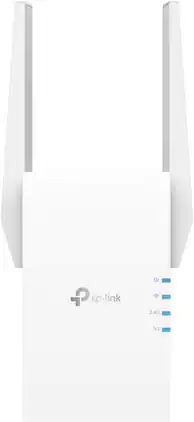
Eliminate dead spots in rooms with weak Wi-Fi coverage with the RE450. It installs easily and delivers blazing-fast dual-band AC1750 Wi-Fi across your home for HD streaming and gaming in any room.
- Wireless-AC technology: Offers optimal signal strength and coverage to expand your wireless network.
- Dual-band operation: Delivers speeds up to 450 Mbps at 2.4GHz and up to 1300 Mbps at 5.0GHz for combined speeds up to 1750 Mbps.
- Compatible with 802.11ac Wi-Fi routers and access points: Backward compatible with 802.11b/g/n networks, so you can upgrade easily.
- 3 adjustable external antennas: Help maximize wireless coverage.
- Gigabit Ethernet port: Allows you to connect a wired device to your network.
- Intelligent signal light: Shows the signal strength, so you can find the best location for the range extender.
- 64- and 128-bit WEP, WPA-PSK and WPA2-PSK encryption: Helps keep your network secure.
Whats Included
- AC1750 Gigabit Wi-Fi Range Extender
- Quick Installation Guide
Product Manuals
A: It supports seamless roaming using the router SSID. That is the way it is set-up and working in my home.
A: yes it can I currently have 2 extenders in the house and one in the garage, all different brands and they all work seamlessly together.
Q: Will this work with a U-verse modem.
A: Yes. I have it working with a U-Verse modem. I first bought the AT&T range extender, but it did not work properly so I returned it. This TP LINK AC1750 extender is so much better than the AT&T extender!
Q: Is this compatible with Windows 10
A: Yes, WiFi extenders are universally compatible with WiFi devices and do not rely on operating system compatibility since they function on the network layer, not the application layer.
A: Where are you getting the wifi, do you have it on your router, if so this will pair with your router and your network. 100ft is getting to the outside of its range, depending on and obstructions/walls/ect a signal has to go through. if you try this or any extender, download a wifi meter from the play store to your phone and check your signal strength ant various places/distances.
A: I use this extender in a secondary position to get wi-fi to my rv, which is parked about 50 ft from the primary modem/router setup. Signal is good most of the time, drops occasionally, 1G is more stable than 5G connection.
A: Theoretically, it can help improve connectivity as long as WiFi signal strength/range are the current cause of the issue with your router. However, if the speed issue is due to the router itself or your service, please bear in mind an extender will only repeat the quality of signal it receives from your router. Regards, TP-Link Support
Compare similar products
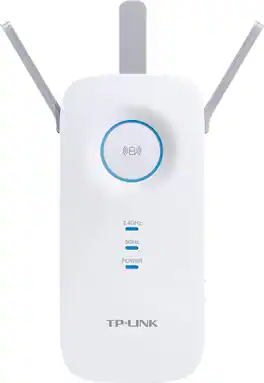
Eliminate dead spots in rooms with weak Wi-Fi coverage with the RE450. It installs easily and delivers blazing-fast dual-band AC1750 Wi-Fi across your home for HD streaming and gaming in any room.

Convert your home electrical system to an internet network with this NETGEAR Powerline 2000. It plugs into any outlet and accepts a network connection, and it lets you access up to Gigabit wired speeds in any room. This NETGEAR Powerline 2000 includes a standard outlet, so it doesn't even keep you from accessing electricity.
Extend high-performance Wi-Fi across your home to remove dead spots and Wi-Fi drop zones with RE705X Wi-Fi 6 range extender. High-gain antennas extend your routers’ Wi-Fi signal so you can enjoy smoother and more reliable streaming, gaming, downloading, and more with dual-band Wi-Fi speeds up to 3 Gbps (2402 Mbps on 5 GHz band and 574 Mbps on 2.4 GHz band) with the wider 160 MHz channel. Pair RE705X with a TP-Link OneMesh compatible router to create a network that only needs one name and password. Easily set up and manage RE705X with TP-Link Tether app (Android, iOS). Plus, the intelligent signal indicator will help you find the best placement for your range extender.

Extend high-performance WiFi across your home to remove dead spots and WiFi drop zones with RE505X Wi-Fi 6 range extender. High-gain antennas extend your routers’ WiFi signal so you can enjoy smoother and more reliable streaming, gaming, downloading, and more with dual-band WiFi speeds up to 1.5 Gbps (1201 Mbps on 5 GHz band and 300 Mbps on 2.4 GHz band). Pair RE505X with a TP-Link OneMesh compatible router to create a network that only needs one name and password. Easily set up and manage RE505X with TP-Link Tether app (Android, iOS). Plus, the intelligent signal indicator will help you find the best placement for your range extender.
| Pros for TP-Link - AC1750 Gigabit Wi-Fi Range Extender - White | |||
|---|---|---|---|
| There were no pros for this product— | Ease of use, Performance, Setup, Speed, Connectivity | Ease of use, Range, Performance, Signal Strength, Setup | Ease of use, Range, Signal Strength, Setup, Overall Performance |
| Cons for TP-Link - AC1750 Gigabit Wi-Fi Range Extender - White | |||
| There were no cons for this product— | Size, Lag, Price | Size, Lag, Compatibility, Heat | Lag |
Specs
Reviews
Customer Images
The vast majority of our reviews come from verified purchases. Reviews from customers may include My Best Buy members, employees, and Tech Insider Network members (as tagged). Select reviewers may receive discounted products, promotional considerations or entries into drawings for honest, helpful reviews.
- Rated 5 out of 5 stars
Great to extend a network signal
Using it as an Access Point (AP) gives it better performance than a simple Range Extender (RE). No need to try and boost a weak signal to begin with. We have Cat-6 throughout our home, so running this AC1750 from one of our network ports as an AP extends a Wi-Fi signal that our Verizon Wi-Fi 6 router cannot accomplish. We use this TP-Link-AC1750 (RE450) in the basement and a TP-Link-AC2600 (RE650) also as an RE on the 2nd Floor.
This review is from TP-Link - AC1750 Gigabit Wi-Fi Range Extender - White
Posted by Elroy
- Rated 5 out of 5 stars
Home on the Range
As good as it was reviewed. Only issue I had was yard and garage. 17,500 square foot yard is now almost completely covered and the detached garage has a signal. Read the instructions and setup is fast and easy if you have a modern router they will find each other with two button pushes. I just purchased a new wifi modem and it didn't connect to the 5G the first time but now it is right as rain.
This review is from TP-Link - AC1750 Gigabit Wi-Fi Range Extender - White
Posted by Gymm
- Rated 3 out of 5 stars
Bulky and pricey, but gets the job done
The TP Link WiFi extender does a good job at extending WiFi coverage. I put it in the mud room to extend coverage to the security camera on the garage, and I no longer have interruptions in recordings. I give this product 3 stars because of the size and price of the product and difficult setup. The product is about the size (height and width) of two hands together. It also has a bright blue light that you can’t turn off. It’s somewhat of a good thing if you want to use it as a night light.
This review is from TP-Link - AC1750 Gigabit Wi-Fi Range Extender - White
Posted by SuperUser