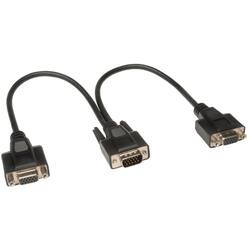
Tripp Lite - 1' VGA Splitter - Black
- Key Specs
- Connector Type (End 1): D-Sub
- Gender (End 1): Female
- Connector Type (End 2): D-Sub
- Gender (End 2): Male
- General
- Product Name: 1' VGA Splitter
- Brand: Tripp Lite
- Compatibility: Compatibile with PC
- Model Number: P516-001-HR
- Color: Black
- Connectivity
- Cable Type: VGA
- Product Type: Splitter
- Connector Type (End 1): D-Sub
- Gender (End 1): Female
- Connector Type (End 2): D-Sub
- Gender (End 2): Male
- Other
- UPC: 037332142870
Set up a dual-display workstation with this Tripp Lite monitor Y-splitter cable. Support for SXGA and UXGA formats lets you connect HD displays with resolutions up to 1600x1200 for presentation purposes or enhanced desk productivity. This 1-foot Tripp Lite monitor Y-splitter cable has standard 15-pin plugs for compatibility with VGA connectors.
- Double shielded: For a clean, high-performance signal.
- 15-pin HD D-Sub (HD-15) to 15-pin HD D-Sub (HD-15): Connects VGA ports from a computer, projector or monitor.
- 1' length: Lets you place your devices exactly where they're needed.
Whats Included
- 0.31 m (1-ft.) SXGA/UXGA Hi-Res Splitter Cable, HD15M to 2 x HD15F
Product Manuals
A: I am not a purchaser of this product. I do have 30 years of pc experience and cable experience. I believe the product description answers your first question as yes, that is the intent of this cable, to split your signal as cloned output to two separate monitors. As for the second question, I do not see this as a smart connection. The PC video card controls the output and needs to sense the two monitors as separate on two separate output cables. To solve your question I installed a game port card to get access to a second monitor as a separate monitor to run different applications on different monitors at the same time. The pc settings allowed me to set up how to control the two monitors in the same way a laptop allows me to add a monitor and use both the laptop screen and a full monitor.
A: undefined
Q: How long is the splitter? The picture looks like its 3 feet long
A: About 12 inches on each sode




















