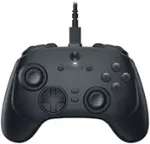
Turtle Beach - Stealth Pivot Wireless Smart PC Gaming Controller with Rotating Modules - Black
Turtle Beach - Stealth Pivot Wireless Smart PC Gaming Controller with Rotating Modules - Black
- Turtle Beach - Vulcan II TKL Pro Wired Magnetic Mechanical Gaming Keyboard with Analog Hall-Effect Switches - Black$149.99
More Buying Options
Related Item

Specifications
- WirelessYesBattery SizeNot ApplicableCompatible Platform(s)Xbox Series X, Xbox Series S, Xbox One, Windows
- Key Specs
- Wireless: true
- Battery Size: Not Applicable (The battery size required for operation.)
- Compatible Platform(s): Xbox Series X, Xbox Series S, Xbox One, Windows
- General
- Brand: Turtle Beach
- Model Number: TBS-0120-05
- Product Name: Stealth Pivot Wireless Smart PC Gaming Controller with Rotating Modules
- Color: Black
- Features
- Product Type: Controller
- Headset Jack: true
- Rumble Vibration: true
- Analog Joysticks: true
- Button Mapping: true
- Connectivity
- Wireless: true
- Power
- Battery Size: Not Applicable (The battery size required for operation.)
- Batteries Included: true (Indicates whether the product comes with the required batteries for its operation.)
- Dimensions
- Product Height: 4.25 inches (The out of box height of the item. Height is measured as the vertical distance from the bottom of the item to the top as it would be primarily used or placed.)
- Product Width: 0 inches (The out of box width of the item. Width is measured as the horizontal distance from one side of the item to the other as it would be primarily used or placed.)
- Product Length: 6.35 inches (The out of box length of the item. Length is measured as the longest dimension of the item.)
- Product Weight: 0.25 pounds (The out of box weight of the item.)
- Compatibility
- Compatible Platform(s): Xbox Series X, Xbox Series S, Xbox One, Windows
- Warranty
- Warranty - Parts: 1 year
- Warranty - Labor: 1 year
- Other
- UPC: 731855001200
Rank up to Revolutionary Control. The Turtle Beach Stealth Pivot wireless smart controller is designed for revolutionary gameplay on Windows PCs. Stealth Pivot features rotating button modules to quickly switch between core button layouts designed for FPS, action & racing titles, or revolved layouts for fighter & retro games. Play wirelessly on PC with the 2.4 GHz wireless transmitter, or via Bluetooth on Android devices & Smart TVs, and even play on Xbox consoles using the wired connection. A 20-hour battery life keeps you locked in without disruptions, plus the wired cable supports play-and-charge capability. The Connected Command Display screen offers extensive customization, and hall-effect thumbsticks, adjustable triggers and mappable buttons provide smooth, long-lasting, and adjustable control for multi-genre dominance.
- High-Performance, Lag-Free Wireless for PC: Our proprietary, lag-free 2.4 GHz wireless connection and built-in Bluetooth technology gives you the freedom to play on Windows 10 & 11 PCs without a wired connection. Plus, you can connect to Android mobile devices and supported Smart TVs with built-in Bluetooth or play on Xbox Series X|S & Xbox one with a wired connection.
- Rotating Button Modules: Rotating modules give you the versatility to easily switch from a traditional core button and thumbstick layout, to a revolved layout designed for domination on fighter games. A set of release switches on the backside of the controller allow for easy rotation once unlocked, and keep the modules locked in place once set.
- Connected Command Display: A high-contrast display screen lets you customize your controller and stay in touch with your friends. View your social notifications feed, adjust any 3.5mm connected headset, assign mappable buttons, manage wireless connections on-the-fly and more.
- Patented, On-Board Social Notifications: Receive social notifications from your phone for all your favorite social media platforms on the Connected Command Display to stay in the loop while gaming.
- 20-Hour Battery Life + Play & Charge: A long-lasting 20-hour wireless battery life keeps you locked in the game, and the included USB cable supports play-and-charge capability when battery life runs out.
- AntiDrift Thumbsticks: Contactless, hall effect thumbsticks use internal magnets instead of full contact analog-style sticks to provide high-resolution, smooth control without drift. You can even dial in stick performance to suit the exact game you’re playing with linear input for consistent steering in racing games, or precision input for pinpoint aim in action & FPS games.
- Adjustable Trigger Stops: Modify the throw distance of the triggers on-the-fly to suit the games you play. Shorter hair trigger locks provide a faster return profile for FPS games or set to full travel for precise throttle and brake control when racing.
- Four Mappable Quick-Action Buttons: Four mappable buttons allow you to set up the Stealth Pivot to your exact preferences depending on the types of games you play. Two mappable buttons on the back of the controller, and two buttons in the revolved layout keep your go-to actions in close reach. Plus, you can save up to five different onboard profiles for multiple games and loadouts.
- Quick-Slide Adjustment Switch: For split-second in-game adjustments, a return-to-center toggle, with customizable RGB lighting is in quick reach at the center of the controller and can be mapped to functions like headset volume adjustment.
- Precise, Customizable D-Pad: D-pad response can be set to classic digital input, or analog thumbstick response and is tuned for fast actuation and reset, ideal for critical combos or platform jumps.
- Pro-Aim Focus Mode: Selectable as one of preset functions for any of the four mappable buttons, Pro-Aim tunes thumbstick sensitivity for enhanced long-range accuracy. Whether it’s a long-range snipe, or a daunting free kick, Pro-Aim is fully adjustable to dial-in the sensitivity just right.
- Customization with Control Center 2 Companion App: Open the Control Center 2 app on your Xbox console, PC, iOS, or Android smartphone to adjust settings on the controller like social notification preferences, customization of button mapping, dead zones & axis response modes, vibration intensity, audio enhancements, and RGB lighting. Plus, the Control Center 2 app lets you quickly make product updates.
- Advanced Audio Tuning: Enhance any 3.5mm connected headset with easy access audio features only available from Turtle Beach including four EQ presets and Superhuman Hearing. Plus, you can set the game & chat volume mix to your exact preference, adjust mic monitoring and more, all directly from the Command Display dashboard.
- Immersive Vibration Feedback: Dual rumble motors in the handles and triggers provide immersive vibration feedback and are fully adjustable via the Command Display dashboard. Tune the levels of vibration to suit the games you play, from maximum vibration for intense racing games, to minimum feedback for reduced interference when precise aim control is needed.
- High-Performance, Lag-Free Wireless for PC: Our proprietary, lag-free 2.4 GHz wireless connection and built-in Bluetooth technology gives you the freedom to play on Windows 10 & 11 PCs without a wired connection. Plus, you can connect to Android mobile devices and supported Smart TVs with built-in Bluetooth or play on Xbox Series X|S & Xbox one with a wired connection.
- Rotating Button Modules: Rotating modules give you the versatility to easily switch from a traditional core button and thumbstick layout, to a revolved layout designed for domination on fighter games. A set of release switches on the backside of the controller allow for easy rotation once unlocked, and keep the modules locked in place once set.
- Connected Command Display: A high-contrast display screen lets you customize your controller and stay in touch with your friends. View your social notifications feed, adjust any 3.5mm connected headset, assign mappable buttons, manage wireless connections on-the-fly and more.
- Patented, On-Board Social Notifications: Receive social notifications from your phone for all your favorite social media platforms on the Connected Command Display to stay in the loop while gaming.
- 20-Hour Battery Life + Play & Charge: A long-lasting 20-hour wireless battery life keeps you locked in the game, and the included USB cable supports play-and-charge capability when battery life runs out.
- AntiDrift Thumbsticks: Contactless, hall effect thumbsticks use internal magnets instead of full contact analog-style sticks to provide high-resolution, smooth control without drift. You can even dial in stick performance to suit the exact game you’re playing with linear input for consistent steering in racing games, or precision input for pinpoint aim in action & FPS games.
- Adjustable Trigger Stops: Modify the throw distance of the triggers on-the-fly to suit the games you play. Shorter hair trigger locks provide a faster return profile for FPS games or set to full travel for precise throttle and brake control when racing.
- Four Mappable Quick-Action Buttons: Four mappable buttons allow you to set up the Stealth Pivot to your exact preferences depending on the types of games you play. Two mappable buttons on the back of the controller, and two buttons in the revolved layout keep your go-to actions in close reach. Plus, you can save up to five different onboard profiles for multiple games and loadouts.
- Quick-Slide Adjustment Switch: For split-second in-game adjustments, a return-to-center toggle, with customizable RGB lighting is in quick reach at the center of the controller and can be mapped to functions like headset volume adjustment.
- Precise, Customizable D-Pad: D-pad response can be set to classic digital input, or analog thumbstick response and is tuned for fast actuation and reset, ideal for critical combos or platform jumps.
- Pro-Aim Focus Mode: Selectable as one of preset functions for any of the four mappable buttons, Pro-Aim tunes thumbstick sensitivity for enhanced long-range accuracy. Whether it’s a long-range snipe, or a daunting free kick, Pro-Aim is fully adjustable to dial-in the sensitivity just right.
- Customization with Control Center 2 Companion App: Open the Control Center 2 app on your Xbox console, PC, iOS, or Android smartphone to adjust settings on the controller like social notification preferences, customization of button mapping, dead zones & axis response modes, vibration intensity, audio enhancements, and RGB lighting. Plus, the Control Center 2 app lets you quickly make product updates.
- Advanced Audio Tuning: Enhance any 3.5mm connected headset with easy access audio features only available from Turtle Beach including four EQ presets and Superhuman Hearing. Plus, you can set the game & chat volume mix to your exact preference, adjust mic monitoring and more, all directly from the Command Display dashboard.
- Immersive Vibration Feedback: Dual rumble motors in the handles and triggers provide immersive vibration feedback and are fully adjustable via the Command Display dashboard. Tune the levels of vibration to suit the games you play, from maximum vibration for intense racing games, to minimum feedback for reduced interference when precise aim control is needed.
Whats Included
- Turtle Beach Stealth Pivot Controller
- Wireless USB Transmitter
- 8’ / 2.5m USB-A to USB-C Cable
- Quick Start Guide
- Turtle Beach Stealth Pivot Controller
- Wireless USB Transmitter
- 8’ / 2.5m USB-A to USB-C Cable
- Quick Start Guide
Q: What are the different button layouts available on the controller?
A: The Stealth™ Pivot features rotating button modules that let you quickly switch between core button layouts for FPS, action & racing titles, or revolved layouts for fighter & retro games.
Q: Does the controller have any features to help with aiming in FPS games?
A: This controller features rotating button modules that quickly switch between core button layouts designed for FPS, action & racing titles.
A: The Stealth Pivot gaming controller has a 20-hour battery life.
Q: Can the controller be used with both PC and consoles?
A: The Turtle Beach Stealth™ Pivot wireless controller allows for wireless PC gameplay, Bluetooth® connectivity for Android devices and Smart TVs, and a wired connection for use with Xbox consoles.
Q: What are the different ways to customize the controller?
A: The Turtle Beach Stealth™ Pivot controller features rotating button modules that let you quickly switch between core button layouts for different game genres, such as FPS, action, racing, fighter, and retro games.
A: The Stealth Pivot does NOT work with PS5. Best Regards.
A: While the Stealth Pivot doesn't have direct features meant to control the mouse and keyboard on PC, you maybe be able to look into Windows specific controller features that allow you to fully navigate with controller input, or something like Steam "Big Picture" mode that would result in a more console-like experience on your PC. Best Regards.
Q: Are the buttons on the back programmable
A: Hello Kim! The Stealth Pivot mappable buttons allow you to set up the Stealth Pivot to your exact preferences depending on the types of games you play. Two mappable buttons on the back of the controller, and two buttons in the revolved layout keep your go-to actions in close reach. Plus, you can save up to five different onboard profiles for multiple games and loadouts. Best Regards.
Compare similar products
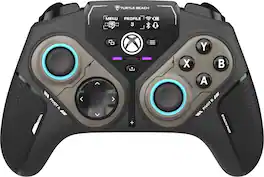
Rank up to Revolutionary Control. The Turtle Beach Stealth Pivot wireless smart controller is designed for revolutionary gameplay on Windows PCs. Stealth Pivot features rotating button modules to quickly switch between core button layouts designed for FPS, action & racing titles, or revolved layouts for fighter & retro games. Play wirelessly on PC with the 2.4 GHz wireless transmitter, or via Bluetooth on Android devices & Smart TVs, and even play on Xbox consoles using the wired connection. A 20-hour battery life keeps you locked in without disruptions, plus the wired cable supports play-and-charge capability. The Connected Command Display screen offers extensive customization, and hall-effect thumbsticks, adjustable triggers and mappable buttons provide smooth, long-lasting, and adjustable control for multi-genre dominance.
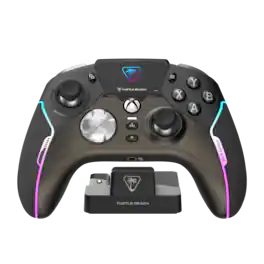
The New King of Control. The Turtle Beach Stealth Ultra high-performance wireless smart game controller with charge dock is built for gamers who demand the best. Lag-free wireless quickly connects to Xbox consoles, and Windows PCs, plus Bluetooth for Android devices & supported Smart TVs. Tactile microswitches throughout provide fast, reliable response and last up to 5X longer than standard buttons, while AntiDrift thumbsticks eliminate drift for precise, customizable control and adjustable triggers suit your game on the fly. The Connected Command Display lets you customize the RGB lighting, audio, thumbsticks, mappable buttons and more, plus patented technology receives social notifications from your phone. Best of all, adjustable power modes provide up to 30 hours of battery life on a single charge.
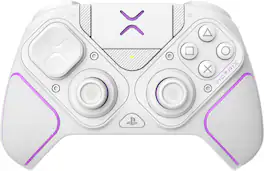
Step-up your competitive gaming level with this professional controller, built for PlayStation and PC. Full customization and top performance gives players the edge with precision thumb sticks, triggers and buttons for PlayStation 5, PlayStation 4, and PC. Pro BFG includes 4 interchangeable analog sticks, w/stainless steel shaft for smoother movements. The Victrix Control Hub PC App allows you to customize, calibrate, run diagnostics and update controller firmware. Built for all kinds of competitive gameplay, the Left Module can be flipped 180 degrees to personalize your style of play. The Right Module can be swapped out for standard or fight pad style control. The back of controller has a profile button with LED allowing you to map the back buttons and toggle through the profile settings. 3 profiles can be stored in the controller’s memory. Ready to travel, Pro BFG includes a sleek durable carrying case that holds all your cables, modules, and extra pieces like USB-C cable (3m) and Module Customization Tool to install and remove modules. The Victrix Pro BFG Controller includes 14 swappable components to transform the controller to match your game and your play style.

The Victrix Pro BFG Reloaded PC Controller is built for high performance on Windows 10/11 and Steam Deck. It features drift-free Hall-Effect modules, customizable with eleven interchangeable components including thumbsticks, D-pads, and gates. A precision trackpad, mappable back buttons with keyboard and mouse emulation, and patented audio controls offers unique features only included with this controller. Patented 5-Stop Hall-Effect Clutch Triggers with Hair-Trigger mode enhances your response giving you the edge for victory. With both wired and wireless (up to 30 feet) options, and a premium build, the Pro BFG Reloaded delivers top-tier accuracy, control, and versatility for competitive gaming.
| Pros for Turtle Beach - Stealth Pivot Wireless Smart PC Gaming Controller with Rotating Modules - Black | |||
|---|---|---|---|
| Battery Life, Customization, Display, Connectivity, Weight | There were no pros for this product— | Ergonomics, Customization, Battery Life, Overall Performance, Button Quality | Ergonomics, Build Quality, Modularity, Button Layout, Trigger Responsiveness |
| Cons for Turtle Beach - Stealth Pivot Wireless Smart PC Gaming Controller with Rotating Modules - Black | |||
| Size, Build Quality, Button Layout, Stick Drift, Software | There were no cons for this product— | Size, Connectivity, Vibration | Battery Life |
Specs





Reviews
Customers are saying
Customers admire the Stealth Pivot Wireless Smart PC Gaming Controller with Rotating Modules for its impressive battery life, functional display, reliable connectivity, comfortable weight, and easy customization. However, some find the button layout less than ideal due to joystick deadzones and describe the build quality as inexpensive. Additionally, a few users feel the controller is too small and dislike the software. Despite some concerns, many appreciate the controller's positive attributes.
Customer Images
The vast majority of our reviews come from verified purchases. Reviews from customers may include My Best Buy members, employees, and Tech Insider Network members (as tagged). Select reviewers may receive discounted products, promotional considerations or entries into drawings for honest, helpful reviews.
- Rated 5 out of 5 stars
Birthday gift
Great product it was a birthday gift and my dad loves it
user591724 Posted
- Rated 4 out of 5 stars
Fairly Basic Controller with a Great Screen
While this controller tries to come off as fancy with all its bells and whistles, underneath it all is a fairly basic controller. The build quality is decent for the price, but don’t expect it to compare with higher end controller as it just can’t compete. The controller fits well in hand but is very lightweight which to me makes it feel on the cheaper end. I prefer a heavier controller that feels more robust, but that is really personal choice. If you prefer a light controller, you might prefer this. The sticks move extreme easily with very little resistance which makes it more difficult to give accurate motion with the sticks. The buttons are harder to press than average. Not necessarily a bad thing, but something to know. The triggers and bumpers feel pretty standard and include trigger locks. The sides are made of rubber, but not the back. It is so smooth that it doesn’t really offer any more grip than plastic does and to me doesn’t feel any better. A better grip would go a long way. The main feature of this controller are the pivot controls. This allows you to switch between a standard controller layout and a fighting/arcade layout. To switch it, you turn the sticks to sink them into the controller, unlock them on the back and flip over the controls and lock them. This is done on both sides. This is a clever feature and switching them is very quick and easy. I did have a problem getting that layout to work with games. For some reason, the buttons were not compatible and behaved badly with a lot of games that it should have worked with. Using the standard layout on this controller worked fine with those games. I was not able to get the alternate layout to work with relevant games making it kind of useless. The sticks are hall effect which should go a long way. The connection uses a dongle. I had no problems with the connection, and it never disconnected on me. I used this controller with my gaming PC and had no compatibility problems with it aside from the pivot alternate controls. It does include a screen that has helpful information on it, most importantly, the battery level. You can also easily select the profile you want to use from the screen with the menu and bumper buttons. The screen allows you to map buttons on the controller without the use of any software and configure the profiles. From the screen menu, select the button you want to map and them select from the list which button you want to map from. There is a slide control that is used to scroll through the menus and selections. You can also map the slider to control volume, mix chat, and profile select. That is a very nice extra control to have. There is an app that you can install that allows you to set up button mappings which you can also do right on the controller, adjust stick sensitivity and dead zones (I played with this and couldn’t find any differences in the settings), lighting (which I couldn’t figure out how to adjust), and firmware updates. The firmware was already up to date when I opened the controller. While the app was well laid out and simple to use, it didn’t offer me anything that I couldn’t already do right on the controller. Overall, this is a decent controller that competes with other basic controllers. The pivot feature unfortunately didn’t work with my games making that not so useful. There may be other games that it does work with but none of mine. The sticks feel a little too loose for me and buttons too firm. The screen is a big plus, works well, and allows you to configure everything without the need of any software. If you want something customizable on the controller and don’t mind a controller that feels fairly basic otherwise, this may be for you, but if you have the funds that you want to spend, I recommend spending a little more money and get something that feels a little higher quality.
Dalton Posted
- Rated 5 out of 5 stars
Best rog ally controller
Easy to use, very user friendly and quick response! It’s a must have controller.
HeatherV Posted