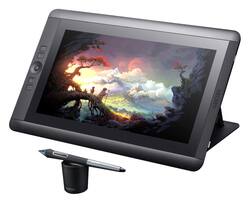
Wacom - Cintiq 13HD Interactive Pen Display - Black
- Key Specs
- Number of Buttons (Total): 4
- General
- Product Name: Cintiq 13HD Interactive Pen Display
- Brand: Wacom
- System Requirements: PC: Windows® XP SP2, Windows® Vista SP1, 7 (32/64 bits), 8,Mac: Mac OS X, v 10.6.8 o posterior (procesador Intel) (The software that a product must have for it to be able to integrate with another product.)
- Model Number: DTK1300
- Features
- Mouse Type: Touchpad
- Performance
- Mouse Operation: Other
- Handedness: Ambidextrous
- Tracking Method: Touchpad (There are several types of computer mice, optical and laser being among the most common. Optical mice detect less detail and provide more precise and accurate movement. Laser mice detect more detail and can be used on a wider variety of surfaces, but are more sensitive to small movements.)
- Number of Buttons (Total): 4
- Connectivity
- Wireless Connectivity: Bluetooth (The manner in which a device sends data to another device over a short distance without the use of wires or cables.)
- Wired Connectivity: USB
- Operating System Compatibility: Mac
- Power
- Mouse Power Source: Wired
- Dimensions
- Product Height: 9.8 inches (The out of box height of the item. Height is measured as the vertical distance from the bottom of the item to the top as it would be primarily used or placed.)
- Product Length: 0.01 inches (The out of box length of the item. Length is measured as the longest dimension of the item.)
- Product Width: 14.8 inches (The out of box width of the item. Width is measured as the horizontal distance from one side of the item to the other as it would be primarily used or placed.)
- Product Weight: 115.2 ounces (The out of box weight of the item.)
- Warranty
- Manufacturer's Warranty - Parts: 2 years limited
- Manufacturer's Warranty - Labor: 2 years limited
- Other
- UPC: 753218991447
Create digital art with this Wacom Cintiq 13HD DTK1300 graphic tablet, which features a responsive touch interface and includes a pressure-sensitive Pro Pen, making it easy to draw precise lines. The adjustable display stand helps ensure comfortable use.
- 13.3" active-matrix TFT-LCD graphic tablet: With a touch interface, 1920 x 1080 resolution, 178° viewing angles and 16.7 million colors delivers vibrant, realistic images and allows intuitive on-screen artistic creation.
- Cordless, battery-free, silicone-rubber Pro Pen: With 2048 levels of pressure sensitivity and tilt recognition allows precise control, so you can accurately draw on the tablet. The included carrying case simplifies storage.
- 4 user-assignable, application-specific ExpressKeys: Plus a 4-position, customizable rocker ring and home button simplify operation.
- Detachable, 4-position stand: Can be adjusted to 22°, 35° or 50° or can be used completely flat on your desk or lap, so you can work comfortably.
- USB 2.0 interface: Enables simple wired connection to your PC or Mac via the included 3-in-1 cable. The HDMI interface lets you connect a compatible display for expansive viewing options.
Whats Included
- Wacom Cintiq 13HD Interactive Pen Display
- Adjustable display stand, desktop pen stand
- Pro Pen (KP-503E-00), pen carry case, 9 replacement nibs, nib removal tool, 3 color pen rings
- 3-in-1 cable (HDMI, USB 2.0 and AC power), installation CD-ROM, software download key
- Owner's manual
A: It's not a touchscreen, as in you can touch it with your fingers. It is touchscreen, as in you touch it, click, double click, drag and all of that kind of stuff with the included stylus.
Q: Does this have touch screen capabilities?
A: No, this is not the touchscreen model.
Q: Does this come with a drawing program or will I be spending extra money on a bunch of programs
A: it comes with something called sketchbook which i don't use. i purchased the wacom to use corel painter and photoshop which does not come with the tablet. you download your program to a usb to install on the wacom.
A: You have to use the cable for power , video, computer connection. so only if you can find adapters to extend as far away as you wish to be
Q: Can you use a laptop with windows 8 with this Cintiq?
A: Yes, you can.
Q: Will this work with a Dell Inspiron 2-in-1 touch screen Intel Core i7?
A: it should work as long as you have Windows 7, 8, or 10 and hdmi and usb ports
Q: How big would you say this is? Small, Medium, Large?
A: It's a 13 inch screen, the display is smaller than a lap top. The screen is HD so the picture is great. The size is great for holding it and drawing. I personally wouldn't need a bigger one.
Q: Will This tablet be compatible with the new Windows 10?
A: I have Windows 10 and it works for me! :)














